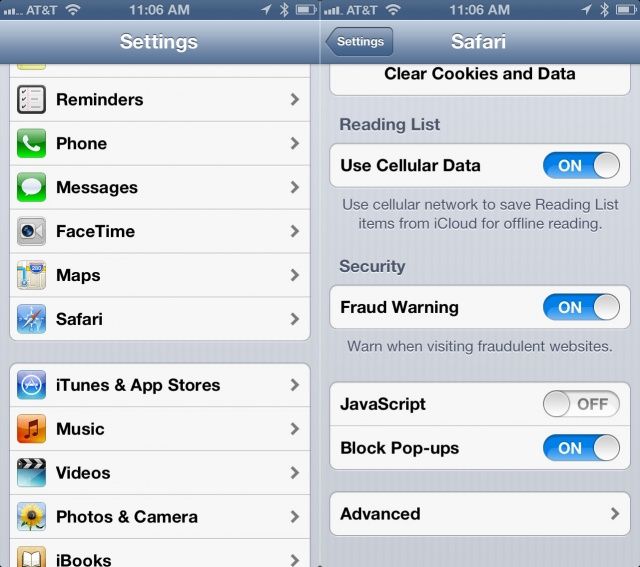
If you’re one of the many folks that own and still use an older iPhone, iPod touch, or iPad, you might notice a slowdown when using the more recent web apps out there. Many of these rely on Javascript, which can slow down older devices when browsing those sites.
Luckily, it’s fairly easy to disable Javascript on mobile Safari. Here’s how.
Launch your Settings app with a tap, and then scroll down to the Safari button. Tap that, and then scroll down again to the JavaScript toggle, which is right above the Block Pop-ups toggle switch. Tap the ON button to OFF.
Click the Home button to get out of Settings, and then relaunch mobile Safari with a tap. You may need to reload any currently displayed web pages that rely on Javascript to see the effect of the toggle.
Any site features that rely on Javascript will now not work; some web sites may become downright unusable. The rest of the web, however, will load a lot faster on older devices, as many current processor hogs, like AJAX and ads, rely on Javascript to load. Without these objects loading, mobile Safari may feel a bit more spry to those of you on an older iOS device.
Source: OS X Daily

Rob LeFebvre is an Anchorage, Alaska-based writer and editor who has contributed to various tech, gaming and iOS sites, including 148Apps, Creative Screenwriting, Shelf-Awareness, VentureBeat, and Paste Magazine. Feel free to find Rob on Twitter @roblef, and send him a cookie once in a while; he’ll really appreciate it.

