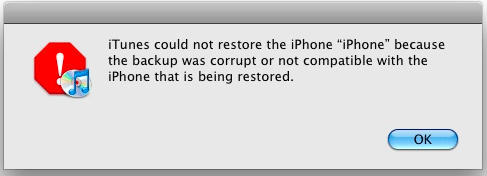
The backup/synch process for iPhones takes a really long time and may turn out to be worthless for restoring a bricked device, according to emerging reports.
Blogger Erica Sadun wrote the other day about her frustrations with Apple’s synch and backup protocols in the iPhone 2.0 firmware and wondered why on earth she has to wait for entire applications to backup every time she synchs her phone with iTunes, instead of having iTunes backup only changed Document and Library data.
Writer Rob Griffiths also complains, “I can connect my phone, let it run a full backup and sync, disconnect it, let it sit on the desk for three minutes, then connect it again”¦and get hit with another hour-long backup cycle.”
And what’s worst is the local backup may be useless for restoring an iPhone to its as-configured state after crashing due to application instability or glitches in the 2.0 firmware. If this is a real problem, Apple’s millions of iPhone customers juggling their tens of millions of AppStore downloads will be letting us know quite soon, but as Griffiths writes, “the current implementation of backup in iPhone 2.0 seems very broken.”

Lonnie Lazar is a writer-musician-web designer-attorney. He writes about Apple for Cult of Mac and Mac|Life, and about VoIP and telecommunications for Voxilla. Follow Lonnie on Twitter @LonnieLazar, join the Cult of Mac on Facebook, and find Lonnie’s photos on Flickr.

