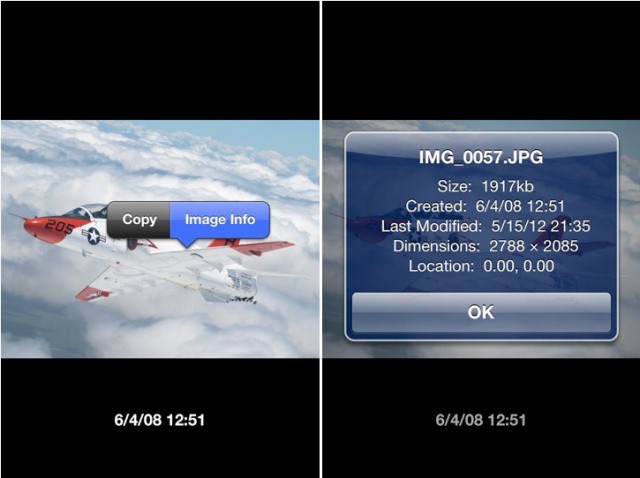
Have you ever been browsing through your iPhone’s camera roll and stumbled across a photo that you don’t remember taking? Or would you like to know how old that picture of your sister’s cat is? Then you need Dater, a new tweak for jailbroken iPhones that adds timestamps and dates to the pictures stored on your device.
With Dater installed on your iPhone, you’ll find a date and time beneath every image stored on your device, allowing you to see instantly each photo was taken. Furthermore, you can tap and hold an image, then hit the ‘Image Info’ button, to see additional information, like the size of the image, its name, its dimensions, when it was last modified, and where it was taken.
There are no options to configure and nothing to enable — simply install Dater and the information will be automatically added to your Photos app. It’s that simple.
Dater can be found in the BigBoss repo within Cydia, and it’s priced at $0.99.
Source: Cydia

Killian Bell is a freelance writer based in the U.K. He has an interest in all things tech and also covers Android over at CultofAndroid.com. You can follow him on Twitter via @killianbell.

