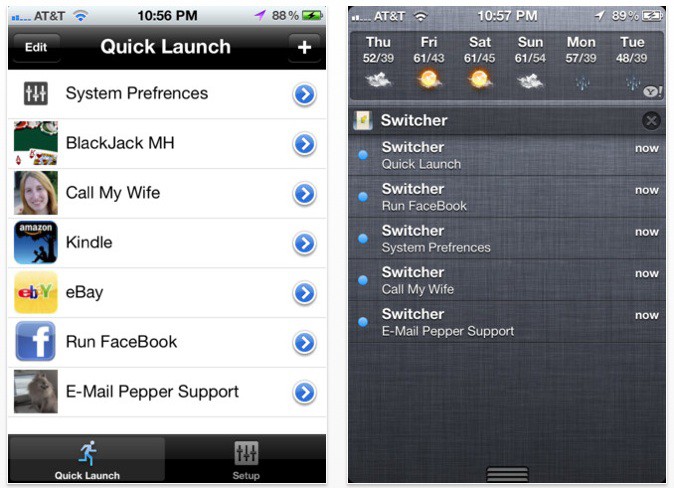
There’s a lot to like about iOS 5’s Notification Center, but unfortunately, it’s not nearly as configurable as it could (and perhaps should) be.
If you want to wring more power out of your Notification Center, though, we’ve got good news: there’s a really simple way to turn Notification Center into a quick launch bar for all your favorite settings and contacts. Even better? Unlike many Notification Center tweaks, there’s no jailbreak required.
The app is called App Switcher, and what it does is allow you to quickly and easily launch your favorite tasks right from the Notification Center.
Here’s how it works. All you do is set up a task as a Quick Launch, which allows you to access it by pulling down the Notification Center bar and tapping the appropriate task. For example, you can set up a Quick Task to call your wife, send a text to your brother, turn off Bluetooth, open an app or even load a webpage.
Once you’ve set up your Quick Tasks, they will always show up as notifications in Notification Center, with no limit to the number of quick tasks you can set up.
The result? Notification Center can now function as an infinitely long quick task launcher, helping you supplement the limited space in your iOS dock. Brilliant.
App Switcher is available now from iTunes, and costs just $0.99.
18 responses to “Change Settings, Launch Apps And Dial Friends Through Notification Center, No Jailbreak Required”
Apple pulls the App in 3…2….1
um, i’m not seeing any way to add bluetooth setting as a quick task
It’s not breaking any guidelines.
Unless you coded the app (which you may very well have, I don’t know who you are), you can’t say for sure if it does or not. That being said, Apple has pulled apps in the past that didn’t break a specific guideline.
tacky.. not downloading it..
never mind — found it and it works well so far
Nah, I didn’t code it – I’m just a 16 year old high school student. :P
These will all work or the URL links
About — prefs:root=General&path=AboutAccessibility — prefs:root=General&path=ACCESSIBILITYAirplane Mode On — prefs:root=AIRPLANE_MODEAuto-Lock — prefs:root=General&path=AUTOLOCKBrightness — prefs:root=BrightnessBluetooth — prefs:root=General&path=BluetoothDate & Time — prefs:root=General&path=DATE_AND_TIMEFaceTime — prefs:root=FACETIMEGeneral — prefs:root=GeneralKeyboard — prefs:root=General&path=KeyboardiCloud — prefs:root=CASTLEiCloud Storage & Backup — prefs:root=CASTLE&path=STORAGE_AND_BACKUPInternational — prefs:root=General&path=INTERNATIONALLocation Services — prefs:root=LOCATION_SERVICESMusic — prefs:root=MUSICMusic Equalizer — prefs:root=MUSIC&path=EQMusic Volume Limit — prefs:root=MUSIC&path=VolumeLimitNetwork — prefs:root=General&path=NetworkNike + iPod — prefs:root=NIKE_PLUS_IPODNotes — prefs:root=NOTESNotification — prefs:root=NOTIFICATIONS_IDPhone — prefs:root=PhonePhotos — prefs:root=PhotosProfile — prefs:root=General&path=ManagedConfigurationListReset — prefs:root=General&path=ResetSafari — prefs:root=SafariSiri — prefs:root=General&path=AssistantSounds — prefs:root=SoundsSoftware Update — prefs:root=General&path=SOFTWARE_UPDATE_LINKStore — prefs:root=STORETwitter — prefs:root=TWITTERUsage — prefs:root=General&path=USAGEVPN — prefs:root=General&path=Network/VPNWallpaper — prefs:root=WallpaperWi-Fi — prefs:root=WIFI
Those URL links aren’t supposed to work anymore in 5.1, so if this app uses them it probably won’t work after the update.
how did you find it?
Crashes for me on 64gb iPhone 4S when I try to add a SMS/PhoneCall task to Notification Centre.
says it only works for US numbers… any news for OZ crew?
You have it turning it on and off? if so what did you use?
What about the U.K. aswell?
N/m they said it’ll be fixed in an update.
Is this an advertisement or what……..
is it possible, to you make an review video?
The original message was received at 2011-12-10 10:36:15 +1100
from postoffice.home [10.0.0.1]
—– The following addresses had permanent fatal errors —– <[email protected]>
—–Transcript of session follows —–
… while talking to postoffice.home.:</[email protected]>
New update on 12/21 disabled notification center support

