The puppet version of Walt Mossberg shows you how to make an iPad stylus from a pen, scissors, tape and the wrapper from a protein bar in this video resulting in the stylus pictured above.
Not a bad idea — if you’re tired of cleaning up sticky finger marks from your magical device. Skip the corny jokes and head to about 1:42 for the details on how to make the stylus.
Not a puppet person? You can probably figure it out with the sound off, too.
While this Etch-A-Sketch case for the iPad brings back all sorts of fuzzy memories of early-80s morning spent meticulously squiggling drawings of Optimus Prime in sharp ninety degree angles on the first tablet I ever owned, I can’t help but be disappointed by the vestigial nature of the knobs.
Surely if you’re going to go to all the trouble of licensing the coveted Etch-A-Sketch brand, you should go the whole hog, hook the knobs up to the dock connector and use them to interface with an official Etch-A-Sketch app. I’d easily spend twice as much as this case’s $40 asking price for that functionality, especially if I could finally save my aluminum powder masterpieces for future generations to admire.
It’s still a fitting fusion of brands, though. I’m hard pressed to identify the most magical tablet I ever owned, my iPad or my first Etch-A-Sketch… and come to think of it, they have more than that in common, since my delinquent (and now drunken) brother recently proved that just as he did with my Etch-A-Sketch so many years ago, he also enjoys bursting into the room when I’m playing with my iPad, ripping it from my hands and insanely shaking it above his head as he fills the air with his cruel, taunting laughter. Ah, memories.
Popular open-source media player VLC is now available for iPad, thanks to developer Applidium.
Offered gratis, VLC faces some competition from other universal media-playing apps already available for the iPad including paid apps OPlayer ($2.99) and CineXPlayer ($3.99).
VLC has long been my go-to app for video viewing (can’t remember the last time I even bothered to update Quicktime), nice to know it’s available now for the iPad, too.
Atelier Lole in Montreal with the iPad community station and social media wall.
Women’s activewear retailer Lole launched a new store design concept with 15 iPads they hope will connect customers and make the store more sticky.
The new concept store called Atelier Lole opened doors recently in one of Montreal’s main shopping drags, St. Denis Street. One of the main portions of the store is set aside for community, with tree stump stools and iPads on a low workbench opposite a wall featuring customer’s travelogue pics.
Described as kind of a “living Facebook,” through an app developed especially for the stores users can also “flip” through photos directly on the iPads located along the Atelier’s social wall.
Samsung’s just pushed live their latest advertisement for the first of the prestige-band iPad competitors, the Samsung Galaxy Tab… and while you certainly shouldn’t expect device agnosticism from someone who has “Cult of Mac” written on his paychecks, I’ve got to say, I think they did a pretty good job enumerating the Tab’s relative advantages over the iPad.
In about two minutes, the commercial quickly and compelling puts ticks next to the boxes of all the iPad’s more niggling omissions — web cam and expandable storage being the most obvious — and even a few that no one really cared about, like the fact that you can’t also use the iPad as a big stupid looking phone, which you can with the Galaxy Tab.
Like a time travel scenario where you meet your own grandfather as a child, enthusiasts working with the Einstein Newton Emulator project have ported the Prodigal PDA to the iPhone. The current implementation is only available as source code and runs a bit slow, but is an actual working version of NewtonOS complete with handwriting recognition and familiar input gestures.
This week’s must-have iOS games include the newest addition to the The Sims series with some fantastic new features, guns galore in the latest Time Crisis arcade shooter, and Gameloft’s impressive Prince of Persia game in HD on the iPad.
Check out a few of our favorite games from the past week after the break!
Turn your videos in to cartoons, share you favorite books, movies & TV shows with friends, and make notes with the best interactive notepad in the world; all with apps featured in this week’s must-have iOS apps.
Check out a few of our favorites from the past week after the break!
Photo: Jim Merithew/Cult of Mac Photo: Jim Merithew/Cult of Mac
Now that Apple has made iBooks available on all iOS devices users can read their purchased eBooks on a number of different devices. But what if you have a couple large RTF, DOC, TXT, or LIT files of your own that you want to view in iBooks you’re out of luck. In this tutorial we’re going to show you how to get digital and convert your documents into eBooks so that you can enjoy reading them on your iPad, iPhone or new iPod Touch.
The iPad is a beautiful device and a well-constructed case is a must have. The ‘Happy Cover’ from design house Atelier Kurth aims to meet our case needs, all the while delivering retro style that sets it apart from the masses.
Why anyone would feel compelled to do this, I don’t know, but TUAW have found some footage on YouTube of an iPad user who has created a tutorial on how to get Windows 3.11 and Windows 95 running on your iPad.
If you really want to give it a go, you’ll need a jailbroken iPad and the open-source Bochsemulator. Check out the video above from MSComputerVideos for the step-by-step guide.
Britain’s best-selling Sunday National Newspaper The News of the World is the latest publication to announce plans for a subscription-based iPad app.
Dates for the iPad app haven’t been announced but are expected to be in synch with the relaunch of the website in October.
iPad users will have to pay £1.19 a week (about $1.85) to view the celebrity highs and lows, that’s slightly more than the £1 newsstand cost but less than a snail-mail subscription, which currently costs £134.00 a year or £2.57 a week.
The website will also be behind a paywall, charging readers £1 for a day’s access or £1.99 per month.
The rogue tabloid — currently embroiled in the celebrity phone hacking scandal — is the third title in under six months in the News International stable to launch digital subscriptions, following the Times and Sunday Times.
“News International is leading the industry by delivering on its commitment to develop new ways of making the business of news an economically exciting proposition,” Rebekah Brooks, chief executive of News International, told Reuters.
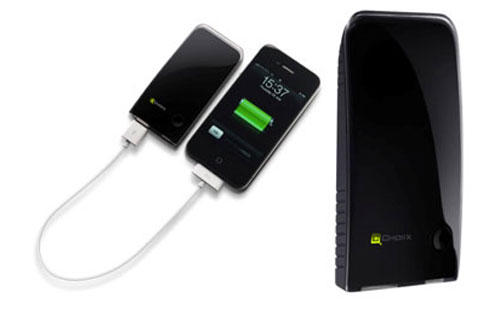
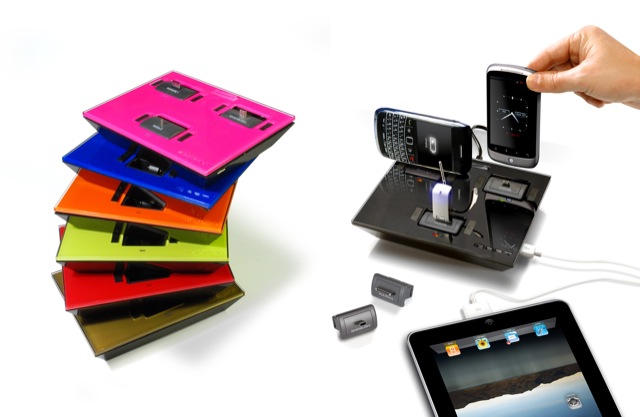
Case and battery manufacturer Mophie has just launched the Juice Pack Powerstation — a one stop iOS charging station.
It’s 3,600mAh capacity means it is more than capable of fully recharging either iPad or iPhone (including iPhone 4), which will bring the possibility of going days without touching a power point.
The Powerstation has a pair of USB ports, one used to charge your device and the other for charging the battery itself. At 2.86 x 4.31 x 0.65 inches, and weighing somewhere around a pound, it is not the most portable of devices. You would be hard pressed to find a pocket big enough to lug this around in, but that said it will comfortably fit in most bags.
The Mophie Juice Pack Powerstation for iOS devices is available now direct from the Mophie site for $99.95. Full review as soon as we get our hands on one.
There’s an interesting change in the way iOS 4.2 handles orientation lock on the iPad… one that indicates a curious design backpedal on the part of Cupertino.
Previously, orientation lock on the iPad was handled with a physical hardware switch on the side of the device, but in iOS 4.2, it has been repurposed as a physical “Mute” button, with the orientation lock achieved the same way it is on the iPhone 4 or iPod Touch under iOS 4: through the multitasking tray.
It’s a minor but significant change that, I suspect, portends the elimination of the mute/screen orientation button on the second-generation iPad. For famously minimal and streamlined Apple, a physical mute button doesn’t make a lot of sense on an iOS device that isn’t a phone.
If you’re a DevonThink user and an iPad owner, here’s some good news: the forthcoming DevonThink To Go app will let you take entire DT databases with you.
Just as you can with the desktop application, it’s possible to add notes into each database’s inbox while you’re out and about, and sort and categorize them later. Everything gets synced to your computer over a local wifi network when it suits you.
Although intended as a companion for the desktop, there’s no reason why you can’t use DevonThink To Go as a standalone iPad notebook and document storage box.
Apple has today released the first beta of iOS 4.2 for the iPad, iPhone, and iPod Touch, which is now available to download for developers.
4.2 comes just a week after the public release of 4.1, and was first previewed by Steve Jobs at Apple’s media event on September 1st. The update introduces some much-anticipated new features to the iPad in particular, including; folder organization, Game Centre, and long-awaited multi-tasking. AirPlay, a new feature for streaming music to your device, is also introduced to iOS in this update, along with the wireless printing feature, AirPrint.
Devices supported in beta 1 include the iPad, the iPhone (3G and above), and the iPod Touch (2nd-gen and above).
The iOS 4.2 download weighs in at 514MB and is currently only available to registered developers through Apple’s Dev Centre. The update is scheduled for public release in November.
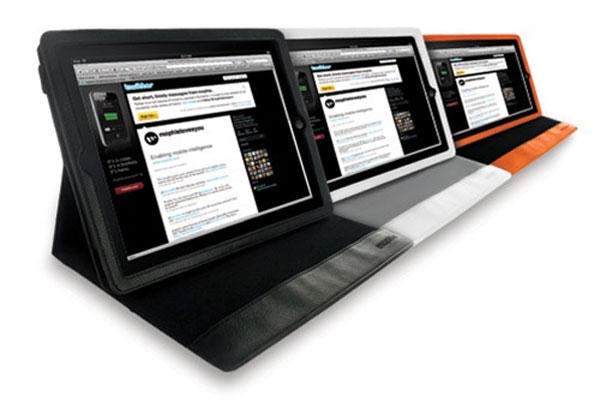
We’re not sure what’s stopped you from already buying yourself an iPad case if you planned on getting one at all, but perhaps Kensington’s PowerBack case can finally get you to whisk out the credit card: not only does it have one of those kickstands all the cool cases are flaunting these days for handsfree media watching, but it comes infused with a slim 4400mAh battery that will juice your iPad for an extra five hours. It’s available now for just $129.99.
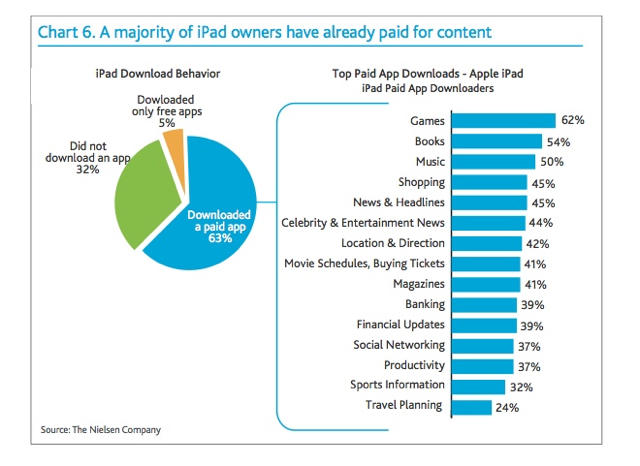
Apps are so easy — maybe too easy? — to buy on an iPad even a three-year-old can do it.
Toddler Sienna Leigh in Sydney racked up about $50 in app purchases before her mom noticed the shopping spree.
“She uses it every day for a few hours, but I didn’t think anything of it.
“She was just playing with it until, later, when she had gone to bed and I was checking my email and I saw that I had paid for a whole bunch of apps that I didn’t remember buying.”
Mother Lisa Leigh had to go to a Mac forum to figure out how her kid did it — it seems she went to a recently-purchased app and continued shopping with the saved password.
Sienna bought $17 Docs to Go app and a flight control app among others before mom managed to stop the spending spree. “But the main thing is that I’ve completely turned off the Wi-Fi on her iPad so she has no chance of accessing the app store at all now.”
Leigh decided not to ask Apple for a refund, since by the time she figured it out her other children had already opened and played with them.
Apple said it wasn’t the first time parents had contacted them about iPad purchases made by their kids.
If you have a tech-savvy toddler, here’s how Apple Fiona Martin spokesperson suggests you keep the tyke from shopping: “The restrictions preferences are located under Settings > General > Restrictions > Allowed Content (In-App Purchases) OFF. When this is activated, in-app purchases is turned off.”
Six weeks after inaugurating an iPad wine list, one top Atlanta restaurant is reporting an uptick in sales and interest with patrons ordering more — and often more expensive — wines.
Bones offers a 1,350 label wine list, loaded with descriptions and ratings, including those from wine writer Robert M. Parker Jr. The owners say wine purchases shot up overnight — about 11 percent higher per diner in the first two weeks compared with the previous three weeks, with no obvious alternative explanation. The New York Times reports that other restaurateurs who are experimenting with iPad wine lists, from Sydney to London to Central Park South, report similar results.
“I felt like they had given me the answer sheet to the test,” said Bradley D. Kendall, a Bone’s regular who recently used the iPad to select a 2005 Corté Riva cabernet franc for $102, about 25 percent beyond his usual range.
Those clever people at London creative agency BERG have produced yet another amazing thing – a film called Making Future Magic, in collaboration with another agency, Dentsu.
What’s amazing is the innovative technique they used to animate the frames in the film. They programmed an iPad to display slices through each image they wanted to project, then dragged the iPad through the air as it displayed each slice.
Paper or plastic? A Stanford student with textbooks for one class. @Stanford.
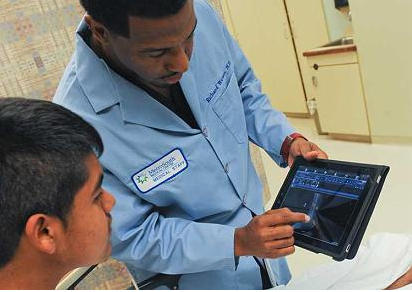
First-year medical students at Stanford University are finding a bunch of ways to use the iPad to help them learn.
The 91-first-year students who started three weeks ago were the first crop of pre-meds to be handed iPads.
Here’s how they’re using it:
to look closer
A slide presentation or textbook may offer a tiny diagram of a molecular structure that students need to memorize. “You can’t even see that,” noted student Steven Sloan. “But on the iPad, you can just touch the screen to enlarge it.”
Proving a thing or two about making the most of what you have – unlike Microsoft – Amazon has come out with a cute ad poking fun at using the iPad in bright sunlight, and its premium price to boot.
I’m an iPad fan, but I will admit the little Never-Say-Die eReader does win on these fronts…
With few exceptions, the best way to predict what Apple is going to do is to look at what they’ve already done, which is why it’s best to take this rumor reported by Apple Insider with a grain of salt: they claim a FaceTime-equipped iPad will be coming in time for the holidays.
Apple Insider, on their part, realize that that their source — “a person with proven knowledge of Apple’s future product plans” — is giving them insider intel that defies Apple’s history of yearly generational cycles in their iPod and iOS line-up, but claim nonetheless that “there [is] an ambitious push inside Apple to verify the refresh for a possible launch ahead of this year’s holiday shopping season,” and that the testing of the FaceTime-equipped iPad has already reached the advanced testing stage.
That the next iPad will boast at least a forward facing camera for FaceTime calling is a given… but releasing it less than a year after the first iPad seems like an invitation for customer backlash.
Perhaps recognizing this, Apple Insider’s report ends up contradicting itself later, on, saying that the FaceTime-equipped iPad will arrive “no later” than the first quarter of 2011. Given that the first quarter ends in March, that’s close enough to a year after the iPad’s debut that it seems unlikely that Apple will meaningfully break their historic product cycle for a second-gen iPad, no matter how much they want FaceTime to be the de facto standard for video calling.
Let’s dispel here and now any notion that the next great guitar solo or hit record will be produced or recorded using Apple’s mobile devices or the myriad amplifier emulating and recording applications available for them today.
Will. Not. Happen.
That said, for the casual music enthusiast and app dabbler, a few interesting peripheral/app combinations continue to highlight the versatility of Apple’s mobile development platform — and point the way to a future in which talented individuals won’t have to invest thousands of dollars in equipment and studio time in order to produce professional sounding music recordings.