It doesn’t do much — no fancy vocal wizardry, just adjusts the pitch of the user’s voice up or down — but Devil Voice looks like the first instance of a real-time voice-changing app, without the need to record a user’s voice first before playback — though it can, if desired.
The app is a dollar, and comes out just in time for Halloween; see our forthcoming Halloween Guide for examples on how to duct tape it and attached speakers into a Darth Vader mask and whatnot.
Apparently, OnStar thinks the iPhone isn't photogenic enough; their promo images exclusively feature Droids. Hmmm...
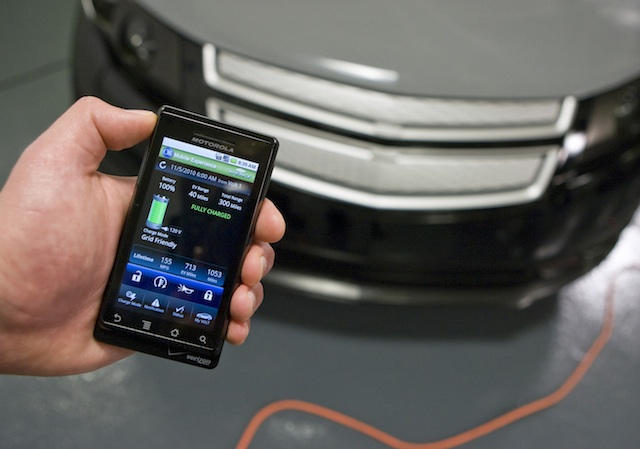
Potential and current (see what I did there) Chevrolet Volt owners will be pleased to hear that the mostly electric car’s iPhone app will finally be hitting the App Store at the end of October.
The app includes a ton of interesting controls and features: Charge the Volt immediately or schedule a charge time; check charge status and battery level; display expected range; and display various data tracked while driving like how many miles were electric-only, how many were gas. That’s on top flashy functions like being able to start the car from the app and mess with the door locks.
An OnStar spokesperson told us the Volt comes with five years of free OnStar service — other cars get six months free — and that the app will be free for the iPhone (and the Droid — sorry, Blackberry). Not impressed with (mostly) electric vehicles? OnStar will be making the app (sans Volt-specific functions) available for about a dozen or so additional OnStar-equipped cars in the near future.
If you ever had an Amiga, prepare to squeal: the Bitmap Brothers have just announced that, in association with Tower Studios and Vivid Games, they will be bringing their famous Amiga game Speedball 2 to iOS.
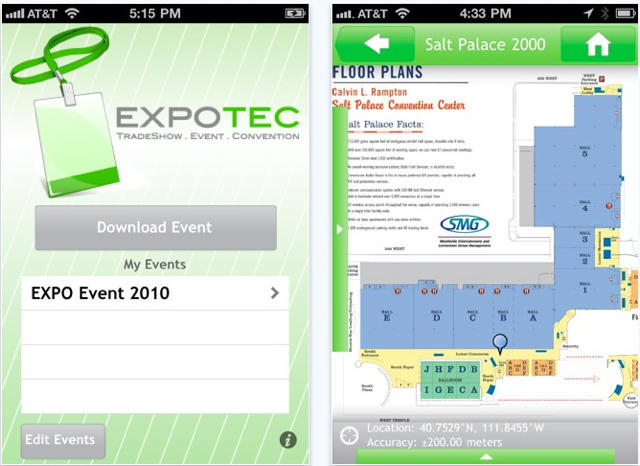
Cast your mind back to June; remember reading about an app that used the iPhone’s GPS to bulls-eye the user’s location on any map imported into it? Well, the developer, Fog Technologies, is back with Expo Tec, an app that starts with the same basic principle, but narrows its focus to convention-like events and adds some features to help the user through his chaos-laden convention visit.
The developer says it’s pretty easy for event planners to create “event packs” through a web interface designed for the app, which then shunts the pack to users of the app. Besides a GPS-enabled event map, the app provides event schedules, instant event updates, detailed vendor info and general event info.
Expo Tec is $4, and boasts that it’s a “fist-in-the-industry” solution. Yeah, sure, it was probably supposed to read “first-in-the-industry,” but we like the fist version better; “we’re angry as hell (about getting lost) and we’re not going to take (poor convention info) anymore!” Or something.
With all due respect, this was originally intended to be a gallery post dedicated to discovering the magic of MC Escher, a 99¢ app that brings users hi-res imagery of the artwork that’s decorated millions of dorm rooms and student apartments worldwide over the years. The app incudes two mindbending games as well, and for a buck, it’s got to be good value. MC Escher on the iPhone and iPad — how could you go wrong?
However, digging around for something to say about the Escher app, iFractal surfaced. It’s a free app that allows users to play around with renderings of the Mandelbrot and Julia sets of images derived from mathematical visualization theory. There’s also Fractals, a $2.99 app that seems to offer the same thing, with perhaps a finer manipulative granularity — but in the end, these apps warrant a gallery.
This looks cute: Evac is an upcoming pixel block maze game incorporating elements from games as diverse as Pac-Man to Splinter Cell. Your job is to guide a cheery moppet of a pink square through a maze while dodging red guards by any means necessary: from stealthing past them, to trapping them, to outright vaporizing them.
It looks fantastic, and sounds even better thanks to a captivating soundtrack by Kubatko. It should be available on the iPhone and iPad sometime next month.
As if its frenetically gleeful yellow and purple icon wasn’t enough enticement to download, yesterday saw Yahoo make its free Yahoo Messenger app even more appealing with some beefy upgrades: backgrounding, voice calling and the biggie, video calling.
We tested it briefly and found the video calling works pretty well over wifi, even with a 3GS — though, obviously, the person on the other end won’t see a face unless the 3GS is turned around — with decent transmission of both voice and picture. But the app suffers from a few issues, which fellow Cultist David Martin will reveal in a full review later this week.
While voice and video calls will only work between users of the app, Yahoo also yesterday added the Skype-like ability to make voice calls (including international calls) to landlines or mobiles at low fees via a Yahoo Voice Phone Out account.
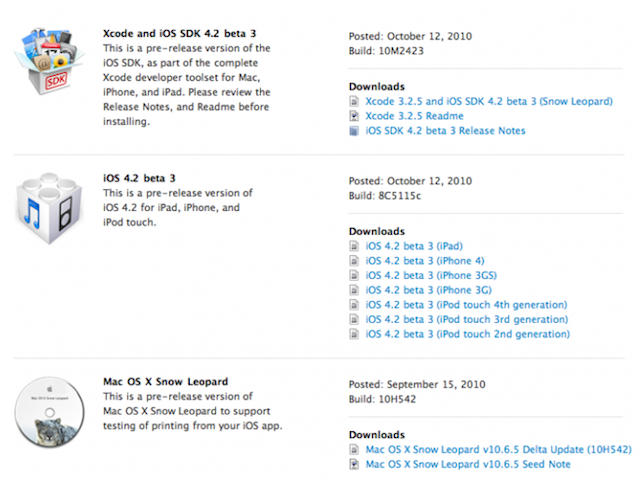
Apple released a 3rd beta build for iOS 4.2 on Tuesday, along with a 2nd for iTunes 10.1. It looks as though new builds are coming at roughly two week intervals at this point.
Amateur Space Photography (photo: brooklyspaceprogram.org)
https://www.youtube.com/watch?v=fXkoIBDXwd8
Taking their iPhone Where No iDevice Has Gone Before, a father and son in Newburgh, NY recently took a weekend science project to new heights. Luke and Max Geissbuhler attached an HD Video Camera, iPhone and some styrofoam packing to a weather balloon, then launched their homemade satellite on a journey that lasted 72 minutes and climbed over 100,000 feet into the atmosphere!
If you need convincing about the power of HTML5, look no further than Biolab Disaster, a fantastically retro, shoot-em-up platformer with some fantastic gameplay. Here, go play it for a bit now, I’ll wait for you.
Fun, right? Want to play it on your iPhone now? Well, the game’s developer has it up and running on the iPhone 3GS at sixty frames per second, and it looks awesome.
The only problem? The developer seems a little unsure about whether or not Apple will let Biolab Disaster onto the App Store because it uses the JavaScriptCore Framework, which is a private API on iOS. He’s hopeful he can get around that problem by bundling his own copy of the JavaScriptCore Framework with his app, which is perfectly legal to do since it’s part of WebKit, but there’s always the chance Biolab Disaster for iPhone will be shot down.
Let’s keep our fingers crossed: Biolab Disaster on the iPhone would be the perfect pick-up-and-play platformer SHMUP.
Two and a half weeks ago, as New Zealand rolled back their clocks for Daylight Savings Time, Kiwis started noting an odd iOS bug: any recurring alarms they had set on their iPhones were going off an hour early. Curious, but then it gets curiouser: last week, when Australian had to adjust for Daylight Savings Time, it happened again.
We love the story: its like a mini-Y2K for iOS 4.1, hitting iPhone users around the world as their country enters Daylight Savings Time… and with Europe set to enter DST on October 30th, and America on November 6th, the bug is about to hit a lot more people.
So what does Apple intend to do about this? Apple Australia says they’re on it and have developed a fix that will be included as part of an upcoming software update. Since iOS 4.2 has a late November ship date, that means we’re likely to get an iterative iOS 4.1.1 update sometime before the 30th, when all of Europe starts hurling their iPhones dramatically against the wall when their alarms rob them of an hour of sleep.
Pogoplug has updated their free app over the weekend, and it now sports the ability to stream and play music in the background over either a wifi or 3G connection from a network-attached storage device running the Pogoplug engine — which currently means either a Pogoplug unit or one from Seagate.
The big advantage the Pogoplug app’s new function has over, say, the free Zumocast app (which debuted last month and does the same thing), is that the Pogoplug version doesn’t require a computer running from which to stream music. Downside? You’ll need to pop for a Pogoplug-equipped NAS unit, if you don’t already have one. The app also gains background photo uploading and fast app-switching.
Next, hopefully Pogoplug will improve the app’s movie-streaming capability, which sorely lacks the ability to convert videos on the fly to a streaming-freindly format, like Zumocast does.
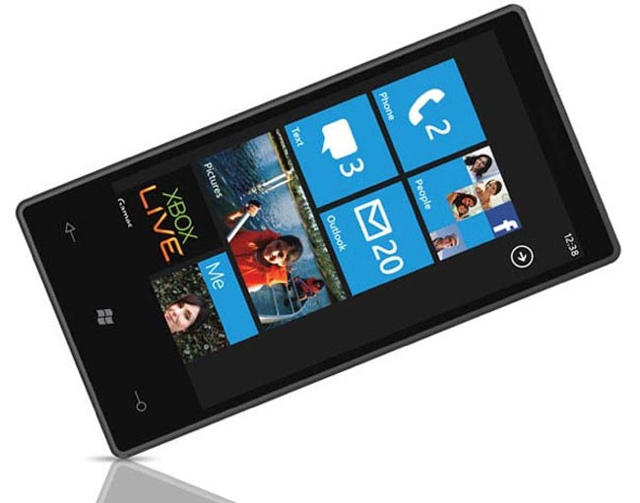
It’s taken them over three years to respond to the revolutionary shift in the mobile operating system landscape posed by iOS, but Microsoft has finally done it and released a properly modern, properly app-laden and properly multi-touchable successor to the Windows Mobile series: Windows Phone 7. But what differentiates Windows Phone 7 from Windows Mobile 6.5, Windows Mobile 6 and a host of even crappier mobile operating systems squirted out by Microsoft?
Quite a bit, actually, and it’s quite a bit better… but it’s still two years behind the curve of iOS.
Aralon: Sword and the Shadow by Galoobeth Games is an upcoming open-world role-playing game for iOS devices, and as you can see from the the trailer above, it looks about as close to Oblivion for the iPad as we’re going to get. But for a laugh, check out the original trailer for the game below the cut. Amazing what a bit of spit and polish can do in six months, isn’t it?
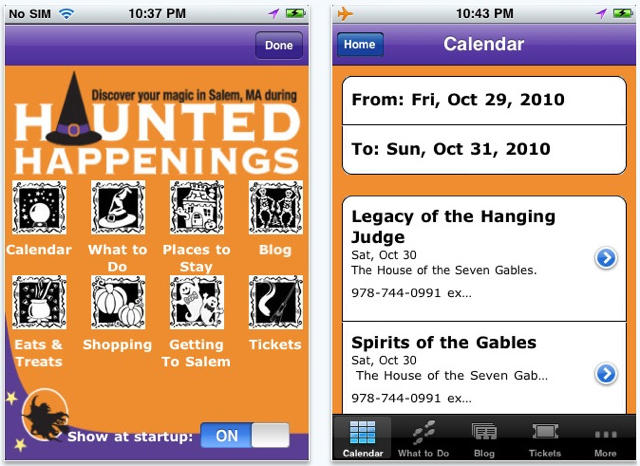
Halloween is Big Business in historic Salem, Massachusetts. It’s now High Tech too. For the 29th Haunted Happenings Celebration, the annual festival of witches, ghosts, and fall in New England, the town has created a new Haunted Happenings App for the iPhone, iPad and iPod touch.
The app features info about the Festival Calendar of Events, local attractions and museums, restaurant and retail listings, and directions on how to get to Salem (tip: plan ahead and leave time). Users also have an opportunity to purchase tickets for some events and attractions directly from the app.
One of our favorite iOS apps this week is Gordon Ramsay’s Cook With Me, which features 52 mouth-watering recipes, with simple to follow steps for cooking up gorgeous dishes.
Esquire‘s new magazine app for the iPad is another featured this week: see the World Trade Centre being built, complete with information on how it all will happen.
We also have an amazing new painting application for the iPad!
This week’s must-have iOS games features Sega’s latest Sonic the Hedgehog 4 that many of us have been eagerly awaiting. It’s been described as the best Sonic for iOS yet, with improved controls, smoother gameplay and a genuine Sonic feel.
Another of our favorites is Chillingo’s Cut the Rope – the addictive puzzle game that knocked Angry Birds off the top of the paid charts this week. It combines realistic physics with simple, precise touch controls to create a wonderfully challenging puzzler.
Black Pegasus is the latest Modern Combat 2 game from Gameloft, and also features in our favorites this week. Its console quality graphics together and excellent production make it one of the most impressive first-person shooters to arrive on the iPhone.
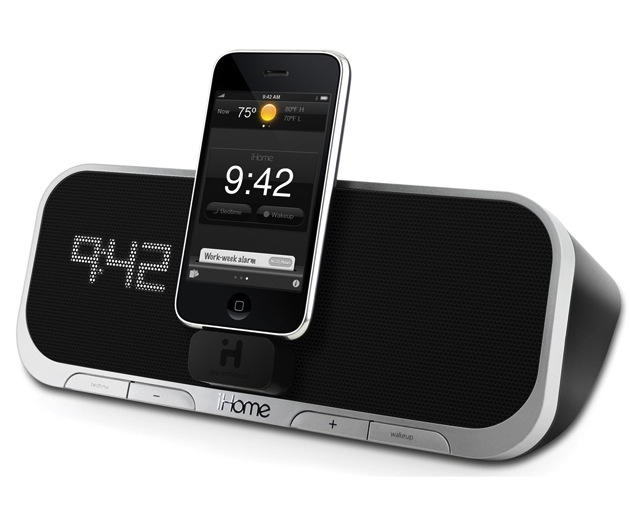
Let’s face it — for a multi-purpose device heavily weighted toward music, the iPhone’s music-player interface is crap. Dealing with those tiny buttons crammed onto the bottom of the screen is bad enough under most conditions, worse for meaty-fingered users and infuriating when the iPhone is docked or when movement is involved.
Enter Quick-Tunes, a $1 app that replaces the iPhones native chintzy soft controls with a big, meaty, attractive buttons. It also adds cool additional functions around the main play/pause button that let the user play more songs from the same artist, genre or album.
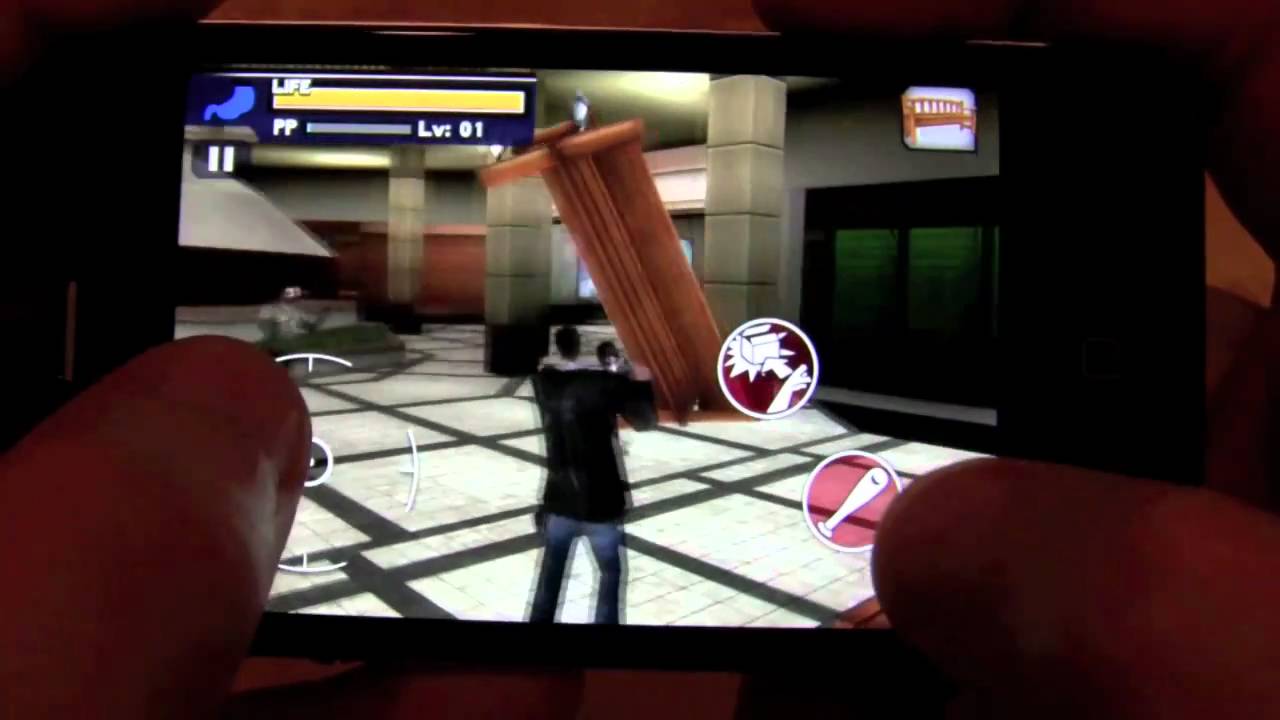
Capcom’s Dead Rising series for the PC and the Xbox 360 is an acquired taste, despite the fact that it’s central conceit is the chocolate meets peanut butter of zombie games: killing the slavering, flesh-hungry dead in an American shopping mall. Now it’s coming to the iPhone later this year in Dead Rising Mobile, but can Capcom make the series work on a handheld device?
This week’s top iOS games features EA Sports’ latest addition to the Fifa series in Fifa 11, which delivers console quality gaming to your iPhone. Offering an outstanding visual experience on the Retina display, and improved controls that make for fluid gameplay, Fifa 11 gives other soccer games in the App Store some great competition for 2011.
BIT.TRIP BEAT HD is an arcade game from Namco that fuses Pong with interactive beats in a colorful, pixelated environment. Listen to the different beat progressions and try to survive the onslaught of spectacular retro visuals as you bounce back beats from where they came. BIT.TRIP BEAT also features an intense multiplayer mode that allows you team up with your friends.
The incredibly addictive 0.03 Seconds Pro tests your reaction time using various different puzzles over 24 challenging stages, and then rates your score out of 5 stars. The puzzles seem simple, but you’ll be tearing your hair out as you try to beat the reaction time for each level and grab a 5-star score.
We also have an awesome augmented reality game that’s probably the best yet for iOS, and a chance to win one of the games featured in this week’s post.
This week’s must-have iOS apps features a new application that allows you to have free, high quality video calls over both Wi-Fi and 3G. Tango Video Callsis free a application to download, and works on other smartphones as well as the iPhone.
PDF Expert for iPad is Readdle’s latest application that delivers the ultimate solution for all your PDF needs on your iPad. It lets you read and annotate PDF documents, highlight text and make notes. You can also edit the documents you have stored on your Dropbox, iDisk, and Google Docs accounts.
PlainText is a free text editor compatible with all of your iOS devices that uses your Dropbox account to save your work. It has a paper-like interface that provides a nice, simple feel, and it’s a great substitute to iOS’s built-in Notes app.
Cherokee Nation language school students (photo: cherokee.org)
Surviving for centuries and advancing across cultures, the Native American Cherokee language has gone digital and is now available for iPhone and iPod touch handhelds running iOS 4.1:
The Cherokee Nation has been working with the software developers at Apple, Inc. for several years to incorporate the tribe’s unique written language, called the Cherokee syllabary, into new technology offered by the software giant. Cherokee is the first Native language to be featured on Apple, Inc. devices, and one of about only 40 languages overall.
“People communicate differently today,” said Cherokee Nation Principal Chief Chad Smith. “Including our language on the iPhone and iPod makes it accessible to more people, especially our youth. This is critical to the survival and growth of our language.”
[Cherokee Nation]
Email, text messaging and other apps now have access to the language as a native part of the operating system. The Cherokee Nation website contains instructions for how to use the Cherokee syllabary (and how to type on the ᏣᎳᎩ keyboard).
One of the reasons owners of the iPhone 3G and iPhone 3GS have been waiting for a jailbreak for iOS 4.1 is to enable the iPhone 4’s impressive HDR functionality on their older handsets… a hack which is already available for jailbroken 3G and 3GS users on the iOS 4.1 beta through a Cydia app.
It looks pretty likely, though, that these users won’t need to jailbreak their devices to enable HDR functionality… Apple seemingly intends to add HDR in a software update coming down the line.
Sega have been working hard throughout 2010 to bring Sonic 4 to the iPhone, which they confirmed back in May would be coming to the iOS. Today they have announced an official release date of October 7th!
Sega have ported two of their Sonic the Hedgehog games to iOS to date, and these have received mixed reviews. Some people love them for bringing their favorite childhood hedgehog to their palms, while others are disappointed with them for providing slow, jumpy gameplay, and a poor control system.
I’m very much looking forward to Sonic 4, and I’m hoping these issues will be ironed out in Sega’s latest port. Touch Arcade have been lucky enough to get their hands on a nearly complete build of the game at E3 in June, and they were blown away by it.
Interestingly, the release date of Sonic 4 for iOSmeans that the gamewill be available in the App Store before it arrives on any console; it won’t arrive on the Wii until October 11th, the PlayStation 3 until October 12th, and the Xbox a day later on the 13th.
The new iPod nano’s diminutive size keeps inspiring geeks worldwide to a variety of hacks. News today from Japan of the iSpeck’s ability to fit nicely inside the display slot on an old Sega Dreamcast VMU.
The Sega buttons do not control the iPod (yet?) but it’s safe to say this case offers good drop protection, and the headphone cord coming out the side doesn’t look as dorky as with an iWatch.
More photos and videos of the making on the vendor’s original Japanese website. [via TUAW]















![Cherokee Nation language school students [photo: cherokee.org]](https://www.cultofmac.com/wp-content/uploads/2010/10/iPhone-Kids_LG179514361lg.jpg "Cherokee Language Now Available for iPhone and iPod touch")