Mobile menu toggle

iOS apps - page 30

The Economist Is Coming As A Digital Magazine To The App Store

By

ec_promotions_ipad_and_iphone

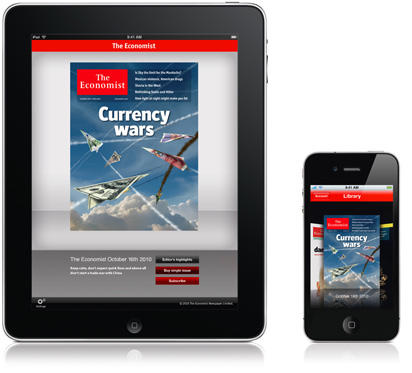
I knew I was old the moment I realized that the foundation of my every Sunday’s pleasure was wandering down to the newsstand and picking up the latest issue of the Economist, so I’m both a little sad and a little delighted to note that I’ll no longer have to make that journey: the Economist is coming to the iPhone and iPad.

This Week’s Must-Have iOS Apps: Time Flies, SpeedTask, ReBirth & More!

By

post-69434-image-e9ed0cc86d2b4517447805f93d1d3f2c-jpg

At the top of our favorite iOS apps list this week is Time Fliesa simple but useful application that helps you keep track of how long it’s been since you last completed a chore or task. It’s now even easier to remember when you last called your parents, bought flowers for your wife, or cleaned the house.

Our second must-have app is a quick and powerful to-do app called SpeedTask. It features a simplistic, easy to use user interface, with free ‘cloud’ syncing that allows you to access your tasks from any device, or sync them with iCal on your Mac.

Also featured this week is the redesigned ReBirth, which is now available on the iPad, emulating the classic Roland TB-303 Bass synth and the Roland TR-808 & 909 drum machines. Making music on your iOS device has never been so powerful!

Time Flies Keeps You Honest, Tells You How Long It’s Been Since You Last Did Your Chores

By

post-69264-image-c151de93771fd261b74aef3b290541d2-jpg

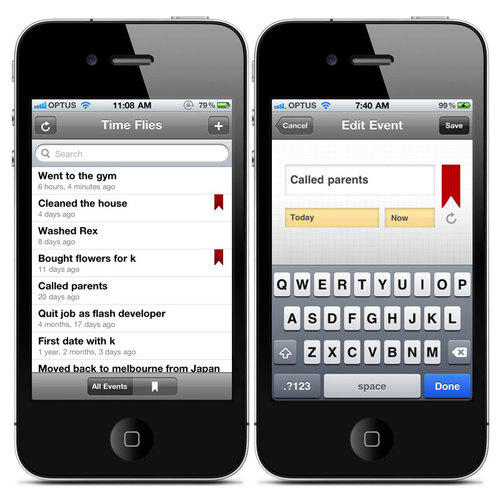
On the one hand, I love the idea behind Time Flies, a to-do app from Absent Design which allows you to record the things you do, then tells you how long it’s been since you last did them.

It’s a great idea, right? Time Flies keeps you honest. “No, you didn’t go to the gym ‘the other day’… it was three weeks ago. No, you didn’t buy your girlfriend flowers last month… it was three months ago. No, you didn’t move the stash a week ago… it’s been a month.” And so on.

My only problem here is that while I’d love to use this app myself, I definitely don’t want my girlfriend getting wind of it and using it against me. Claiming that it’s her turn to do the dishes or grout the tiles is going to be a lot harder if she’s got an app specifically devoted to catch me in my lies.

The Future Of AppleTV Gaming: Playing The Incident via iPad On An HDTV With An iPhone Controller

By

cult_logo_featured_image_missing_default1920x1080

As a glimpse of the possible gaming future of an iOS-capable AppleTV, this is pretty tops: for the latest update of The Incident, Big Bucket Software has added the ability to hook your iPad up to your HDTV and play the game from your couch using a Bluetooth-paired iPhone as the controller.

If Apple ever introduces an App Store for the AppleTV, this is the way they’re going to do it: in the meantime, we can count on jailbreak developers implementing this sort of functionality in jailbroken AppleTV apps. I can’t wait for someone to get an emulator working on this thing already!

Parallels Desktop 6 Brings Windows To Your iPad With Parallels Mobile

By

cult_logo_featured_image_missing_default1920x1080

httpvhd://www.youtube.com/watch?v=Z2I-jCY4N9I&feature=player_embedded

The Parallels Desktop
has been updated to version six today, bringing over eighty new features to the Windows virtualization program, including enhanced performance and vastly improved 3D graphics rendering speeds…. but maybe it’s neatest trick is finally letting you run Windows 7 on your iOS device.

Well, kind of. Parallels isn’t actually virtualizing Windows on your iPhone or iPad. Rather, the Parallels Mobile App is basically a VNC, allowing you to seamlessly connect and control your Parallels Windows install from any network-connected iOS device. Fair warning, though: things get a bit cramped trying to drive Windows from your iPhone.

Parallels Mobile is a free download from the App Store, while Parallels Desktop 6 costs $80, or $50 if you already own version 5.

Boxcar Goes Free As Twitter for iOS Readies Push Notifications

By

post-57832-image-1d69da1154c73a3bedfa0ca60febde88-jpg

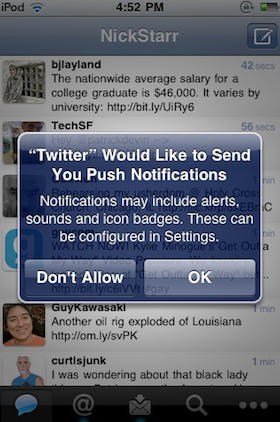
Twitter for iPhone — née Tweetie — is a wonderful first-party client with almost any functionality you could care to name, but one area in which it loses to some of its competitors is in its lack of support for push notifications.

No worries, though, because along with yesterday’s triumphant debut of Twitter for iPad, the iOS team are also working on integrating push for iOS 4.1.

Says Twitter:

We’ve been testing push notifications internally. When we launched Twitter for iPad, there was a configuration error that caused us to offer push messages to a small set of users. We’ve stopped sending push messages, but users may see an option to turn on push until we release an updated version of the app. So, push isn’t ready yet but we look forward to rolling this out soon.

As Twitter notes, you may be able to turn push notification on under settings even if you aren’t on iOS 4.1 Gold Master, although we’ve heard reports that it may require uninstalling and reinstalling the app to get working.

Perhaps not so coincidentally, push notification service Boxcar — which does a healthy bit of business in the tweet pushing market — has just gone free for all Twitter notifications.