
One data breach could be all it takes for someone to steal your identity. If you want to know how to protect yourself from identity theft, a handful of habits go a long way.
Identity theft strikes when someone steals your personal details to commit fraud in your name. Think Social Security numbers, credit card details, that kind of thing. The fallout can drain your bank accounts and wreck your credit. And you could spend months untangling the mess.
This guide breaks down the practical steps that actually reduce your risk of identity theft.
How to protect yourself from identity theft
Your personal data is an open door for scammers, spammers and unscrupulous businesses. Incogni is an easy-to-use data scrubbing service that helps remove your personal data from the internet.
Save 55% when you use code: CULTOFMAC
- Works automatically, with very little effort required.
- Comprehensive: Removes data from hundreds of brokers/sites.
- Customizable: Handles custom removals.
- 30-day money-back guarantee.
- No free trial

Fraud losses in the United States topped $12.7 billion in 2024, and identity theft complaints rose in most states that year. SIM-swapping attacks, in which criminals hijack your phone number to intercept verification codes, have been on the rise as well.
Federal Trade Commission data shows identity theft is one of the most commonly reported consumer complaints nationwide.
But none of that means you’re helpless. Most identity theft prevention comes down to a few habits. Repeat them consistently for both your physical documents and digital accounts, and your risk drops fast.
Protecting my identity: Start with securing your physical documents
Digital threats get the most attention, but some identity scams still start with paper. Protecting your identity starts with treating your Social Security card like a spare house key.
Never carry it with you in your wallet. And make sure you only share it when genuinely required, like on tax forms or new employment paperwork.
Also, ensure that you shred anything sensitive before it hits the trash. This includes things like bank statements, credit card offers and medical bills. A decent cross-cut shredder is worth the $40 or so you spend, as dumpster-diving thieves usually look for intact documents.
Another thing you should do is pick up your mail promptly or lock your mailbox. Stolen mail shouldn’t be an easy entry point into your identity.
How can I protect my identity online? Strengthen your digital security.
Multi-factor authentication, aka MFA, comes next, and it matters more than anything else. Make sure you turn it on for banking, email and social media at minimum. MFA is one of the best methods to prevent identity theft. It stops most attackers cold, even if they manage to steal your password.
And if you’re wondering, phishing is usually how criminals get that password in the first place. Avoid clicking links in unsolicited emails or texts. Also, make sure to verify the sender directly through the company’s official site or app.
Public Wi-Fi is another soft spot when it comes to identity theft. Avoid checking financial accounts on public Wi-Fi or networks. If you absolutely have to, use a VPN to encrypt your connection.
How do I protect my identity for free? Monitor your financial health.
Checking your transactions every day is one of the simplest but best ways to protect your identity for free. Review your bank and credit card activity weekly instead of monthly. This way, you might spot unauthorized or suspicious charges.
Free credit reports
Checking your credit reports regularly is another way to protect your identity for free. AnnualCreditReport.com offers free weekly access to reports from Equifax, Experian and TransUnion.
They cost nothing and only take a few minutes. Reviewing them regularly means you’ll spot unfamiliar accounts or inquiries before they turn into a bigger problem.
Freeze your credit
If you only do one thing to protect your identity, make it this: Freeze your credit. A credit freeze is widely considered to be the best way to protect yourself from identity theft.
It locks your credit report, which means no one will be able to open new accounts in your name. It’s free, and contrary to popular myth, won’t hurt your credit score. You can lift it temporarily whenever you need to apply for credit yourself, then freeze it again once you’re done.
Data brokers and identity theft
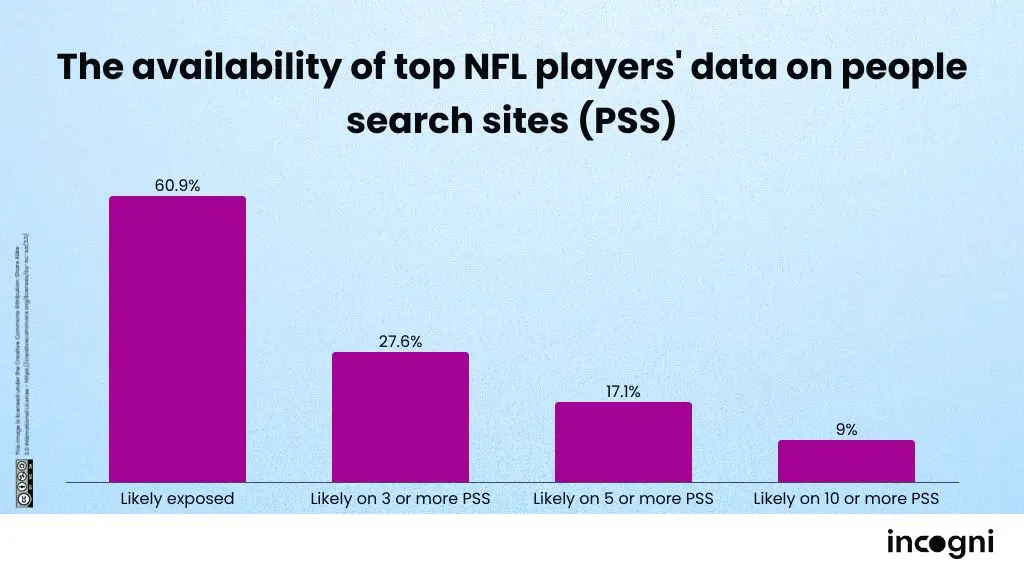
Steps to protect yourself from identity theft don’t stop at your accounts. An important part is removing your data from data brokers.
Data brokers are companies that collect and sell your personal information. This includes your address, email addresses, phone number and even details about relatives. Exposed data like this often fuels scams. It also makes identity theft easier to pull off, since scammers can use it to sound convincing when impersonating a bank or relative.
Removing that data significantly reduces your digital footprint. Services like Incogni automate the data removal process across more than 420 data brokers. Roughly 260 of those are people-search sites, while the other 160 or so are private database brokers.
How Incogni works

Photo: Leander Kahney/Cult of Mac
Incogni also covers more than 2,000 additional unique domains through Custom Removals. That’s a combined reach of about 2,420 sites. It also happens to be the first and only data removal service to undergo a third-party assessment of its process.
An independent limited assurance report from Deloitte confirmed plenty of things. Incogni covers more than 420 brokers and receives removal confirmations from them. It then resends requests on a set schedule: every 60 days for public brokers and 90 days for private ones.
Deloitte also confirmed that Incogni doesn’t sell customers’ personal data. The service has already processed more than 245 million removal requests to date. It also earned Editors’ Choice recognition from both PCWorld and PCMag.
For the 260-plus people-search sites it scans directly, Incogni requires minimal information from you: up to three phone numbers, three emails and three addresses. It uses this to flag every matching profile and file removal requests automatically.
Private database brokers, almost 160 of them, can’t be scanned the same way. For those, Incogni sends official, legally binding removal requests on your behalf. And since brokers tend to re-collect your data over time, Incogni keeps resubmitting requests rather than stopping after the first success.
Individual and family plans are available.
Incogni’s Unlimited plan gives you access to Custom Removals with no cap on requests, so you can manually target unsupported sites yourself. Throughout the process, you can track potential databases found, requests sent, and requests completed from your Incogni dashboard.
What can strangers find about you?
Incogni’s free exposure scanner checks hundreds of data broker sites and shows you exactly what’s publicly listed about you. The scan usually takes under a minute, and doesn’t require an account or credit card.
The bottom line
Identity theft prevention isn’t about any single trick. It’s the accumulation of small habits. Shred what you don’t need, freeze your credit, turn on MFA, and cut off the data brokers feeding scammers your information in the first place.
None of these steps take much time individually, and together they make you a dramatically harder target.
Incogni starts at $7.99 a month for a standard plan. Family plans (covering up to five members) start at $15.99 a month.
Cult of Mac readers can use code CULTOFMAC to get 55% off.
Your personal data is an open door for scammers, spammers and unscrupulous businesses. Incogni is an easy-to-use data scrubbing service that helps remove your personal data from the internet.
Save 55% when you use code: CULTOFMAC
- Works automatically, with very little effort required.
- Comprehensive: Removes data from hundreds of brokers/sites.
- Customizable: Handles custom removals.
- 30-day money-back guarantee.
- No free trial

Anurag Chawake is a tech-focused writer specializing in smartphones, apps and consumer technology. His interest in computers began during the Windows 98 era, eventually leading him to explore everything from operating systems to mobile devices and PC hardware. Anurag previously contributed to The Indian Express, covering Apple, Android, gaming and the broader technology landscape.

