Closed captioning. This wouldn’t have even pinged on my radar if it wasn’t for an email I received from a reader not long ago. Let me tell you about it.
Treehouse Web And iOS Development Courses [Ends Today]
Closed captioning. This wouldn’t have even pinged on my radar if it wasn’t for an email I received from a reader not long ago. Let me tell you about it.
I know it’s a slow news day and all. Not like anything was announced or anything…
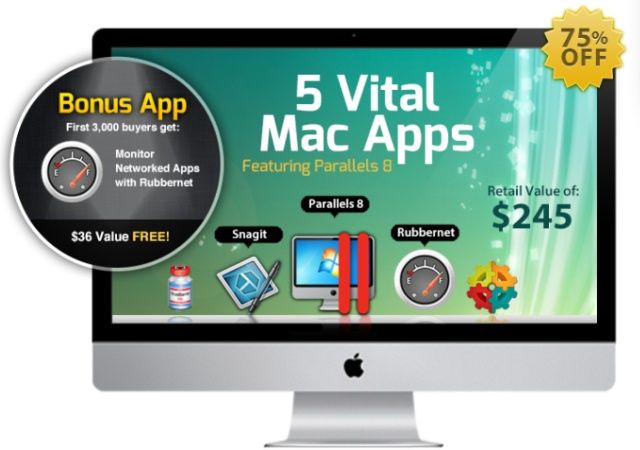
Anyway, let’s talk Windows. Since we got BootCamp way, way back … and then Parallels and VMWare Fusion (and before that anyone remember the Orange cards you’d install to run Windows on a Mac?) Mac users have been trying to find the best way to run Windows apps on their Macs. Yeah we love our Macs, but sometimes we have to use a Windows app. Personally I’ve always gone the Parallels/VMWare route, I’ve tried Wine a couple times but it couldn’t run the apps I wanted/needed. Now there’s a commercialized version of Wine called Crossover XI and guess what? It’s part of a new bundle we’ve got!
With all the changes in the web and graphic design world, I hope you don’t think for a moment that Adobe has diminished one iota as the king of graphics and layout. Good. Now that we’ve got that out of the way, let’s talk about learning these infernal apps.
I don’t know anyone who uses Adobe apps who doesn’t have even just a touch of a love-hate relationship with the tools. Which makes learning Adobe apps with Adobe Authorized training all the more awesome. Even more awesome when you get get $100 worth of training for less than $50—Learn Web Design With Train Simple
You’ve created a great app. Maybe you learned how to code it up through the Learn To Code Bootcamp Bundle, but do you have your website ready for it? I blows my mind how many times I try to learn more about an app (especially when I want to review it) and the website either isn’t complete or just looks…bad.
Let me give you some advice (don’t forget way, way back in the day I was a purveyor of apps too), have a solid, good-looking website for you app. Oh and don’t sweat if you’ve maxed your budget on making the app and can’t hire a web-dev team. That’s why templates were invented—Style Up Your iPhone & iPad Apps w/ Iconnice: Get a Bundle Full of 15 Sleek iPhone & iPad Website Templates For your App
I have a million ideas for great apps. I bet you do too. Here’s the problem—I couldn’t program my way out of a paper bag. I don’t think I’m alone in this quandary either. So…
Knowledge to the rescue! We’ve got a cool ebook—Turn iPhone App Ideas Into Reality With This Ebook Bundle: Learn How to Successfully Build & Launch iPhone Apps—that solves a lot of pain points for the whole “turn an idea into an app into money” problem.
If you have one of the new touch-screen iPod nanos, then you know one of the cooler things you can do with it is to wear it as a watch. I mean all it needs is a front-facing camera and you have a Dick Tracy watch!
Of course one of the problems I’ve seen with iPod nano bands (remember I worked for an Apple retailer for a while and I saw lots and lots of samples) is that they just look…terrible. Most of the time the band is just a pop in-pop out kind of system that makes the watch band more of a wrist-mounted carry strap than a real watch band. This Paradox watch kit seems to be a horse of a different color. A kit that gives you the power of your nano in the sleekness of a watch. Hmm.
I don’t know about where you live, but here in British Columbia holding your cell phone in your hand to talk or text while driving is a no-no. The “I was just answering my kids, officer.” doesn’t hold water either. Now hands free options are everywhere. I made sure my wife has a car mount in her car. So she can see who is calling or keep directions up on screen. We’ve gone through several options and you know they all break. Why? Because they can’t adapt to the fact that people keep their iPhones in cases.
I think we have a solution to that problem with the NKMOS Universal car mount.
We all—or should—password protect our Macs. Start up, login. Come out of sleep, login. Deactivate the screensaver, login (though technically that’s just unlocking). What about “fire up Chrome” or “start up Evernote”? We don’t usually think about entering a password to do those tasks. Maybe we should.
Mac App Blocker is, frankly, a new one on my. It’s an app that lets you set application passwords. Launch Mail, enter a password. Chrome…Evernote…Word… you get the idea. Interesting, huh?
If you’re looking for a blazing fast ultraportable laptop, the MacBook Air is the best value for the money… and that value just got a little bit better, as Apple has finally started adding refurbished models of the 2012 MacBook Air to the online Apple Store, offering savings of up to 16%.
Here’s the scenario: You invite a date over to impress them with your cooking skills. The house is tidy and you look sharp. You’re slaving away in the kitchen when your date innocently asks to check their email and you absentmindedly oblige. Then it hits you… You left your download folder open! Yeah, that dreadfully unorganized file that looks more like your trash bin. You run to try and save your dignity, but it’s too late; you have been exposed and the date is a solid block away in a dead sprint.
Don’t worry, we’ve all been there before. Lucky for you we have a download manager that is here to put your worries at rest so you can move on with your life once and for all. Folx Pro packs a ton of nifty features to get you on the fast track literally and figuratively. Here is what you can get for 3 bucks:
I personally purchased MacJournal for $40 six months ago and was extremely pleased with the value. If I only knew I could have landed 10 additional applications for $10 more a little down the road…
The Mac Hype Bundle includes 6 apps that cost $40+ individually which is the first 6 reasons you should dive on this deal. If journaling isn’t your thing (and it should be if want to keep your brain dancing and those creative juices flowing) here is what else $50 bucks will get you:
Last chance for this great freebie for all you Cult of Mac fans. We have a slick looking WordPress theme designed to show off your new iOS app idea. Simple as that. A premium theme usually $37 now FREE for you for just a short time. So, go check out the theme for yourself and then come back and download it. Why? Because it’s free and I’m sure there is always a project that you can find a great theme for.
Speaking of free, you should definitely enter our iPhone 5 Giveaway. The rumors are heating up for the highly anticipated Apple phone and it sounds like it’s shaping up to be amazing! We’ll drop the cash and wait in line; you, simply make a couple clicks and keep your fingers crossed.
Let me paint a scenario for you. You’re a creative type. Maybe professionally or as a hobby or maybe you’re just the go-to person in the office. You need to pull a rabbit out of your hat—again— and you’ve got nuthin‘. Like less than nuthin’. What you need are some creative resources to browse through and use for your project.
Most of us have a few things stashed away to use, but those get old and stale fast. Which is why from time to time you need to pick up some new fonts, textures, graphics, icons, and such. Something like The Creative Design Bundle 2.0.
Let’s say you want to program, oh, everything. Websites, responsive-design websites, iOS games, and iOS apps. Then let’s through in, just for kicks and giggles, Ruby and PS6. Cool?
This is hours and hours of classes. If you take classes the “traditional” way in a classroom, getting through all this will take a while. Don’t get me wrong, I’m all for in-person classes (I teach them myself), but I’m also a big fan of self-paced, online courses that let you learn at your pace and on your own terms/time.
This is why I like these bundle deals for courses. Like the Programming Bootcamp we kick off today.
Imagine jotting down a quick memo, tossing it into the air and having a little magical fairy swoop by and catch it, stashing it away safely for later reference. TopXNotes is the next best thing! We all know and love our Mac Stickies but imagine them on steroids. That is what you get with TopXNotes, the most comprehensive task manager yet. Let’s face it, Stickies aren’t fail proof and those quickly jotted notes can sometimes be crucial. TopXNotes constantly autosaves your notes and categorizes them to help insure anything worthy of being written down doesn’t accidentally fall through the cracks.
Why limit yourself to one designer when you can tap into the talent of HUNDREDS? Competition breads excellence which is exactly what this deal will bring to your needed designs. The idea behind 99designs is to essentially have designers compete for your business. Awesome right!?
Where do you take notes? I mean on your Mac. Notebook apps are a thing of mine. So today’s deal for NoteBook by Circus Ponies certainly got my attention. I took a look at it (how could I not and you know I’m pretty impressed. Sure, fine, Evernote is a behemoth in the note taking world. It’s also not the best note taking app though. It has a lot of limitations that bug me. What I like about NoteBook is that it’s task focused. You create notebooks based on what you’re starting point is. Writing a paper, starting a project, or just keeping a journal you get a nice, organized starting point.
Raise your hand if your iPhone has run out of juice at the worst possible time? Yeah, I’m sure that’s most of you. Certainly me. That’s why I have a battery pack case for my iPhone. While it’s good, it does have a little flaw—I still need to plug it in to charge.
Now a solar pack can help eliminate some of this need. No, not all, but let’s say, a lot. The Monster Watts case acts not just as a batter pack, but it has solar panels so you can recharge your phone wherever the Sun shines!
I love these WordPress theme deals. Why? Well, because I’m a theme junkie. Even if I don’t get a particular theme deal, I love knowing about and checking out the various WP theme foundries that are out there. Always good to have a few smaller foundries in your back pocket, IMHO.
Today we have a deal for Themify. Nice themes. Good styles. Nice layouts. And my favorite option: they support Child theming. Why is this important? Well, let me tell you…
We love Readdle’s productivity apps here at Cult of Mac, especially when they’re going cheap. The company is currently holding a Back to School campaign that sees a number of iOS apps that “are indispensable for studying” reduced. Those included are ReaddleDocs for iPhone, ReaddleDocs for iPad, and Remarks.
U.K. retailer PC World has made some incredible reductions to Apple’s last-generation Macs, with prices starting at just £379 (about $670) for a refurbished Mac mini. It also has MacBook Airs starting at £499 (about $790), and MacBook Pros starting at £649 (about $1,028) — that’s £350 (about $554) off the original price tag.
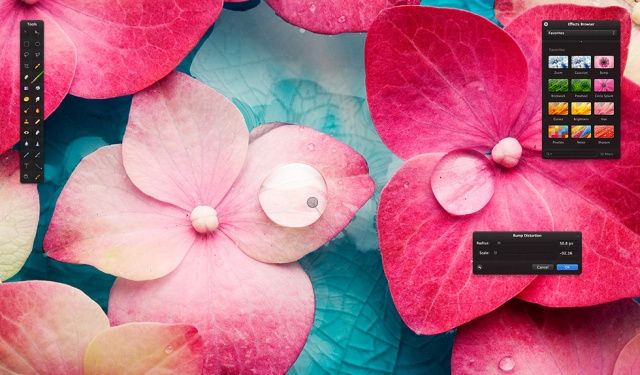
Folks, this is a one-day deal that you would be an absolute fool to miss out on. The app is Focus, and it lets you mess with the focus and such of your pics. I was a skeptic at first. I have a gabillion photo apps on hand and thought, “do I really need another one?“.
Then I tried it.
I’m getting this app ASAP because at $3, it’s a steal and very, very cool. Even if the price doesn’t get you, the examples I did just now (in about 5 minutes) sure will.
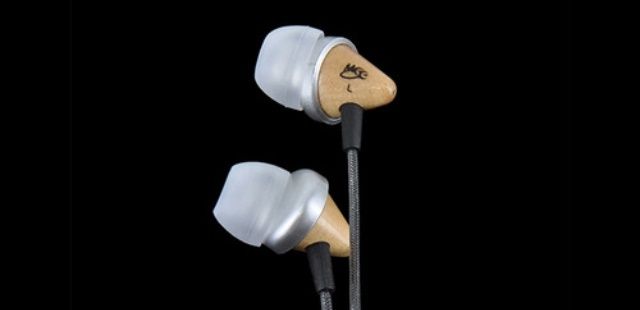
Can we just face facts folks, the ear buds that Apple includes with our iPhones and iPods (funnily enough not with the iPad—you don’t get ear buds at all) are okay as back up ear buds, but if you really want to enjoy your music you need to step up your game.
Today we have BodyGuardz Tonic Earbuds for a steal at $20. Great looking ear buds that should make any audiophile happy. Yes, you can check out Beats headphones. Oh yes, they are amazing. I’ve used them and was blown away. They also cost a fortune. Let’s not break the bank just to have music that sounds good shall we?
Last chance folks, this deal ends today!
We have another great bundle for you today. This bundle includes 8 great apps:
– PDF Editor Pro (edit and enhance your PDFs with optical character recognition.)
– CrossOverXI (run Windows applications on your Intel Mac.)
– Invoice 3 (create and manage your invoices.)
– Fantashow (making your own movie has never been easier)
– Logoist (create logos, title art, icons, banners, web site elements, greeting card headings and more.)
– iClip (get past the limitations of a single clipboard)
– Speed Download 5 (speed up your download times so you can get your assets faster.)
– My Living Desktop (monitor your Mac for possible security infringements.)
While all the apps are great there is one that stands out for me as the “killer app” for me: PDF Editor Pro. So what makes it great? Read on…
Hey, you! Like free money? Free music? Free apps? Then head on over to Walmart: the mega-retailer is selling an $100.00 iTunes digital gift eCard for just $80.
Sure, in the grand scheme of things, it’s still just the translation of real-world money into a virtualized credit system, but hey, if you’re reading this site, you’re going to spend $80 through iTunes eventually anyway. You might as well pay that $80 now and get an extra $20 free.
Source: Walmart