David Snow, an expert on Apple hardware and software, writes on a variety of technological and cultural topics for Cult of Mac. They include Apple news, technology buying guides, and features about computer setups and Apple TV shows and movies.
With 30 years of experience covering technology and other subjects, he has written and edited for numerous print and online publications, including CMP Media, TechTV.com, CNET, Wired News, Red Herring magazine, Law.com, The National Law Journal and Law Technology News magazine. Among other roles, he served as executive editor of the Law.com network of websites and editorial director, technology, for ALM Media.
Snow graduated with a B.A. from Syracuse University with majors in magazine journalism and psychology. While there, he worked as a reporter for The Daily Orange newspaper and associate editor of Equal Time magazine.
Founder of the blog At the Waterline, he can be reached on X (formerly Twitter) via @atthewaterline and on Mastodon via @dsnow.
A setup with a nice desk and paired HomePod mini speakers drew some cable-management flak. Photo: Aaron Bielert
On social media, crowing about the beautiful computer setup you finally finished putting together can be a risky gambit. Because, you know, people. They might just gleefully and repeatedly point out small flaws in your masterpiece as if they’re the main thing. Picky, picky, picky.
Lynch's nice, neat setup helps with iOS development and YouTube content creation. Photo: Stewart Lynch
Canadian iOS developer and YouTuber Stewart Lynch got lucky when he broke the USB-C port connector on his brand new 27-inch LG monitor the first day he had it. Huge-upgrade lucky.
Lynch, who hails from North Vancouver, British Columbia, took the stricken display, under warranty, to a repair shop.
“About a week later LG called me and said they did not have any 27-inch monitors in stock so they offered me a 38-inch upgrade at no cost,” Lynch told Cult of Mac. “I took it and sold my dual monitor arm that was holding the 27- and 24-inch monitors and went with the setup I have now.”
Goulielmos' retro screen and audio gear work fine with his MacBook Air. Photo: Alex Goulielmos
Alex Goulielmos, based in Piraeus, Greece, works as a software engineer for a maritime shipping company. He keeps it steady as she goes with his WFH setup, figuring, “if it ain’t broke, don’t fix it.” Or don’t go buying expensive new gear to replace it, anyway.
Good thing his recently acquired and “very snappy” MacBook Air works just fine with a 12-year-old Apple Cinema Display and audio equipment that dates back to the turn of this century. His new M1-powered laptop replaced a 2017 MacBook. But the monitor and audio gear may go on forever.
Best of all worlds? A powerful Mac and PC combo crushes work, gaming and podcasting. Photo: Liquidsama@Reddit
Redditor Liquidsama’s setup is popular on the social media app not just for the adorable Pac-Man Ghost Light in the corner (see photos), but for its awesome computing power for work and play.
The LED ghost light phases through nine colors and reacts to music, by the way — which is neat — but the real draw here is a bulked-up Mac Pro for IT work and a heavily modded PC for gaming. Not to mention a great audio rig for podcasting.
Even at 10 or 15 years of age, a 30-inch Apple Cinema Display can still be insanely great. Photo: brazzy2010@Reddit
Redditor brazzy2010 has a super-simple setup with a tremendous asset to go along with an M1-powered MacBook Air. It’s a 30-inch Apple Cinema Display from more than a decade ago. Its exact age is unknown, but it could be up to 16 years old.
Not only does the elderly display still work — with the right connectors, it still dazzles.
Nanoleaf Shapes give you interesting lighting options. Photo: arnaki_gkioulmpasi@reddit
If one thing catches your eye first about Redditor arnaki_gkioulmpasi’s setup, it’s probably the interesting light show on the wall behind it. That array is made up of Nanoleaf Shapes that can be arranged any which way.
Those cool-looking lights, along with a Yeelight Screen Light Bar Pro atop the Dell 32-inch curved 4K monitor and a standing lamp next to the desk, keep eyestrain to a minimum.
A game developer makes good use of wide and tall monitors. Photo: linden_park@Reddit
UK-based Redditor linden_park just updated their setup while working in the early development phase of a new life simulator game set in space among multiple planets and space stations. Covering all that intergalactic territory, it helps to have both wide and tall screens.
Rocky Lira works his day job and podcast production here. Photo: Rocky Lira
Rocky Lira, aka “Rocky Bandit,” and his “knucklehead” friends Eddie and Paddy went big into podcasting on a moderate budget recently. And they have the gear and the podcasts in circulation to show for it.
He and his Chicago pals started the weekly show Bums of Manarchy for fun, recording more than a dozen episodes so far. Lira got off to a fast start handling the podcast editing and production. He said he uses an M1 MacBook Pro and an older model, along with two iPad Pros and his iPhone 12 Pro — in concert with a Rode RodeCaster Pro Integrated Podcast Production Studio console.
An ultrawide monitor and a vertical one can be a good look. Photo: CompilingTheFuture @ Reddit
Reddit is a great place to seek advice about computer setups. Redditor CompilingTheFuture did well recently when puzzling over replacing the triple-monitor display running off his M1 Mac mini.
The problem? One of the main issues was that three screens were so wide that peering into the corners required a lot of “neck twisting.” Sounds painful.
Ben Thompson's setup is wired for great sound. Photo: Ben Thompson
We noticed business and technology author and noted Mac guy Ben Thompson volunteered a pic of his setup on Twitter when tech and politics writer Casey Newton posted a shot of an immaculate setup, wondering if he has “remotely what it takes to put something like this together.”
Well, Taiwan-based Thompson certainly has what it takes to put together a great setup — even if it’s more lived in and not quite as photo-ready as the one Newton posted.
Digiarty Software offers a free giveaway of MacX MediaTrans. Photo: Digiarty Software
This media transfer post is presented by Digiarty Software.
If you ever found iTunes a bit clunky or too restrictive, you might want to try an alternative for transferring media files between your Mac and your iPad and iPhone, like Digiarty Software’s MacX MediaTrans. It’s an effective option.
Or you can get a lifetime license with free upgrades. It’s currently available at a 62% discount, but you save less the longer you wait to buy. (The giveaway version lets you use all the MacX MediaTrans features except for the free upgrade service, which is reserved for users of the full version of the software.)
AirPods Max and Pro stand in for speakers in this setup, which uses a Palm Vx as a desk clock. Photo: Singulaffect @ Reddit
Redditor Singulaffect stirred up a swarm of comments recently when posting a MacBook Pro-based setup featuring an LG 21-inch 4K display but no speakers — and two sets of AirPods. But what really stole the show was a Palm Vx from 1999.
Arun Venkatesan's setup is a light and airy marriage of form and function. Photo: Arun Venkatesan
San Francisco-based designer Arun Venkatesan is about to take delivery on a 2020 MacBook Air with an M1 chip to replace the 2013 MacBook Air he uses in tandem with his 2018 MacBook Pro. But the new Mac isn’t really what he’s excited about.
He thinks less about having the latest technology and more about how his tools fit into his design philosophy, which he wrote about at length here. Form and function meet in his elegant and minimal setup.
Christian Roman built his setup for beautiful video and audio: three 5K screens, speakers with a massive subwoofer and pro lighting. Photo: Christian Roman
iOS software engineer Christian Roman has a “love-hate relationship” with his impressive triple 5K display setup.
“It’s fantastic when it works,” he told Cult of Mac. “It’s a nightmare when macOS suddenly decides to stop working with triple screens.”
This easy-to-use Mac app lets you quickly download and trim videos from your favorite websites. Image: SnapDownloader
This video download post is presented by SnapDownloader.
So many videos online, so little time. If you want some help downloading videos to your heart’s content from a tremendous number of popular websites — even simultaneously — you might want to try SnapDownloader for free. If you like it, you’ll be glad to know it’s inexpensive and super-easy to use, whether your computer’s operating system is macOS or Windows.
This setup includes 3D-printed elements and Nintendo-inspired decorations. Photo: Vincent Belotti
Vincent Belotti, a mechanical engineering student at Farmingdale State College on Long Island, New York, has a colorful setup — and we’re not just talking about his screensaver. He 3D-prints some of the components in it himself, and he can’t get enough decor related to his favorite games.
3D printing as a hobby
As an engineering student, Belotti has made 3D printing into a hobby. He uses his MacBook Pro to model and slice prints that become components to enhance his setup. They include an Apple Watch dock, shown on the right side of his desk in these photos, and 3D figurines on the shelf above his monitor.
Tony Walker's setup centers on a 2020 iMac. Note the 2nd-gen iPod at upper left. Photo: Tony Walker
Tony Walker has been an Apple user since 2003. As a college student in his early 20s, he did his classwork on a 12-inch PowerBook G4 and a 3rd generation iPod during downtime at his graveyard-shift job.
Things have changed a little almost two decades later.
Shad Ahmad's straightforward setup centers on a MacBook Pro and 32-inch monitor. Photo: Shahid Ahmad
Shad Ahmad was a hard-studying freshman majoring in biology and minoring in history at Harvard University in Cambridge, Massachusetts, when the COVID-19 pandemic struck.
Going home to continue classes for a semester remotely from his parents’ house in Wisconsin may not have been ideal, but Ahmad found a comforting upside. Integrated smart technology makes his life easier, he told Cult of Mac.
Instagram content creator Matt Tran runs his MacBook Pro with an ultrawide screen and a portable one for different reasons. Photo: Matt - Instagram @nvzion
Austin, Texas-based photographer Matt Tran initially built his impressive setup to share his pics on Instagram, and you can certainly see a lot of them there. But now he uses his workstation, centered on a MacBook Pro and two monitors of vastly different sizes, to film and edit videos.
“I like having the 38-inch [LG] ultrawide to view the timeline on Final Cut Pro and the smaller, 15.6-inch Desklab portable monitor to review the footage,” he told Cult of Mac.
Ryan Brookes likes open spaces in and around his setup. Photo: Ryan Brookes
Ryan Brookes, who works in sales for a financial services firm in Denver, Colorado, likes his open spaces. That includes indoor ones, like a spare, clean setup on his desk. Physical space helps him think, he told Cult of Mac.
His Mac mini with an M1 chip tethered to a 49-inch Samsung curved monitor probably help him think, too. Those and his iPad, which he will soon pair with a Keychron K1 Mechanical Keyboard.
David Wilcox's setup centers on a 27-inch 5K iMac with 28-inch Samsung monitors on either side of it. Photo: David Wilcox
David Wilcox is an IT consultant working from home in Bristol, England. His remote work situation means he gets to tweak his setup just as he likes, he told Cult of Mac.
Wilcox’s central command is a 27-inch 5K iMac from 2019. Humming along with it are two 28-inch U2HE850 monitors paired and run together via a Startech Thunderbolt 3 to Dual DisplayPort Adapter.
With that much screen real estate and a plethora of networking gear, he gets a lot done.
“My first computer was a Sinclair [Research] ZX81,” he said, referring to a machine made by Timex Corp. in the United Kingdom starting in 1981. “So this setup is just about a home-computing Nirvana!”
Edward Wang's setup features an ultra-wide monitor. (Note the eye-strain-reducing BenQ Screen Bar lighting atop the monitor.) Photo: Edward Wang
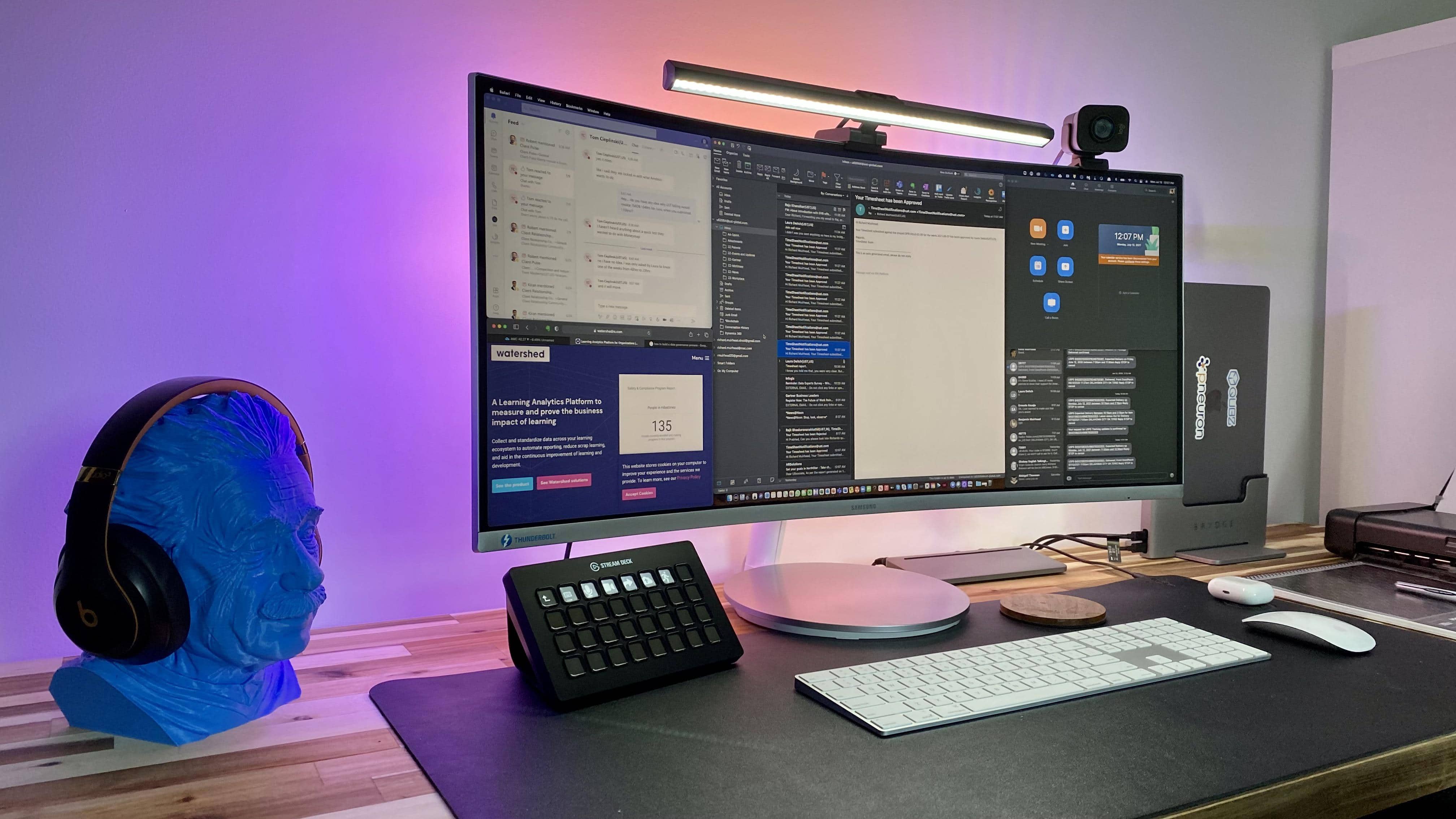
Basking Ridge, New Jersey-based Edward Wang, Ph.D., is an executive director with Quest Diagnostics. He took some serious time and effort making his setup a clean and powerful tool for health care work and audiovisual play. Once he diagnosed and treated a cable-management malady stemming from several separate pieces of computer and audio equipment, his setup delighted him.
A 43-inch wide curved monitor is the highlight of Duncan Shultz's gaming setup. Photo: Duncan Shultz
Brisbane, Australia-based defense contractor Duncan Shultz loves Dungeons & Dragons. And that’s the main action his Mac-mini-and-wide-screen setup sees, although he also admits to using it to work for a living. An Aasimar Sorcerer’s got to eat, after all.
“The wide screen is simply awesome for my uses,” Shultz told Cult of Mac. “Specifically in running online D&D games. I can have video conferencing, multiple browsers, streaming software and other tools all open and accessible.”
In addition to the aforementioned sorcerer character — goes by the name of Selinth, BTW — Schultz is a dungeon master for Curse of Strahd campaigns, one online and one in person. Online he uses the Roll20 website and in person he uses EncounterPlus for iOS and macOS.
In this setup, an LG curved monitor is great for work as well as movies and TV. Photo: Paul O'Toole
An IT professional who specializes in Mac and iOS home implementations probably has a leg up on the next guy when it comes to building an Apple-centric home office and man cave.
Or is it a man cave and home office? We’ll let Paul O’Toole, an IT pro from Worcestershire, England, decide that. It’s his, after all. He calls it a “sitting room,” actually.
He turned his garage into an office and movie palace, thanks to an LG 34UC99 curved monitor and a pair of HomePods running with his Mac Pro.
When you have more gear than you use, it's time to break it down to basic needs. Photo: Gareth Owen
Gareth Owen is a London-based professional sound designer whose job involves extensive CAD and acoustic modeling, but he also does sound effects work and multitrack mixing.
So he built a setup that functions as both his home office and a basic home studio.