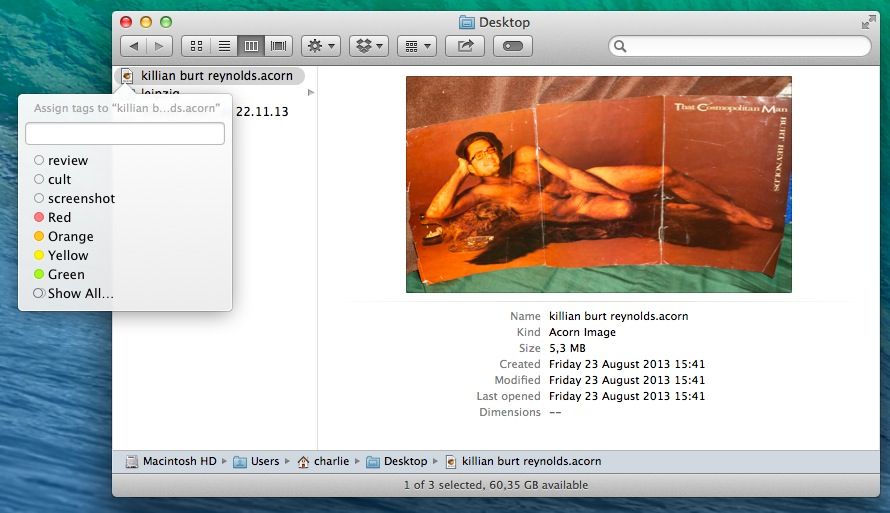
Mavericks’ new in-Finder tagging is great, letting you treat your files like you treat your Gmails and effectively keeping the same file in multiple “folders” at once. But actually tagging the files is still kind of a pain. Happily, Brett Terpstra is here to help with a rather simple tip.
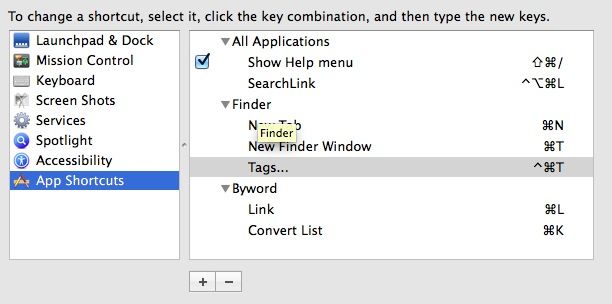
The arguments continue about whether keyboarding or mousing is the faster navigation method, but one thing’s certain: keyboard-shortcut junkies hate to move their hand to the right to grab a mouse. This tip’s for you. Just fire up the Keyboard pane in System Preferences and add a new App Shortcut. Choose the Finder as the only application that will respond, and type “Tags…” into the Menu Title. Then pick a shortcut (I copied Brett’s ⌃⌘T).
You’re done. Now, whenever you have a file or files selected in the Finder (including the desktop) you can just hit your key combo and the new Tags box will pop up. Bonus: type to narrow the list by search, or just use the arrow keys to navigate, then hit return to apply the tags. You can even create new tags just by typing a name.
Try it. It makes tags totally useful.
Source: Brett Terpstra

Charlie Sorrel writes reviews and how-tos. Follow Charlie on Twitter at @mistercharlie, and at micro.blog on @mistercharlie


4 responses to “Tag Files In Mavericks Finder Using The Keyboard”
Should be “Tags …” with space. (Maybe only in german layout)
According to Brett Terpstra it should be “Tags…” with ellipsis (Option-;) …
In Poland it is “Tagi…”
thanks! I still would love to see Mac include the old option to assign a tag with a *single* keystroke. I have been using finder to sort photos for work, and every extra keystroke adds minutes and hours to my workflow. The new change is making me decide to switch programs for this function.