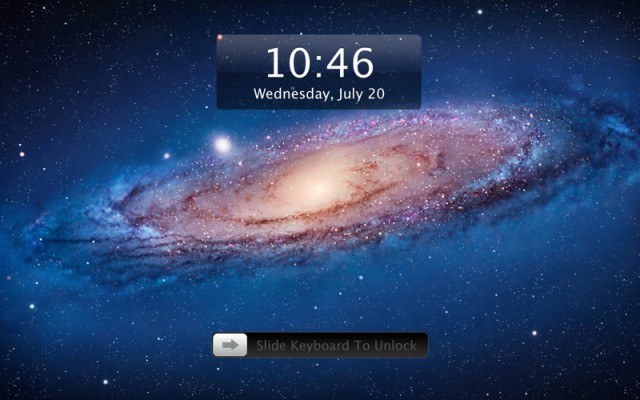
One of the main staples of iOS is its iconic “Slide to Unlock” lock screen. The interface makes sense on a touchscreen device — just swipe your finger from left to right to unlock.
An app called Lock Screen 2 brings the “Slide to Unlock” screen from iOS to the Mac. Practical, right?
Introducing The New Way To Lock/Unlock Your Computer Screen On MacOS
- Lock by hotkeys
- Lock after idle
- Lock before sleep
- Slide to unlock by keyboard
- Slide to unlock by trackpad
- Slide to unlock by passpattern
- Custom slide to unlock text
- Custom lock/unlock sound
- Custom wallpapers
- Open at login option
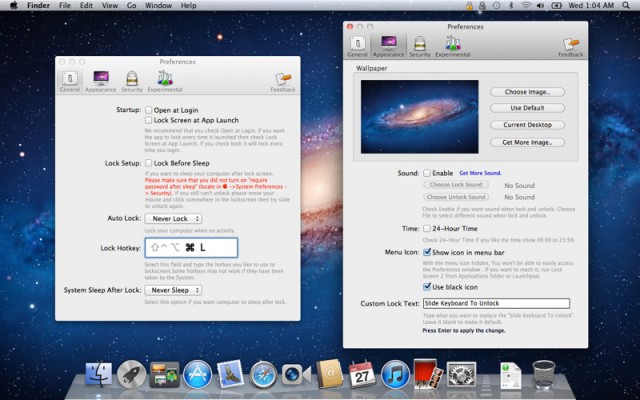
You obviously don’t have a touchscreen on your Mac, so Lock Screen 2 isn’t going to work exactly like iOS. Instead, you have a trackpad on MacBooks and Macs with a Magic Trackpad. Lock Screen 2 lets you swipe across your trackpad like an iOS device to unlock. You can also set a string of keystrokes to simulate a slide to unlock gesture.
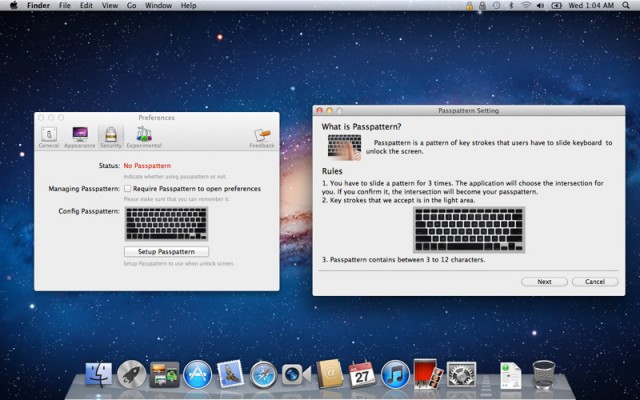
The app lets you set a password of 3-12 keys to use for unlocking your Mac, but the trackpad option makes more sense (unless you want the added security). Lock Screen 2 lets you customize the lock screen background, text, and sleep/wake options within the app.
httpvhd://www.youtube.com/watch?v=MossgogtxCQ
Lock Screen 2 is available for the current price of $1.99 in the Mac App Store. The app’s regular price is $4.99.
What do you think? Weird, or actually useful?

Alex Heath is a journalist who works for Tech Insider. He’s the former co-host of The CultCast. He has been quoted by the likes of the BBC, KRON 4 News, and books like “ICONIC: A Photographic Tribute to Apple Innovation.” He lives in Lexington, Kentucky. If you want to pitch a story, share a tip, or just get in touch, additional contact information is available on his personal site. Follow him on Twitter.

