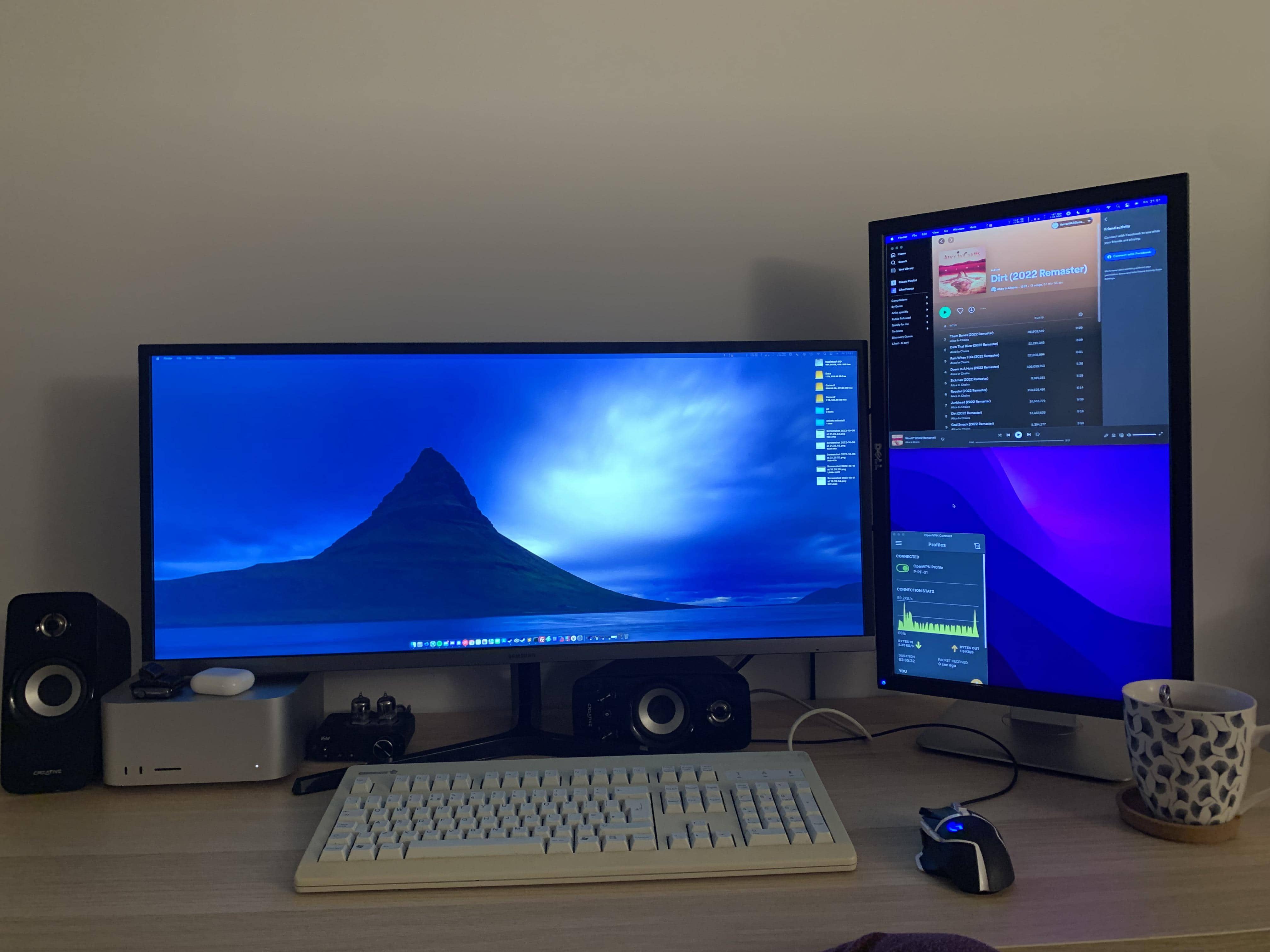
Once you shell out a couple thousand bucks or more for a marvelous Mac Studio desktop machine, how do you add an ultra-wide display without running up your already-tortured credit cards?
Today’s featured dual-monitor Mac Studio setup solved the problem by going back in time. Its owner added an ultra-wide display — and much of the other gear in the workstation — from a few years ago.
Mac Studio setup shows an ultra-wide display need not cost a fortune
Redditor InfaSyn showcased the setup in a post entitled, “Just grabbed my first ultra wide.” They run their new ultra-wide display — a 34-inch Samsung QHD monitor — with a base model Mac Studio.
The desktop sports an M1 Max chip with a 10-core CPU and a 24-core GPU, 32GB of integrated memory and a 512GB solid state drive.
And the ultra-wide display shows how little you have to pay now to get the ultra-wide experience. That model, which came out in 2019, tends to fetch about $300 now.
What do you give up going with an older model? Well, that particular display is a QHD with a 21:9 aspect ratio and 3440 x 1440 pixel resolution running at a refresh rate of 75Hz. You’d very likely pay quite a bit more to vault up to higher screen resolution available now in ultra-wides, either 3840 × 1600 or 5120 × 2160. The latter is often called 5K2K, and those usually cost between $1,000 and $1,500.
However, if you value screen resolution as much or more than screen real estate, you could go for a regular 32-inch 4K monitor with not-too-high a price tag, around the same $300 in some cases, give or take. Here’s an example 32-inch Samsung 4K at exactly that price point.
When asked about their impression of the monitor, Syn said, “Only 8 hours in but I’ve done a little coding, some gaming and some sys admin stuff today — initial impressions good.”
And their other screen, a 23-inch Dell E2311 1080p monitor, goes for around $149. They used the word “crap” to describe it and said they’ll replace it soon.
‘Wild’ mechanical keyboard and vacuum tube headphone amp
“That keyboard is wild,” a commenter said, perhaps employing a bit of sarcasm. The mechanical keyboard looks like it escaped from an accounting firm in the 1990s.
“Haha, thanks,” San said. “Not a stunner to look at but really damn nice to type on. Its a Cherry MX 3000 with MX Black switches.”
Syn uses the smooth-typing keeb in concert with a Logitech G502 Lightspeed Wireless Gaming Mouse.
“What’s that thing with the two vacuum tubes behind the vintage 1997 keyboard,” another commenter asked.
San explained that it’s a Sabaj PHA3 Vaccum Tube Headphone Amp. They use it to jack up the sound on their Sennheiser Momentum 2.0 over-ear headphones when they’re not playing tunes on their Creative speakers.
If you like a retro vibe, you can find that mad-scientist-looking headphone amp for less than $30. See all the gear in the list below.
Shop these items now:
Computer:
Displays:
Input devices:
- Cherry MX 3000 mechanical keyboard with MX Black switches
- Logitech G502 Lightspeed Wireless Gaming Mouse
Audio:
- Creative T15 Bluetooth 2.0 Speaker System
- Sennheiser Momentum 2.0 headphones
- Sabaj PH3 Vacuum Tubę Headphone Amplifier
If you would like to see your setup featured on Cult of Mac, send some high-res pictures to [email protected]. Please provide a detailed list of your equipment. Tell us what you like or dislike about your setup, and fill us in on any special touches or challenges.

David Snow, an expert on Apple hardware and software, writes on a variety of technological and cultural topics for Cult of Mac. They include Apple news, technology buying guides, and features about computer setups and Apple TV shows and movies.
With 30 years of experience covering technology and other subjects, he has written and edited for numerous print and online publications, including CMP Media, TechTV.com, CNET, Wired News, Red Herring magazine, Law.com, The National Law Journal and Law Technology News magazine. Among other roles, he served as executive editor of the Law.com network of websites and editorial director, technology, for ALM Media.
Snow graduated with a B.A. from Syracuse University with majors in magazine journalism and psychology. While there, he worked as a reporter for The Daily Orange newspaper and associate editor of Equal Time magazine.
Founder of the blog At the Waterline, he can be reached on X (formerly Twitter) via @atthewaterline and on Mastodon via @dsnow.

