Top stories

Microsoft’s My Documents Folder Makes Triumphant Return – On iPad

20100209-mydocuments.jpg

Earlier today, I was reading Infoworld’s article, The iPad questions Apple won’t answer. The first question they listed was “Can you save and transfer documents to the iPad?”, and their assumed answer was “No”; they suggested that the only way to do this would be to open a document from an email message.
I read that [...]

Top 5 Things To Check Out at Macworld 2010

Macworld 2010 opens today. It is the 25th annual gathering of Mac users. That’s right, 25 years!
But thanks to the absence of Apple this year, this “Mecca for Mac Heads” may be the last. So check it out while you can.

The show runs for 5 days. The Expo showfloor opens on Thursday at noon.
For the [...]

Opinion: MacBook, or iMac + iPad?

20100208-imacipad.jpg

The announcement of the iPad has done a lot of things: it’s stoked up excitement in the Mac using community, it’s got a bunch of developers feverishly coding exciting new stuff, and it’s got retailers and cell phone companies the world over drooling over the money they can make from it.
And it’s also somewhat upset [...]

In Depth: 30 Days with the Nexus One

It’s been a month since my review of Google’s “SuperPhone”, the Nexus One. Since that time, we’ve surfed, updated facebook, navigated, called, played endless hands of cribbage and even tried to freeze it to death on a trip to Dayton Ohio. Follow me after the jump to find out does the “SuperPhone” stand the [...]

The Top 5 Secrets To Designing A killer iPhone App Site

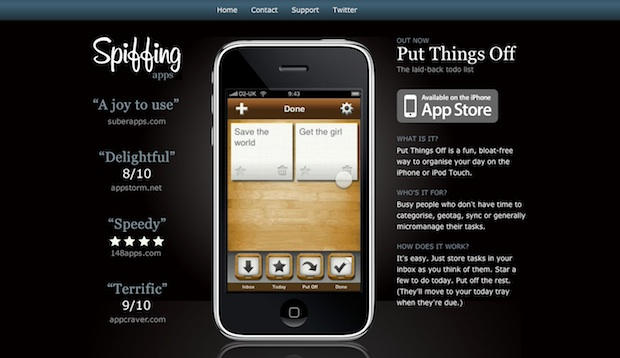
spiffingapps

Here’s the Top 5 Secrets for making a killer website to showcase your iPhone app, courtesy of the WebDesignerWall blog.

“To compete with thousands of iPhone apps in the App Store, having a good app icon is not enough. A nicely designed website for the app is very important. A beautiful website helps to drive traffic in and also makes your app stand out from the crowd.”

Here’s the list:

  • One Page — Your app’s site should be one page. No more, no less.
  • iPhone Image — Use an image of an iPhone running the app as the main design element. Drop shadow or reflection optional.
  • Apple App Store Badge — The download button should be Apple’s App Store badge. Easy to spot and instantly recognizable.
  • Animated Screenshots — All sites show screenshots of their app, but animated screens show it in action.
  • Display Pricing — It’s frustrating for prospective customers to not know the price up front.

Link.

About the author

Leander Kahney

Leander Kahney is the editor of Cult of Mac, and author of three books about technology culture: Inside Steve’s Brain, the New York Times bestseller about Steve Jobs; Cult of Mac; and Cult of iPod. Leander has written for Wired, MacWeek, Scientific American, and The Guardian in London. Follow Leander on Twitter @lkahney and Facebook.

Email the author | Read more posts by Leander Kahney.

8 comments

    Tip six: ensure there are downloadable press assets, so press people like me save time and therefore like you, the app maker, rather than hating you.

    Tip Seven – Make a good app first. This way, the app will help sell itself. Helping developers and users in the long run by not clogging up the app store with junk.

    Um, I don’t see the apps price on the photo. (See Tip #5)

    The new in-app pricing makes the problem worse. Now, you download a app and get surprised after you use it for a while (both with a random amount and at a random time after you start using it).

    Many apps don’t even bother mentioning in the description that you have to pay for continued and/or full functionality.

    A demo video of a few key features and positive quotes from media may also be helpful. :)

    I would like to know more about iPhone user interface for my new apps, does anybody know where i can found iPhone toolbox links ?

    thanks
    Visigraphic

    The reason pricing isn’t displayed, is that Apple doesn’t allow it. It can be a cause for rejection. (Although you could get approved and then add the pricing to the description or website.)

    It’s not a bad policy, since you never know what someone’s local currency is.

    This restriction on pricing is why you’ll often see devs advertise sales with x% off instead of quoting the exact price.

    Apple does not disallow the display of pricing anywhere but in the app itself and application icon. They don’t care if it’s on your website.

Add your comment

Name(Required)

Mail (required, but not published)

Website

Comment

Buy Inside Steve's Brain Buy from Amazon.com Buy from Barnes & Noble

