If you recently used Limera1n or GreenPois0n to jailbreak your iOS device, and want to make sure that iTunes doesn’t automatically update your device’s firmware whenever the next update is released by Apple, then here is a quick fix to prevent you from accidentally updating your iPhone/iPod/iPad.
In order to prevent iTunes from downloading and installing the firmware update you can use the script below. When you want to update your firmware all you’ll need to do is download the firmware manually from a site like this and use option+Restore in iTunes to update to the newest firmware.
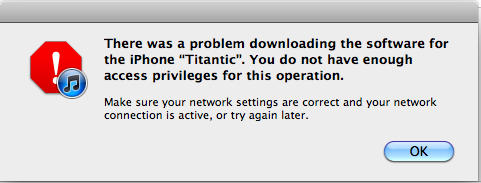
All the script does is chmod the download directories of the iTunes software updates. When you try to update your iPhone you’ll get a lovely message like this –
The script is as follows:
#!/bin/bash
clear
echo "This script will chmod the download locations for Firmware Files, So iTunes can not download firmware."
echo "AKA it will prevent iTunes from auto updating your device."
echo ""
echo ""
echo "To restore firmware just hold down option and manually select the firmware file."
echo ""
clear
echo "Made By: Wesley K"
echo "https://wesleyk.me"
echo "https://wesleyk.me/twitter"
sleep 2
read -sn 1 -p "Press any key to continue..."
clear
echo "Now I need your password to continue"
echo "Killing iTunes now"
sudo -v
sudo killall -9 iTunes
sleep 2
clear

echo "Im going to make all the folder needed to future proof a few things"
echo "If errors occur here, No big deals."
sudo mkdir ~/Library/iTunes/iPad Software Updates/
sudo mkdir ~/Library/iTunes/iPod Software Updates/
sudo mkdir ~/Library/iTunes/iPhone Software Updates/
sleep 2
clear

echo "I am going to dump all the current files in your update folders."
echo "This will prevent any updates from downloaded firmware."
sudo rm -rf ~/Library/iTunes/iPad Software Updates/*
sudo rm -rf ~/Library/iTunes/iPhone Software Updates/*
sudo rm -rf ~/Library/iTunes/iPod Software Updates/*
sleep 2
clear

echo "Now preventing iTunes from downloading new firmwares."
sudo chmod 444 ~/Library/iTunes/iPad Software Updates
sudo chmod 444 ~/Library/iTunes/iPod Software Updates
sudo chmod 444 ~/Library/iTunes/iPhone Software Updates
sleep 2
clear

echo "Made By Wesley K"
echo "Give me credit if you use it"
echo "For safe measures I would run this script after iTunes updates, It shouldn't affect it but I don't know yet."
Via MacWorld

Buster Hein is a freelance writer who lives in Phoenix, Arizona. Twitter: @bst3r.

