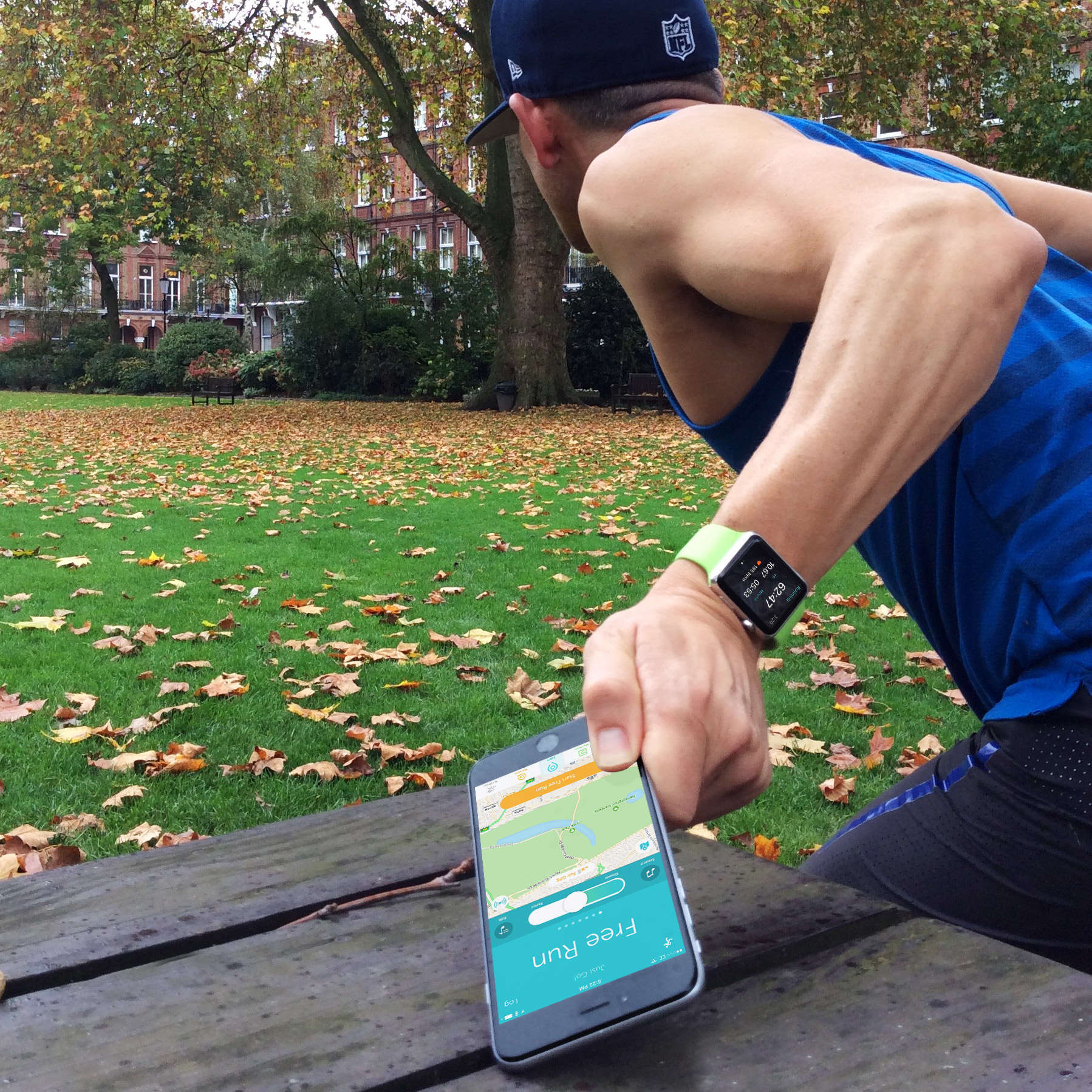
Runkeeper is one of the first big-name running apps to offer full watchOS 2 support, which means you can log a run on your Apple Watch even if you leave your iPhone behind.
The Apple Watch’s built-in Workout app has always offered this feature, but it is new for third-party apps. I had never tried it before, but Runkeeper got me curious. So I left my iPhone charging at home, put on a pair of Nikes and went out for a run.
You’ll see red when your Watch can’t see your iPhone
The first thing you’ll notice when you stray out of range of your iPhone is that your Apple Watch gets upset. An ugly red icon appears at the top of the screen in protest, and stays there until you reunite your Apple gadgets.
It is pretty clear that Apple expects you to take your iPhone with you most of the time. However, Apple claims the Watch can log runs without the smartphone, providing the wearable is calibrated. This simply involves taking your iPhone and Watch on a 20-minute run together.
That’s the theory, anyway. To test it, I started off using Apple’s own built-in Workout app. My Apple Watch was already well calibrated, since I had logged more than 30 hours of running with my iPhone.
The results I got, however, were surprisingly inaccurate. Without the help of my iPhone, my Apple Watch thought my daily 7.2-mile run was 10.5 miles. I tried three separate test runs of this same distance and on each occasion the Watch was off by around 45 percent.
When I take my iPhone with me on a run, my Apple Watch’s pace and distance estimates are highly accurate. Without my iPhone, it became so inaccurate it was useless.
A good running watch never blames the runner
While my Apple Watch clearly did not like leaving the iPhone behind, I loved it. I had gotten so used to having my bulky iPhone 6 Plus strapped to me that I had forgotten how much lighter and freer it felt to run without one.
Determined to solve the accuracy problems, I contacted Apple support. Initially, they advised me to take my iPhone with me if I wanted greater accuracy. But I was not about to give up just yet. So instead, they suggested un-pairing and re-pairing my Apple Watch – a fiddly and time-consuming task that made absolutely no difference.
I tried resetting my calibration data and recalibrating, but this did not help either.
I began to wonder if it was my fault. My arms swing a lot when I run (something my running coach always used to tell me off about). Perhaps all that extra motion was throwing off the Apple Watch? But surely a good running watch should be able to handle a wide variety of running styles.
Photo: Graham Bower / Cult of Mac
The more you run, the less satisfied you become
I was curious to find out how many users are affected by this issue, so I asked Bernard Desarnauts, CEO of Wristly, a specialist in Apple Watch research.
Overall, Wristly has found users are extremely satisfied with their Apple Watches, although the satisfaction level drops significantly when it comes to running without the iPhone. 55 percent say they are satisfied with the accuracy, which is not bad, but when you look more closely at the data, a different picture emerges.
Desarnauts broke down the data for me by how many times a week Wristly’s survey respondents work out, and found that the more you exercise the more you are dissatisfied with Apple Watch.
Which makes sense given that the further you run, the more apparent inaccuracies become. Perhaps my bad running style is not entirely to blame after all.
Third-party running apps are also affected
Runtastic was first off the starting line with the launch of its native app for watchOS 2 in September. But it does not support running without iPhone.
Runkeeper is hot on Runtastic’s heels with a recent update for watchOS 2. Unlike Runtastic Pro, the new Runkeeper app does support iPhone-free running. So I decided to give it a try.
There is a lot to like about the new Runkeeper app for Apple Watch. The user interface is clean and simple. And when you are logging a run, you don’t need to tell the app if you will be taking your iPhone with you. It just works this out for you, combining accelerometer data with GPS data when it is available.
Runkeeper co-founder and CEO Jason Jacobs advised me that for tracking with just the Watch, it works best if you are out of range of your iPhone when you start the activity. In my case, that involved walking several meters, because my iPhone’s Bluetooth signal seems to reach outside my house and down the road.
Disappointingly, however, I found that when running without iPhone, the results were the same as with the built-in Workout app. Jacobs confirmed that Runkeeper has the same level of accuracy. I assume this is because third-party apps offering iPhone-free running must use Apple’s new workout API, and therefore whichever app you use, the data ultimately comes from the same source.
I was also surprised to discover that the Runkeeper app suffers from the same dreaded double lag that afflicts other third-party running apps, resulting in a pause of several seconds before the pace and distance update on the watch. I had assumed this would not be a problem for Runkeeper because it does not need to wait for GPS from the iPhone. But for some reason, it still is.
Your mileage may vary
While the Wristly data suggests that I am not alone in encountering these problems, it seems that not everyone is affected. Some people I have spoken to have gotten accurate results during iPhone-free runs. Which makes me suspect it is an issue with my flappy-arm running style after all. Ultimately you must try it for yourself to find out if it works for you. (Let us know in the comments below).
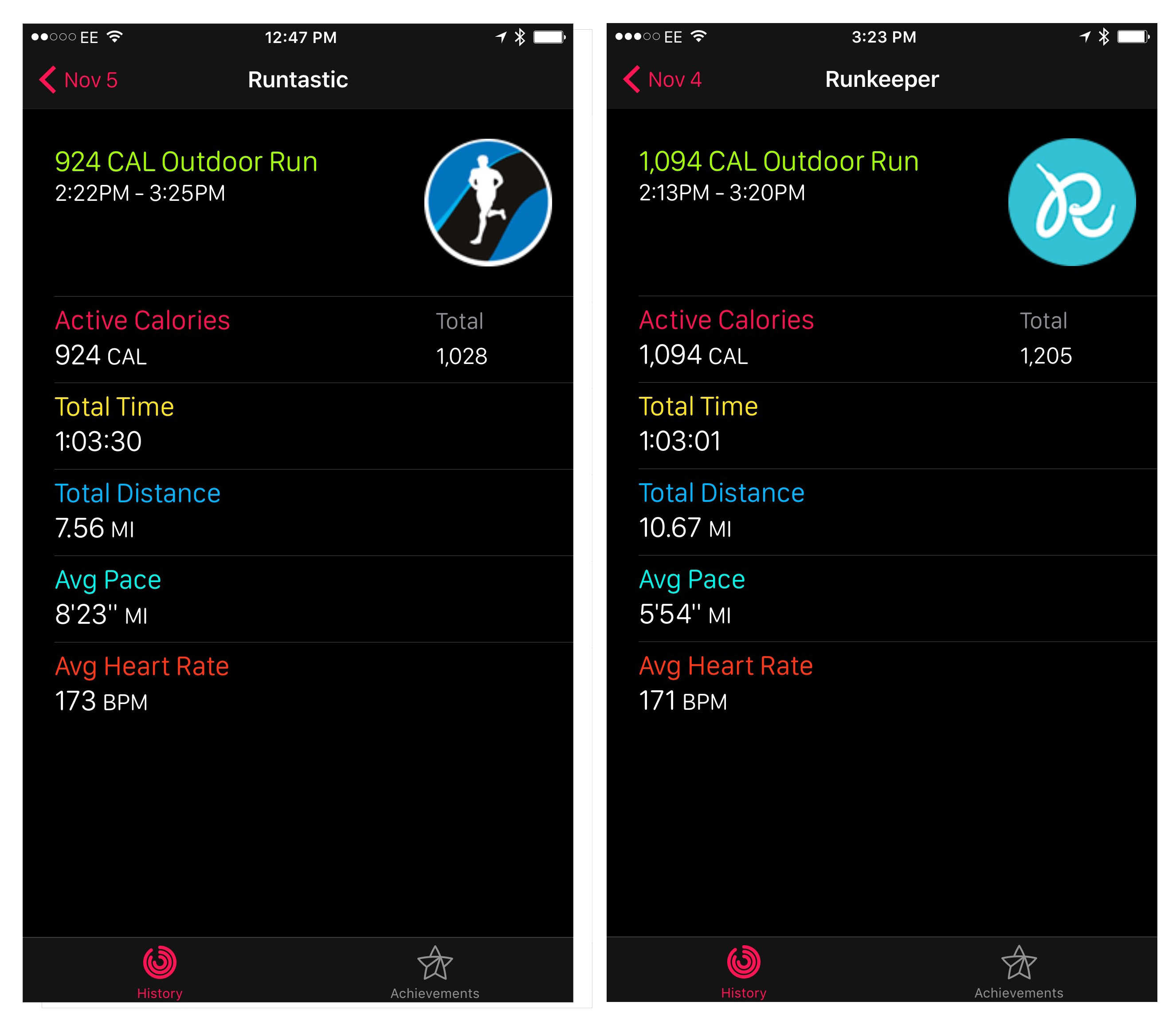
Photo: Graham Bower / Cult of Mac
The Cinderella bug: Your Move Ring disappears at midnight
One really nice feature of Runkeeper is the way it integrates with Apple’s fantastic Activity app.
Runkeeper doesn’t just contribute to your Move and Exercise ring totals. In the iOS Activity app, a Runkeeper icon appears on days when you have logged a run, and tapping through reveals a breakdown of your distance, pace and heart rate.
However, there currently seems to be a bug affecting this. Calories from a run you log with Runkeeper are added to your Move Ring initially, only to disappear at midnight, like Cinderella’s carriage. This can be very frustrating if you had a nice Move Ring streak going. Hopefully there will be a fix for this in Runkeeper’s 6.3 release.
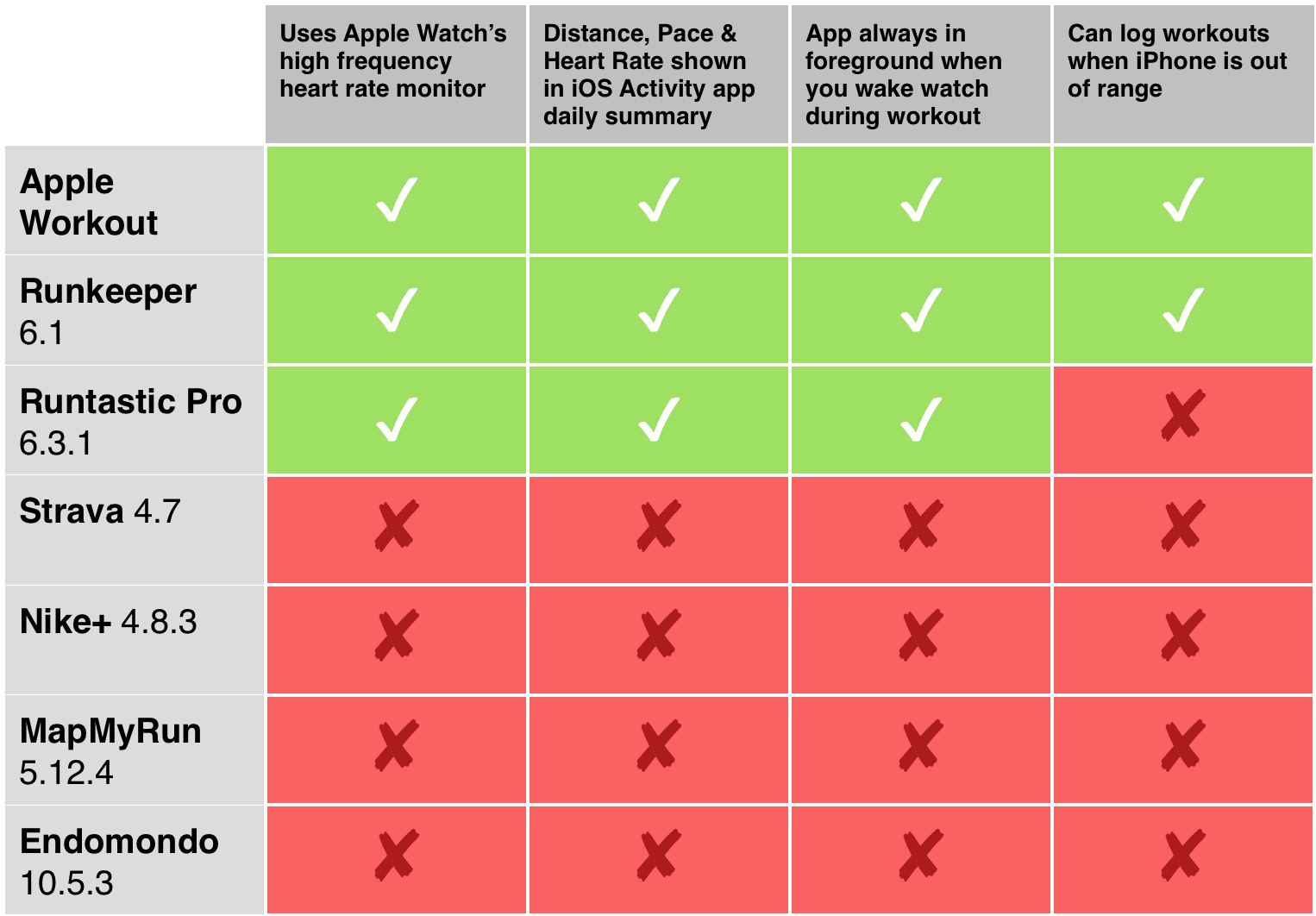
Chart: Graham Bower / Cult of Mac
I’ll keep cheating on my Apple Watch for now
A couple weeks ago, I admitted that I was cheating on my Apple Watch and had resorted to using a dedicated GPS running watch alongside it. The problems I’ve outlined above further illustrate that the Apple Watch is still not suitable for serious runners.
While watchOS 2 apps like Runkeeper and Runtastic Pro (which has recently been updated to address the issues I previously reported on) show the potential of Apple Watch as a runner’s platform, other big-name running apps are proving slow to adopt new features. More support for watchOS 2 will certainly help, but I still think Apple Watch will only become a serious option for regular runners when Apple adds built-in GPS.

Graham Bower is a designer, writer, fitness geek, and long-time Apple user. He is the co-host of Apple Core, a podcast about the history of Apple, and the developer of Reps & Sets, a fitness app for iPhone, iPad, and Apple Watch. Connect with Graham on Bluesky or at www.grahambower.com.


8 responses to “Running without iPhone makes Apple Watch inaccurate”
I love my Watch, but since the running app makers started embracing it, I feel like the whole experience of running and tracking my runs has gotten worse. Take Runkeeper – it seems like the watch app is now for watch only running. I don’t know who runs without their phones these days, but IMHO its not only unsafe but as mentioned you miss out not he GPS functionality. I had expected an app like Runkeeper to use the watch for things like heart rate but this isn’t the case. They tell me I have to start my workout from the watch, but no heart rate info is ever added to my iPhone app nor online even though I can see it. I just don’t want a stand-alone watch experience, I want the two to be integrated and feed off each other. let the watch feed heart rate and other data to the phone and be a dashboard for the phone’s tracking. I’m surprised nobody has mastered this yet.
I almost feel like I HAVE to leave my watch at home, or remove these apps from the watch entirely. Its just bad right now. I really just want to give up my heart rate belt and use my watch… please, someone, can’t you do this right?
I’ve been a runner for decades and an RRCA certified running coach for years. I’ve worn just about every running watch and GPS dedicated running watch on the market. So I was very excited to use my Apple Watch, which I bought in June, for my running. But after hundreds of miles run with the Apple Watch, including the Marine Corps Marathon on October 25th, I have to admit that my Apple Watch is a disappointment. I’ve tried every recommended trick, tweak, and calibration to make it more accurate, but to no avail. In addition to all of the things that you wrote, Graham, if you happen to be a 4 hour plus marathoner, the battery on the watch will die before you finish your marathon. I can’t tell you how hard I’ve cheered for the AW and how badly I’ve wanted it to work for everything for which its been designed. But it’s got a long way to go for runners. My girlfriend, also an Apple Watch fan, and I have been so pleased with other aspects and functions of the watch, but we’ve gone back to wearing Garmins and Nike + watches for our running. Even with the iPhone in my waist belt or CamelBak, the distance and pace for our AWs have been disappointing.
I have noticed that when I run in treadmill indoors, the watch always gives different distance (more distance) than the treadmill itself. Probably the calculations done by Apple Watch are not accurate and tend to go to give more distance that it actually is. Hope the correct these issues in a future update
I can tell you what your problem is really quickly. When you run with your iphone, you’re using GPS to map distance. When you run without it, the watch doesn’t have GPS so it estimates distance by stride length. Like every other activity tracker without GPS on the planet.
There should be inside the app some way to manually input stride length. And it’s easy. If you’re sure you have 7.2 miles on your morning run, you take the distance, probably in feet (5280*7.2) and divide that by your step count. That gives you your average distance ran per step. It won’t be spot on 7.2 because our steps aren’t identical, but it will be a *lot* more close.
As a guesstimate I’d say that you need to reduce your auto-calculated stride length by about 30%.
Maybe you should calibrate it a bit more often or you have an odd way of moving your arms during workouts – I’m surprised every other day how accurate my apple watch is and I’m 90% running without iPhone. Even when doing indoor running, the treadmill-displays nearly exactly the same distance as my watch does. It’s <2% inaccurate most of the time and nearly equivalent to gps.
The apple watch wont be useful for accurate run tracking until it has GPS built in. Until then its a novelty for people that casually jog, not a tool for dedicated runners.
That is complete BS in my case: same outdoor tracks with just the Apple Watch nearly show the exact same distance all the time. And also running in a stadium with 400 meters shows +1km every 2.5 rounds) In my case the watch is really accurate. At least it shows nearly the same data as my Garmin Forerunner 305 with integrated GPS. Also running next to my friends bike for 20km showed only -200meters on the watch. That should be completely fine – even for dedicated runners.
Plus: you do not have to wait for a GPS fix and you can run through tunnels, next to high buildings etc. pretty. I’m not waiting for GPS in the watch for running purposes – it will drain the battery even faster. But I think Watch 2 will have GPS, e.g. for a native maps app etc.
What does the Apple Watch report if you stand perfectly still but move your arms as though you were running when out of range of your iPhone? I think it was an episode of Big Bang Theory recently that used this kind of operation to fake a workout with another device, the FitBit maybe? If it reports you moving when only your arms are moving, then, yes, this is a serious limitation of iPhone-less operation. Maybe someone should make a GPS/cell-signal-sensing wrist band that can augment the Apple Watch?