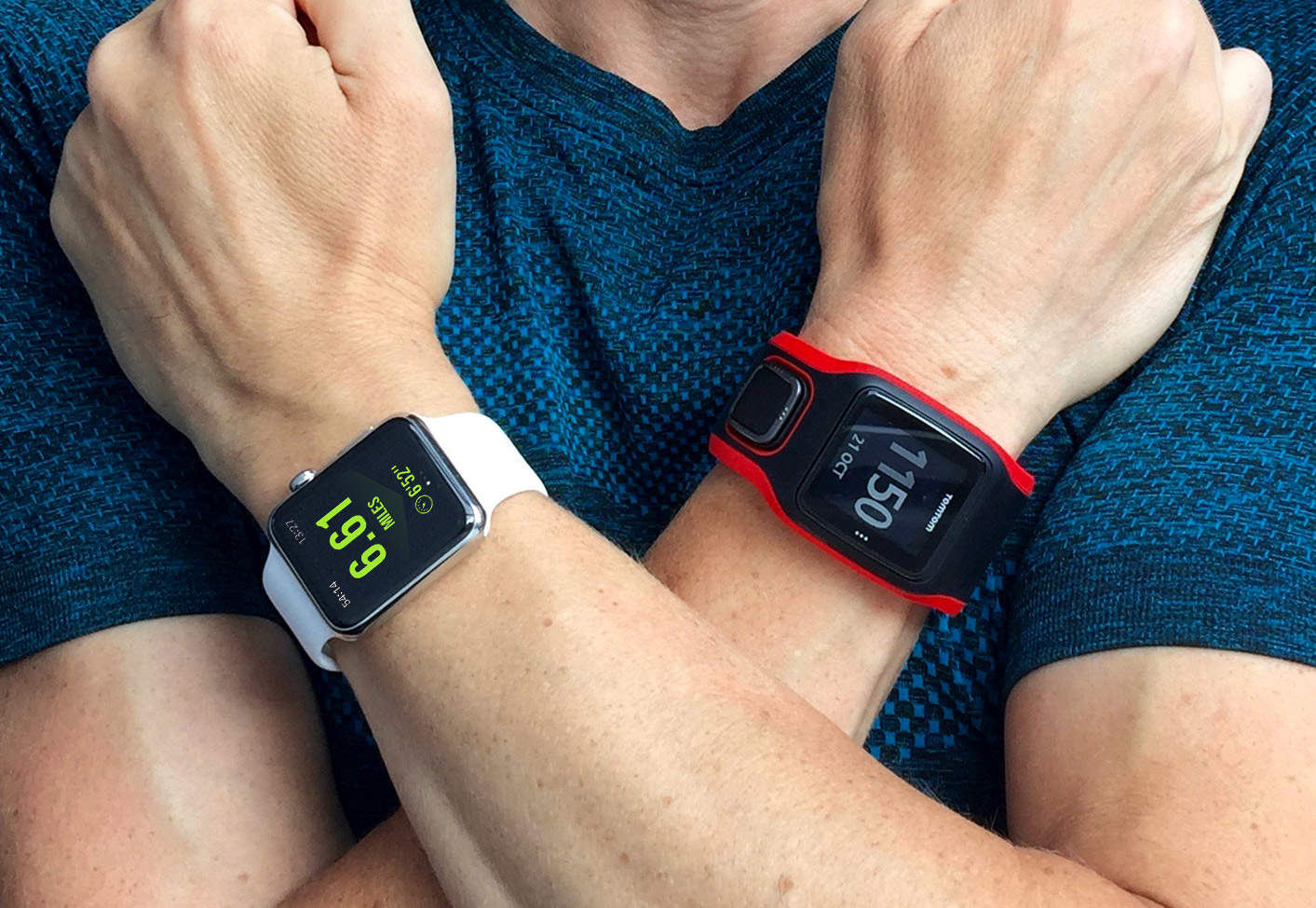
After six months of trying to log my runs with my Apple Watch, I finally gave up and bought a dedicated GPS running watch.
There’s a lot to like about Apple’s new wearable. The Activity app, for example, is brilliant at helping people lose weight. But the truth is, as a running watch, it sucks.
I abandoned my Apple Watch for a TomTom a couple weeks ago, and frankly I’ve been blown away by how much better it is for running.
Now I’m wondering why I put up with an inferior running watch for so long.
Apple Watch seemed like the future of running watches
I really wanted to like my Apple Watch. As an Apple fan, a fitness fanatic and an app developer, it seemed to have so much potential. So I discarded my Nike+ Running Watch GPS in favor of Apple’s latest shiny gadget.
There was a sense of inevitability about Apple Watch. Even Nike had scrapped its wearables in favor of developing Apple Watch apps. So, while I knew the lack of built-in GPS would be a major drawback, I went ahead and bought one anyway.
Complications are not what you want in a running watch
Every running watch I had previously owned was simple and reliable. But Apple Watch is not just a running watch. It is more complicated, with more things that can go wrong.
I quickly had to become an expert in tinkering with the Watch to get third-party running apps to work. Uninstalling and reinstalling them. Restarting the Watch and the iPhone. Repeatedly attempting to start a workout. Never viewing a run on my phone while it was active on my Watch. And giving up on the risky and foolish idea of ever using the “Pause Workout” button.
There was a Heath Robinson-esque quality to running with Apple Watch.
Third-party running apps can’t keep up
I used third-party apps, rather than the built-in Workout app, because I wanted GPS route maps that I could sync with Nike+ and Strava. Even when I managed to get these apps working, they suffered from what I called the “dreaded double-lag.”
The first lag occurs when you raise your wrist – it takes some time for the watch to recognize this gesture and wake the display. But even then, the running data it displays has not updated. This is where the second lag occurs, as the app re-establishes its connection with your iPhone to update your distance and pace.
The result is that you have to wait for several seconds every time you check your progress. Raising your wrist and holding it still during this double-lag ruins your running form. It can even be dangerous, if you’re looking at your Apple Watch when you should be watching where you are going.

Photo: Graham Bower/Cult of Mac
watchOS 2 didn’t solve the problems
I endured all these problems because I was holding out for watchOS 2, which promised native third-party apps. I assumed this would fix most of the problems, but it did not.
Firstly, very few major developers have updated their running apps for watchOS 2. Runtastic Pro and Runkeeper (the latter updated just this week) are notable exceptions.
But after trying these apps, I realized that even watchOS 2 was not going to solve my problems. Sure, there are now some native running apps, but if I wanted GPS, the dreaded double-lag would remain, because even native Watch apps still have to connect with their parent iPhone app in order to access it.
This realization finally drove me to give up and buy a TomTom Runner Cardio watch instead. I felt a bit guilty about it — like I was cheating on my Apple Watch — but I’d had enough.
Now I wear two watches when I’m running
My first run with the TomTom was a revelation. Whenever I raised my wrist, the latest running stats were immediately ready to view. Even the pause button worked without a glitch. And when I finished my run, it synced the GPS and heart rate data to Nike+ and Strava simultaneously.
No tinkering. Just running. I was stunned. Why on earth had I put up with Apple Watch for so long?
I’m certainly not giving up on Apple Watch altogether. I love using it when I’m not running, and I’m hooked on the Activity app. In fact, I am so obsessed with closing the Activity rings every day that I wear it as well as the TomTom when I’m running — to make sure I get the credit on my Move ring.
Yes, I’ve become that guy. The geek who wears two watches. But only when I’m running. And hopefully not for long. Surely Apple will solve this by adding built-in GPS to the next-generation Apple Watch 2. But until then, I won’t be trusting Apple with my precious running logs.

Graham Bower is a designer, writer, fitness geek, and long-time Apple user. He is the co-host of Apple Core, a podcast about the history of Apple, and the developer of Reps & Sets, a fitness app for iPhone, iPad, and Apple Watch. Connect with Graham on Bluesky or at www.grahambower.com.


38 responses to “Why I’m cheating on my Apple Watch”
I too am a runner that was hoping the Watch would solve some things. Let me first say, I carry my iPhone with me in a spibelt so I don’t need a GPS tracking watch – I prefer my iPhone actually.. I run 2 different running apps on it (one for miles, one for km) and get reports back from both while also listening to music.
What I want out of my watch is to replace my bluetooth heartrate belt that rubs me raw and is just another thing to get all sweaty etc.
Run keeper recently introduced their new app that runs on the watch, I’m hoping I can still launch the app on the iPhone and that it will finally get real-time heart rate from my watch .. but I suspect its not that simple.
I don’t like looking at a watch at all during a run – can hardly see whats on the screen. I was using it to help pause runs, but found recently that auto-stop has gotten better and simply re-enabled that in app.
Do you want to know something really interesting that is worth paying your attention right now,a fabulous online opportunity to work for those people who want to use their free time so that they can make some extra money using their computers… I have been working on this for last two and half years and I am making 60-90 dollar/ hour … In the past week I have earned 13,70 dollars for almost 20 hours sitting ….
Any skills, Degree ,Specific qualification is not necessary for this, just keyboard typing and a good working and reliable internet connection ….
Any time limitations to start work is not required … You may do this work at any time when you willing to do it ….
Do you want to know how I have been doing this?…..….see this {Iink} on my !|profile|!` to know how I am working` on this`
sajhsdhj
I’m waiting on Strava to get it in gear and release their touted HRM on the watch so I can lose the chest strap. I run with a 6+ and a Sport and the lag is negligible – It’s not a deal breaker – it was with Nike Running -which was accident inducingly slow and the reason I switched. If Watch rev 2 has GPS and I can accurately track a run and listen to music whilst ditching the phone that would be killer.
I know a couple of people on the strava beta. Maybe a nice tweet to them will get you on it.
this article was reading my mind! I did the exact same thing except I went for the Garmin fenix 3 since I am a multi-sport guy. There are a couple of things not mentioned here that were part of the tipping point for me:
1. Random locking. Several times during races or tough workouts, I would glance to my watch to find it locked. I wear it pretty tight, but there must be sweat with a combination of loss of skin contact that makes this happen. There is no way I am entering a six digit passcode.
2. Touch screen. I am not convinced touch screens have a purpose on activity watches. They are imprecise, obscure the view, and most importantly don’t work around sweat/water. In the workout app, there is only one piece of information on the screen. To get to pace, you need to swipe. The other nightmare situation is if you accidentally push the Digital Crown or switch to another app. You are pretty much done.
In any case I am super happy with the battery life, course navigation, and reliable physical buttons on my Garmin fenix 3.
The Apple Watch is now only used for things I can voice control.
You just spent $400 on an Apple Sport Watch. Before you spend another $229 on a TomTom Cardio you should give the updated Runkeeper app a shot. I switched from Runtastic Pro to Runkeeper and it solved ALL the problems in this article. It loads extremely quickly since it’s now native to the watch. There is zero lag because you can use the audio cues for distance and/or time – there’s no reason to ever look at your wrist. (There’s less than 1 second lag to update data if you prefer to look at your wrist). You can use Runkeeper without the iPhone and get music and audio cues via Bluetooth ear buds (just no GPS mapping). I doubt the author used Runkeeper much considering the new version was released just 2 days before article was written. I’m putting my TomTom on eBay. I’ve never felt the need to comment before and I don’t work for Runkeeper – I just think these problems have been solved and the author is unaware the all the new functionality in Runkeeper. You just saved $229 – your welcome
He said GPS was the biggest important feature. So the new native Runkeeper didn’t solve that problem since GPS apps need to use the iPhone and the lag continued…. he specifically said this. So you wasted your first comment ……
That’s not how it works. The GPS antenna is NOT necessary to measure the important metrics of pace, time, distance, speed., etc. (it’s only for drawing a map of your route to view later). The Apple Watch is calibrated after just one run with the iPhone along. I’ve been using the RunKeeper app daily with Apple Watch AND TomTom MultiSport for comparison – the readings are identical! The author wrote this article BEFORE he tested the new app. It’s misinformation and you’re perpetuating it without looking at the evidence to the contrary. I’ll sell you my TomTom for $100 cause Apple Watch is more capable now
Who said anything about how it works.. All I said was he pointed out that native apps didn’t cure the GPS / lag when connecting to iPhone issue.. He specifically said it DID NOT IMPROVE when HE TRIED THE new APP.. and the LAG was his issue.. here is the exact quote…” but if I wanted GPS, the dreaded double-lag would remain, because even native Watch apps still have to connect with their parent iPhone app in order to access it.” So.. again.. how is it “not how it works”.. you went off rambling about something the author never even mentioned being the issue..
If you know where you start (GPS coordinates from iPhone) you can integrate the x,y,z acceleration data to see a really accurate motion path (that is what the M8 motion coprocessor is for) relative to that GPS coordinate.
That’s how tracking is done without a GPS.
Now, this method isn’t robust enough to guide missiles (DARPA is working on that), but it is more than enough for running levels of accuracy.
It works fine for me. Every day. Zero lag with app update and audio cues. He’s not set it up properly. Too bad
I disagree. I tried the new Runkeeper watch app, and it still has the dreaded double update issue as described by the author. I want to look at my watch and know right away the current mileage, etc – just like my Garmin shows. I too am sad the Apple watch doesn’t work better as a running companion.
I don’t look at my wrist because I’m using the audio cues to track pace, time and distance. RunKeeper pauses the music and I can keep my eyes on the road at all times. No lag and pinpoint accurate. Apple Watch replaced my bike computer too. Glad you’re happy with your Garmin. Sold my TomTom
its not a watch for sports, which is a shame. maybe v2 will be better. Until then, I’m sticking with my garmin vivoactive which is superb for running
…despite the word “Sport” in it’s name.
I’ve trained for 2 half marathons with my Apple Watch and, while it hasn’t been perfect, I’ve found it sufficient for my needs. Spending another $200 and adding another device to keep track of is a complexity that I don’t want.
Here’s my set up. I start the workout app on my watch simultaneously starting Nike+ on my iPhone. This allows me to glance at the watch with minimal lag while still recording my runs in the Nike+ app. Honestly I’ve had zero issues with this setup. No crashing, always shows the right data… The only thing that I guess is an “issue” is that it records it as 2 workouts.
I wear two for a totally different reason. I really wanted the Apple Watch, just got it 2 weeks ago, and while it’s cool, it’s not really a good watch. Round watch faces and a square screen is kind of dumb. Then there’s the fact that it doesn’t stay on all the time. I don’t want to have to wait for the screen to come on to see the time. So I’m living the super geek lifestyle now. My nice mechanical watch on my right wrist (I’m a lefty), and the Apple Data Device (aka Apple Watch) on the left using the Modular face so it looks as little like a watch when I turn on the screen as possible. Also, I turned off auto screen on wrist raise so it only comes on when I touch it now.
That’s why I’m very happy with my Garmin Fenix3 instead of an Apple watch
As a runner and triathlete, this is a big reason why I haven’t bought the Apple Watch. It just can’t hold a candle to my Garmin 910xt (5 year old model). Can’t connect to Heart Rate strap, no standalone GPS monitoring, no swim, no bike tracking…
Apple watch heart rate sensor has been tested to be as accurate as the $200 heart rate straps on amazon…
GPS isn’t necessary as you can integrate motion coprocessor signal.
People have swam with it.
Not sure about biking.
I recently bought an apple watch and within 24hrs I took it back. I just wanted something to managed some walking, running and sleep. So I got a Fitbit. $100.
Must admit I have different experiences than the writer of the article. Yes, the fact not having maps in the watch workout app and not having pulse reading in third-party apps was a problem at first.
But I figured it out how to do it: I ran the built in workout and Nike+ the same time. While running I use the watch for pulse reading (so I have the built in app open). But Nike+ provides the music and the audio information about time, pace and distance. At the end I have my map in Nike+
(ok, you have to figure out the order to start and stop both apps for the run … but once you do it’s an easy task)
Although I hope Nike+ will add pulse reading one day I used that combination since end of April (yes, I got it on first day) for training for a half marathon. I not only did the training but mastered several 10k’s and the half marathon without any problems.
The point were the watch lacks most is other training types (for me CrossFit). But hope that watchOS 2.0 allows apps that can track other movement (like weightlifting, squats, pull ups etc).
I two will be wearing two at the end of the week. I am giving the Band 2 a try. I by no means want to give up my Apple Watch but want a better workout watch. I tried the new Runkeeper last week and it was OK but has lag. The bigger issue was after updating to 9.1 last night my move ring result lost the Runkeeper days in its totals. Runtastic crashes all the time on the watch. It seems the watch and activity app only play nice when using the built in workout app witch kinda sucks.
Great article. But I always have the problem where/how to carry the Iphone 6. Is big!
Any recommendations?
Thanks!
Great article confirming a lot of my own suspicions on Apple Watch. Am a seasoned Apple fanboy – but NEVER buy gen one.
iPad 1 still a workhorse. been battery cycled 1500 times for games/videos.
I’m a Mountian biker, so I don’t have this problem. I use Map my Ride Application and use the Apple Watch’s Outdoor cycle to track calories burned.
Well it seems pretty obvious to me that if you need a dedicated device you can’t use a multi-tool. You won’t go to a race track with your Prius and expect to win, you’ll need a proper race car.
Same thing here, if you need a device to be precise in tracking your running, go buy a Garmin or TomTom or pretty much anything other than a Apple Watch – specially considering it’s still the very first model which, let’s face it, is pretty much a prototype like the first iPhone was.
Give it some 5 years of development with real users feedback and then you might get something actually useful out of it. And again, like the iPhone…
Gotta build in reasons to upgrade that hardware every year. This is why Apple is worth nearly $700B.
I wonder what you would think of the Microsoft Band?
Have you had the opportunity to test it?
So I’m not the only idiot :-)
I also have been running with two watches (Polar M400), but my issue is mainly that there seems to be no app where I can put in a custom training schedule. I’m training for a marathon and my training schedules can look like a combination of the following:
1. Run an amount of minutes in some heart rate zone (1 t/m 5)
2. Run an amount of minutes at the speed of 5.00 minutes per kilometer (or 12km per hour).
3. Run an amount of kilometers in some heart rate zone
4. Run an amount of kilometers at some speed
And if you come above or below that speed or heart rate zone the Watch will give me a warning.
I also would like to see 3 types of information on the screen:
1. heart rate
2. speed
3. how many kilometers or minutes do I still have to go in this heart rate zone or speed
Then a second screen with:
1. Total distance
2. Total time
3. Overall speed
Would be nice and having gps routes on the phone is also nice.
My Polar M400 can do this but I haven’t found an App which could do the same.
I believe iSmoothRun would be able to do this. You can create intervals based on heart rate zone, pace and more. It’s the best running App by far.
You can customize screens on the watch, and have I think up to 4 different ones showing different data. That does not help with the lag though the author is speaking of. It’s also much more accurate than Runtastic and many of the other running Apps. It also logs your runs to just about any of the services out there. When I complete a run, my data goes to Smashrun, Runkeeper – (which is where I started back in 2009), Nike+, Strava and a couple of others. It;s a very capable App and also offers lots of options for device connectivity – much more than Runkeeper.
That’s why I too wear 2 watches, though the Pebble I got for under $100 – it’s what I used before I got the watch – displays all the data that any running watch does. Screen is always on, and bright at night it’s great.
I wear the Apple Watch on my other arm like the author so I too get credit for the movement.
Wow, great tip on using iSmoothRun. I took a look at the app and it looks amazing complete. Once they have an Apple Watch native app, I would expect them to then be able to grab heart rate data. I love how it exports to so many sites.
Yeah, it’s awesome, and the developer responds speedily to messages, does betas, he’s fantastic, and I guess it’s because he’s a runner too.
And yes, it is a feature and export-complete App. Hope you’ll enjoy it.
Yeah, I also use a flip belt, that works awesome!
How does the TomTom watch sync with Nike+ and Strave? Do you have to manage the sync settings through an iPhone App? Is the Nike+ sync actually sync miles or just Nike fuel? I use Wahoo Fitness occasionally and they integrate with Nike, but only for Fuel and not actual miles. I have no idea what the difference is; but I’d need the TomTom to actually post my miles and GPS route to consider picking it up.
Thanks for the info.
I’m waiting on an Atlas Wearable. I’ve been waiting for two freaking years… but when it arrives, I’ll be wearing on my right wrist for workouts. I do not run, but the promise of real, comprehensive fitness tracking is a big part of what I am looking for.
But not giving up my Apple Watch. I’m hooked.
Interesting post, but instead of wearing two watches, it is better to have one with satisfaction. And as per one of the above comments it is not a sports watch. As far as I am concerned, I like TomTom runner cardio.