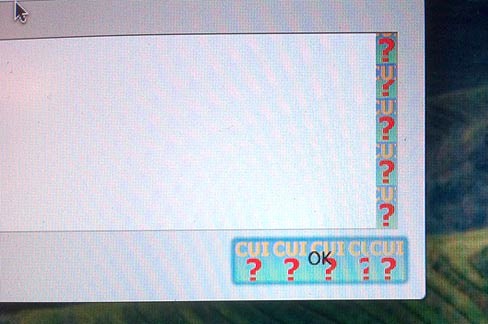
For a lot of people, yesterday’s 10.7.3 update for OS X Lion went without a hitch using Software Update, but for a sizable (and understandably annoyed) minority, the update resulted in the widescale crashing of apps and the replacement of stock Lion UI elements with a mysterious “CUI?” error.
If you’ve been bit by this error, you have our sympathies, but buck up! In most cases, it’s a pretty easy thing to fix the update and get Lion working as it was.
The excellent OS X Daily explains how to rid yourself of CUI? Errors:
The simple formula is this:
- Download Mac OS X 10.7.3 Combo Updater (direct link)
- Run the 10.7.3 Combo Updater on top of the existing 10.7.3 installation
- Reboot
If you can’t get to the desktop of the Mac in question, you can boot it with Target Disk Mode(Firewire or Thunderbolt required), and then point the 10.7.3 Combo Update at the troubled Mac and install it that way.
None of us are afflicted, so we can’t vouch this works, but OS X Daily’s users are reporting some success. Give it a try and let us know how it turns out for you.

John Brownlee is a writer for Fast Company, and a contributing writer here at CoM. He has also written for Wired, Playboy, Boing Boing, Popular Mechanics, VentureBeat, and Gizmodo. He lives in Boston with his wife and two parakeets. You can follow him here on Twitter.

