Design Problems With The New 13-inch MacBook Pro? UPDATED

macbook_k_slot

UPDATE: The security lock on this device does not block the SuperDrive. See our review

Eagle-eyed reader Ronald Kang thinks the new 13-inch MacBook Pro may have some design problems.

Poring over pictures of the machine on Apple’s website, Kang is worried about two things: the Kensington Security Slot blocking the Superdrive; and the single audio I/O jack, which makes the machine unsuitable for “Pro” audio recording.

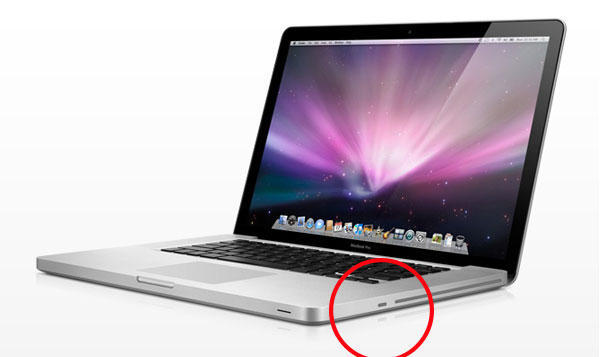
1. The Kensington Lock Slot is located next to the Superdrive slot — and will likely block it.
The Kensington security slot on the new MacBook 13-inch has been moved from the left-hand side next to the I/O ports, to the right side next to the Superdrive slot. Kang thinke the Kensington lock he uses every day to lock up his MacBook is going to get in the way of inserting and ejecting discs. “I tried estimating the position of the Kensington lock, and I am sure it is going to block the Superdrive” says Kang. “I also realize that the original unibody Macbook had the Kensington lock at the port side as well. Why did they move it?”

2. The Audio In/Out jacks had been integrated into ONE SINGLE JACK.
Instead of separate jacks for microphone and headphone, the new MacBook has integrated both into a single jack. This makes it harder to do audio recording with an external microphone and a pair of headphones, or even plug in a gaming headset. “How can this be called ‘Pro’?”says Kang. “Certainly this wouldn’t be the laptop for one who records audio at a studio or makes “Pro” stuff would it? I simply cannot believe Apple calls it a Macbook Pro, when it doesn’t even have something a Pro computer should have.”

features_io13_20090608

DON'T MISS
Fit Your MacBook Air With A Security Lock Thanks To MacLocks

Kang blames the changes on the new SD Card slot, which required Apple’s engineers to remap and consolidate slots. He also thinks the SD Card slot is pretty useless, because it reads ONLY SD cards.

“I’d rather have both my Audio In and Out Jacks than have a SD Card slot,” says Kang. “Apple said they ‘challenged’ their hardware engineering team to fit more memory, hard drive space, firewire 800 and SD card slot, and obviously in the process they screwed up on design and functionality, which Apple had always been focused on, just to squeeze out every single Pro-ness in a poor thirteen inch laptop, in the end making it less Pro, what logic is that?”

About the author

Leander Kahney

is the editor and publisher of Cult of Mac, and author of three books about technology culture: Inside Steve’s Brain, the New York Times bestseller about Steve Jobs; Cult of Mac; and Cult of iPod. Leander has written for Wired, MacWeek, Scientific American, and The Guardian in London. Follow Leander on Twitter @lkahney and Facebook.

(sorry, you need Javascript to see this e-mail address)| Read more posts by .

Posted in Apple, Hardware, Macintosh, News, Top stories |

  • http://www.grizzlymedia.co.uk MCal

    This is nonsense…. No one ‘Pro’ is using the builtin audio i/o on a macbook pro. They use an interface. Can anyone say nitpicking???

    Al.

  • http://www.snubcommunications.com Craig Grannell

    I really like the SD card—will save me fishing about for readers all the damn time. Plus, you can create a bootable SD card for emergencies, which is a hell of a lot easier to cart around than a DVD of the system.

    I’m with our reader on the audio in/out, though.

  • Tom

    And you’d want to use the laptop’s DVD drive whilst locked down why?
    Get a USB microphone.

  • Brian

    Quick, call the whaaambulance.

    1. Why would anyone try to access the Superdrive with the lock attached? Kill two birds with one stone WIN.
    2. Want more features, buy a larger, now less expensive 15″ Macbook Pro.

    Maybe Apple figured people working with expensive audio gear would pony up a few extra beans for the 15″ Macbook Pro and the kind of person who would buy the cheapest aluminum Macbook Pro would appreciate the SD card slot instead of trying to turn it into the wedding DJ computer. Kang seriously needs decaf.

  • tony

    wow really. they put in two new slots and condensed two slots into one but kept all the same functionality and this guy is bitching about it. what a douche. SD cards are becoming the standard if you haven’t noticed!!! Shit all my new equipment is using SD cards. it’s the new floppy. Don’t buy the 13 inch then buy the 15″ if you really need that bad, they reduced the price to make more affordable, if you’re a “pro” you would buy the minimum model if you valued your work. the 13″ was made for people with lighter usage in those areas. But hey you can’t please everyone can you?

  • Camillo Miller

    This is complete bullshit.

    1) You really use CD and DVDs that much when you’re in a situation that requires the use of kensington lock? Really? How can you you say it’s blocking the drive without proving it by testing it!!!?

    2) Whoever uses the integratedaudio card of whatever model of Mac to register audio can’t even be considered a Pro.
    Podcaster have used USB Mics for years and the Pros use external audio hardware connected via USB or FIREWIRE 800. And guess what? They eliminated one audio port to make room for both the SD Card slot (super useful) and the FIreWire 800 port.

    Stop the silly whining please.

  • http://www.davidmckeitch.com Peachey

    To be honest, im an audio engineer (check the site if your looking for one :P) and my next Mac will be a 13 inch macbook pro im fairly sure.

    Though I would have MUCH prefered an express card slot (adding more ports would be handy) im fine with the one audio port. Any serious recording should really be done with an external firewire or usb interface.

    Internal audio cards will always suffer from noise problems because of how close they to the rest of the componets, electrical noise ect, also there just not design for perfect audio recordings.

    Two would be better but to get a firewire (THANK YOU APPLE) port on a small laptop is worth it.

  • MacRat

    “This makes it harder to do audio recording with an external microphone and a pair of headphones, or even plug in a gaming headset. ”

    Ever heard of USB microphones and headsets?

  • Michæl

    You’re not losing the audio in port, you just need an adapter to split the combo port. It’s better, actually, because it’s now compatible with not only separate mics, but headsets! It’s as if you’re complaining about not getting both a Firewire 400 port—when the 800 port is backwards-compatible.

    And any ‘pro’ audio user would be using a USB or Firewire interface for their recording.

    And that lock location certainly won’t block my disks with the Kensington cable lock I have. It appears to be the same distance from the drive slot as the lock port is from the USB port on my PowerBook, and I don’t have any problems.

    This is my favorite MacBook design yet.

  • http://www.none.com BeachDude

    For those that really need two separate ports, the Audio In/Out port is simply a business opportunity! Let’s see how fast an adapter break-out cable is available from Griffen, DLO, Belkin, etc…

  • zach

    I’ve been using MacBooks for pro audio for years, and guess what I use a high end FIREWIRE interface. so by adding an 800 port at the expense of the combined audio port( which by the way is now compatible with the iphone headphones, nice touch) has served to make me more not less likely to upgrade since I prefer a smaller laptop form factor. sd reader is just icing on the cake.

    though how can you find fault with a product review where the author hasn’t even touched the product

  • http://www.trentlapinski.com Trent L

    1) It’s probably a good thing people can’t put CD/DVDs in a locked down computer. Any Mac user who knows what they are doing knows you can reset any Admin password by booting up on an OS X DVD. If anything this is added security for public computers.

    2) As a musician, and having several friends that are musicians as well we all use USB audio interfaces for our guitars, and soundboards. None of us record directly through our Mac, and almost all the audio interfaces I’ve ever seen include all kinds of inputs and outputs for headphones, AUX, etc.

    –TrentLapinski.com

  • Evan

    You’re crazy to think that any professional recording is done through the 3.5mm line-in jack on a MacBook Pro. If your profession is recording sound then you most likely will possess several high-end Firewire/USB2.0 interfaces that cost more than several MacBook Pros combined. Honestly, adding Firewire to the 13″ was the most pro-audio friendly move they could have made.

  • Wireman

    Who the hell uses the audio-in for pro recording?

  • Ken Taylor

    While pro’s wouldn’t use the analog audio input, the loss of the optical digital audio is a problem – I use this regularly for digital downmix. I’ll be keeping my old “non-pro” MacBook which does this fine.

    It’s a shame, but yes, it’s not a showstopper for most people – there are plenty of external digital audio inputs

  • Mike the Audio Guy

    Oh goodness me, Apple has ingeniously combined two jacks into one, which means that my “pro” equipment (which TOTALLY runs EXCLUSIVELY on unbalanced 1/8″ connections) is now useless with my shiny new slab of aluminum wonderfulness. I don’t have any other options! Oh wait. Yes I do.

    1. XLR (balanced) to USB adapter might work. Oh maybe, it just might.
    2. Or even a straight-up USB mic. I guess that might be solution #2.
    3. Oh snap! I totally forgot. As a professional, I do *occasionally* use actual “pro” equipment, not the least of which might be…..a portable FireWire interface for when I’m not in the studio!!! One that has multiple connections and I/O ports for mics/line level out/headphone out/whatevs just by its own damn self. Such as my 6-channel, 8-output FW interface that rhymes with “TroPools BMox” (no, this is not a product endorsement, but surrrrriously, Mr. Kang, get with it here). Wait……..what is this I just remembered? OH YEAH. I use that device EVERY SINGLE DAY, whilst my craptarded little 1/8″ audio-in contents itself with collecting the dust kicked up by my FW devices.

    In all seriousness, it would be helpful to do a little research as to what “professionals” actually use instead of complaining about a product for reasons that aren’t sound. Thanks for reading this far.

  • Paul

    This will never end. Apple releases a new (or refreshed) product and someone finds a way to bitch about it. What I really like about this instance is that Kang’s main complaint (this shouldn’t be a MB Pro because it lacks a feature all ‘Pro’ machines should have) has been completely debunked by actual pros.

    I just wonder why Cult of Mac even thought to publish this nonsense. (It drove us to read it, so I guess that explains.)

    Best to all you Pro users – thanks for shutting up this wannabe.

  • Terry

    I see no point at all in an SD card slot. HDMI or eSata would have made MUCH more sense.

  • Eric

    Wow, this is a load of tosh. I much prefer the new design. +1 for the comments above, -1 for the author for this silly piece.

  • WTF

    Mr. Ronald Kang has to have one of the most nit picky comments I have ever read on a post. I’m actually surprised that it was even printed. Who locks up their laptop while inserting disks into their Superdrive slot and then has the balls to call it a design flaw. Likewise on the bitching about the audio in/out jacks. I really want him to define for me what a “pro” computer is and why the 13″ doesn’t meet his strict criteria. Laughable.

  • Adam

    I do not agree that the single audio in/out jack is a problem, this really is a neat solution. But I have to agree with the Kensington slot. Here at work, all our laptops MUST be locked, at all times. And we DO make use of the optical drives in this state. I really think this is a bad design, I also spotted it right away. It is this silly design mistake that may stop our company from buying 13″ MacBooks this time round…

  • joebob

    The arguments for and against each choice are mildly arcane. What bothers me is Apple’s attitude that it knows what the average buyer does or does not need, and screw-them if they don’t like it. They got lucky with the timing on killing the floppy drive, but the last couple iterations are either off the mark, or worse, designed to chisel the hundred dollars back they cut from the old price. Changing to the mini display port is reasonable – but only if you provide an adapter. It’s an extra 30 bucks if you want to use an external monitor, whether you already own one or buy one new. Same goes for FW800. It’s great that it’s backward compatible with my FW400 devices, but only if you have the cables. There’s another 30 bucks.

    If I want to use a headset for video conferencing with anyone, I’ll need another adapter! Seeing how they used non-standard pins on the old iPod cables, I’m guessing this will be another Apple-specific $30 cable. If you currently use a digital microphone you’ll have to buy another adapter or a new mike! Heck, my creaking PowerBook Ti came with DVI to VGA adapter and a 6 to 4-pin FW adapter.

    Trading the Express card for an SD slot is just plain stupid. I can buy a USB adapter – like a thumb drive, not a cabled dongle – for about 10 bucks. And when they crank up the speed and capacity of SD again I won’t have a useless slot on my computer. The CardBus slot on my PowerBook allowed me to upgrade to USB 2.0 cheap and easy. Besides, what is the point of an SD slot? (And ONLY SD??) USB is leagues better for exchanging data, and if I really need to download pictures to my notebook away from home I can stuff a cable in the bag.

    Overloading a computer with zillions of connectors most people don’t use, like a number of PC manufacturers are wont to do, makes no sense. Personally, I have little use for a 273-form factor card reader. At the same time, changing “standard” connections without providing the legacy trail is cheap and/or stupid. It makes most of these “price reductions” bogus, even if you plan to replace your peripherals at the same time.

    Chiseling the customer is beneath Apple. Especially since we’re all willing to swallow the “Apple Tax” so easily.

  • http://benwatt.net/blog/ Benjamin Watt

    The Kensington lock slot has been on the right hand side beside the DVD drive on the unibody 15″ MacBook Pros since they came out in October, this is just bringing the newly promoted MacBooks into line with this, and it looks like it’s positioned the exact same distance from the DVD slot.

    I regularly use a Kensington laptop lock with my MacBook Pro and it doesn’t block the drive at all.

  • Frodon

    The Kensington lock part is plain stupid for two simple reason:

    1) The Kensington lock slot is exactly at the same place as it is on previous and current 15″ MacBook Pro and if it were misplaced we would have known it for a long time know considering that 15″ Unibody MacBook Pro 1st gen are out since october 2008.

    2) A DVD drive is surrounded by a metal enclosure, and it’s unlikely that the user is strong enough to make the lock piercing the DVD drive enclosure. So if something can get blocked here it’s the Kensinton lock and not the DVD drive.

    And finally, anyone with a minimum sense of engineering and know how a Kensington lock looks like would see that the distance between the DVD drive and the kensington slot is far enough for a Kensington lock.

    In an nutshell: the reader statement is wrong.

  • Frodon

    Hmm I think I see the point on the kensignton lock. It’s not that it will block the DVD from the inside, but that the size of the external part may be a problem.

    Considering the space between the DVD slot and the kensington slot, even with typically big locks, I think it’ll fit, the space is quite important.

    But even if it might enter in the DVD slot area, knowing that Kensington locks generally have a silicon part the adapt to the thickness of the Laptop enclosure, there will be no problem to just push the kensington lock a little in the front direction of the laptop to free the way for DVD discs, the silicon part allow that easily without having to force at all. So even if the lock might block the DVD slot, you can free the area easily without having to disconnect the Kensington lock, just by pushing it a little to free the area.

  • http://searchjaywontdartoniTunesformypodcast jaywontdart

    I love that there is now a “cheap” macbook pro, its kinda weird Apple made unibody MacBooks and then takes them away? Weird.

    However, I also think its stupid to take away a port like the line in, just like I thought it was stupid to take away firewire from the MacBook unibody.

    SD Card, WTF? It looks kinda cool, but why? I had a multi card reader on my old 2003 windows laptop, which also had SIX USB 2.0 ports…. why do you need a card reader built in? If its for a digital camera etc, why not just plug in the usb cable?

    Im glad that Apple added a SD card reader, sure why not, but wish it still had all the standard ports. Really, its just another adaptor you need. Im a huge apple fan, but this is just a bad idea really. No sense defending everything Apple do.

    Best wishes

  • Chris K

    Its funny how i just got the 13 inch “old” macbook because I ordered right before the new one came out. Both are good for what I do which is use the internet and do work for college. If I was a musician or some kind of editor I would buy the 15 inch.

  • http://apple.com MacBook Pro

    You sir, are an idiot.

  • radu

    Mr. Kang is kind of an a-hole.

  • firesign

    wtf? the sd card slot is useless because it only reads sd cards? so what?? oh noes, it doesn’t read sony memory sticks or cf! next to “thumb” drives. sd cards are probably the single most widely used storage medium. cameras, phones (microsd with an adaptor), etc. it will have wider appeal to a larger number of people likely to buy a 13 or 15 inch mbp. god forbid apple should try to appeal to a wider spectrum of consumers who could care less about expresscard, esata, or hdmi. and they put the fw 800 jack back in. quit whining already.

  • http://rhspector.com Bob Spector

    I have more questions than comments: Will the new 13″ Macbook Pro project slides on to a screen with the same color quality as the 15″? Does the extra graphic card in the 15″ MacBook Pro only affect the quality of color in movies and not in still photos? Is a non-glossy screen available for the new 13″ Thanks in advance

  • http://www.burggrafenamt.com/en/ ander

    It’s not a design problem, it’s a feature: When you lock the Macbook Pro, you protect also the DVD inserted before and nobody can steel it without forcing the Kensinton lock ;-)
    While I’m happy about the Firewire (I will probably buy the 13″ MB pro), I’d prefer the classic audio in jack instead of the sd slot.

  • Peter Too

    The notion that anyone involved in any sort of “pro” audio recording would rely on jacks is laughable at best.

  • http://www.emsa.org.eg dra3b

    and if you need the mic port just for iChat & skype (like me) I guess you could simple buy the iPhone headset, it has both Audio in AND out in one 3.5mm jack. I heard that it works perfectly with the MacBook Pro 13″

    I’m definitely getting one of those 13″ MacBook Pros very soon…

  • Greg

    As a recent Mac convert (I hacked my Dell Mini 9 to run OS X and liked it enough to get a Mac desktop), the addition of the Firewire and SD slots have my sold on the 13 inch MacBook. The SD slot on my Hackintosh is a huge plus for me and I have Firewire 800 external drives.

    I’m not a “Pro”, but these design changes / port additions have sealed the deal for me!

  • Eye

    So what? I think I last used a security cable on a laptop 10 years ago.

  • scott

    Can I just say a few things…

    1) article writer is an idiot…do you do any real research before you write an article…get a grip…

    2) cult of mac…shame on you for publishing this garbage

    3) I would kill to have one of the new MBP’s…just lost my job so that is out for me

    4) can I get a HELL YEAH FOR FIREWIRE BACK ON THE 13 INCH MACBOOK

    I want to thank all the people that signed the petition to get firewire back on the 13 inch model…finally the people have spoken and Apple listened

  • Huan Seah

    I’m so glad readers have bashed this article to bits…what a load of crap! I used to enjoy reading cultofmac…NO MORE!
    SD cards functionalities extend far beyond just memory usage. And I have NEVER used the digital input for recording fieldwork…it’s sufficient but I always have my mbox 2 pro/apogee duet with me that uses the firewire which I’m SO Thankful they have put it back on…coupled with the ability to have 8GIG ram and 256GIG SSD?!?! It’s ONE hugely useable and portable mac for pro audio!

  • Yasser Khan

    From how I see it, you could get a 3.5mm splitter that will not only allow you to use your headphones but also other inputs (Though it has to be confirmed if it can do both simultaneously when connected). Since the combined Audio IN/OUT port also supports the new headsets from Apple, I think it was a good decision to combine them.

    You would still get digital quality output…

  • http://www.myspace.com/caleblee Caleb Lee

    It’s much easier to bash an article than it is to write it… I’m not bashing I’m disagreeing.

    I have use my 15″ unibody with the lock attached and it didn’t block the process, didn’t make it easy, but still wasn’t completely a prevention.

    This has been said already but anyone doing pro audio is going to spend between $200 – $3,000 for an interface to go with their Lappy so the single jack is a non-issue.

    The new SD slot feels really PC to me, but whatever, I’m sure we gave enough feedback to have it added… so for what it’s worth it’s an “improvement”.

  • James Bogard

    A) Buy the iMic from Griffin

    http://www.griffintechnology.com/products/imic/

    B) Don’t use the superdrive while you’re locked down

  • wooko

    if you have a sony stick you can buy an adapter for $5 and use it as an SD card. stop looking for imaginary defects!!! mac pro 13″ rocks!!!!

  • Ed

    The addition of the SD slot is very useful to some people. Although the statement of author about the inadequacy of the analog audio stirred up the pro audio community, we have to keep in mind that audio engineers are not the sole users of MacBook Pros.

    Most high-end digital SLR cameras utilize some form of SD/xD chip, and when you’re in the field unloading 64GB of SD photos into a machine, you really don’t want to do it at 480Mbit (less than half a megabyte) per second over a USB 2.0 adapter. Whether or not the embedded SD slot is worthwhile depends on how the engineers connected it, internally.

    The 13″ MacBook Pro was designed to accommodate all “Pro” users, and the small form factor was used for better portability. Firewire is a must for the pro audio guys, high-speed SD for the photographers. But, photographers find little value in firewire while most pro audio guys don’t need hi-speed SD transfers. It all depends on your profession.

  • LE Studios

    I’m freakin’ amazed! In October ’08 damn near everybody was crying over lack of Firewire 400 on the 13″. Now they re-released it with a Free iPod Touch Promotion, New Lowered Price, choice of Intel 2.26GHz & 2.53GHz Core Duo 2 processors, Firewire 800 and a SD Card slot with memory upgradeability to 8GB DDR3 and hard drive up to 500GB with a increased capacity battery. All they did was took off the Digital/Analog input and some of you still crying like a bunch of old ladies watch a damn soap opera! If you don’t like the 13″ MacBook Pro then go to Walmart and buy a Damn Compaq with Windows Vista! Jeez you guys are lame!

  • Michael

    I do like the idea of a separate line-in, however since I do music on a professional level, I definitely couldn’t do without some sort of external audio box to handle my input/output needs. So I can do without the audio in jack. For non-professional recording, though. The built-in mic above the display is an excellent mic. It’s a lot better than the non-expensive microphones you could plug into a line-in port. If you did shell out for a $120+ mic, you’ll probably at least have a cheaper M-audio box to go with it. Fortunately, most of those come with their own stereo line-in and various 1/4″ jack inputs.

    On the other hand, I did read that there are Mic+headphones that will be able to do both input and output, at the same time, through that jack. If that’s the case, I could see it being possible for someone to create an audio-jack splitter connector (if it hasn’t been done already) that could plug into there. That’ll appease the intermediate music artist, who isn’t going for the external boxes, but just wants a nice line in they can monitor with their existing headphones.

    Still, the -pro moniker can be argued. I guess we can say that Pro models are now based on having certain hardware specs (no longer a dedicated video card is a requirement…but perhaps that’s because of the relatively good performance of the 9400M) not because of the end user it is geared for.

  • John Connolly

    My 15 year old uses my macbook pro 17 to record her songs with GB. She is an amateur but GB is for amateurs. So she saves up and buys the new mbp 13 and now doesn’t have the basic i/o found everywhere else in the free world to get the job done. Having the basic i/o of headphones and line-in is the most simple, useful, thoughtful approach to getting basic music created and is best leveraged by Apple’s Garageband. Having only one port for two frequently used GB functions seems like a leave behind to get a half-baked sd card reader (note most laptops have multi-format card readers for the last oh 4 years – and why does it stick out so far). Come on cupertino, schedules are tough but doing it right wins.

  • Lisa Imbruglia

    Such a lot of carry on. I love the new macbook pros. I dont even own one but get to work on these all the time in my job. Had my hands on the 13inch the other day for the first time. Beautiful.
    If I had to complain about anything it would be that the usb ports are very close to each other. I often have to run a flash drive while the macbookpro is plugged into a usb external harddrive or some other equipment or even another flash drive at the same time. Many times I have to unplug (oh horror) the other item as they dont fit in side by side. This may be a hassle sometimes but who cares. There’s always a work around and Apple are improving their machines all the time…. yipee! r the next time I buy flash drives I will buy thin…..lol.

  • atomic

    This is nonsense…. No one ‘Pro’ is using the builtin audio i/o on a macbook pro. They use an interface. Can anyone say nitpicking???

    Al.

    AGREED! This is nitpicking at it’s finest. I work with Apple products on a daily basis in the forms of both hardware and software and personally I think the Apple engineers have done great things with this portable. How one can make these claims just by looking on the website is beyond me. And as for the ‘ONLY SD’ comment… buy a card reader if its that important to you! If one is also going to be using an MBP for ‘pro’ applications, they’d be buying at least a 15″ to make use of the dual graphics chipsets, higher resolutions and dual sound ports. This 13″ MBP is a brilliant piece of technology, but judging by the benchmarks and my personal use of it – a higher powered MBP would be better for ‘pro’ uses.

    Why would Apple release this portable without having someone like Ronald Kang going through it with a fine-toothed comb BEFORE it is released?

    Seriously…

    I give it many kudos. For the media-loving home user, it’s money well spent.

  • James

    I just tested my new 13″ MBP with my iPhone headset microphone. Indeed, the earphones and mic in the headset work just like the iPhone, when plugged into the MBP combined audio input/output plug. Perfect for Skype etc. I’m very happy with this arrangement. Awesome!

    When I want to do any “real” audio work, I’ll use my Griffin interface.

  • SomeOne

    So, Ronald Kang is an idiot, who bases his paranoia on incorrect conjecture.

    This is worthy of a story, how?

