Mobile menu toggle

Search results for: Apple One

Stevenote Flash Game Makes You the iCEO

By

post-1648-image-b3af1671d5f624bea7e453ec1b733c53-jpg

The guys and gals of KathArt Interactive, a Danish interactive design firm, have put together a fun Steve Jobs keynote-eve game that puts you in charge of sneaking top-secret Apple product concepts to Macworld SF. It’s a lot like the game Adventure for Atari, only with 3-D graphics and 3G iPhone prototypes. Definitely worth a click, and the Danish-ness of it gets a bonus endorsement from me.

Via Engadget.

Free Beer at the Gizmodo/Ars Party on the Night Before Macworld

By

macworld_party.jpg

My two favorite tech news sites — Gizmodo and Ars Technica — are hosting a pre-keynote party in San Francisco on Monday night (the 14th) at Harlot, 46 Minna Street. 8-11.30pm.

Giz editor Brian Lam is promising to buy everyone a beer, and there’s schwag (likely shite) for early birds. I’ll be there, and so apparently will Dan Lyons, aka Fake Steve.

Here’s a handy map to the bar.

UPDATE: I just discovered that the free schwag are copies of my books. Ooops.

It’s Official: Dishwashers Are Great For Cleaning Keyboards

By

post-1625-image-11ed3fda3408ff44cae0cc6d2eb8c28b-jpg

Last month, after a couple of eggnogs at the office, I drenched my keyboard in a cup of coffee. Kind readers suggested running it through the dishwasher. Of course, putting keyboards in dishwashers is the kind of thing you read on the internet all the time, but never believe it actually works.

So, skeptical that it would work, I tried it myself.I’m happy to report that running a filthy, coffee-stained keyboard through the dishwasher works great. The keyboard is spotless, and it works perfectly.

Feel me: dishwashers make keyboards better than new.

Full procedure after the jump.

2007: The Return of Golden Convergence

By

post-1591-image-cd5591744307a20b7067bdec01f3995e-jpg


Image copyright Andre Gunther

As another year in the Apple-watching game comes to an end, I wanted to take a quick moment to look back on the year that was and search for themes. Given how much Apple got done in 2007, there were a lot to choose from, but one really stands out: Golden Convergence Strikes Back.

For those who weren’t closely watching the moves of Apple closely during the mid-’90s, this might be a new term for you, but it’s a long-time idea in Mac circles. Variously credited to Bahamut of MacEdition and Robert Morgan of Recon for Investors, Golden Convergence speaks to the idea of taking a lot of seemingly divergent technologies and suddenly integrating them into a superior and seamless whole. Originally tagged to the rumored launch of the Apple Media Player in early 1998 (never happened), Golden Convergence has shown up dramatically throughout the second coming of Steve Jobs, from the standardization of USB and FireWire down to the wide use of Mac OS X despite initial resistance by the installed base.

But 2007 was when it really blossomed. We saw Apple take dozens technologies and roll them out to multiple platforms. OS X mutated and got optimized for the AppleTV, iPhone and, later, the iPod Touch. CoverFlow, initially created for iTunes 7, showed up first on the AppleTV, then the iPhone, then the iPod Classic, Nano and Touch before becoming the centerpiece of the Leopard UI. Front Row moved from the AppleTV to virtually every Mac on the market. Flexibility bred new uses, new interactions, new consistency. Everything Apple worked on had a tighter link than ever to another Apple product.

And nowhere is this more evident than the iPhone, the most flexible platform Apple has created since the original Mac. For now, it’s officially impossible to install third-party software on it, but that will change in early 2008 with the release of the iPhone and iPod touch Software Developer’s Kit. The reason that the iPhone is great is that nothing about it makes it a phone only. Its form is built for maximum flexibility. Few hardware buttons. Multi-touch creating hardware controls where and as they are needed. It can be an Internet browsing tablet, an iPod and an e-mail reader. Nothing about its hardware design precludes any future uses. If you build it, this thing will come along.

And that right there is the essence of Apple’s new spin on Golden Convergence. Don’t design anything in hardware that locks you into a current use or goal. Instead, build an interface flexible enough to accommodate all kinds of future uses or even new businesses. The iPhone could become a very powerful gaming platform is Apple decided to steer it in that direction. It could be slightly modified into a point of purchase device. The next version, upgraded with 3G and a GPS chip, could easily become a navigation device to challenge Garmin’s product line. Get a decent CCD into it with a better lens and a flash, and it’s a decent consumer digital camera.

It’s brilliant design, and it flips on its head the way that Apple approached new technologies in the 1990s. Back then, Apple wanted to make everything: printers, digital cameras, scanners, PDAs, stereos, game consoles — everything. Now, Apple still wants to play in all kinds of product categories, but they’re setting themselves up to do that with a single device. Don’t sell everything. Sell everyone iPhones. You’ll reduce your number of SKUs while also locking people into a product that generates monthly revenue long after its purchase price has been swallowed. Every year, build in faster chips and add a few features that are locked into hardware. Do everything else via software.

Apple already started this process in 2007, and I expect to see it increase dramatically over the next five years. After all, would you rather by an Apple TV or just get a high-capacity next-gen iPhone that can wirelessly stream video to your TV? It’s the safest way to innovate, and Apple nailed it. Happy New Year, everyone!


Intel Previews Capable Low-Power Chips – Can You Say Sub-Notebook?

By

cult_logo_featured_image_missing_default1920x1080

Once Apple began to work with Intel, it got a lot easier to begin predicting the future development of Mac hardware. When IBM and Motorola provided the horsepower (or lack thereof, as the case may be) for the Mac platform, it was anybody’s guess when Apple might ship new machines — or what would cause the shipping delay this time. Intel, however, is an open book. They show off their processor roadmap up to a year in advance.

RIght now, everyone is waiting for Apple to unveil new portable Macs using the Penryn chip, the world’s first consumer 45nm CPU. They should drop at MacWorld. But Intel’s way out in front. According to BusinessWeek’s Reena Jana, the future will be ultra-efficient chips powering greener laptops with longer battery life. She writes about her exclusive preview on the Next blog.

Yet Intel seems to really be walking the walk on these two matters. Chip-wise, the company will be rolling out a platform code-named “Menlow,” in Q2 or Q3 of 2008. It’s the first-generation of low-power platforms, which promises to run on 10 times less CPU power and is 5 times smaller than previous chips.

Sounds like the ideal way to make a tiny MacBook with extremely efficient battery life that won’t burn your knees. I’m just waiting for the first Mac portable that can operate for 9 hours without a charge.

Fascinating Factoid: Spilled Coffee Pools on Keyboard Keys

By

post-1574-image-944dcf0f83c9a598aef8e0a71f70fabd-jpg

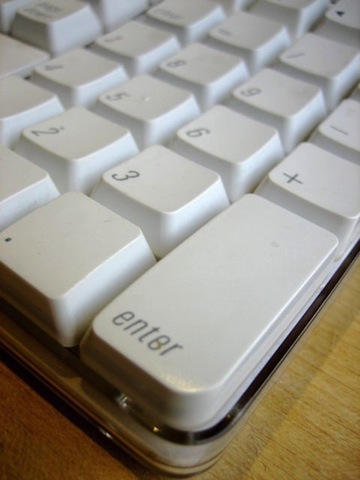
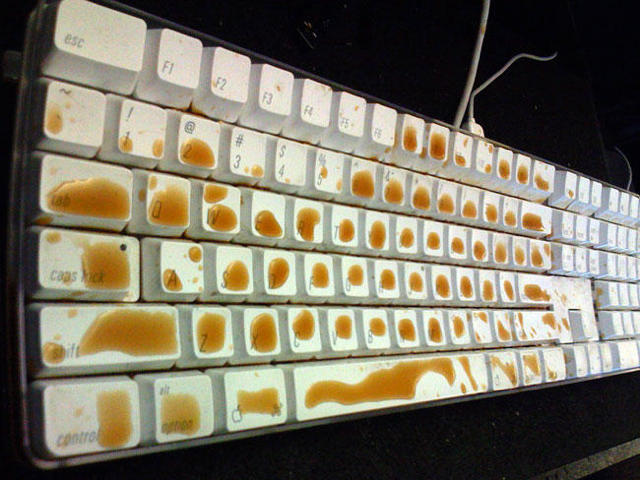
I just spilled coffee all over my computer keyboard. While horrified at the damage, I was fascinated to see how the coffee pooled in the middle of the keys.

I’ve never seen the like before.

It’s an Apple keyboard. The keys have a glossy finish and are slightly depressed in the center. Of course, most of the coffee drained off the keys and collected in the keyboard’s base, which is made of transparent plastic. I wish i’d got a picture of that. It looked like one of those paperweights filled with oil and water, but in this case, it was a muddy brown liquid. But the coffee drained out when I turned it over.

I shall run the keyboard through the dishwasher to see if that myth works.

4,000 Newton Modems Fall Like Dominoes

By

cult_logo_featured_image_missing_default1920x1080


A video from 1996 at Newton just resurfaced after years of obscurity. Basically, the erstwhile Apple division had 4,000 spare modems for the PDA that they just had to get rid of. Soon, a spectacular display was planned. Over at MacLife, Maurice Sharp, a former Newton Engineer, explained what happened…

I remember making this video… the simple beginning of an email letting people know there were some modems if you wanted one, the discovery that a few was 4,000 or so, then the start. Luckily I lived very close by so I rushed home to get my video camera.

During this time, the Newton group was still in it’s heyday. We were pushing the envelope. We had fun disagreements on what the optimal design was for our customers. There should still be a Newton prototype around somewhere that was built into an empty Palm Pilot shell (now that would have been interesting, though the cost of the Newton would have been much higher.) And the return of Jobs and demise of Newton was not even a bad dream.

I really admire the faith of the Newton true believers. Right up there with the Amiga faith.

Via MacLife

Help Needed: Pages ’08 Borks Endnotes When Exporting to Word

By

pages.png?w=341&h=341

I’m losing my mind. I’ve spent the last two evenings trying to get a 300-page document written in Apple’s Pages ’08 word processor to export properly to Word format.

The bulk of the document exports OK, but it screws up hundreds of endnotes: the markers jump to the wrong endnotes. I’ve tried everything I can think of — exporting to PDF (which can’t track changes) or RTF (which strips the endnote markers).

Anyone got any ideas?

UPDATE: Many thanks for all the suggestions. I eventually found a solution. There were several problems with the endnote markers in the Pages document. The most serious was a missing endnote marker right at the beginning of the 300-page document, which caused all the subsequent endnotes markers to point to the wrong records. Trouble is, the problem only manifested itself when I exported to Word. The missing marker wasn’t apparent in the Pages document — it only showed up after exporting to Word! And no matter what I tried, I could not get rid of that screwy marker. So here’s what I did:

1. Convert all the endnotes to footnotes.

2. Cut and paste the document, one chapter at a time, to separate Pages documents.

3. Export each Pages document to Word, one at a time, carefully checking that all the endnote markers work.

4. Reassemble from the separate chapters in Word.

Miraculously, it worked. Why? No idea. Note: Exporting the Pages as a PDF works better than exporting to Word for preserving endnotes. All the endnotes are present and correct, but you can no longer track changes.

Again, many thanks for the suggestions.

CULT HOW-TO: Replacing an iPod Battery Isn’t Actually Hard

By

post-1492-image-fb6c9cdf7dc597eac3fef11a61ec1430-jpg

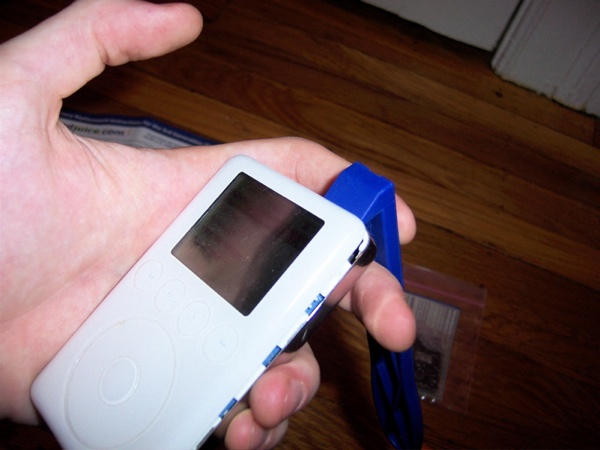
A lot of people, like me, had the misfortune of buying a 3G iPod, loving it, and absolutely hating its terrible battery life. Apple eventually provided a product recall following a class-action suit, but the replacements weren’t that much better. At this point, my factory installed battery literally averaged just 45 minutes of life each charge. Less if I tried to skip a song or change playlists.

To really get this lovely vintage gear in top shape, an upgrade with longer life is called for. Lots of companies are now offering service to install new batteries, but that’s for wimps!

Ready to take on the challenge, I ordered a DIY kit for iPod battery replacement last week, and tonight I got the process down. It’s easy, and it’s fun. So click through for a complete step-by-step photo guide to installing a third-party battery.