Mobile menu toggle

Search results for: Apple One

HP’s Home Media Server Makes Old News

By

post-6486-image-7ab43ed3be36bd8bee66c15fbe86a861-jpg

I have to admit I have been keeping abreast of technology news with one eye, sort of, during this Holiday Season. I have a family, and my one child is going to grow up fast, so I’m told. Thus, I’ve been spending more time with him since he’s off from school for the winter break.

I was a little surprised, then, to see all the hoopla frothing around HP’s introduction Monday of a new Home Media Server for automatically backing up and accessing digital music, videos, photos and documents from multiple computers on a home network. “That sounds kind of familiar,” I thought.

But there it was, all over Gizmodo and Engadget and TUAW and I said to myself, “Has the Apple community been somehow missing this appliance and its amazements?”

To be fair, some of the reportage was done in the context of wondering if Apple itself might be coming out with a similar appliance, and whether or how it might be integrated with the company’s MobileMe web services product. And, wouldn’t you know it, there’s this trade show coming up next week in San Francisco, which would be a perfect time and place to introduce just such a device. The suspense is now killing me.

But this HP baby that got all the ink? Well, it’s compatible with Mac and Windows, organizes files across all PCs on a connected network, streams media across a home network and the Internet, has a server for iTunes that centralizes iTunes music libraries on the server for playback to any networked Mac or PC running iTunes, and costs $600 with a 750GB hard disk or $750 for one with a 1.5TB disk.

Sort of like a souped up version of the Lacie Home Media Server I reviewed six months ago for Mac|Life Magazine, priced at about $150 with a 500GB disk.

Also to be fair, HP’s server plays nice with Time Capsule and Leopard, and lets you easily publish pictures and video to social networks such as MySpace and YouTube – which is not to say Lacie has not updated its software to do the same in the past six months – but on the whole, HP’s latest venture outside its core printer making business struck me as something of the very slow-news-day variety.

Next iMacs To Sport New Cooling Tech?

By

post-4877-image-7a6c4e058ec00c2bdbccfe7a0d1efa54-jpg

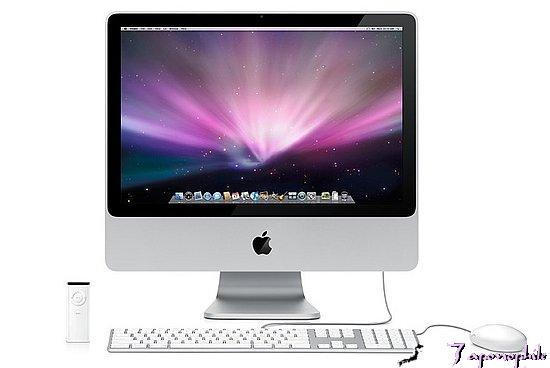
Besides an all-in-one design, new iMacs expected in January could sport new cooling technology for chips developed by chip giant Intel, two Asian-language publications are reporting.

Foxconn will create a “magnesium-aluminum alloy chassis,” according to the Economic Daily News. The Chinese-language pblication also claimed Foxconn’s Precision Components and Auras Technology will produce the iMac’s “cooling module.”

The news may dovetail with a previous report from DigiTimes that Apple was among a group of PC makers opting to use new quad-core processors from Intel expected to alter computer power requirements. The Core 2 Quad chips, ranging in speeds from 2.33 GHz to 2.83 GHz, require 65W rather than 55W for current iMacs, according to AppleInsider.

Folklore: An Introduction to Burrell Smith

By

Burrell%20Smith.jpg
Source: folklore.org

I love hearing and reading stories about the people who made great things happen. In much the same way that I enjoyed “Classic Feynman” and shared the book with many friends, I share with you the beginning of the Apple Macintosh. Andy Hertzfeld’s website, Folklore.org, chronicles the early days of Apple Computer and the creation of the Macintosh. It does more than that though, it brings back all the fun had in creating it, and gives us a first look in the original Cult of Mac: its creators.

Quite a few of the stories follow Burrell Smith. Originally hired as an Apple II service technician, Burrell was an amazing hardware engineer and generally crazy guy. It was his hardware and circuitry work that made the original Macintosh a reality.

“I’ll Be Your Best Friend” introduces you to one of the key men behind the Mac through his introduction to Andy Hertzfeld:

Toward the end of my first week as an Apple employee in August 1979, I noticed that someone had left a black binder on my desk, with a hand-written title that read, “Apple II: Principles of Operation”. It contained a brilliant, concise description of how the Apple II hardware worked, reverently explaining details of Woz’s epic, creative design hacks, in a clearer fashion than I’d ever read before. I didn’t know who left it there, but the title page said it was written by “Burrell C. Smith”.

Later that day, in the late afternoon, I was approached by a young, animated, slightly nervous guy with long, straight, blond hair, who entered my cubicle and walked right up to me.“

I’ll Be Your Best Friend [Folklore.org]

Seismometer Measures Just How Well You Shake That Thing

By

post-6361-image-2479806ad9c95de67f2b5c05949b030d-jpg

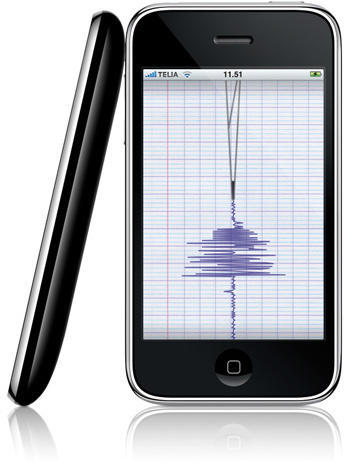
Seismometer is the iPhone app that can not only let you know if you’re in an earthquake (and how bad it is at your personal epicenter), but also records and displays the movement energy of just about anything.

Seismometer uses your iPhone’s built in accelerometer to measure movements in two axes, calculate the resulting energy and draw the results on a rolling scale.

Version 1.1 updates feature noise filtering, expanded frequency settings (20, 40 , 60 and 200hz), and choice of output to logarithmic or linear scale.

99¢ buys you fun for the whole family; no additional premium charged to iPhone users located on major fault lines.

eMotion + Wiimote

By

post-6335-image-c876400aa89a4a82f7e5049f74a913d9-jpg

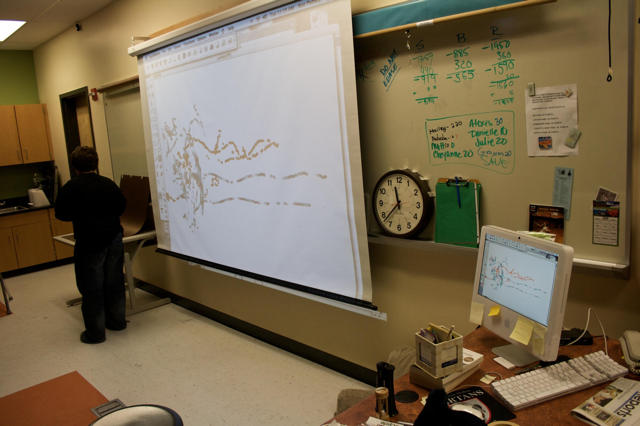
I’m very interested in Wiimote projects for the Mac for two reasons. One is that the guy who came up with the idea (Johnny Lee) is an alumnus of my university. I’m so into his work that I even went to his thesis defense. The other is that my mom is a sixth grade teacher, and I helped her convince the technology department at my old middle school to buy two Wiimotes for her to use with the projector and iMac in her classroom.

Setting up the Wiimotes with the whiteboard is a snap, especially with the Wiimote Whiteboard program for the Mac. The only problems we’ve had are making the IR light pen and finding something simple for the kids to do.

In a quick demonstration last week, using a DVD player remote control since the IR light pen I made ran out of batteries, I set the kids up drawing in Appleworks. This was fun, and the ENTIRE class immediately jumped out of their seats and lined up at the chance to draw themselves. This was certainly one of the most excited and engaged audiences I’ve ever presented to.

Even so, Appleworks isn’t a really great program to be using for this type of thing. It’s obviously not designed for a pen interface, and it can’t use the Wiimote’s multitouch capabilities. This is why I was so excited to see Adrien Mondot’s effort to hook up eMotion to the Wiimote set up:

eMotion+Wiimote in IR mode from Adrien Mondot on Vimeo via [Hack A Day]

The video shows all kinds of wonders that sixth graders would lose their minds over. Drawing is cool enough, but I think we’d have to resuscitate some of them once we got them moving letters around, using multiple pens, affecting particles and giving them 3D graphics.

I’m going to try to make some little kids pass out after winter break. Have you tried the Wiimote whiteboard project?

Made on a Mac: M.I.A. Captured Global Sounds for “Kala”

By

17492020-17492022-large.jpg

British-Sri Lankan rapper Maya “M.I.A.” Arulpragasm’s last album, Kala, was made on a Mac.

Her second album, called an “international block party” by Rolling Stone, Kala is full of ear-wormy music that includes samples of Pink Floyd, gun shots, digeridoo riffs, cash register ca-chings and kids on backing vocals. (Give a listen to “Mango Pickle”.)

She traveled with producer Dave Taylor to India, Australia, Jamaica and Trinidad to record it.

Taylor traveled with minimal equipment:

A MacBook Pro, Logic Studio, the Apogee Duet and a set of Adam S3A monitors.

Mac mini Concept – Why Not?

By

post-6298-image-4bf3933423ac4e672f4c5378dca4629b-jpg

Image © 2008 Victor Anselme

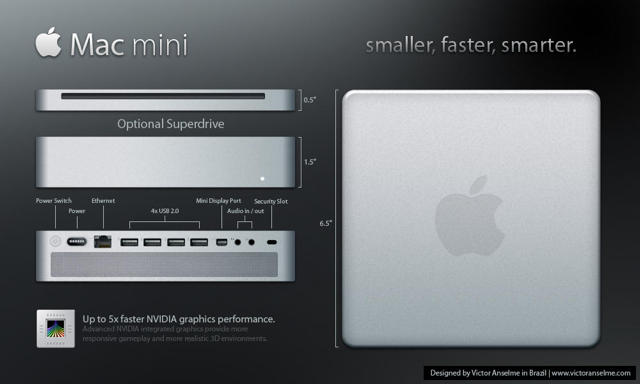
Brazilian designer and Apple fan Victor Anselme has a few ideas about how the Mac mini might evolve into a useful and desirable product.

From his description, helpfully translated by Google from the original Portuguese, as amended by your humble correspondent:

The case would be done in mostly aluminum; the largest piece would be the top along with the four sides. The bottom is black plastic similar to the back of the iMac, with a lever here to open the case, enabling easy upgrades to memory or the hard drive.

Air circulation is much higher now and is pretty much like the MacBook Pro, and this Mac Mini now comes with internal speakers.

In keeping with configuration of new Apple products the Mac mini will no longer support FireWire (note: say it isn’t so, Victor!) and the new Mini Display Port is used for output of digital audio and video.

iPhoneSavior reported on Anselme’s concept the other day, noting it appears inspired by a recent Mac Rumors report showing evidence that a refreshed Mac Mini would be based on the NVIDIA MCP79 chipset.

Along with rumors of an iPhone Nano, detailed below, talk of a refreshed Mac mini and iMac, as well as a 32GB iPhone 3G dominate pre-Macworld chatter leading up to the actual event kickoff on January 5.

AppStore Draws the Line at Boobs

By

cult_logo_featured_image_missing_default1920x1080

57 Varieties of Fart-oriented applications are approval worthy in the eyes of the inscrutable AppStore gatekeepers. But iBoobs, a demo of which can be seen above, apparently violates a threshold of taste beyond which Apple is unwilling to go.

It’s nice to know there is a standard one must meet as an app developer, though, personally, it seems to me iBoobs at least uses the accelerometer to somewhat realistic effect.

Via Edible Apple

Fart Joke Apps Are The New Tip Calculators

By

post-6260-image-d7d0f0c425163b5bf2afdf9ca8922afe-jpg

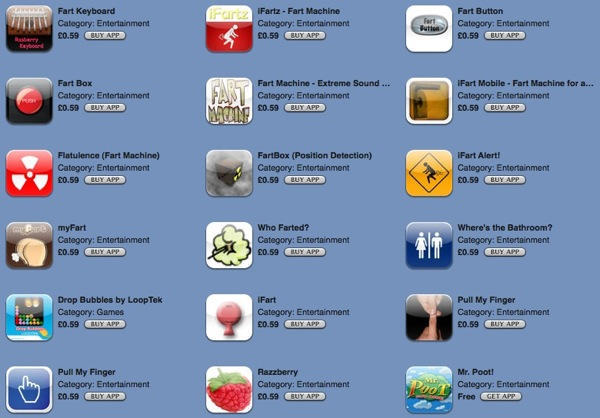
This is the just the first half. Of the first page. Of search results for the word “fart” on the App Store.

It would appear that if you haven’t written a fart app, you’re nobody.

Seriously: do any of you have one of these on your iPhone? Has anyone had one of these apps installed for more than 10 minutes? A day?

I can’t talk. I’ve got Star Wars Sound Board installed.

Freeverse Makes Indoor/Outdoor Mobile Apps Fun

By

post-6207-image-e72b83010a604ffb91c38d256fb5c708-jpg

There are many fine and useful offerings coming out of the Freeverse development shop and I recommend a visit to the website, but I want to talk right now about a couple of their iPhone/iPod Touch games – Flick Fishing, which you can see in the video above, and Flick Bowling.

When I got into this gig, I didn’t intend on becoming an iPhone game addict, but I’m beginning to understand why some people chase the mobile handset dragon.

Ancient wisdom in fishing circles holds that the worst day fishing beats the best day working. Well, Flick Fishing is an app that will give you a mighty realistic taste of a day on the water during that smoke, or coffee, or lunch break on a day when you’re stuck at work.

Choose from 6 locations, 9 types of bait and tackle, a dozen tournaments and dozens of unique species of fish, for a far more satisfying virtual fishing experience than you’d think 99¢ might buy. You can even use Network and Hotseat play to compete against your friends and show off your trophy catches by email with the “Brag” feature.

If you’d rather kill some time with a virtual indoor experience, you could do a lot worse then Flick Bowling. There are a couple of other bowling games on the AppStore, but Freeverse’s 99¢ program knocks ’em down in the first frame.

Excellent 3D animation and realistic bowling alley sounds, along with great music – and customizable bowling balls in the latest version – make Flick Bowling an oddly relaxing way to feel good about doing nothing in particular. You can choose from varying levels of difficulty and bowl solo, against your friends or against a built-in opponent. Between frames you can switch over to iBeer and come back to pick up where you left off.