Jonathan Mann once wrote a tune about Paul Krugman that went wildly viral and landed him on the Rachel Maddow Show. Now he’s written one about Steve Jobs and it remains to be seen where this one might take him, but it’s at least a pretty good song by our reckoning: “he’s the best at what he does though I hardly can define/what it is and what he has and that kinda blows my mind.”
Mann is a busy, creative guy who’s led a very interesting and adventurous life so far, which you can hear more about on his YouTube site. He has been writing a song and making a video a day since January 1, 2009 and while he admits he wants to be a star, he also cops to simply “trying to make my way through life.”
In addition to Steve Jobs’ Head (song #541), he recently posted song number #543, Let’s Get Along, which he shot and edited on his new iPhone 4. A dedicated Apple fan, Mann also uses a Mac Pro and a Macbook Pro to record his material.
How come no one ever uses Windows gear to write songs about Steve Ballmer or Bill Gates?
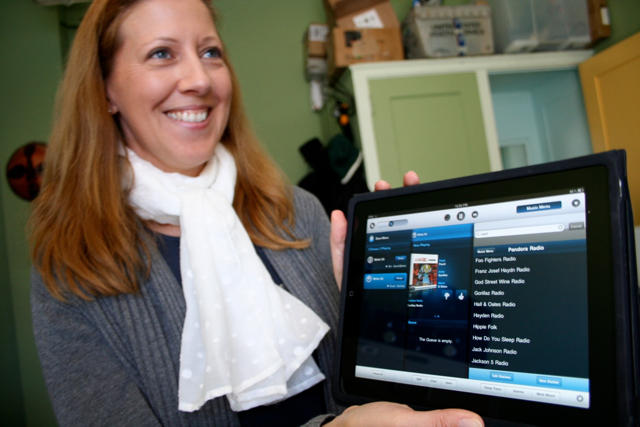
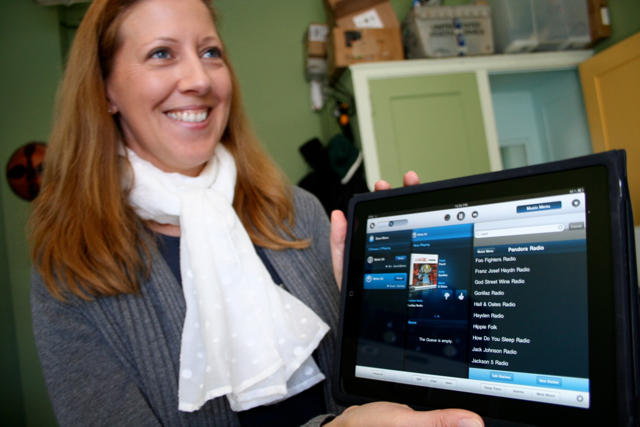
Sonos product manager Joni Hoadley shows off the company's upcoming iPad app.
I just got a sneak peek at Sonos’ upcoming iPad app — and it looks awesome.
Sonos sells wireless music players that make it easy to get multi-room audio around your house. Plug in a player in each room and stream music to each one (or the same music to all of them). Sonos’ products have won kudos for painless setup, ease of use, relative low-cost (you can spend a lot more) and innovation — this is the home stereo of the future.
Sonos is about to take it to the next level with a fantastic iPad app that makes digital music very easy — especially listening to online music services. Using the iPad as a big Wi-Fi remote control, you can play music from your iTunes library, thousands of online radio stations, satellite radio subscriptions, or online music services like Pandora, Rhapsody and Last.fm (and soon the fantastic Mog.com).
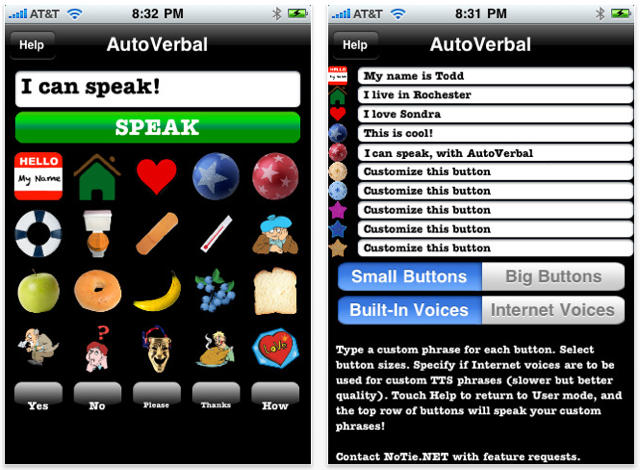
What it is:Auto Verbal Pro (iTunes link) is handy, if not quite full-featured augmentative and alternative communication (AAC) software that gives non-verbal people an inexpensive tool to communicate using an iPhone, iPod Touch or iPad.
Why it’s cool: Other high-end AAC solutions such as Proloquo2go (iTunes link) cost well upwards of $100 while Auto Verbal Pro hit the iTunes store a couple of weeks ago at 99¢. The introductory price won’t last long but even when NoTie Software kicks its offering up to $30 it will still be a bargain for the help it can bring to people with autism or other conditions that make it difficult for them to communicate verbally.
With over 100 pre-programmed icons in its intuitive interface, Auto Verbal Pro makes it easy for a non-verbal person to say basic phrases such as “I am tired,” or “I am OK,” and things such as numbers, days of the week, shapes, colors, food items, animals and so on. There are 10 icons which can be custom programmed to utter more complex phrases, such as “This software is the bomb, isn’t it?” and a text entry field in which any phrase can be typed and played through the device speakers. Users can choose between large and small buttons, which can be very useful to the visually impaired or fat-fingered, and between male or female sounding computerized voices in low-fi or hi-fi quality.
While great strides have been made in recent years developing software to speak for us, Auto Verbal Pro showcases some of the limitations that persist. The built-in low-fi voicings are certainly intelligible but lack any kind of nuance or expressiveness. Hi-fi voicings are even more intelligible and slightly more expressive, but they require WiFi Internet access in order to work, since the files live on NoTie’s servers. When a custom or typed phrase is called on to use a hi-fi voice, the software connects to NoTie and plays back the sounds using QuickTime, which results in clunky, irritating delays. Where no Internet access is available, the program defaults to the low-fi voicing.
All and all, this is useful and potentially even quite amusing software; with good reason it quickly jumped into the Top 5 Paid Medical apps on the iTunes App Store.
Where to get it:Auto Verbal Pro (currently English-only, but with French, Spanish, and German versions planned) is available on the App Store for a limited time at 99¢, after which its price will jump to $30. It’s well worth investing a dollar now to see if it’s something that could be useful to you or someone you care about.
We end the week with another batch of App Store freebies, including “PocketFish,” a fish simulator for the iPhone or iPod touch. Also in today’s spotlight: a 1.83GHz Core 2 Duo MacBook for $500. Finally, we all know the iPad is pretty sweet, so why not let everyone know it, as well, with a hard case that appears like a jumbo candy bar?
Along the way, we’ll check out new iPhone and iPad software, along with other gear. As always, details on these and many other items are available at CoM’s “Daily Deals” page right after the jump.
The iPhone might not run Flash, but that hasn’t stopped Zynga from bringing their popular social gaming phenomenon Farmvilleto the App Store.
Almost everything short of a Flash-engine is the same in the iPhone version, allowing players to buy and sell their crops and livestock. Any changes on your farm are reflected in the Facebook app, and vice versa. Additionally, iOS players get some exclusive new Farmville items to play with, including a Snow Leopard.
Farmville is available now on the U.S. App Store. It’s free to download.
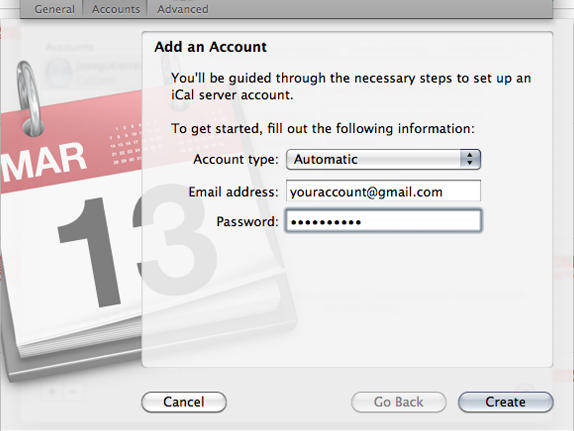
We are being told of a problem using your iCal application after upgrading to iOS 4.0: you travel back in time. Seems users are reporting that old events reappear as new in the iPhone 4.0 version of iCal.
“And it seems to be able to loop, reminding you of the same event numerous times (I’ve seen as many as 4 reminders for one event. In the past.)” one blogger wrote. Another problem: syncing. One user who emailed Cult of Mac said he was unable to sync his MacBook iCal items with his iPhone 4.
Others report problems retrieving items from their Google Calendar.
“After new iPhone 4.0 update, my iPhone calendar will not pull in all of my calendars created in google calendar. The only thing pulling in is my main (primary) email account calendar–but all of the other ones are missing.” A user identified as a Google employee suggested using a gmail account to gather email.
The apparent iCal troubles aren’t the only complaints being aired following Apple’s release of the iPhone 4. Talk arose about a yellow screen and dropped calls due to “wrong” hand placement. That last report, which pointed to the iPhone’s antenna, prompted Apple CEO Steve Jobs to speak out. “Avoid gripping it in the lower left corner in a way that covers both sides of the black strip in the metal band, or simply use one of many available cases,” Jobs suggested.
Although the iPhone 4 has stolen some of the spotlight, demand for the iPad remains strong, suggesting Apple will have trouble into November building enough units, one analyst said Thursday. Apple is building 7.5-9 million iPods for the September quarter.
“Our checks in the supply chain indicate Apple iPad demand continues to outstrip supply,” Sterne Agee analyst Vijay Rakesh told investors Thursday morning. This indicates “solid preorder/order trends on the iPad given build visibility now extending into November,” he adds.
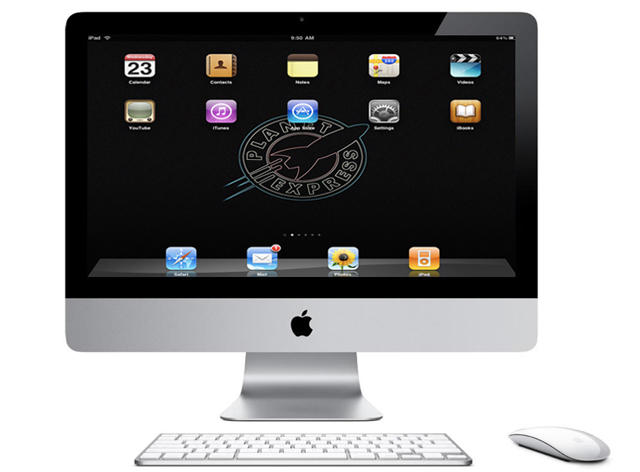
According to LOOPRumors, Apple intend to host a special event in the next sixty days to reveal a refreshed, touchscreen iMac, and will come preinstalled with both OS X and iOS. A hybdrid iMac/iDevice, as it were.
Needless to say, it’s a lie, and you have to be pretty gullible to believe it. While it looks likely that Apple will try to merge OS X and iOS over time, it’s not going to happen in the next “sixty days.”
TomTom is a popular turn-by-turn navigational app for the iPhone that has recently been updated to support multitasking and iOS 4. The new app released on Tuesday is version 1.4 and TomTom has advised all users to upgrade to this version immediately if they are running iOS 4.
If you’re going to jailbreak your iPhone or iPad, the first thing you MUST do is backup your device’s SHSH blobs.
With the release of iPhone 3GS and iPod Touch G3, Apple added an extra layer of security to prevent hacking, jailbreaking and unlocking. Apple is constantly closing the exploits used by jailbreak hackers by updating the firmware of its iPhone/iPt and iPad. If you accidentally upgrade your jailbroken device to Apple’s latest firmware, you can’t re-jailbreak it until hackers release new jailbreak software.
You can, however, downgrade your device to the previous firmware version which can be jailbroken — if you have your SHSH blobs on file.
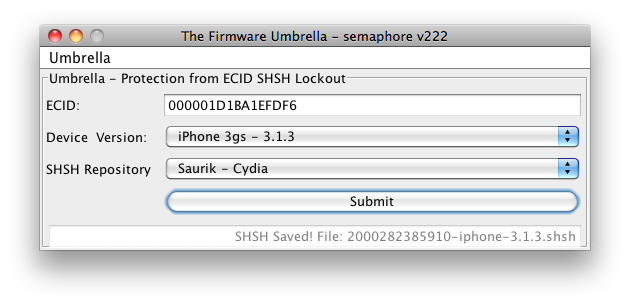
You can extract these SHSH records and save them with the help of a utility called Umbrella. Here’s how:
These records are firmware specific and each time you update, you should repeat this process to save the records for the particular firmware version.