The honeymoon is officially over. With the release of iPhone 4 over two weeks ago, Apple has been hit by everything except the kitchen sink. From the 3G iPad privacy concerns to the most recent App Store hack, Apple has been in full damage control mode. This makes it the perfect time to add insult to injury. Read my 5 suggestions on how to improve iOS 4 after the break.
Comex, the creator of the wonderfully painless iOS 3.1.3 jailbreak solution Spirit, is still tirelessly plugging away at his Flash for iOS project, Frash.
Porting Adobe’s official Flash app from Android to the iPhone, Comex has demonstrated Frash working on the iPhone before, but now he’s showing it running on the iPad to boot with support for the iPhone 3GS and iOS 4 promised soon.
Interested in helping? Comex has put out a call for developers to help him move the project along. If you’ve got the skills, help Comex out, if only so we can get to the bottom of Apple’s claims that Flash will destroy the iPhone’s battery life once and for all.
In the iPhone, Apple has the biggest non-dedicated mobile gaming device in the world, while in the DS, Nintendo controls the most successful dedicated mobile gaming console. There’s a war on, and while it won’t be a battle to the death, Nintendo understandably doesn’t want to give Apple any more help than it has to when it comes to gaming… least of all by creating iPhone versions of its more popular franchises.
During an investor Q&A, Nintendo president Satoru Iwata confirmed that you shouldn’t expect an iPhone version of Super Mario Bros. or The Legend of Zelda anytime soon.
“Other companies don’t share Nintendo’s values or traditions when it comes to creating devices,” he said. “We are absolutely not thinking of [releasing software on other platforms].”
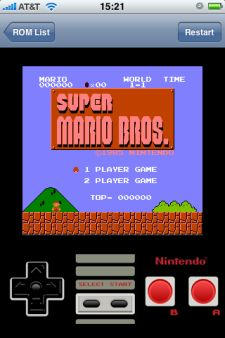
Iwata wasn’t specifically referencing the App Store, of course, but the message is clear: Nintendo’s gaming franchises are long-term strategic assets Nintendo isn’t going to lend for a quick buck to promote another console. If you want Nintendo games on your iPhone, you’ll have to turn to jailbreaking and emulation.
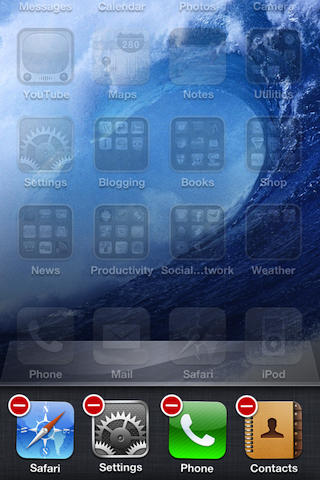
I’ve been using my new iPhone 4 for over a week and now that I’ve had some time to explore it I’m learning a lot about the hardware and software that it came with. The iPhone 4 isn’t perfect since I’ve found a few problems with the hardware and iOS 4, but fortunately I’ve got workarounds for some of the bugs plaguing iOS 4.
The popular Spotify music application for iPhone & iPod Touch has been updated to version 0.4.7 today for the iOS 4 software. This update brings with it the eagerly awaited multitasking support which now allows you to listen to your favourite music whilst using other applications on your device.
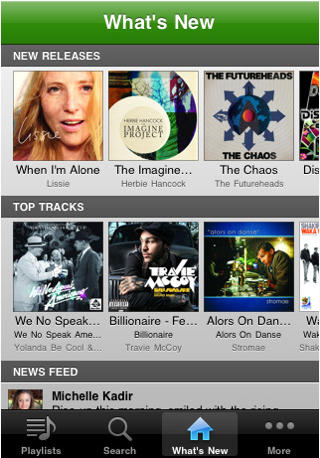
The update also features a new “what’s new” tab that displays new releases, the top 100 tracks in your country and a social news feed that displays Facebook posts. As well as the ability to use your headset remote, the multitasking dock buttons and the lock-screen buttons to control playback.
The full list of changes as listed in the description are:
iOS 4 multitasking! Play Spotify tracks while doing other things with your phone. NOTE: Only iPhone 3Gs, iPhone 4 and iPod Touch (3rd generation) support multitasking.
Use the headset remote and lockscreen buttons to control Spotify playback
“What’s new” tab has been added showing you newly released albums, the top 100 tracks in your country, and the social feed
Share tracks and albums to your Spotify friends!
Battery consumption is improved when the app is in the foreground or paused.
You can find Spotify in the App Store here (U.K.), but please note; you need a Spotify Premium account to use the iPhone & iPod Touch application.
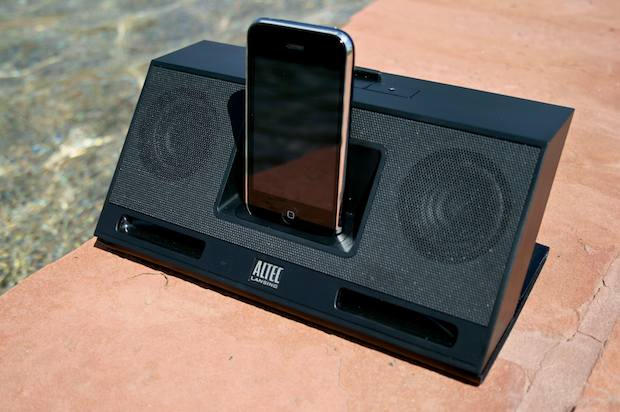
We previewed this compact dock last January at CES in Vegas and came away impressed that Altec Lansing could make a unit so compact and relatively inexpensive sound as good as it did. When they contacted us and said they had review units available, we wondered if we’d still be as impressed with the inMotion Compact once all those mojitos had cleared our system. Turns out, the mojitos had nothing to do with it.
We start the day with prevention for your iPhone or iPod. First up is an anti-slip mat which you can attach to your dashboard or other surface and clings to your electronic device. Next is a “waterproof” case for your iPod. Just how waterproof may be indicated by the warning “not available for diving.” (So, you’re good-to-go when you spill your drink, but hold off playing your favorite tunes while diving to that ship wreck.) Finally, there is the Evo Cam 3 webcam software.
We’ll also check out other gadgets, including a four-foot extension cord for your iPhone. As always, details on these and many other items are available at CoM’s “Daily Deals” page right after the jump.
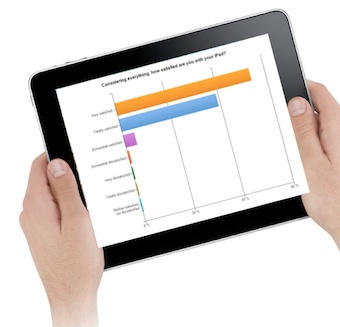
A poll of iPad users — 6,000 of them — found they are overwhelmingly pleased with the device.
Technologizer asked iPad owners in May how they were getting on with their new device, they were overwhelmingly pleased with battery life, speed and reliability and some 59 percent were satisfied with speed and reliability of the 3G network.
Despite claims that the iPad was nothing more than a kiddie pacifier, about 93 percent of owners surveyed said they either “frequently” (73 percent) or “occasionally” (over 20) use it instead of a traditional computer.
Some are also using it in place of smartphones, too. Over 80 percent of iPad owners surveyed are also iPhone owners, about 60 percent of respondents said they “frequently” use the iPad instead of their smartphones, another circa 25 percent “occasionally” use their iPad instead of the phone.
Does this reflect how you’re using your iPad or not?
If the Palm Pilot was the corporate digital tool of choice in 2000, today’s boardrooms are likely to be populated with iPads, according to one venture capitalist. “In nearly every board meeting I attend, multiple iPads are unfurled,” writes David Hornik of August Capital.
Writing at VentureBlog, Hornik remarks about the button-down set: “Where once they carried Palm Pilots, now they hold an iPad under their arm. iPad is the new cool toy.”
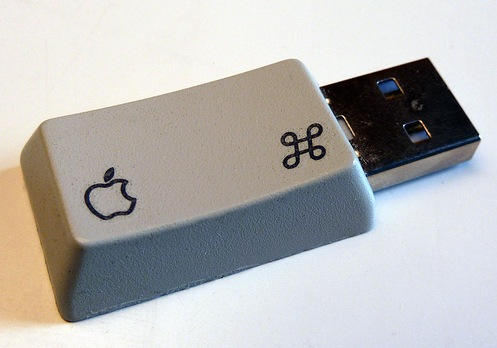
Here’s the result: the command key stick. If you want to make your own, Laurent has published some instructions – they’re in French, but you’ll be fine with just the pictures.
Then again, if you can read French, you might enjoy Laurent’s blog about all things Apple: pomme-c.