With the announcement of Apple TV it’s never been more apparent that physical format is dying and your collection of DVDs is becoming more obsolete by the day. However, that doesn’t mean you have to purchase all your favorite movies again just so you can enjoy streaming them to your iOS devices. Here we’re going to show you how to take your encrypted DVDs and rip them onto your Mac.
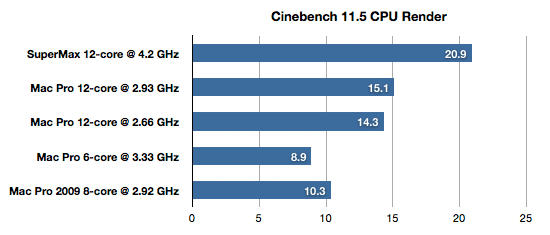
Apple’s fastest Mac is the 12-Core Mac Pro, featuring two 2.93 GHz Xeon processors. Configure it with 25GB of DDR3 ECC SDRAM, and Apple’s fastest Mac will cost you $8,749.00.
Yowza. That’s an extraordinary amount of money. If you don’t mind dropping an extra $300, though, you might be interested in Macintouch’s guide to building not Apple’s fastest Mac, but the world’s fastest Mac yourself.
Yup, according to Macintouch’s tests, their Hackintoshed monstrosity — a total beast of a machine running two 3.33GHz hexacore Westmere processors overclocked to 4.2GHz each and supplemented with 24GB of DDR3 RAM — melted the Mac Pro’s face off.
Of course, there’s a lot of drawbacks to this approach, including compatibility issues and a much louder system than the Mac Pro, as well as a desktop footprint that makes the Pro look compact. But as of right now, it seems that a Hackintosh is the fastest Mac in the world. God help us.
Apple’s Automator is a fantastic way to manage your iTunes tracks… but with Apple’s iTunes 10 update, many iTunes-specific Automator workflows have simply stopped working.
According to upset users in Apple’s discussion forums, the vast majority of iTunes Automator actions go missing when you install iTunes 10. Try to run a previously created iTunes workflow and you will ironically be prompted to install iTunes 4.6 or higher. Ugh.
The good news here is that none of the functionality has disappeared from AppleScript, so it should be able to replicate the functionality if you change gears. Still, the sudden absence of iTunes functionality in Automator is mysterious: did Apple purposely drop the functionality, or is this a bug? If the former, what was Apple’s rationale?
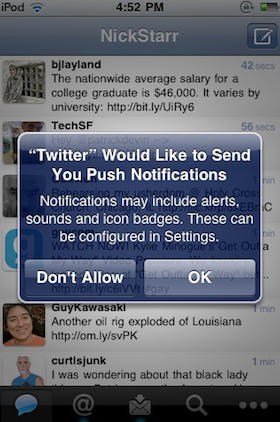
Twitter for iPhone — née Tweetie — is a wonderful first-party client with almost any functionality you could care to name, but one area in which it loses to some of its competitors is in its lack of support for push notifications.
No worries, though, because along with yesterday’s triumphant debut of Twitter for iPad, the iOS team are also working on integrating push for iOS 4.1.
We’ve been testing push notifications internally. When we launched Twitter for iPad, there was a configuration error that caused us to offer push messages to a small set of users. We’ve stopped sending push messages, but users may see an option to turn on push until we release an updated version of the app. So, push isn’t ready yet but we look forward to rolling this out soon.
As Twitter notes, you may be able to turn push notification on under settings even if you aren’t on iOS 4.1 Gold Master, although we’ve heard reports that it may require uninstalling and reinstalling the app to get working.
Perhaps not so coincidentally, push notification service Boxcar — which does a healthy bit of business in the tweet pushing market — has just gone free for all Twitter notifications.
Possibly attempting to steal some thunder from Apple’ Wednesday announcement of 99-cent TV episode rentals, rival Amazon.com launched episodes for sale at 99-cents each. The Internet bookseller and Kindle maker said it would offer shows from ABC, Fox and the BBC “to own.”
While Amazon’s Video on Demand service streams such shows as “Glee,” “Bones” and “Lost” to Macs, as well as PCs and set-top boxes, the Seattle-based company noted the shows downloaded “cannot be transferred to iPods.”
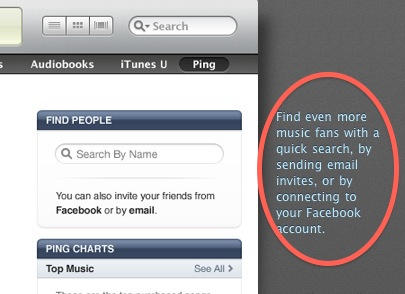
It seems the situation is more confused than I thought; some people have been able to connect Facebook with Ping, and other haven’t. See end of post for a number of updates.
OK, I give up. I’m confused. I have no idea what’s going on with Ping and Facebook.
On the one hand, we have the above screenshot, taken from Apple’s own Ping web page just this morning.
It clearly says you can connect Ping to Facebook. But. You can’t.
The lack of an official, native version of the Twitter client for the iPad has been a puzzling omission, but now the big blue bird has set things right, having pushed their native iPad app to iTunes.
I haven’t had a chance to play with it, but it seems that a big part of the native client’s delay was because Twitter had big ideas for the app, grafting a truly unique (and, perhaps, a bit quirky) interface on top.
Gizmodo’s Matt Buchanan explains the new interface:
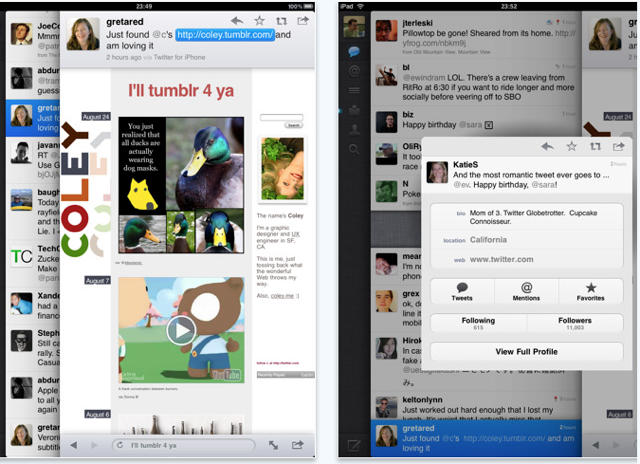
The interface starts out straightforward, like a simple cross between the Tweetie for Mac and the iPhone app. But Twitter for iPad is actually a bit more complicated than it lets on—it’s the most complex of the three. Rather than sticking with the iPad’s standard split-pane views, like in Mail, Twitter is kind of like its own desktop environment, with overlapping, stacked panes that move from left to right. So, on the far left, you’ve got the main control panel, like Tweetie for Mac, which is the bottom pane. To the right of that, and on top of it, you’ve got the tweet list—either the main feed, mentions or direct messages. Whenever you touch on a tweet, a third pane opens to the right, on top of the other two. If there’s a link in the tweet, it’ll open the browser. If not, it’ll open that person’s somebody’s profile. (And if you type a direct message, that’s layered on top of everything else via a popover, for four total layers.) You can switch back to the main tweet list or control pane by touching it, and it’ll load browser pages in the background while you browse through other tweets. It can get cluttered quickly if you’re opening sub-menus and other things—at the same time, it gives you a lot of flexibility.
Buchanan ultimately finds the new interface bold, but quirky, but Techcrunch’s MC Siegler declares it a triumph, announcing that it completely and totally obviates not only any other Twitter app out there, but Twitter’s own website. Then again, I thought pretty much any Twitter client had killed the need to visit Twitter.com over a year ago.
Twitter for iPad is a free download, and it’s available now on iTunes
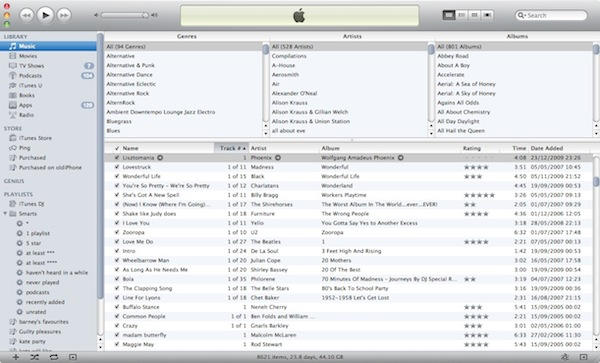
Here’s iTunes 10, and the first thing you’ll notice is a sleeker, cleaner look. There are fewer lines, there’s a little more space. The application is still bloated with far too much stuff, but at least it looks a little less crowded now.
As revealed yesterday, The latest version of Apple’s iTunes media-managing software, iTunes 10, is now available to download through Software Update or via direct download here.
iTunes 10 has long been rumored to be the first version of iTunes that capitalized upon Apple’s acquisition of Lala and brought cloud-streaming to the masses, but Steve Jobs belied that expectation yesterday by saying that Apple remains “skeptical” of the cloud for the time being.
Instead, the major new feature in iTunes 10 is Ping, a baked-in social network based around music discovery. You can follow friends and artists like on Twitter and be alerted to new music that they rate and review, while also giving the heads up to friends about hot new tracks you might enjoy.
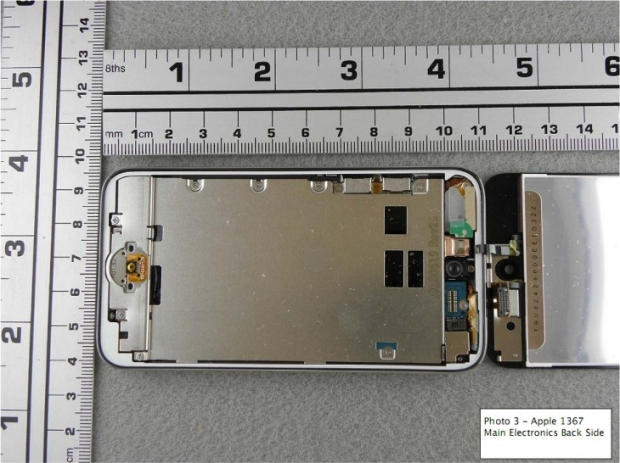
The FCC has just beaten our the guys over at iFixit to the device vivisecting punch by tearing down and publicly airing the guts of Apple’s brand new iPod Touch… and it looks nearly as gorgeous on the inside.
While managing to slim down the iPod Touch’s already thin form factor, Apple managed to cram an A4 CPU, a Retina Display and even two cameras into the already svelte chassis. Okay, granted, one of those cameras is a ridiculously paltry affair capable of capturing still shots of less than 1MP… but it’s better than nothing, especially given that getting two cameras into the iPod Touch is pretty much an engineering miracle to begin with.
To check out more shots, head on over to the FCC site and marvel, yet again, at how Apple’s fantastic design starts from the inside-out, and not vice versa.