Mobile menu toggle

Search results for: Apple One

Essential App #12: Facebook Feeds The Connection Addiction

By

facebook

There are a few Essential Apps that handle themselves so well on the iPhone they quickly eclipse the website they evolved from; apps that, once installed on the iPhone, completely replace their browser-based ancestors.

Essentials Yelp, The Weather Channel and Twitter clearly fall into this category. But Facebook’s app is different. It doesn’t just replace — it hooks.


New App For Virtual Gonzo Table Tennis Should Come With Leash

By

post-60750-image-8f0c10809edaaeb5190415c9537f8039-jpg

We haven’t…uh…tried this yet (primarily because Cult editor Leander Kahney refuses to get back into his fencing Mexican-wrestler costume after last year’s Halloween fiasco) but it looks pretty damn cool, or something.

Sonic Speed Ball sets up a Bluetooth connection between two iPhones (or BT-equipped iPods), then simulates a virtual ball that can be smacked around using an iDevice as a paddle. Different gestures affect the virtual ball in different ways, à la the Nintendi Wii controller.

Sonic Speed Ball is $1; leash not included.

Dev Team Jailbreaks Fourth-Gen iPod Touch With SHAtter

By

cult_logo_featured_image_missing_default1920x1080

httpvhd://www.youtube.com/watch?v=aoX1Q8ym2J8&feature=player_embedded

If you’ve just picked up a brand new iPod Touch or you bought an iPhone 4 after the update to iOS 4.1 and are eager to jailbreak, you’re probably looking forward to the SHAtter exploit, which — once rolled out — will not only allow any current iOS device to be hacked, but which can’t be patched by Apple through software.

We’re still waiting for an end-user jailbreak using SHAtter to release us from the shackles of iOS 4.0.2 and above, but the Dev Team just released the above proof of concept video, showing how the SHAtter explot baked into a beta version of PwnageTool was enough to allow them to load their custom IPSW onto a fourth-generation iPod Touch.

iOS alarms broken for New Zealand users after Daylight Savings

By

flip_clock_iphone1

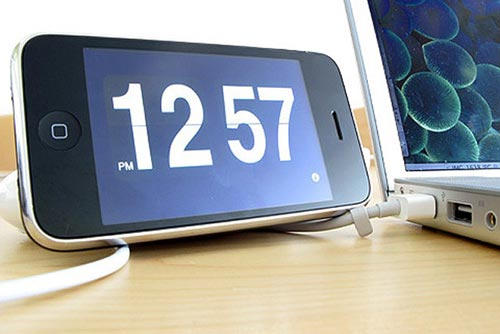
About a month ahead of America and Europe, New Zealand clocks fall an hour back when they switch to Daylight Savings Time on the last Sunday of September. Apparently, though, New Zealand iPads and iPhones are proving a tad overzealous when it comes to falling back this year: numerous iOS users are reporting that since yesterday’s switch, their alarms are going off an hour early. Given that Kiwis were already having to wake up an hour earlier than they were used to, that’s quite a rude awakening.

FileMaker Go for iPad Take Your Data With You [Review]

By

fmprogo

FileMaker recently released FileMaker Go for the iPad and iPhone. I’ll be taking a look at the iPad version only today, because based on my experience with technology in the Enterprise the larger format screen that the iPad provides is the way to go. I think that version will be better received by business users since the iPhone screen is much to small to use on a regular basis or at least it is for me. It’s good in a pinch, but for real work I prefer the iPad as primary and the iPhone as backup.

FileMaker Go will not work by itself since you need to have FileMaker Pro, which is now at version 11, to create databases that you will use with the iOS app. FileMaker Go will allow you access and edit the information in the database you created with FileMaker Pro on your Mac or PC.

How To Get Rid Of The Ping Drop-Down Menu In iTunes

By

20100926-pingdropdown.jpg

If you’ve updated iTunes to 10.0.1 in the last day or so, you might have noticed that Ping is pushing itself in your face rather more forcefully than before.

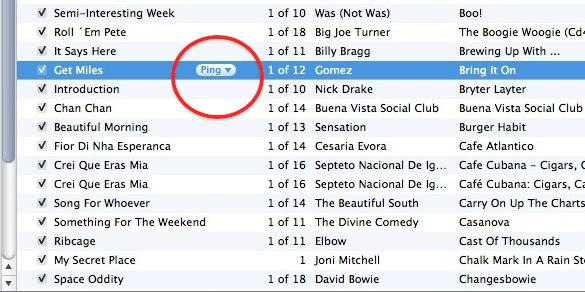
One thing: there’s the Ping sidebar on the right. Another: there’s a new Ping drop-down menu that appears in your music library, alongside any song you have selected.

They’re fine if you use Ping, but if you don’t, you might want to get rid of them. The sidebar is easy to deal with, you can hide it with a click. But the drop-down menu requires a little more tinkering to get rid of.

This Week’s Must-Have iOS Games: Real Soccer 2011, We City, New Gangstar & More!

By

post-60571-image-78420555763e96dbfa0589571b4b64d7-jpg

This week’s must-have iOS games include the awesome new Real Soccer from Gameloft, which features gorgeous high-definition graphics optimized for the retina display. We also have their long-awaited Gangstar sequel, Miami Vindication, and some seriously addictive gameplay in ngmoco’s We City.

Check out a few of our favorite games from the past week after the break!

This Week’s Must-Have iOS Apps: Napster, VLC, GV Mobile+ & More!

By

post-60590-image-278a623bb1ed99063f2bc69d5439dfae-jpg

This week’s must-have iOS apps include Napster’s new music streaming application that provides access to over 10 million of songs on your iOS device, Google Voice calling with GV Mobile+, and a media player that supports pretty much every codec out there!

Check out a few of our favorite apps from the past week after the break!

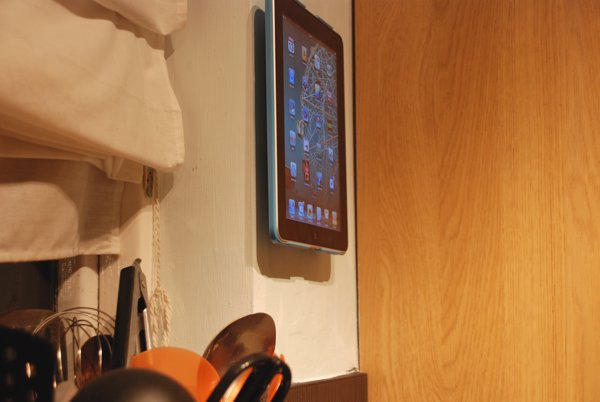
The Wallee iPad Wall Mount And Case [Review]

By

DSC_1058

The Wallee is both a hard case for iPad as well as a simple and efficient wall mounting solution. It allows you to use your iPad throughout your home. It’s one of the best solutions out there, and delivers both on style and functionality. The Wallee is a gadget that is so well-engineered that I often forget about it. It has just blended its way into my everyday life – just like the iPad itself.