Mobile menu toggle

Search results for: Apple One

This Isn’t The iPad 2, But It’ll Probably End Up Being Close

By

SELENE - by Richard Rich x Max Tannone

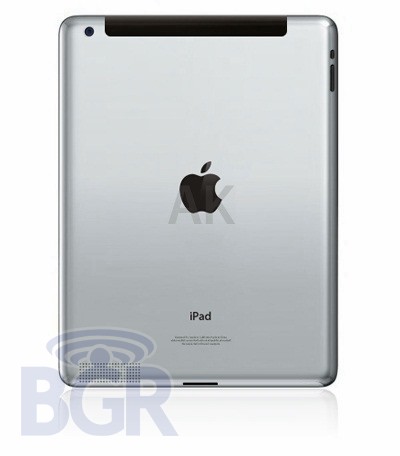
“Is this Apple’s next iPad?” Boy Genius Report asks, then supply their own answer in an update mere hours: no, it jolly well isn’t. At least not technically. But when March 2nd rolls around, it’ll probably end up being something pretty close.

This morning, Boy Genius Report was sent the image of the iPad 2 you see above, featuring a thinner design, flattened back, a visible rear speaker and a rear-mounted web cam. Unfortunately, they were punk’d: it was just a high-quality render of the iPad 2 by the Apple fan.

That said, we’d be willing to put money down that on Wednesday, you’re going to see an iPad 2 very like the above render. The case-manufacturers all agree upon the broad outlines of the iPad 2’s external redesigns. So we probably will see an iPad 2 that looks identical to this come Wednesday, with the only real question mark being that rear-mounted webcam. Everyone agrees the iPad 2 will come with FaceTime, but that only depends upon a forward-looking webcam.

Cult of Mac Has Been Hit By Google’s War On Content Farms

By

CoM_logo_cropped

It’s a beautiful morning here in San Francisco to wake up and find your website has been effectively disappeared off the web by Google.

Cult of Mac has been downgraded by the changes Google has made to its algorithm to rerank content farms like Demand Media.

We’ve become a civilian casualty in the war against content farms.

You can read more about here in The Guardian, which highlighted us in a story about legit sites hit by the changes.

We’re not alone. Also affected is the British Medical Journal, PR Newswire, and one of the earliest online communities, The Well. According to an analysis by Sistrix, an independent search-engine analyst firm, hundreds of other legitimate, hardworking sites have also been hit.

Why us? We have no idea. The changes Google has made to its system are secret. What makes it worse is that Google’s tinkering seems to have actually improved Demand Media’s page rank, while killing ours.

We’re a blog, so we aggregate news stories like everyone else. But our posts are 100% original and we do a ton of original reporting, as The Guardian noted this morning.

Perhaps it was because we’re constantly ripped off by shitty clone blogs?

Or maybe because we ranked so highly for popular keywords like “Apple” and “iPhone.” In fact, we used to get a lot of love from Google, placing highly on Google News and Google’s general search pages. A lot of our traffic came from Google, which is why the changes are so serious. I’m already seeing a big drop-off in traffic. Over the weekend and today, the traffic is half what it normally would be.

I’m pissed because we’ve worked our asses off over the last two years to make this a successful site. Cult of Mac is an independently owned small business. We’re a startup. We have a small but talented team, and I’m the only full timer. We’re busting our chops to produce high-quality, original content on a shoestring budget.

We were just starting to see the light at the end of the tunnel. After two years of uncertainty, the site finally looks like it will be able to stand on its two feet.

But this is a major setback. Anyone got Larry’s cell number?
JPMorgan: Tablet Market to Hit $35B By 2012, Cannibalize Netbooks and Notebooks

By

steve-jobs-ipad

As expectation builds that Apple will soon announce a new version of its original iPad, one financial house projects the overall tablet market will become a $35 billion business by 2012, with more than a third of the devices reducing demand for netbook and notebook PCs.

“We expect tablets to have an increasingly negative impact on PC shipments,” JPMorgan Securities analyst Mark Moskowitz told Reuters Monday. More than 35 percent of the tablets will cannibalize the market for low-cost netbooks and notebook computers.

iPad 2 Coming in White?

By

Screen shot 2011-02-28 at 10.05.50

Despite Apple’s struggle with the white iPhone 4, a new iPad digitizer discovered by the iFixYouri iPhone repair shop suggests the company’s second-generation tablet may also be available in white. The part comes from Shenzhen City in China, where many of Apple’s products are assembled.

Closer inspection of the white digitizer above shows a small circular cutout along the top bezel, for what we expect to be the iPad 2’s front-facing camera, and it’s a perfect match for 9to5 Mac’s recently discovered iPad 2 screen protectors from Asia.

Just like all of Apple’s unreleased products, details and specifications regarding the second-generation iPad are under lock and key at Apple HQ until the device is announced on March 2nd, however, reports have suggested the upcoming device will be thinner, lighter, and faster.

This Week’s Must-Have iOS Apps: Tap DJ, Wunderlist HD & Text Writer

By

Screen shot 2011-02-27 at 20.39.00

Not many DJ applications for iOS devices quite deliver the experience you get from using this week’s first must-have app – Tap DJ. Its bucket-load of features, together with its brilliantly designed and incredibly intuitive user interface, make it the ultimate pocket DJ application.

Another of our favorites is Wunderlist a beautifully elegant task manager that’s been around for a short while on the iPhone, and now it’s available in all its HD glory on the iPad

Writing on your iOS device can sometimes be a painful experience, especially if you don’t have a good text editor. Fortunately, our third must-have application is just that. Text Editor is a wonderfully effortless, yet incredibly useful text editor that will go a long way to ensuring that writing on your iOS device isn’t so bad.

Find out more about the applications above and our forth must-have – Oscar Backstage Pass after the break!

This Week’s Must Have iOS Games: Tiny Wings, Volcano Escape & Zombie Runaway

By

Screen shot 2011-02-26 at 22.29.59

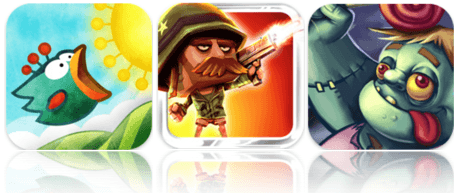
This week’s roundup of must-have iOS games features what I think could be the next iPhone craze; Tiny Wings is a simple one-button arcade game based on a dream of flying, and another huge App Store success that will be sure to hang around for a while at the top of the paid charts, just like Angry Birds or Doodle Jump.

Volcano Escape is another of our favorites a terrific platformer that provides level after level of action-packed entertainment, which, together with its crazy characters and explosive weaponry, makes it one of the greatest games of its genre.

Zombies are quite the stars within the App Store – some of the most popular iOS games feature the living dead. Our third must-have game this week, and another to add to the list of zombie successes, is Zombie Runawaya brilliant run-as-far-as-you-can game that’s a little different to the rest.

Find out more about the games above after the break!

Improve Your Writing Experience on iOS with ‘Text Writer’ [Must-Have App]

By

Text Writer

Text Writer($0.99) Universal – Productivity

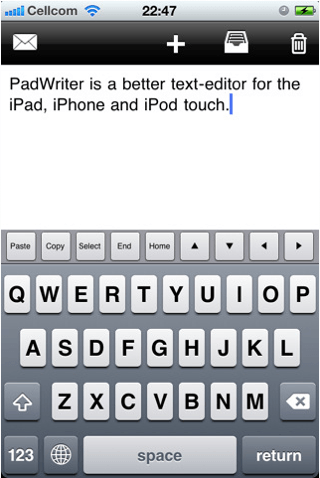
Writing on your iOS device can sometimes be a painful experience, especially if you don’t have a good text editor. Fortunately, Text Editor is just that – a wonderfully effortless, yet incredibly useful text editor that will go a long way to ensuring that writing on your iOS device isn’t so bad. My favorite feature is a very simple one, yet you’ll be surprised how much you use it: there’s an additional line of keys across the top of your keyboard that features the copy, paste, select, home, and end functions, as well as all four arrow keys for when you can’t quite drag your cursor where you want it. It makes performing different tasks that little bit easier, and you’ll soon miss it within other applications.

While you’re writing your document Text Writer will automatically save it, so you don’t need to worry about losing your work if you take a call, jump out of the app to reply to a text, or if your battery dies half way through your document. And once you’ve finished, you can send the finished article via email. This app is universal, so one download will work on all of your iOS devices, and it’s great value for money at just a dollar. I love this application for its pure simplicity and ease of use, and for anyone looking for a basic text editor without all the fancy functions, you won’t go wrong with Text Writer.

[xrr rating = 80%]

Run for Your Life, the Humans Are Coming in ‘Zombie Runaway’! [Must-Have Game]

By

Zombie Runaway for iOS

Runaway Zombie($0.99) Universal – Games

Zombies are quite the stars within the App Store – some of the most popular iOS games feature the living dead. The latest must-have game to add to that list is Zombie Runaway, a brilliant run-as-far-as-you-can game that’s a little different to the rest. Instead of fighting off the undead to save yourself, in this game you are one of them, and your aim is to escape the humans. As opposed to traditional 2D running games, this one’s in 3D, and uses a simple 3-button control system to dodge and jump objects that get in your way on your runaway chase.

This game’s a must-have thanks to its multiple game modes that provide you with countless hours of exciting gameplay, and two completely different ways to play, unlike most other running games. When you’re confident the humans will never catch you, try out your skills in ‘Blitz mode’ in which you run through a dark graveyard crushing as many tombstones as you can within a certain time. Once you start playing, the excitement never dies and ensures Zombie Runaway isn’t just another zombie flop.

[xrr rating = 85%]

Mac OS X Lion Adds Recovery Partition Support [Gallery]

By

LionRecovery1

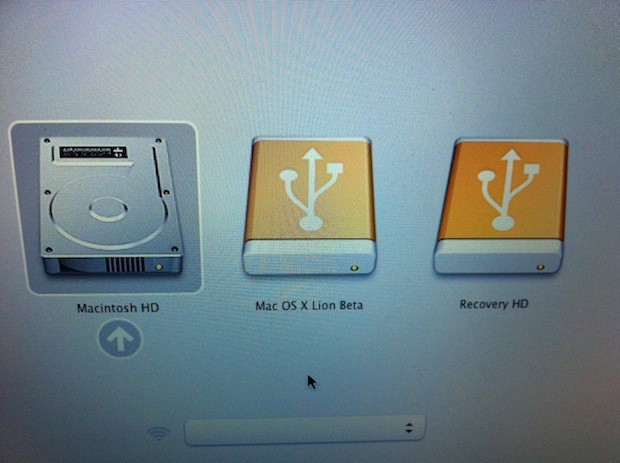
Mac OS X Lion recovery partition.

Apple’s new Mac OS X Lion adds support for a recovery partition as part of the OS installation and while this may not seem important to most users — it is.  Apple is making the tools and resources available to you that will allow you to perform disk repair and recoveries on your mobile Mac while on the road or on your desktop Mac at home. The utilities will be readily available and therefore you won’t have to go hunting for that always elusive DVD or USB stick.

This is because the new partition labeled Recovery HD acts just like the DVDs and USB sticks that Apple has traditionally shipped with its computers. You simply press and hold the Option key after starting your Mac. You are eventually presented with a list of the available boot partitions.

You use the arrow keys to select the boot drive and press Return. The system will then boot from the selected disk. In this instance you would choose the Recovery HD disk to access the Mac OS X Lion recovery partition.

It looks like Apple is going to have another blockbuster OS release later this year. I don’t know about you, but I cannot wait until Lion hits store shelves (virtual or otherwise).

Check out more photos after the read link.

Sparrow Lite Now Available On The Mac App Store

By

tumblr_lh62awxU1m1qbptnpo1_500

We loved Sparrow for Mac when we reviewed it a couple of weeks ago for treating your inbox more like Twitter, describing it as “the equivalent of skipping stones, not piloting a submarine.”

Much as we loved it, though, that approach to email isn’t for everyone, especially power users. If you’d like to give Sparrow a try without paying, though, you now can: Sparrow Lite is now available on the Mac App Store, allowing you to use Sparrow to drive a single Gmail account for free, if you don’t mind an advert subsidizing the experience.

Give it a shot. You can download Sparrow Lite for free by clicking here, or searching for it on the Mac App Store.