Mobile menu toggle

Search results for: Apple One

New York Hong Kong iPad Cases: Forget The Posing — These Are Some Seriously Slim Cases

By

wpid-Photo-31072012-1200.jpg
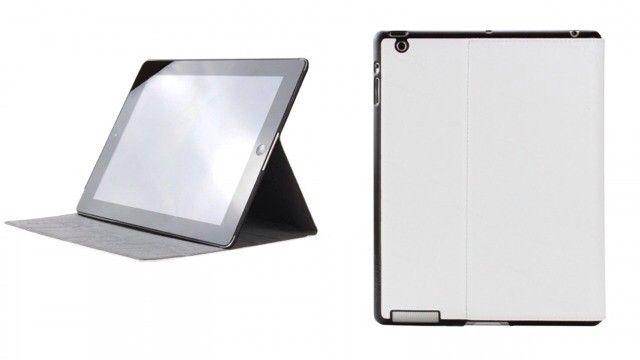
The Folio Shell may be my next iPad case


The search for the perfect iPad case is never ending, but that won’t stop me trying. And as you get further along in your quest, the differences between cases becomes smaller and smaller. At first glance, these two slimline cases from Lioncase look like any other slimline folios and Smart Covers, but close up they look much more compelling.


Give Google Chrome And Other Third-Party iOS Apps A Nitro Speed Boost [Jailbreak]

By

What if Chrome felt just as smooth as Safari?

I gave up on Google Chrome for iOS about a day after it was released. Even though my iPhone is jailbroken and I can bypass iOS’s restrictions to set Chrome as my default browser, I missed Safari. Also, Chrome felt considerably slower than the iPhone’s default browser, and that was because Apple handicaps third-party apps by not allowing them to access the lightning-fast Nitro Javascript engine in iOS.

Does the lack of Nitro in your favorite third-party iOS browsers keep you awake at night? Me neither. But that doesn’t mean it wouldn’t be cool to make an app like Google Chrome just as fast as Mobile Safari. For jailbreakers, there’s a new tweak out that makes it all possible.

Use This Quick Trick To Force Microsoft Word To Use Retina Display

By

retinaword

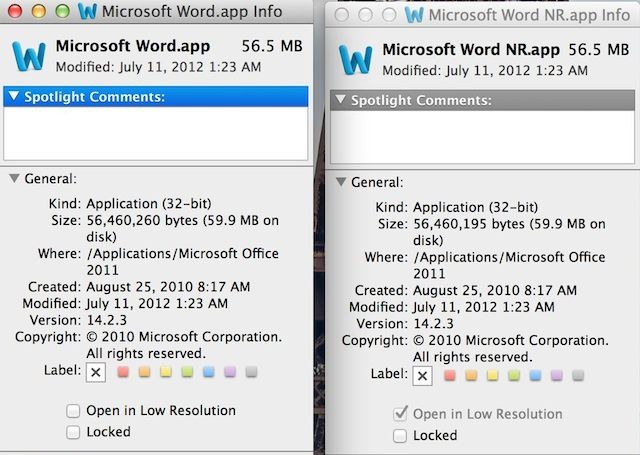
Even though Apple’s Pages app is a pretty solid word processing tool, a lot of Mac users still love to use Microsoft Word. If you’re one of them, that’s cool, we won’t judge you. The biggest problem with using Word on a new MacBook Pro with Retina display is that it looks pretty ugly because it hasn’t been updated to take advantage of the Retina display yet.

The great news for Word fans is there’s a really easy work around that will force your Microsoft Word app to use your MacBook Pro’s Retina display, which makes the app look a lot better. All you got to do is follow these quick steps and you’ll be on the path to more Retina goodness.

Bring Back Save As To Mountain Lion, Weep With Joy [OS X Tips]

By

Welcome back! We've missed you!

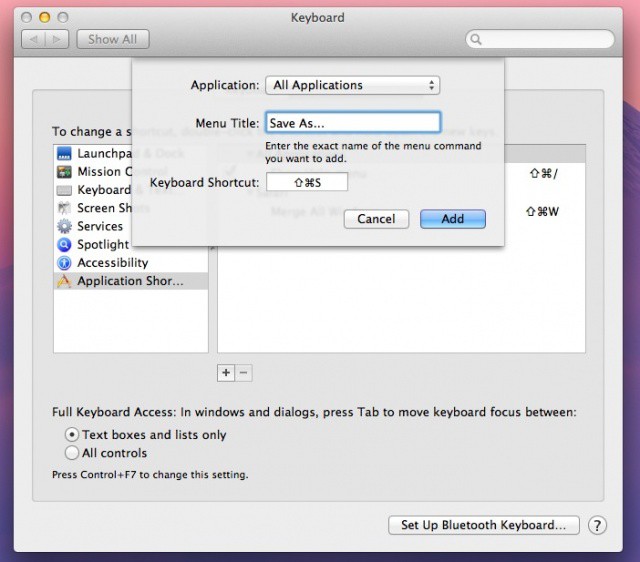
When OS X Lion debuted, our old-friend Save As… had been sent packing for a new imposter, Duplicate. We tried to like this new one, but wow was it not the same. Luckily, Mountain Lion has brought Save As… back, only in a sneaky, less than obvious way.

We want to share how to see the Save As… command, of course, with a simple key press, but we’ll go even one step further, clueing you in on how to return good-old-Save As… to its former glory, in the exalted spot it used to reside in. Here’s how.

President Obama Launches Official Re-Election App ‘Obama For America’

By

Obamappmap

The 2012 Presidential Elections are fast closing in on us, with a little over three months left before Barack Obama and Mitt Romney enter the ring and, following the protocol laid out in the constitution by our forefathers, settle the question of who will become the next American president in front of a panel of judges in a Zoolander style walk-off.

Perhaps to prepare for this upcoming challenge, Prsident Obama’s re-election campaign is launching a new iOS app.

This Musician’s iPad Has Utterly Changed The Way He Teaches, Learns, And Practices Music

By

There is, in fact, an app for that.

Redditor GrandHarbler is a musician and music teacher. He took to the popular social news sharing site today to start a conversation about how the iPad has improved his own practice, teaching, and music learning workflow.

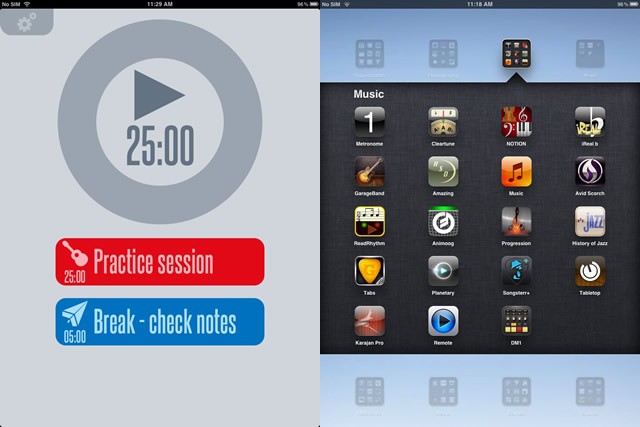
As a musician, GrandHarbler has to practice every day. A lot. He works on goals that he times with an app called TaskMatrix, setting up 25 minute on and 5 minute off practice intervals called Pomodoros. He times them with a simple timer app, called 30/30.

Create A PC Hackintosh Running OS X Mountain Lion With The New UniBeast Tool

By

unibeast_mtnlion

OS X is designed to run seamlessly on Mac hardware, but did you know that you can actually install Apple’s desktop operating system on a Windows PC and make what’s called a “Hackintosh?” Apple released OS X Mountain Lion in the Mac App Store last week, and it has already been downloaded 3 million times. But if you’re stuck with a PC, you can’t taste the forbidden fruits… until now. UniBeast, the tool used for creating a Hackintosh, has been updated with support for Mountain Lion.

Hackintoshing is not for the faint of heart, but if you’re up to the challenge, it’s possible to get Mountain Lion up and running on your PC.

ZaggFolio iPad Keyboard Case Is Great… Apart From The Case [Review]

By

wpid-Photo-28072012-1554.jpg
As a keyboard, the Zaggfolio is great.

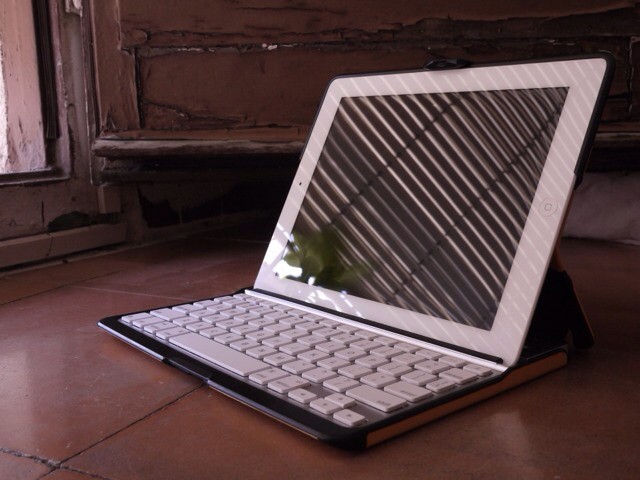
The new Zaggfolio keyboard and case for the iPad 3 is a very weird little number. At first glance it looks like any other folio case, a protective book which holds the iPad in one side and has a keyboard embedded behind the front cover. But this one is modular, with a removable keyboard. And it comes in colors, although the plastic used to do this looks like it has been cut by (a shaky, alcoholic) hand.

And if you want to use the case without the keyboard (which is actually possible, as they’re available separately) then you’re going to end up with the dumbest-looking case around.

Despite all this, the Zaggfolio is actually pretty great.

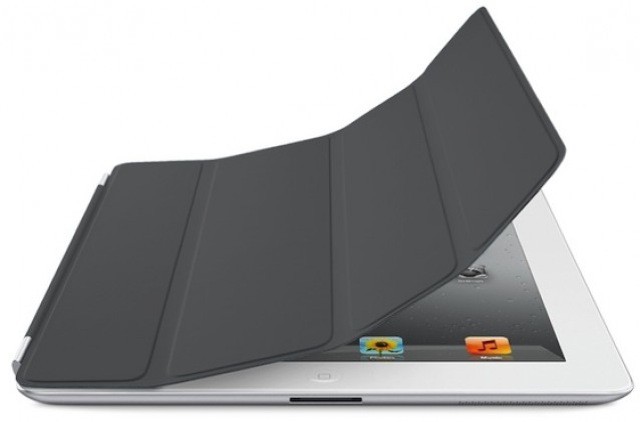
How The Smart Cover Security Vulnerability Reunited A Man With His Lost iPad

By

dark_gray_smart_cover-e1319465768894.jpg

Losing your iPad is probably a horrifying experience. It’s never happened to me, but if it did I would probably roll up into the fetal position and sob uncontrollably on the hard floor of the city bus until someone gave it back. Maybe I’m exaggerating a tiny bit, but it’d be a really really sad day in my life.

The worst part about losing your iPad is knowing that someone else is going to find it and they’re not going to give it back. All of your photos, iBooks, and hard work on Fieldrunners 2 is now theirs. Except sometimes an incredible story pops up that restores your faith in humanity, like how this kid on Reddit found a lost iPad and worked on finding the owner for 4 months.

djay Updated With Mountain Lion Support, AirPlay Audio, Retina Graphics

By

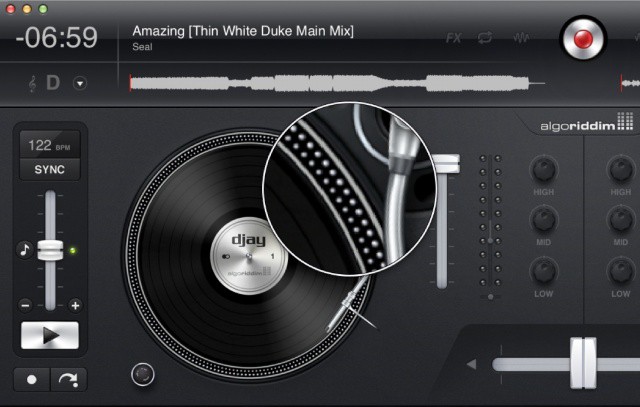
djay now looks great on the new MacBook Pro's Retina display.

Algoriddim, creators of popular music player djay on the Mac, iPhone and iPad, today announced a huge update for the Mac version. Not only has djay been updated with support for the newly-released OS X Mountain Lion, but Algoriddim has also optimized the app for the new MacBook Pro with Retina display. Thanks to the enhanced AirPlay functionality in Mountain Lion, djay users can also wirelessly stream audio from the Mac app to any AirPlay-enabled speakers or Apple TV.