Mobile menu toggle

Search results for: Apple One

Visualize (And Touch) Your Evernote Data With Bubble Browser For Mac And iPad

By

Apparently, I need to tag my notes more.

Evernote–it’s totally awesome, right? Track everything you do in Evernote, and access it on your Mac, the web, your iPhone, your iPad, or any other platform Evernote lives on, all with one login. Need that shopping list you created on your Mac while at the store? Pull it up on your iPhone at Costco. Want to show off that great website you saw while browsing the web at the coffee shop? Clip it to Evernote, and then pull it up on your iPad at home.

When you use Evernote as often and as regularly as many of us do, you’ll find that your own set of organization starts to break down. You’ve got so much stuff in there, across a variety of categories, notebooks, tags, and the like, that it starts to make less sense, perhaps, to your visual mind.

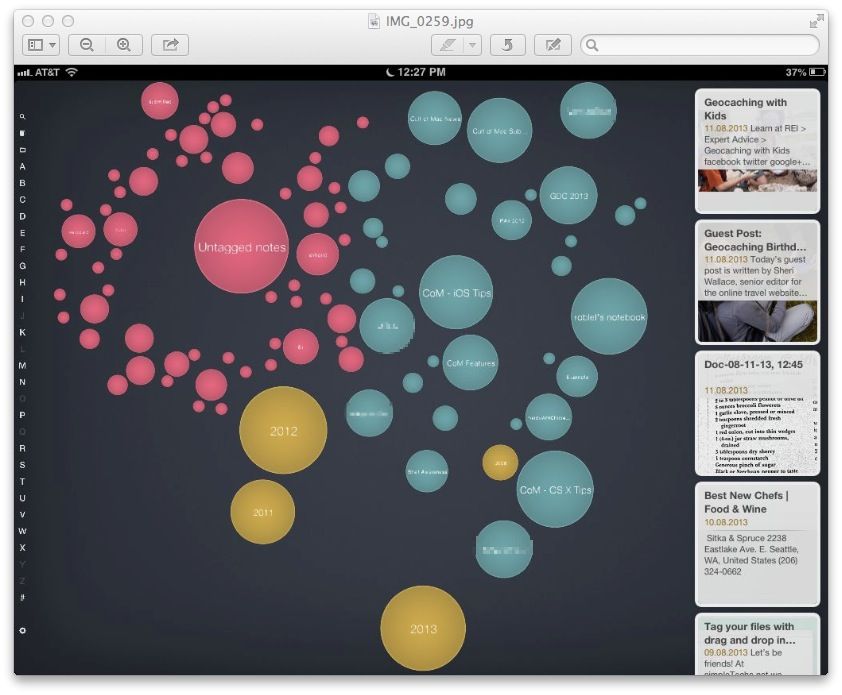
That’s where Bubble Broswer for Evernote comes in. This slick app, available for Mac as well as for iOS, re-visualizes your Evernote data into bubbles, making it easier to see patterns in your own data.


CBS Sports iPad App Updated With Live Video Streaming

By

cbs-sports

With college football, the NFL and the MLB post-season all knocking on the door, CBS has pushed out an update for its iPad app which allows users to stream live video of sporting events.

CBS has been streaming video to the iPhone for a while now, but it’s finally bringing it to the iPad with a full tablet experience. Now you can stream on-demand clips or live events to your iPad and push it to your TV via AirPlay via the free update.

Here are the release notes:

The HoverBar By Twelve South Is The Best Mount For Your iPad [Review]

By

twelvesouth_hoverbar_front_hires

Has your life been graced with a Twelve South product yet? The company’s Mac-only accessories line is imbued with such cleverness, it’s difficult to avoid complete ubiquity in the home or office. While I’m fond of many of their products — I use the PlugBug every day — it was their HoverBar that actually changed my life. All it required was a change in how to use the HoverBar.

HoverBar by Twelve South
Category: Stands
Works With: iPad
Price: $79.95

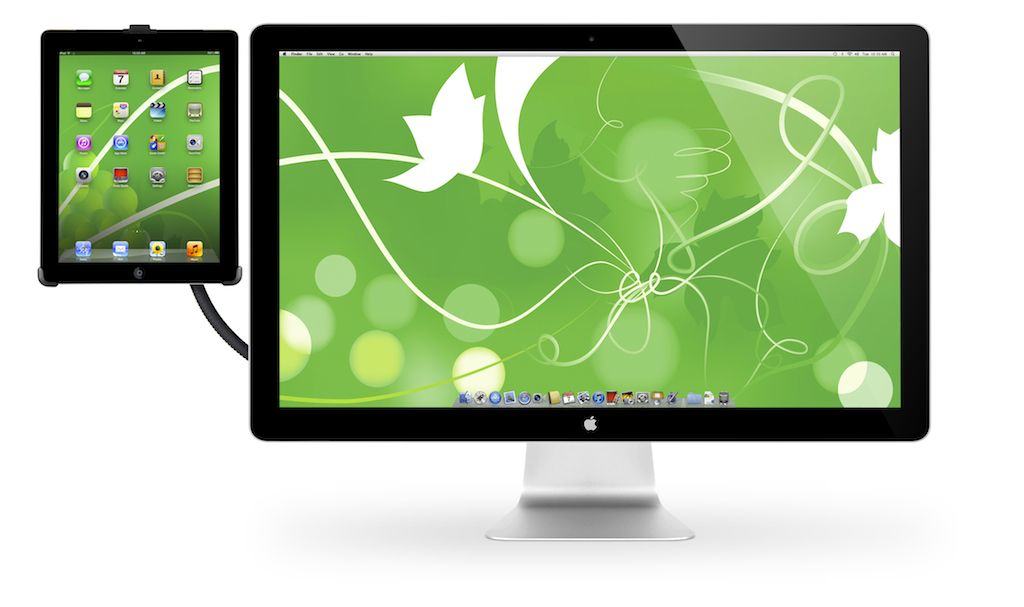
The intention of the “Tony Stark-inspired” HoverBar is to provide increased screen real estate on the iMac with a cool opposable arm. The mounting brackets fit an iPad 2, 3 or 4, providing the user not just with more screen real estate, but with touchscreen real estate. (Win!) I use an iMac primarily for film editing, so having an iPad near allows me to check email while I have all 27 inches of the iMac devoted to a project. The problem for me is that access to an iPad during this time is just a distraction.

Ultima Forever: Quest For The Avatar Is An Engaging, Free-To-Play MMO [Review]

By

Combat is simple yet frantic.
Combat is simple yet frantic in Ultima Forever: Quest For The Avatar.

Created in 1981, the Ultima series of computer games has a long and storied history. Richard Garriott (Lord British in-game) created Ultima while working at a ComputerLand, selling copies out of Ziploc bags and eventually getting picked up by a publishing company, creating his own publishing concern (Origin Systems), and finally selling Origin to Electronic Arts in 1992. In 1997, EA released Ultima Online, widely accepted as the first massively multiplayer online role-playing game.

Ultima Forever: Quest for the Avatar by Mythic Entertainment, EA
Category: iOS Game
Works With: iPad, iPhone
Price: Free

Fast-forward to today, and Mythic Games, along with publisher EA, has created a loving tribute to the Ultima franchise with Ultima Forever: Quest for the Avatar. These days, most EA games are created with a free-to-play aesthetic, and Ultima Forever is no exception.

What’s surprising, however, is just how little that matters: Ultima Forever: Quest for the Avatar is a delightful top-down MMO that’s easy to play without spending a dime. Which, ironically, is the reason many of us will.

WSJ: New iPad Will Use iPad Mini’s Touch Technology To Become Thinner And Lighter

By

iPad-Retina-Screen

The fifth-generation iPad will use the same touch-panel technology as the iPad mini to allow it to become thinner and lighter, according to “people with knowledge of the matter,” who have been speaking to The Wall Street Journal. The device is expected to look just like the iPad mini, with narrow bezels and a significantly thinner shell, but it will maintain a 9.7-inch Retina display.

Drag And Drop To Tag Your Files In OS X Mavericks Beta [OS X Tips]

By

drag n drop tags Mavericks

One of the cool new features of OS X Mavericks is the ability to tag files in the Finder, making Finder labels a bit more useful. Want to sort a bunch of files for your upcoming vacation into one place? Make a tag for “vacation,” and then add the tag per file with a right-click as we showed you a while back.

Want to track some of those vacation files with the destinations they pertain to? Go ahead and tag them with a second tag. Can’t do that with a label.

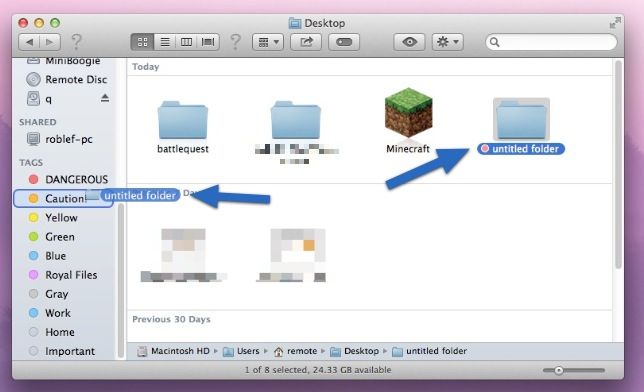
While it’s easy to right-click on a file and choose a tag, it’s even easier to add tags with a simple Mac OS standard move. Here’s how.

Abbyy’s TextGrabber + Translator 4.0 Grabs Text And Translates It

By

tt


If Abbyy’s upcoming new Textgrabber+Translator app came in a tin, then the app would do exactly what it said on that tin. And the tin—to stretch the metaphor—would be a beautiful, iOS 7-styled container.

The updated app, which now comes in an iPad-shaped tin to match the iPhone-shaped one, uses the iPad/iPhone’s camera to scan text, turn it into actual editable text and—if you like—translate it into any of 40 languages.

SteadyTune, A Beautiful Guitar Tuner That Sits Waiting In Your Mac’s Menu Bar

By

home-feature-steadytune

When I pick up a guitar, pretty much the only thing I can do is tune the thing. Well, that’s not entirely true: I can coil the strings and keep a burning cigarette in there, Eric Clapton-style, but as I quit smoking a few years back that’s not so useful anymore.

However, I’m fully aware that there are people out there who can thrash some amazing sounds out of their axes, and yet have trouble keeping the things in tune. SteadyTune, a Mac app that’s always waiting in the menu bar, is there to help.