Mobile menu toggle

Search results for: Apple One

RAW Capture And Megapixel Madness And Why Nobody Cares [MWC 2014]

By

The Galaxy S5 is trying to win a game the iPhone isn't even playing.

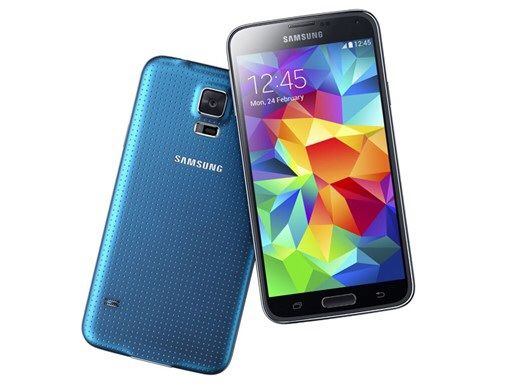
One of several themes at this year’s Mobile World Congress in Barcelona has been cellphone cameras (the others were waterproof phones, crappy smartwatches, and NFC). Samsung’s new flagship Galaxy S5 ups the pixel count from 13MP 16MP, and adds 4K video capture. Nokia’s handsets can now shoot RAW pictures (or rather, record RAW pictures, as all photos are RAW to begin with) and Sony was showing off new camera modules (the iPhone uses a Sony camera).

As I was walking around the show and shooting everything with my iPhone 5, I started to wonder: who cares?

Endless Surf Is A Gnarly Kind Of Endless Runner, Dude [Review]

By

photo_14_

As its name suggests, Endless Surf is pretty much an endless runner with a whole lot more water involved. If you’re looking for a true to life surfing sim, complete with realistic board dynamics and the like, you’re going to be disappointed. But if you can look past that, Endless Surf is a giant wave of fun.

Endless Surf by Lemur Software
Category: iOS Games
Works With: iPhone, iPad, iPod Touch
Price: $0.99

Like any endless runner, your goal is to keep going for as long as possible, while simultaneously notching up the highest score you can. In your path are various power-ups — in this case including one that turns the weather temporarily stormy, therefore increasing the size of your wave —as well as an array of obstacles to negotiate. These are mainly made up of buoys and menacing shark fins, but the real threat is the constantly advancing wall of water breaking behind you. Move too slowly and you’ll get swallowed up — leading to the inevitable “Wipe Out” screen. Move fast enough and, over time, you’ll be able to customize your character and complete the various stages the game has to offer.

Editor’s Letter

By

striscia

It’s hard to admit, but I know more about decluttering my closet than I do my computer. The last time I took my MacBook Pro to the Apple Store, I was humbled by the Genius who stumbled upon the virtual equivalent of an overstuffed, rat-infested garage.

It was like something out of one of those hoarding reality shows that I’m fond of because they confer a zen-like simplicity to my messy but-not-enough-to-die-buried-alive-under-belongings: there was a ton of dusty, useless, embarrassing crap clogging up my machine. With one raised eyebrow, he made me feel like a basket case for piles of applications that would never run on my current OS (and they were in the dock, too. The shame!) and a desktop so cluttered with screen shots, empty alias folders and .txt files that my actual desk looks pristine in comparison.

Enter Mac RX, Spring Cleaning Edition to the rescue. Cult of Mac readers know our long-running series on how to fix what ails your Apple device; this week we get a special decluttering take from our vintage expert and Apple Certified Consultant, Adam Rosen.

He’ll tell you what you really need to know about getting better performance from your Mac and why the machine gets clogged up in the first place. Hint: most of us don’t follow the basic tidying procedures we should.

So it’s time for a clean-up session: we’ll get you in, out and have your Mac running faster than it has in months. We stopped just short of Feng Shui for your desktop, but I have an expert for that if you’re interested.

Top iOS Apps of the Week

By

UpWord Notes

Browsing the App Store can be a bit overwhelming. Which apps are new? Which ones are good? Are the paid ones worth paying for, or do they have a free, lite version that will work well enough?

Well, if you stop interrogating me for a second, hypothetical App Store shopper, I can tell you about this thing we do here.

Every week, we highlight some of the most interesting new apps and collect them here for your consideration. This time, our picks include something to help you read that fine print, a handy money-tracker, and a shockingly comprehensive converter.

Here you go:

I’ve covered a few list-makers before, but this one just replaced Notes as my go-to item tracker.

It’s called UpWord Notes, and it is a simple but powerful app that lets you create, manage, and update lists with just a few simple commands. You can swipe left to make bullets and mark things as important, and you cross items off with a swipe to the right. Coolest of all, you can pull down, refresh-style, to remove all crossed-off items at once.

Plus it all syncs to Dropbox, so you can rest assured that you can always get your grocery list anywhere.

UpWord Notes – $0.99 | Lau Brothers LLC

Converta

It’s enough for some people just to plunk one value into a box and watch the conversion come out the other end, but we’re savvy here, right?

The newly released free version of Aperture Mobile’s Converta app thinks you are, and that’s why it actually bothers showing you what it’s doing. The free version calculates the equivalent values of angles, lengths, mass, temperatures, and volumes, and the $0.99 paid version includes things like illumination, radiation, velocity, and energy. You can also choose between a keypad and a clever gestural interface.

I’m not sure how useful the radiation conversion would be to most people, but it’s nice to know it’s there.

Converta – Free | Aperture Mobile

Zoomer

Sometimes, print is too small or your eyes get tired. Or you just want to see what something looks like really close up. Enter Zoomer, a simple-to-use, completely uncluttered app that lets you magnify things up to 10x just by swiping to the left. You can swipe to the right to zoom back out, turn on your LED flash, and even reverse colors to make things look all weird (it’s probably for night-time reading, but it does also make things look totally weird).

You can also use it to look at ants close up without accidentally setting them on fire. And I’m sure the ants appreciate that.

Zoomer – Free | LightBulbOne
Balance Book

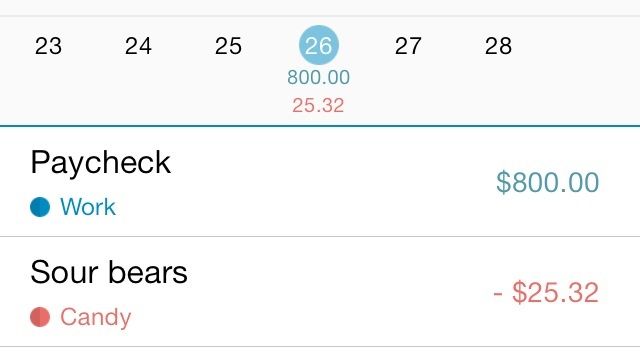
Balance Book is a simple, easy, clean way to track your income and expenses on a daily or monthly level. You set up categories and assign colors to keep them straight, and then you just make entries based on how much money you bring in or spend. It automatically calculates your net values to give you an idea of where you are on any given day.

Now I know that I’m probably spending way too much money on sour bears. But in my defense, they are delicious.

Balance Book – Free | Tree Planet
Enigmo: Explore: You Have 30 Seconds To Relax [Review]

By

Enigmo: Explore

Developer Pangea Software’s well-regarded Enigmo series of puzzle games has been around for a while, and they’ve turned over development of the latest installment, Enigmo: Explore to a new team, but the idea is the same: See that liquid dripping from a pipe over here? Get it into that jar over there.

Enigmo: Explore by Team Chaos
Category: iOS Games
Works With: iPhone, iPad
Price: $1.99

The game gives you a suite of tools to accomplish this, including trampoline-like items that the drops bounce off of and little cannons that can send them even farther. It’s up to you to decide which items in which combinations to use to complete levels, which offers you a decent amount of freedom when you’re playing it.

But a couple other features work just as hard against you, and it’s kind of a shame.

The i360: A Flawless Turntable That Will Give Your iMac 360° Views [Deals]

By

redesign_i360_mainframe

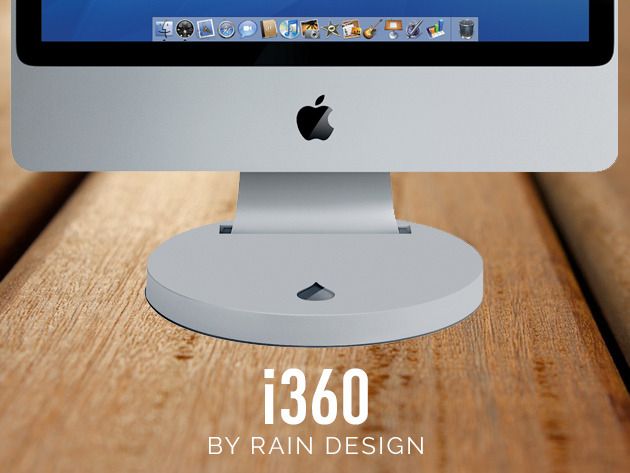
Tired of turning your iMac or Apple Cinema Display just to share things with co-workers or to get a better vantage point when you’re working? This Cult of Mac Deals offer has got your solution.

The Rain Design i360 turntable provides an elegant and dynamic way to turn the iMac, Apple Cinema Display, and Apple Thunderbolt (24“–27”). At the push of a finger, you can share the screen during group discussion and access the back ports easily. And you can get the i360 for only $39.99 courtesy of this special offer from Cult of Mac Deals.

David Fincher Reportedly In Talks To Direct Aaron Sorkin’s Steve Jobs Biopic For Sony

By

fincherdavid6252012

Oscar-nominated director David Fincher is in talks to direct Sony’s upcoming biopic about Steve Jobs, according to Variety. If Fincher did direct, it would team him up yet again with writer Aaron Sorkin. The last time the two worked together was on The Social Network.

Fincher is currently finishing up post-production on his latest movie, Gone Girl, starring Ben Affleck. He directed the first two episodes of House of Cards and is an executive producer for the show. The last project he directed for Sony was 2011’s The Girl with the Dragon Tattoo.

Aaron Sorkin finished his script for the Jobs biopic earlier this year. He has said in the past that the story will be divided into three distinct acts, and each act will take place backstage at an Apple keynote. No rumors on casting yet.

Source: Variety

Buffalo Wings Wants To Pick Up Where Flappy Bird Left Off

By

BuffaloWingsGameplay

The tale of Flappy Bird is almost unbelievable. A frustratingly simple iPhone game from an indie game dev in Vietnam with no prior notoriety becomes an overnight success. It dominates the App Store charts and starts making $50,000 per day in ad revenue. Then, out of the blue, the dev decides to pull it from the App Store at the height of its popularity.

It was a story too good to be true. Except that it was true.

In the wake of Flappy Birds’s removal, countless knockoffs have tried to fill the gap. “Flappy Bird being taken off the App Store has created this vacuum,” says Jeremy Olson, founder of the award-winning app studio Tapity. In an effort to make a worthy successor to Flappy Bird, Olson and his small team have created Buffalo Wings.

Instead of a bird, you guide a flying buffalo over and under walls by tapping the iPhone’s screen. Hit a wall at any point and you have to start over. The gameplay mechanics may be the same, but Tapity is hoping that Buffalo Wings has what it takes to capture lightning in a bottle twice.