Mobile menu toggle

It’s Time for Apple to Kill Off the Hard Drive

By

burning_hard_drive3

Picture from EQueue

Friends, Romans, Applefans, I come to bury hard drives, not to praise them. The evil that poor technologies do live after them, and our good files are oft interred with their ashes. So let it be with hard drives.

Look at your MacBook Pro. It’s beautiful, no? Bright screen, thin body, buttonless trackpad, carefully engineered ports, MagSafe power port… it’s a master-work. Except for one thing. It carries a vestigial organ that all-too-often reveals itself to be the ruptured appendix of computing: a hard drive.

Yes, for all of our wonderful computing progress (spaghetti ports to USB; mobile dual-core processors, DDR3 DRAM, insanely fast GPUs), the lowly hard drive continues to exist based off of approximately the same technology it was back in the 1970s. Spinning magnetic platters with read/write heads, saving our entire digital lives in the process.

And while they have many wonderful qualities (massive storage capacity, more so than anything but TAPE; extremely low cost), they also have a fatal flaw, which is that they break and they break hard. Platters get warped, spindles get loose, heads get misaligned, and suddenly your computer stops working and you lose the project you’ve been slaving over for the last few months (see my wife’s recent calamity for evidence and a little solace in the iPhone).

How the Mac Got Started, in its Birth-Father’s Words

By

511px-Macintosh_128k_transparency

Image via Wikipedia

Fast Co.Design has a very interesting Apple history artifact posted up today: the birth of the Mac, as told by Jef Raskin, the late founder of the Mac project. Jef’s son Aza wrote the piece and provides scans of the original document if you’re into authenticity instead of legibility.

It’s worth noting before you dive in, which I highly recommend, that Raskin’s vision for the Mac was very different from what Apple actually produced once Steve Jobs took over the development team. Raskin wanted the most unified hardware and software imaginable. One screen, one keyboard, one processor, one memory configuration, no expansion slots, one box. Oh, and he wanted a printer built into the box.

He also wanted to get rid of all modality in a computer. So, for example, if you started typing, the word processor would open and capture what you were typing (rather than having Clippy note that you’re writing a letter). A lot of that stayed in, but Jobs made it much more powerful and, ultimately, diverse and fragmented a platform than Raskin ever envisioned (see the Canon Cat for that).

As Aza Raskin notes, his father’s philosophy is much closer to what’s going one with the iPhone and the iPad. After all, you can have any iPad you want, so long as it comes in brushed aluminum.

This item of controlling appearance is quite significant: for example it is impossible to write a program on the Apple II or III that will draw a high-resolution circle since the aspect ratio and linearity of the customer’s TV or monitor is unknown. You can probably promise a closed curve, but not much more. You cannot promise readable characters, either. Therefore, a predictable, documentable system must be entirely under Apple’s control. LISA is Apple’s first system to allow us to design in context, without depending on chance for the all-important visual aspects of the computer’s output.

Well said. And one of the few places Jef and Steve really saw eye-to-eye, in the long run.

Apple Touts Suicide Nets In Supplier Responsibility Report, But Changes Little

By

Worker suicides are still a problem for Foxconn.

The main point of performer Mike Daisey’s powerful one-man show about Apple and its Chinese factories is that in China, it’s cheaper to have people make products rather than have machines make those products. As a result, people are treated like machines. They perform the same tasks, day in, day out. They work excessively long hours and if they break down, they are discarded. Most tellingly, if they try to commit suicide, the factory puts up big nets around its buildings to catch them. Nothing about the work or the workplace is changed.

It’s these nets that Apple touts in its just-published Supplier Responsibility report, which details the progress it has made during 2011 in imposing standards on its overseas contractors. The report discusses child labor, factory poisonings and conflict materials. A whole section is devoted to the suicides in 2010 at Foxconn, its largest overseas supplier.

Don’t Forget Jeopardy! Tonight: See Future iPhone Tech In Action

By

20Computer-span-articleLarge-v2

At the weekend, the Wall Street Journal reported an intriguiging detail about the upcoming iPhone nano: the new iPhone would feature “voice-based navigation.” (It will also be streaming-only, according to our report).

Could this be true system-wide voice control, as programming legend Bill Atkinson predicted at Macworld?

As we previously reported, Atkinson said it’s clear that iPhones would one day be controlled by voice, but he predicted the development to be several years away — two to ten years, he said.

But Atkinson reminded us we can get a sneak peek at the technology if we tune into Jeopardy! tonight. The history-making show features IBM’s DeepQA Project Watson supercomputer versus previous champions, Ken Jennings and Brad Rutter.

It’s likely to be a first public demonstration of the kind of natural-language and real-world knowledge technology to make it work.

“When we see computers interacting with a natural language interface, people are going to want it,” Atkinson said.

“I’d ask you all to watch Jeopardy on February 14,” he said. “It may be a momentous occasion.”

Here’s The Best iPhone Nano Mockup So Far

By

iPhone_micro

This is probably the best iPhone nano mockup so far from our friend Tyler Hojberg, who writes:

Hey, just thought I’d share my concept idea of the “iPhone nano.” Creating a smaller chunkier screen allows more room for a full sized keyboard and contrary to popular belief, I decided to keep the home button. I don’t believe Apple is ready to do away with the iconic home button just yet, as I believe it’s one of the distinguishing form factors of the iPhone. Notice the change in antenna at the bottom which I believe would be blocked because of the way a smaller iPhone is held, leaving only one at the top. It’s conceptual, but not too far-fetched.

What do you guys think? Would it work?

Could Extended Free Access to ‘The Daily’ Mean iOS 4.3 Coming Feb 28th?

By

the_daily_subscription-1

While the wait for iOS 4.3 and in-app recurring subscriptions continues, free access to The Daily has been extended beyond the original two-week trial period until February 28th, sparking rumors that suggest Apple’s next iOS update could also drop on the same date.

The extension to free access was picked up by German Mac blog Macerkopf, after the expiry date of their subscription changed within the “Account Information” in The Daily application. Because the application’s billing method relies on the recurring subscriptions feature iOS 4.3, customers cannot be charged for access to the service until the update is available.

Of course, Feb 28th may be nowhere near the release date of 4.3, and The Daily could be just extending its free trial to a random date in the hope that the update is available by then.

There have been rumors that the public debut of iOS 4.3 would be at 10 AM EST today, however, a quick glance at your clock right now will show that predication was an inaccurate one.

[via 9to5 Mac]

Enjoy the Hubble’s Most Remarkable Images with HubbleSite [Must-Have App]

By

HubbleSite for iPhone

HubbleSite(Free) iPhone – Education

Today’s must-have iOS application is HubbleSite, the online home of NASA’s Hubble space telescope. For over 20 years Hubble has orbited the Earth, beaming home images of celestial splendour; now you have access to the world’s most remarkable Hubble images at your fingertips, to enjoy on your iPhone anytime, anywhere.

Cast your eye over a vast collection of spectacular sights from the Hubble archives and vote for the images that you find the to be the most astounding. Download a selection of wallpapers for your device, all of which have been chosen and edited to deliver beautiful results on the iPhone & iPod touch with a Retina display. Read a compilation of amazing facts about the Hubble telescope’s history and the scientific discoveries it has revealed, from the age of the universe to the mysterious force known as ‘dark energy’ – all within the official Hubble iOS app.

For anyone interested in space and the universe around us, HubbleSite should be the next application you download from the App Store.

N.O.V.A. 2 is the Best Sci-Fi FPS for iOS, On Sale at $0.99 [Must-Have Game]

By

N.O.V.A. 2 on iPhone

N.O.V.A. 2($0.99) iPhone – Games

Although it’s not strictly a brand new release, today’s must-have iOS game has been chosen simply because it’s one of the most exciting first person shooters available in the App Store, and it’s on sale today for just $0.99!

N.O.V.A. 2 is the sequel to Gameloft’s first hugely successful sci-fi FPS – Near Orbit Vanguard Alliance, and this follow up title boasts new enemies with improved AI, a larger range of weapons and powers, and 10-on-10 online multiplayer – you won’t want to miss it!

Find out more after the break!

iPhone Apps Can Help You Impersonate The Police [Bad Ideas]

By

outtmyway

There is an app for practically anything and now there are apps that will help you to impersonate a cop. Especially a cop making traffic stops as one woman reported to Northwest Indiana police recently.

The woman called 911 late one night recently with the suspicion that the black Pontiac GTO with flashing blue and red lights at the top of its windshield wasn’t really a cop. She thought that the driver of the car was following her and attempting to pull her over.

Daily Deals: iPhone App Price Drops, Google Apps Browser, N.O.V.A. 2 for iPhone

By

cult_logo_featured_image_missing_default1920x1080

We start off another week, this time with the iPhone in our deal spotlight. First up is a new crop of price cuts on iPhone apps, including “Fotopedia Nat’l Park,” a photo database of U.S National Parks. Next is a Google Apps Browser, an unofficial application for the iPhone and iPad, giving you access to the various applications, such as Gmail, Google Reader and Google Voice. We then wrap up on the featured bargains with N.O.V.A. 2 (that’s Near Orbit Vanguard Alliance for the uninitiated) for the iPhone and iPod touch.

Along the way, we check out some iPad and iPhone cases, accessories and software. As always, details on these and many other items can be found at CoM’s “Daily Deals” page right after the jump.

AT&T Users Report Automatic Increases In Data Plan Limits

By

post-81871-image-bd41aed59e08bfdb09ec2eb1938145b9-jpg

Rumors have been running rampant on the internet about AT&T’s response to the Verizon iPhone and one of those rumors was about adjustments that AT&T will be making or could be making to current data plans. Retention of current customers seems to be on AT&T’s mind lately and we can thank Verizon for that.

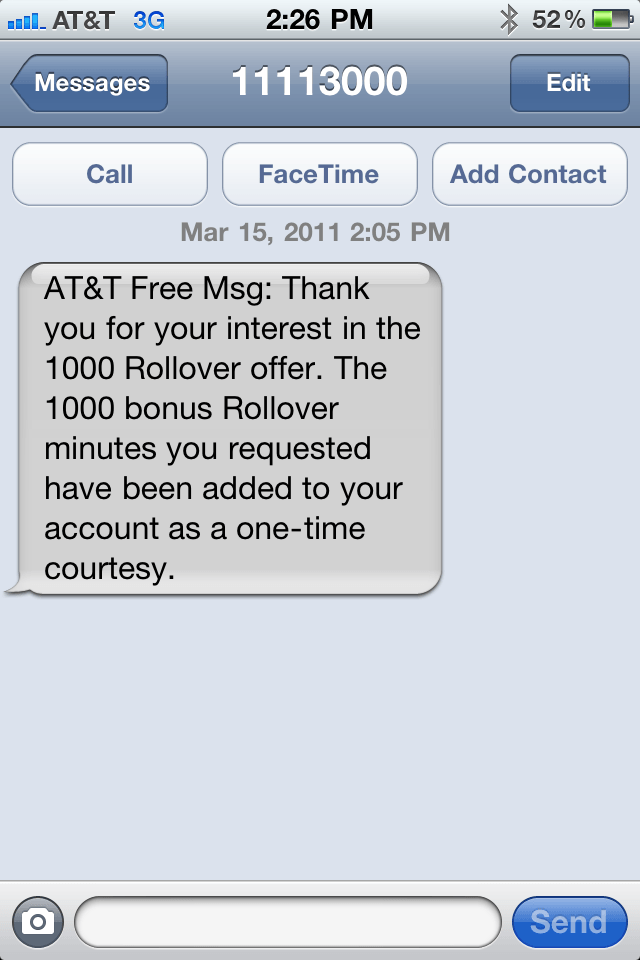
It all started with the fairly generous offer of 1,000 rollover minutes for customers who simply sent the word “yes” in a text message to 11113020.  The system responded telling those customers that they would receive these minutes on their account within four weeks. However, the generosity hasn’t stopped there.

Verizon iPhone Has Limitations With Conference Calls

By

post-81851-image-2f3203397ad7aa36a27cf85ae4c3fe8e-jpg

For many users, the Verizon iPhone is a big step-up from AT&T when it comes to quality service. Service on Verizon is simply more dependable: calls don’t drop as much, the person you’re speaking to seems clearer, etc. That’s 95% of what most people care about.

That’s not to say the Verizon iPhone’s a slam dunk for everyone, though. It has its drawbacks. Verizon’s CDMA network can’t handle the simultaneous juggling of data and voice. 3G speeds are inferior to AT&T’s. And, if you’re a business user, the Verizon iPhone has some serious limitations when it comes to conference calling: not only are you limited to conference calls with just two other people, but you can’t switch between conference calls either.

These aren’t problems with the hardware: just limitations with Verizon’s CDMA network, and ones that every Verizon user has to deal with. This isn’t likely to be an issue for more than a small percentile of customers, but if you’re one of them, and need your network to handle conferencing robustly, you might want to think twice before making the switch.

Report: New MacBook Pros Coming March 1st

By

macbook-pro-unibody-17-6

The iPad 2 isn’t the only new Apple product that is likely to hit stores in March. For weeks now, supplies of existing MacBook Pro models have been plummeting, and given Tim Cook’s obsession with supply, that indicates a refresh across the board.

So when can you expect the new MacBook Pros? Unknown, but according to Danish Blogger Kenneth Lund, the date he’s hearing in Denmark from Apple Resellers is March 1st.

AT&T Throws 50% Off Sale For iPad Accessories In Preparation for iPad 2

By

iluv-ipad-accessories

You only need to take the quickest and most cursory glance at the newsf eeds to know that the iPad 2 isn’t just coming, and it’s right around the corner, hitting Apple Stores no later than sometime in April.

But if you need more proof, consider this: AT&T is having a massive sale on all iPad accessories. They’re clearing house of all the accessories that in a few short months won’t work with the current-gen iPad, and they’re desperate enough that they’re slashing prices literally in half.

Yup, all iPad accessories are now 50% off at AT&T. You just don’t discount accessories on a successful current product like this if you aren’t expecting them to be obsolete soon. As for how soon, if AT&T knows something the rest of us don’t, my guess is that we’re looking at a March launch for the iPad 2 instead of April. Why clear house now if there’s still two months to go?

Simple Utility To Set Up Spotify Control Keys

By

20110214-spotify-menubar.jpg

If you use online streaming service Spotify, you’ll know that the client software required for controlling it is pretty good.

It’s simple to use, and not too cluttered with controls and extras. Since I started paying £5/month for Spotify’s advert-free Unlimited service, I’ve been listening to it for many hours on end, and found only one problem: I have to switch back to Spotify to control it.

Now it’s true that Spotify can be controlled with your Mac’s existing dedicated iTunes buttons – F7 for previous track, F8 for play/pause, and F9 for next track. But this only works well if iTunes isn’t running at the same time. If both apps are open, they both respond to these commands, and audio chaos ensues.

Spotify Menubar is a simple free utility that solves this problem by allowing you to set up your own system-wide keyboard shortcuts for Spotify, so you can avoid the conflict with iTunes and still have easy keyboard access to your favorite songs.

It would be nice if Spotify Menubar had some clickable controls of its own, which would better justify its position on the Menu Bar in the first place. But for those of us who spend hours a day with our heads inside Spotify playlists, it’s a useful little widget to have around nonetheless.

Report: Apple to Pay Galaxy Tab Maker Samsung $7.8B for Components

By

galaxy tab n ipad 2

More deals from the supply front, as Apple reportedly inks a deal worth $7.8B with tablet rival Samsung to supply components for the upcoming iPad 2 and other mobile devices created by the Cupertino, Calif. tech giant. The report follows earlier talk the tablet maker had signed agreements with several manufacturers in a bid to corner the supply of parts required for a high-resolution ‘retina’ display.

This latest agreement reported by the Wall Street Journal would make Samsung Apple’s largest supplier, something which has raised eyebrows. Samsung makes the Android-based Galaxy smartphone and Galaxy Tab tablet, which are alternatives to Apple’s MacBook and iPad.

Get 8X Telephoto Zoom On Your iPhone Camera

By

20110214-iphone8xzoom.jpg

New over at Photojojo is this bizarre $35 add-on for iPhone 3GS or iPhone 4: an 8X zoom lens kit.

You get more than just the lens. The kit comes with a slide-on case for your phone, on to which you attach the lens itself. There’s also a mini tripod so you can keep the whole thing steady.

It certainly looks weird, but it’s so cheap that I can see plenty of photo nerds jumping at the chance to play around with iPhone zoomery.

If you do, let us know what you think of it, or link to some of your sample images.

Pic of the Day: Pinup Sends a Valentine to Her Mac

By

Christy Pelland poses with her Apple devices. @Christy Pelland


Christy Pelland isn’t exactly a pinup, but you’d be forgiven for making that assumption viewing the pic above.

Pelland is a photographer by trade who specializes in retro-pinup portraits. And she loves her Macs.

Read on for more about her love affair with Apple, what makes Mac nerds sexy, her studio set-up, and yes, more pics.

Report: Apple iPad ‘Far Ahead’ in Enterprise Adoption

By

businessman

It’s not often Apple and the corporate boardroom are mentioned in the same sentence, but an increasing number of analysts say the Cupertino, Calif. company’s iPad is a big hit with business. As CEO Steve Jobs puts it: “We’ve got a tiger by the tail…”

Apple’s secret weapon in what Barclays analyst Ben Reitzes calls “the consumerization of IT” is the infiltration of the iPad, iPhone and other products not originally aimed at the enterprise. And as for the iPad, the tablet is “running far ahead” of competitors, making competition for corporate dollars Apple’s game to lose, according to the analyst.

More Detail On Apple’s iPhone Nano [Exclusive]

By

iPhone_nano

UPDATE: The big question about a streaming-only iPhone is apps: How will users download apps? My source compared it to the second-generation Apple TV, which is a streaming-only device but includes 8GB of onboard memory (for the OS and buffering media). “I’m not 100% sure on the amount of memory available for the user,” he said. “I know there is some memory but it acts more like the memory on the AppleTV. There is some there, I’m just not sure how much.”

We have more detail on Apple’s iPhone nano, which according to Sunday’s Wall Street Journal is real and may be headed to market this year.

But what we have will blow your mind.

Stay Hungry, Stay Foolish: Timeless Words of Inspiration from Steve Jobs

By

post-81681-image-48b722a1a6b1f1b08e055cff8873beed-jpg

Back in 2005, after his battle with cancer and first medical leave of absence from Apple, Steve Jobs gave a rare glimpse into his personal passions and motivation in an inspiring commencement speech to Stanford University graduates. As Jobs once again takes leave of his child – and prognosticators debate what may become of Apple – Matt’s Macintosh has created this lovely compendium of an excerpt from that address, with music and great old photos from Before the Turtleneck.

Stay Hungry, Stay Foolish. It’s what has made Apple so special. It can still change the world.

This Week’s Must-Have iOS Apps: Free-App Hero, Google Translate, Pillboxie & More!

By

Screen shot 2011-02-13 at 20.34.11

At the top of our must-have apps list this week is Free-App Hero, a fantastic app tracker maintained by experienced, professional game reviewers with an encyclopaedic knowledge of thousands of iOS apps. Unlike other free app recommendation services, Free-App Hero recommends only the best games, because they’re the best – not just because its developer paid them to recommend it.

Google’s latest application, Google Translate, is also in this week’s choice of applications. One of the best language translation services is now available on your iPhone, with the ability to translate words and phrases between more than 50 languages. It has some great features that make using Google Translate a pleasure on your iPhone.

Pillboxie is an excellent application for those that require regular medication, providing you with an incredibly simple way to create a schedule for your medication and get reminders when your pills are due. Never forget your pills again and discover the easiest method of managing your medication on your iPhone.

Find out more about the applications above and check out the rest of this week’s must-have apps, including Friended and Camera Mic, after the break!