After the amusing skirmish between the Judge and attorneys on late-filing motions and a quick five-minute testimony from a survey expert, we get a bigger fish to fry in Samsung royalty analyst Vincent O’Brien. He is testifying about similar but separate findings than the earlier witnesses.
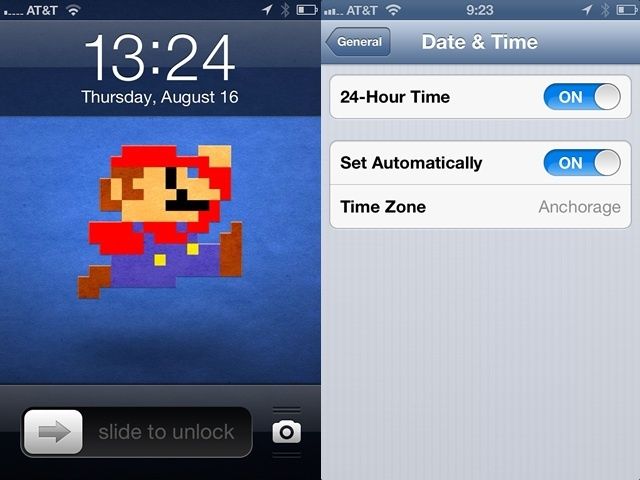
Here in the US, if you’re in the military or work in aviation, you might actually use what most of the rest of the world thinks of as standard, 24-hour time. While it will confuse all your US-living friends and relatives when they ask for the time and you show them your iOS device’s lock screen, that’s their issue, right? You, at least, will have the joy of knowing that you are fully prepared for the type of time tracking that most people around the globe use.
The default iOS clock in the US is a 12-hour clock, with AM and PM appended to the numbers to denote morning or evening. The other, more standard way of representing the time is with the 24-hour clock, in which any time after 12:00 is the logical 13:00, 14:00, and so on. It’s really easy to set on your iPhone or other iOS device.
Question: Do you have any idea what the following terms mean?
Multiply, Screen, Layover, Soft Light, Hard Light, Color Dodge, Color Burn, Addition, Difference, Darken, Lighten, Hue, Saturation, Color and Luminosity.
Answer (if you didn’t answer “yes” yourself): They’re blending modes. And a new iOS called Layover lets you use them to combine layered images. Still confused? Read on…
Don't want the hassle of selling on eBay? Flog your old iPhone to Apple.
Walk into your local AT&T, Verizon or Sprint store and ask to look at the latest and greatest smartphone. A store employee will show you the Samsung Galaxy lll and other Android phones from the likes of HTC and Motorola. You may be shown a Windows Phone like the Nokia Lumia 900. At Verizon, you’re definitely going to be shown about the Motorola DROID RAZR 4G.
You won’t get pitched the iPhone as easily. In fact, many walk into a store with the plan of buying an iPhone and come out with the latest Android phone in hand.
Why? Employees and customers we’ve spoken to agree that sales reps from all three big carriers discriminate against the iPhone on the store floor, but it’s not a conspiracy: profit margins and device-specific incentives pressure employees to intentionally steer customers away.
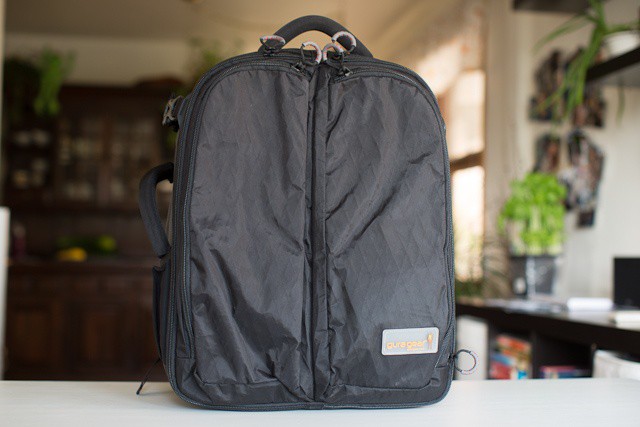
As pro as they come: Gura Gear's Kiboko 22L+ Camera Backpack
Gura Gear’s Kiboko 22L+ ($379) can gulp down multiple DLSRs, two or three lenses, your multitude of other photo accessories, and oh yeah, a 17-inch Macbook Pro, but still fit in the overhead bin of almost any aircraft in the world.
A JPG rotated 900 times. Who says digital files don't rot?
Back up your photos. Always shoot in RAW. After a while all the good advice starts to sound like the adults speaking in Charlie Brown cartoons. Wah-wah-wah-wahwahwah.
Especially now iCloud manages our backups and our iPhones only shoot JPGs.
But one piece of advice is still worth listening to: “always rotate JPGs losslessly.” What?
We are back at the Samsung-Apple Trial with another of Samsung’s witnesses, damages expert Michael J. Wagner. He is testifying about his analysis of possible damages based on the patent infringement Apple accuses Samsung of orchestrating for the last few years. Let’s get to it.
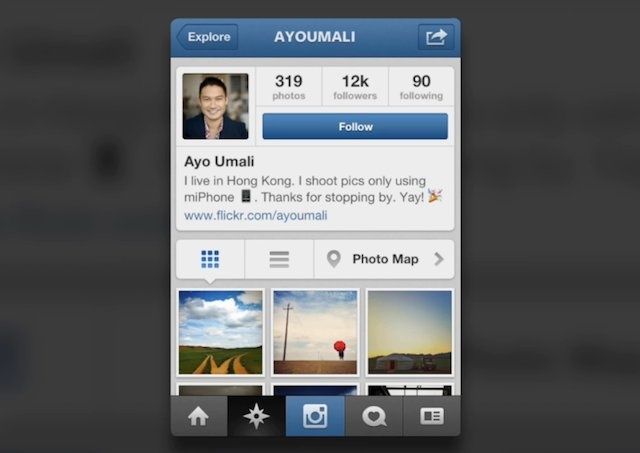
Instagram just released a big new update for their popular photo sharing service. It’s simple. It’s got filters. It’s got a big map with geo-tagged pictures. It’s great. But does anyone use the Instagram app to snap pictures the pictures they actually upload, or do they use something else first?
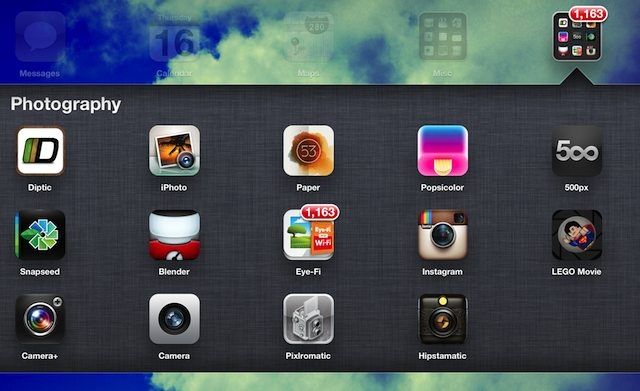
There are a lot of great camera apps on the iPhone, other than the default app, that take pictures – Camera+, Instagram, Picfx, Snapseed, Hipstamatic, Pixlr-o-matic, and way too many more to list. I use Instagram a lot, but thing is, I don’t think I’ve ever taken a photo from inside the Instagram app and then uploaded it. I always use another app first and then import it into Instagram. Am I the only one? What’s your process for taking picture with your iPhone and getting them onto Instagram? Come tell us what you do with your photos before uploading to Instagram.
It was recently reported that Apple’s retail employees around the world have been experiencing staffing cutbacks. Word on the street was that some major internal changes were taking place within Apple Retail, and new hires were getting laid off in stores on multiple continents.
In a very uncharacteristic move, Apple today publicly admitted that it “messed up” with recent changes to its retail staffing, and that things will be going back to the way they were before the layoffs.
Instagram 3.0 is launching today on both Android and iPhone. Whereas previous updates focused on bug fixes, new filters, and speed enhancements, Instagram 3.0 is brings some big UI changes so users can interact with photos in a new way. The key? Geotagging and Photomaps.
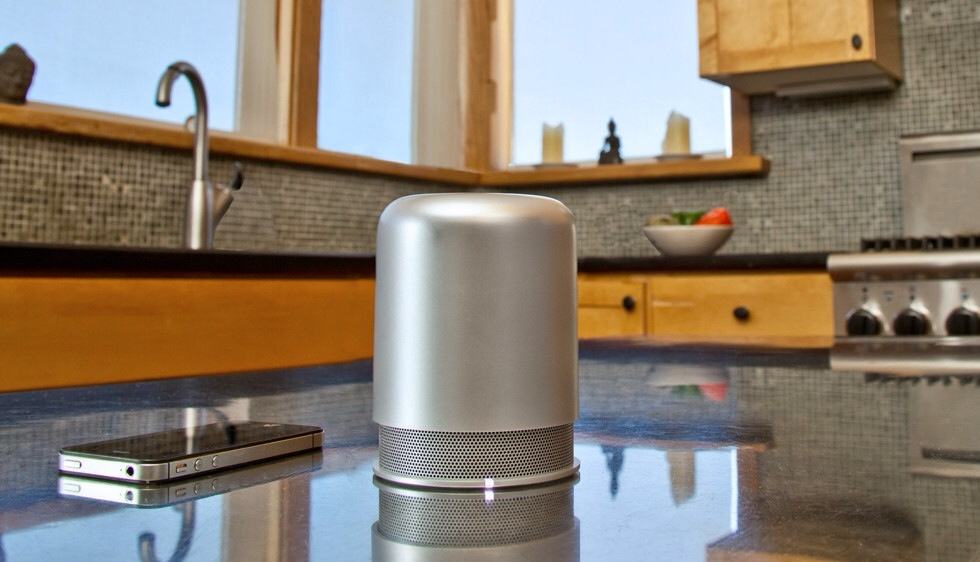
The Hidden Radio speaker is like one giant volume knob.
Hidden Radio, a Bluetooth speaker and radio so minimalist it makes a sheet of blank paper look like something from a Jules Verne story, has finally emerged from a lengthy Kickstarter pupation to go on sale in a web store near you.
It’s stylish, it’s loud and it lasts longer than most other Bluetooth speakers around. What’s not to like?
Apple neglected to give its iPod line any real attention last year, and so it seems likely the devices will receive a much-anticipated refresh before the holidays. Still, we’ve seen little evidence of this, but one German rewards club has promised that there will be a new iPod nano this fall, and that the “old” model is no longer available from Apple.
Your keyboard lights up, so why shouldn't your trackpad?
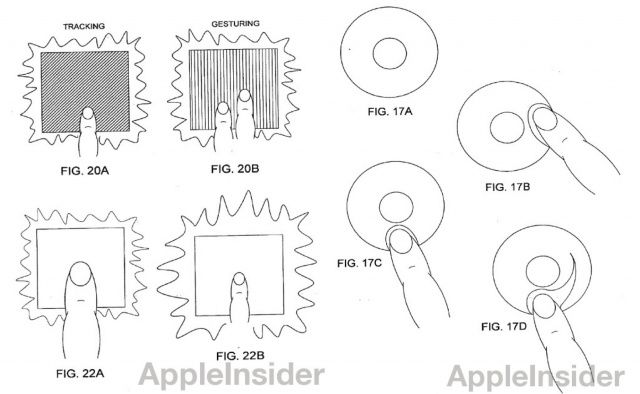
If you’ve got a fairly recent MacBook Air or MacBook Pro, you’ll know that typing in a dark room is a breeze thanks to its backlit keyboard. It now seems as though Apple is looking to extend this feature to the trackpad as well. In a new patent filing entitled “Illuminated Touchpad”, the Cupertino company describes a new touch-sensitive input technology that doesn’t just light up, but also provides an “improved feedback mechanism.”
Could Apple be working on their own answer to Adobe Photoshop or Illustrator: a sophisticated program for professionals doing photo manipulation and digital illustrating? If a new patent is anything to go by, yes, and it won’t just be a major innovation on the Mac… it will work on the iPad as well.
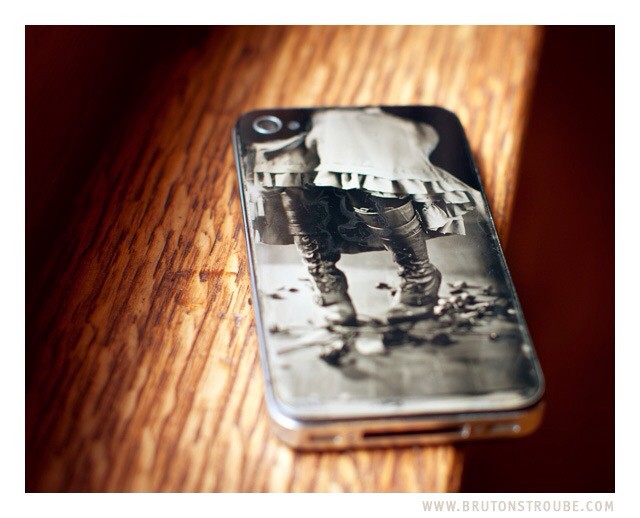
When it comes to iPhoneography, “retro” usually refers to adding some light leaks, desaturating some colors or adding fake grain. But for Jake Potts, it means taking the iPhone’s rear glass panel, turning it into a wet collodion plate and taking a real photograph with it. And because he’s a true photo nerd, he also documented every step of the process.
I imagine that every SLR user ever will want the QuickDraw.
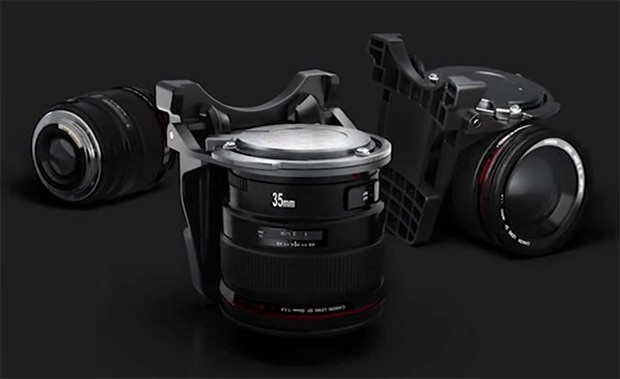
QuickDraw is about as apt a name for a gadget as any we’ve ever seen. And the why-didn’t-I-think-of-that obviousness extends to its function: Quickdraw is a lens bayonet that hangs on your belt and lets you clip any spare lenses around your waist, read to for – you guessed it – a quick draw.
Could your iPhone 5 be capable of reading your fingerprint?
When Apple purchased AuthenTec back in July for $356 million, the news was a surprise to us all. Unlike most of the company’s movements, this one hadn’t been surrounded by rumor and speculation for months prior to the official announcement, and none of us saw it coming. But now it’s time to take note, because the acquisition could spell exciting things for future iOS devices.
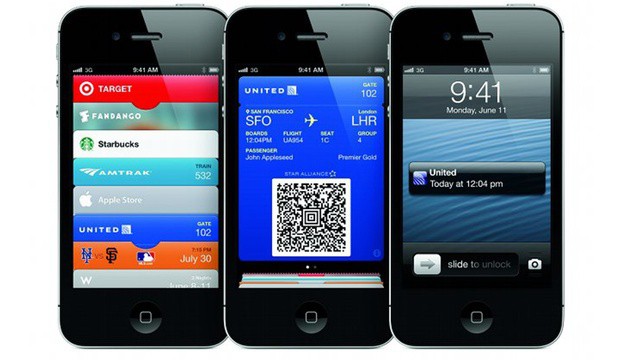
You see, Apple acquired AuthenTec for its 2D fingerprint scanners, which it insisted it needed urgently due to its “product plans and ongoing engineering efforts.” This suggests the Cupertino company is ready to use the technology sooner rather than later — fueling speculation that it will make its debut in the sixth-generation iPhone as the perfect accompaniment to Passbook.
If you can’t make it through the day without some D&D (I’m not talking Dungeons & Dragons you nerds) then this next bit of news is for you. Dunkin’ Donuts wants to keep you running with their new app for Android and iOS. Released today, the Dunkin’ Donuts app allows customers to easily locate the nearest D&D, make payments, gift DD, and more. The app is supposed to make your Dunkin’ run easier, but the payment system seems a bit awkward to me.
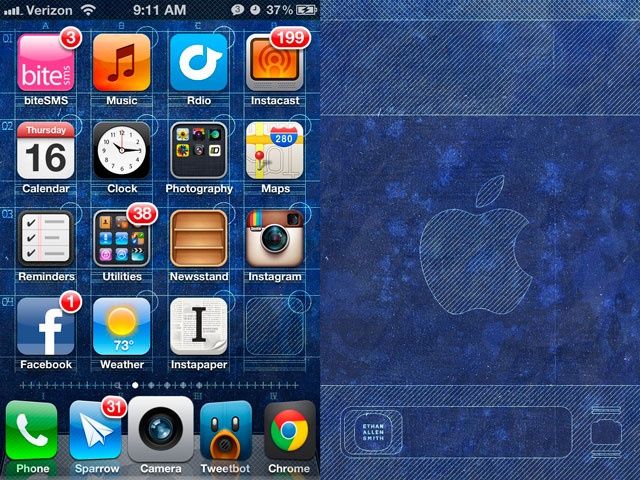
I generally don’t favor Apple-themed wallpapers on my Macs or iOS devices, but I just had to make an exception for these meticulously designed, beautifully rendered schematic wallpapers for the iPhone by Ethan Allen Smith. If anything could give you an appreciation of the majestic geometry and elegant ratios that define every visual aspect of iOS, right down to the badges on every icon or where the pips at the bottom of every homescreen are placed, a couple days with these wallpapers will have you thinking hard about them: in iOS, every little line means something.
Smith has provided two wallpapers: one for the standard homescreen and one for the iOS lockscreen. The lockscreen one is nice, but it’s the homescreen wallpaper that really shines.
Magnificent. I hope these get updated for the longer homescreen of the iPhone 5. You can download them at the link below.
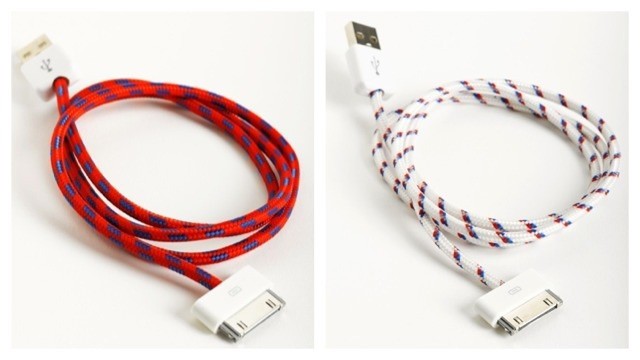
This handsome retro-styled accessory is the Textile iCable from Eastern Collective, a dock-connector with its wire wound in cotton to make it look like an old-timey kettle lead or even a bicycle pump adapter. And if I wasn’t banking on Apple switching over to a new dock connector for all future iDevices (and if I didn’t already have a drawer full of white cables), I’d probably already have ordered a few.
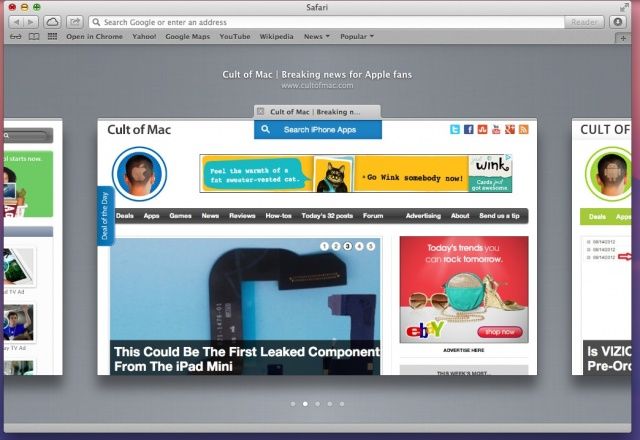
Now here’s a slick new way of interacting with tabs in Safari. When you open a bunch of tabs in Safari, it gets a little hard to figure out which tab is which, right? You can, of course, use Command-Shift-Arrow (right or left) to move between tabs, but that’s only reliable if the site you’re tabbing over to doesn’t auto-focus your cursor to a search field, like YouTube or Google does.
Luckily, it urns out that Apple has again made things a bit more iOS like in its flagship Mac operating system, OS X Mountain Lion. To check this tip out on your own, launch Safari on your Mac (be sure you’re running OS X 10.8 Mountain Lion) and open a few tabs.
Apple has seeded a new OS X Lion 10.7.5 build to registered developers through the Apple Dev Center. It comes with build number 11G36, and weighs in at 1.15GB for the delta release, or 1.92 GB for the combo update.
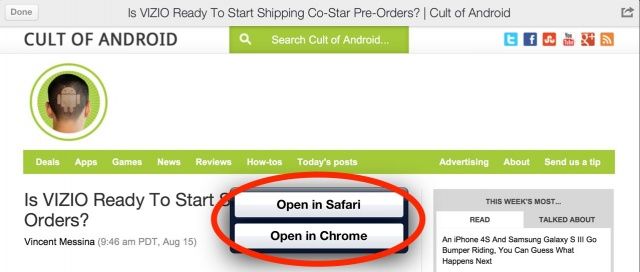
Google has issued an update to Google+ for iOS that makes it the first app to offer an “Open in Chrome” button for URLs. Version 3.1 also brings teen Hangouts, and bug fixes that promise to improve performance.
13 years old and already has more apps in the App Store than I do.
Last year, Nicholas G. was 12-years-old. He convinced his dad to get him a developer account from Apple, and began to learn how to program apps.
Nicholas is now 13, and the second update to his first app, Quick Notes!!, is out on the App Store. Version 1.0, says Nicholas, has already accrued over 3,000 downloads. How many downloads did your app have when you were 13? Mine didn’t have any. It still doesn’t.
Better yet? Nicholas hasn’t taken a programming class, at school or on the internet.
Let's hope Apple continues to lead the industry to wipe out conflict-materials from all tech products.
The Enough Project released a report today that ranks the top technology companies on how well each one is doing in wiping out the use of “conflict minerals” like tantalum, tin, and tungsten in their products. Apple, HP, Intel, Motorola are at the top of the list, while Nintendo is at the bottom, along with HTC, Sharp, Nikon, and Canon.
The minerals in question, mined in areas of armed conflict and human rights abuses, are used in many technology products around the globe, and The Enough Project – a non-profit arm of the Center for American Progress – tracks these in its effort to combat crimes against humanity.