The iPhone 5 is set to launch on T-Mobile this Friday along side T-Mobile’s new “uncarrier” no contract strategy. Not wanting to get left behind, Virgin Mobile is planning to win over T-Mobile’s pre-paid customers by offering them $100 to switch sides.
In a new ad campaign called “Retain Your Brain” Virgin is offering $100 to T-Mobile customers to move their number over to one of its unlimited plans that start at $35 a month and could result in $334 of savings over two years.
Auxo, a popular jailbreak tweak that supercharges your multitasking tray, has been updated to version 1.4-2. The latest release adds a number of new toggles, including one for Do Not Disturb, and makes improvements to the flashlight and respring toggles. It also carries a number of bug fixes.
A few weeks ago I plugged in an old hard drive and saw some scanned photos from when I used to shoot film. In my memory these pictures were some of the best I had ever taken, and I naturally blamed my tools for the fact that I hadn’t snapped anything better with my various digital cameras in the years since.
But you know what happened? I saw these old pictures and realized that they just weren’t that good. The fact is, I snap better pictures every week using my iPhone. And I think I know why. It’s all Instagram’s fault.
There are a couple of cross-platform messaging apps that will help you bridge the divide between your friends on iOS and Android, but over the last year, WhatsApp has become the most popular option, and it’s caught the attention of Google.
A new report claims that Google is in talks to buy WhatsApp for $1 billion, but the talks have been going on for four or five weeks and haven’t been finalized yet.
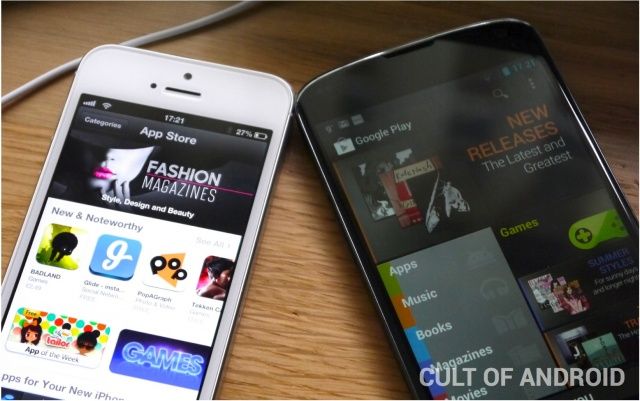
The App Store and Google Play continued to drive mobile app downloads during the first quarter of 2013, while BlackBerry World and the Windows Phone Store remain “distant challengers.”
That’s according to the latest figures from Canalys, which say a whopping 13.4 billion apps were downloaded across these four stores over the last three months, raking in $2.2 billion in app sales, in-app purchases, and subscriptions.
Remember Lodsys, the patent troll that began suing a bunch of indie iOS developers back in 2011 over their use of in-app purchases? Well, it’s back to do more trolling. The company has targeted another ten mobile game makers in its latest complaints, which it has been quietly filing in an East Texas court throughout 2013.
The studios named include Gameloft, Walt Disney, BackFlip Studios, and Gamevil.
If you use Google Drive for iOS, you’ve probably discovered the lack of landscape support when editing a document on your iPhone. Fortunately, that’s no longer an issue, thanks to the app’s latest update — which is available in the App Store now.
This post is brought to you by Bee Square, creator of Run Sheldon.
Once upon a time, the Tortoise famously beat the Hare in a running race. Now you can help him do it again — against an entire gang of hares.
Run Sheldon is a free ($0.00) running / action game for iPad / iPod touch / iPhone optimized for iPhone 5. You are Sheldon, the legendary Tortoise who beat the Hare to collect the Golden Race Trophy. Now, Old Man Hare wants that trophy back. And being lapine, he has bred a large gang of hares to get it for him. In order to survive, Sheldon has to keep running to escape the evil Hare gang….
Apple mysteriously pulled app discovery service AppGratis from the App Store over the weekend. AppGratis is yet to confirm the reason for the decision, but it’s thought the app could have been in violation of a new rule Apple introduced last October banning iOS apps that feature or promote other apps.
Apple lets you control music playback on your iOS devices from the lock screen, but your options are very limited; you can play or pause tracks, and skip back and forth between them. But if you want to listen to another album, you’ll need to unlock your device and open the Music app to find it.
But not if you have Pluck installed. Pluck is a new tweak for jailbroken iOS devices that lets you access your entire music library from the lock screen.
As a user of Google calendar, I’ve often ignored Mac OS X’s Calendar app, formerly iCal, for the bright internet lights of the easy to use, sharable online calendar from the folks in Mountain View, California.
I forget, though, that Calendar has a ton of great features for folks who really don’t need or want to use Google’s option, or who just want to stick with Apple products. One of the cool features that I didn’t realize Calendar had until researching this week’s tips is natural language event creation in Calendar itself.
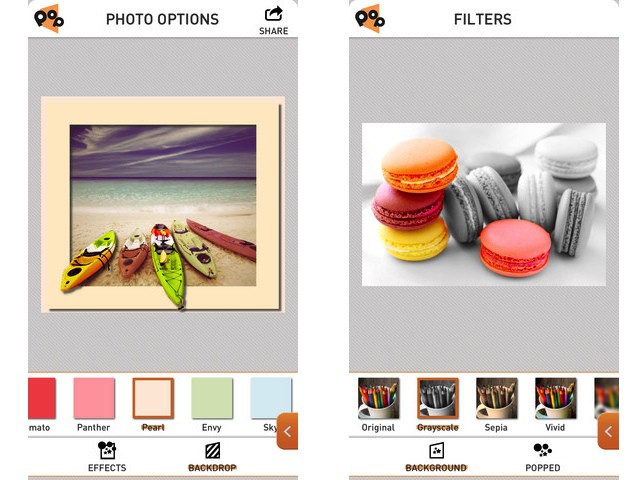
PopAGraph is Yet Another iPhone Photo Editing App (YAIPEA), but it brings a slick interface and a nice new gimmick to the game. The idea is that you create quick masks for your photos, and then apply effects to the masked (and unmasked) sections. Then – and here’s where the name comes from – you can frame the picture so that the subject pops out over the edge.
The example picture of the boats at the top of this post shows exactly how it looks.
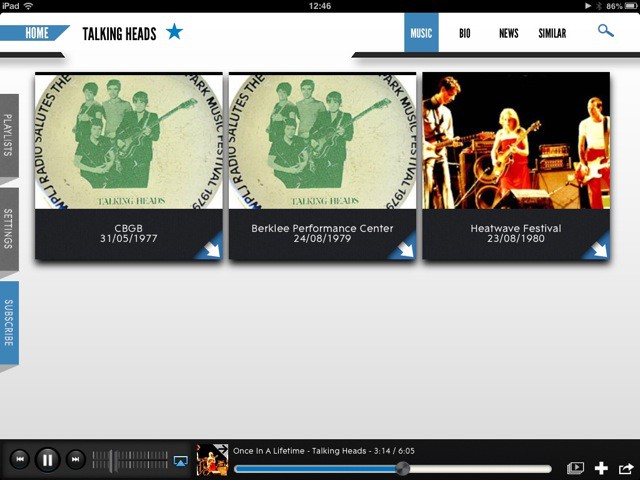
Concert Vault is a neat new iPad app which lets you watch and listen to music concerts. The free app has a slick interface which lets you search on your favorite bands and stream their gigs. It’s a deep catalog, too, going way back in time as well as offering newer content.
A few months back, I spent far too many hours trying to find an app which would scan a page of text and turn into actual, editable text. I found none. Or rather, I found nothing good. There are plenty of OCR (optical character recognition) apps in the store, but they were either inaccurate, or ugly, or (most often) both.
And while Evernote is excellent at letting you search on scanned pages and even your handwritten notes, you don’t get to touch the text itself.
I gave up, and now – as usually happens with my “urgent” research projects, I’ve forgotten why I needed it on the first place. Which is a shame, as Pixter Scanner has been launched,and it is quite excellent – with one huge annoyance, for me at least.
Google’s got an Android problem, and a big one. And it’s a problem Google shares with us fans of Google content-delivering services, such as Google Search, YouTube, Gmail, Google+ and others.
That problems is that companies like Amazon and Facebook increasingly hijack Android to divert user attention away from Google services and toward their own or their partners’.
This post isn’t about the problem, which I’ve written about extensively here, here and here. It’s about the solution.
Still, let’s understand both the problem and the solution.
If you are one of the owners or developers of one of the 60 million websites powered by WordPress and want to know how to integrate it with mobile, one of the most powerful marketing tools of our lifetime, then you are in the right place.
With this actionable video course you’ll learn how to use a WordPress mobile plugin, use a responsive WordPress theme, and a mobile theme to mobilize your site. And you’ll get to it while savings 60% in the process. That’s because this Cult of Mac Deals offer is only $39 for a limited time!
We’re back with another “name your own price” offer here for our Cult of Mac Deals.
That’s right. We’ve partnered with 9 of the world’s finest designers to bring you The Name Your Own Price Designer Bundle! You pay what you want for 3 different designer assets and if you pay more than the average price, you’ll receive all 10!
We’ve chosen three charities that we believe make a significant, positive impact across the globe. 10% of your entire purchase will go to help one of three charities of your choice: Child’s Play Charity, World Wildlife Fund, and Creative Commons. You get to help choose which charity raises the most!
First, Apple CEO Tim Cook was forced to grovel and kowtow to the Chinese Communist Party over their obviously false and politically motivated claims about Apple’s warranty.
Now, Apple is being publicly insulted and used by Facebook.
There is no way Steve Jobs would have put up with this kind of humiliating abuse.
Cult of Mac Deals is ffering you a great deal on a service that makes backing up easy. With SOS Online Backup you can backup 100 GB of your files for three years – and you can do it in a secure online backup application so you can share, access, and maintain all of your important files right in one place. This award winning automatic backup web application that will have you covered on up to five PCs, Macs, Android devices, iPhones, and iPads.
With this deal you can free up 100GB of space on your gadgets for just $29. That’s a savings of 88%!
The iPhone and iPad are magical devices because of one thing: the well-designed hardware and software works in conjunction to make everything just work. The iOS operating system is a thing of beauty, not least of which because there is so much to explore and learn about.
As a touch-based platform, iOS uses gestures like swipes and taps to let you control things with intuitive ease. However, there are bound to be less well-known gestural commands in such a complex set of software. Here are five of the better ones.
I’ve spent some time in Evoland, today, and I have to say I’m impressed. It’s more story than game, though there are all the trappings (pun intended) of the games many of us grew with baked right in. It’s a delight to play through, mostly because many of the older game mechanics, like turn-based fighting and random map encounters, don’t last too long.
It’s like getting to indulge your hankering for retro goodness without having to spend too much time with the lame stuff.
Another World (or, originally, Out of This World) is available on Steam for Mac now for ten bucks. The game has been likened to a proto action/platformer game, having been released in 1991, and then ported to the Super Nintendo Entertainment System (SNES), the Sega Genesis, and the Apple IIGS in 1992. It’s a cult classic, exhibited at New York’s Museum of Modern Art, and you can grab the 20th Anniversary version for Mac now on Steam.
This week on The CultCast: Jony Ive’s huge sweeping iOS 7 changes; Apple Television and the Ring of Power; our favorite April Fools pranks; and careful, your iPad might be giving you Gorilla Arm… all that and the best listener shout out ever on this minty-fresh episode of The CultCast!
Stream or download new and past episodes of The CultCast on your Mac or iDevice by subscribing now on iTunes, or hit play below and let the good times roll.
Apple’s online store has never really been suited to mobile devices. Sure, there’s the Apple Store app for the iPhone, but navigating to the actual website on iOS isn’t the best experience. On the iPhone, the desktop site is squeezed into a narrow, 4-inch display. You have to zoom in to actually interact with and read any part of the site.
Some recent changes help to improve navigating the Apple online store on touch-based devices. Apple has added a scrollable navigation bar under product categories that lets you quickly jump to different pages. Search results for specific products are now displayed in a cleaner grid layout as well. You can click on an icon to open the product page. These improvements look particularly good on the iPad.