Mobile menu toggle

Would you send a kid to college with an just an iPad?

By

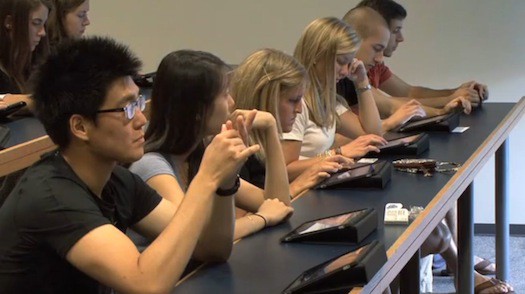
The University of Notre Dame's iPad-friendly classroom.

It’s back-to-school time. And with so many universities handing iPads to students, parents may wonder how many devices they truly need.


While the iPad may be great for textbooks — especially with apps like Kno offering 70,000 titles at a discount — but can it be a student’s main device?
Ken Colburn, of datadoctors.com tries to answer the question from a parent’s point of view:

“It’s possible that your child could get by with just an iPad (with a Bluetooth keyboard) but by the time you get everything you need to make the iPad functional, you could easily have purchased a laptop which is always the better collegiate machine.”

What do you think?

  • Subscribe to the Newsletter

    Our daily roundup of Apple news, reviews and how-tos. Plus the best Apple tweets, fun polls and inspiring Steve Jobs bons mots. Our readers say: "Love what you do" -- Christi Cardenas. "Absolutely love the content!" -- Harshita Arora. "Genuinely one of the highlights of my inbox" -- Lee Barnett.

77 responses to “Would you send a kid to college with an just an iPad?”

  1. BrianVoll says:

    My girlfriend’s laptop was broken for a while, so I let her use my iPad for college. A few of her teachers thought of it more as a “toy” or a oversized phone and wouldn’t let her use it. Of course she used it anyway after a few attempts at talking them into it, what they needed it for mostly was mainly on the web which mobile Safari handled perfectly…

  2. oldandintheway says:

    “with an just an iPad” doesn’t anyone bother to proof read anymore?

  3. Benjamen Scott says:

    From the perspective of an upcoming Freshman at college:

    I bought an iPad 2 a few months ago and used it for notes in the last part of my high school career, and it was very helpful. I have a desktop iMac, and didn’t see the point of buying a MacBook. With my iPad, I can take it to class and take/organize notes, use it as a more portable option for my textbooks, and type simple papers/create simple presentations. If I need heavier computing (I will) I have my iMac to go to. I think I’m set!

  4. Cjb says:

    It’s sad that the teachers didn’t even give it a chance the first time around…

  5. Tom Peet says:

    While it may be good for taking notes ect, I would hate to write a 3000 word report on one

  6. Christopher Lawley says:

    This will be my third year as a college student and last year all I took to class was my iPad. I used Evernote to write my notes up and do any voice recording of my lectures. It worked great for me but I love adapting to new technology and finding new ways of using it. 

  7. Cjb says:

    Bluetooth Keyboard?

  8. Terrance Joseph says:

    I just paid $21.87 for an iPaad2-64GB and my girlfriend loves her Panasonic Lumix GF 1 Camera that we got for $38.76 there arriving tomorrow by UPS. I will never pay such expensive retail prices in stores again. Especially when I also sold a 40 inch LED TV to my boss for $657 which only cost me $62.81 to buy. Here is the website we use to get it all from, http://to.ly/aT8h

  9. Ahmed Alkhuzae says:

    hell no ,, I’ve finished the first year of dentistry 

    during the first half i used the white macbook , its was great 
    – pro : 
     . super fast typing 
    -cons 
    . heavy 
    , low battery time ( yah i know 7 hours , but u don’t know how long i stay there ) 
    ,teacher can’t ssee my screen ( Facebook all the time )
    . it got beaten up and lots of sratches , from the moving 

    in the second semester , i got an iPad 
    pro –
    . super light
    , great battery
    , I’ve gotten fast at the touch keyboard
    . i love taken pictures of stuff from class and adding it to notes
    , eliminated the bag , just an iPad nothing else
    cons –
    the smart cover got dirty

    id say get an iPad , its what I’m using now :)

  10. imajoebob says:

    Go away you maggoty troll.  You run a scam operation and will be in jail before you sell anyone an iPad for less than MSRP.

    Penny/Bid-Pay auction sites are SCAMS, run by organized crime.

    STAY AWAY!!!

    Hey, Leander – kill his link, but leave his post so everyone will know these guys are VERMIN.

  11. imajoebob says:

    The lack of applications makes it problematic.  Lack of storage is another problem, as is the “closed” ecosystem.  It lets you do email and internet and note taking, but not much else is “hot swappable” with a full computer.

    You can’t do your final thesis on an iPad, so it’s not going to replace a notebook.

  12. Cold_dead_fingers says:

    I took my iPad to college Fall semi 2010 and it worked great. It’s super fast and saves so much stress on my shoulder when carrying my books and the computer of my choice. The only problem I had was that I always forgot to sync my iPad to my MacBook Pro at home so all my notes would stay on my iPad and not everywhere I might need it. That all changes with iCloud. Now I will have my lecture notes on all my devices and they’ll always be up to date and I’ll never have the chance to forget. If I feel like taking my MacBook Pro to school instead of my iPad, I’ll never have the “S#%T!!!! I forgot to sync!!!!” Everything will be so seamless. Hell, even on my worst days I could type notes on my iPhone and STILL be caught up with my notes. Apple’s “walled garden” has more fruit than I’ll ever need. I don’t think I’ll ever leave!

  13. imajoebob says:

    Pal, if you put everything on the iCloud, you’ve got NOTHING.  Try telling your professor, “The iCloud ate my thesis.”  

    Unless and until it’s all on your MacBook AND backed up on DVDs, you ain’t got a thing.  I spent 6 months working in earnest on my masters thesis, and I probably burned a new DVD every 5 to 7 days as backup.  And used my server space, AND emailed myself a bunch of files on my Yahoo! email account.  And always saved two separate copies of every important file.

    Apple’s got the greatest tools out there.  And even as you’re marvelling at their multi-billion dollar investment in the iCloud, remember what Astronaut Wally Schirra said he was thinking about sitting in the Apollo 7 capsule waiting for liftoff: “This was all put together by the lowest bidder.”  Are you really going to trust your work to them?

  14. skippykawakami says:

    I wouldn’t. It’s almost good enough, but the simple fact is that editing text is just too hard on an iPad. Writing itself, especially with a physical keyboard instead of the soft keyboard, works well enough, and for a couple of paragraphs you may be tempted to think it’s a workable solution. But when you have to go back and edit what you’ve written — anything from fixing simple grammatical errors to larger changes such as moving bits of paragraphs around, rewriting whole passages, etc. becomes incredibly cumbersome.

    The issue is text selection. While Apple has gotten so much right in creating a touch-based device, text selection is still way too hard for anything longer than an email. Your finger is too big and clumsy to effectively position a cursor easily in the narrow gap between two letters. Everything Apple has done to compensate for this, such as automatically expanding the selection after a certain point, is going to work against whatever action you’re trying to accomplish at least 25% of the time.

    The iPad makes a fantastic device for doing research and can be a very effective device for taking notes (though, in my mind a good pen and a pad of paper beat both the iPad and a laptop in this regard), and the iOS app store offers a ton of excellent apps at relatively low cost. It can replace a stack of heavy textbooks very easily (more easily than the Kindle for the sort of frequently non-linear reading one does while studying). And the portability of the iPad, the ease of networking, the long battery life all make it extremely compelling for a college student. If you can take one to college along with a laptop, then do so.

    But college means you’re going to be writing. You’re going to be writing a lot. And if you take your education seriously, it’s also going to mean rewriting just as often. And it’s here, in this one area, that the iPad is going to hold you back. 

    Hopefully in a couple of years, this will no longer be the case. Some engineer at Apple is probably working on a better, faster method of text selection right now. That’s great. But until then, if you don’t have a laptop or desktop computer you’ll end up spending hours in the computer lab, and trust me, you don’t want to do that.

  15. Apple_News says:

    Check out this great apple blog!

    http://applefanboynews.com/

  16. B066Y says:

    Actually, you could do your final thesis with an iPad. The only thing you would need is the Pages app and a bluetooth keyboard or keyboard dock. If the internal storage isn’t enough space you can use one of the multiple “cloud” options. Also, there’s always Google Documents.

  17. MacAdvisor says:

    I just sent my friend John off to nursing school (after two decades as a dancer, he’s decided he’d like a real paycheck, health insurance, paid holidays, financial security, and some stability in his life). He went with an iPad to take notes while at school and an iMac (with the 27″ screen) at home for more serious work. I think this is the best solution. 

    First, all of his eggs aren’t in one basket. Should the iPad fail, break, or — more likely — get stolen, it is readily replaceable and cheaper than a even the new iPad Air. His iMac is security wired to his very heavy desk and break ins to his building are rare. Secon, his Time Capsule provides excellent and automated back up and syncing his iPad backs it up, too. He can read books and take notes quickly and easily on the iPad for hours while away from the house, but he has the power and comfort of a big screen and powerful processor at home to research and write papers (as they are almost always submitted electronically now, when are we going to stop calling them “papers”?). Third, a laptop is fine when dashing about campus, but when is sitting at home with five windows open researching and writing, screen real estate matters. 

    He spent $499 for the iPad (we went small as he plans to pull things off of it when he syncs), $1699 for the iMac, $299 for the Time Capsule, and $179 for the HP CP1025nw color laser printer (none of those ripoff inkjets for friends of mine). With some rebates, coupons, and other discounts, he paid a bit over $2700 including the tax. Not exactly cheap, but a solid, stable, practical set up that should last him through the three years of his RN and Masters in Nursing program. 

  18. Luke McDonald says:

    I have used just my MacBook for my freshman year so far and I don’t see how the iPad could get me by any better.. sure it would be easier to carry and I could get the books, but I haven’t really had a problem with just my MacBook..

  19. SmittyRedcard says:

    You’re using the wrong program for editing text. There are great text editors that give you much finer control over selection (some even use the arrow keys on a BT keyboard), rather than trying to be all fiddly within a word processor.

    Writing a long-form research document will always be easier on a Mac or PC because of having multiple windows open for reference, but the iPad can handle text editing and note-taking with aplomb, if you search out the best apps for the job at hand.

    I think the sweet spot is a 21.5″ iMac and a 16 GB iPad. That’s the same money as a 15″ MAcBookPro, and gives you the benefits of both a larger screen and a more portable device. It’s what I recommend to all within that budget who ask me the question. Add in the HP B210 Photosmart Plus with ePrint (print/scan/copy), and you’ve got quite a powerful study toolkit. And you’re under $2K.

  20. egojab says:

    Closed schmosed. What a tired argument already. Everything is hot swappable.
    There are apps for office documents.
    Even apps to edit photoshop files, though you probably don’t want to do a full project on one.
    But as a general education device, there’s not anything it can’t do.
    Surely it all depends on what you’re going to school for, but I’d say for the vast majority of students, it’s a more than capable tool.

  21. Hasbullah Mappelawa says:

    I use endnote for input references into my thesis and iPad doesn’t support it. So, I’ll stick with my MBP. 

  22. PJE2011 says:

    Would I send my child to school with a laptop?  I certainly would, especially the MBAir as I still think we are a long way from touch data entry being accepted over the keyboard method.
    Why the MBAir?  Because less data being kept on the machine and pushed to the Cloud means all data can be accessed and not lost again.  In my opinion the iPad will be seen in the future as the template that launched a new generation of hand held devices by which education and research will be done-voice and touch data entry.

  23. MrWhye says:

    Schirra apparently trusted the lowest bidder, and he did quite OK on that trip…

  24. Michael says:

    There’s this new thing called a flash drive, you should try it.

  25. B066Y says:

    That’s your choice. It still doesn’t mean the iPad is a bad alternative for college students though. Besides most degrees don’t require a thesis until you get to the graduate level, so for your typical undergrad the iPad would be good.

  26. Mr. Clean says:

    Well, when the original iPad was released (I have and iPad 2 now) I started my freshman year with it as my main device. I took notes, designed presentations, completed and submitted assignments, and communicated with my professors back and forth through it. Although I LOVE my MacBook Pro and my iMac, the iPad made things seem more snappy being that it is always and instantly on (even though its nothing for my MacBook Pro to boot up), always has data bandwidth which relieves the task of finding a Wi-Fi hotspot (again, even though you could get like 10 Wi-Fi hotspots just walking down your block), and virtually most of the things that I do on my Mac I can (and do) complete on my iPad. Accompanied by my iPhone or even my iPod touch, I am am mobile powerhouse. As if the iPad wasn’t enough…

  27. OMFGitsJUSTIN says:

    As a college student, I just bought an iPad 2 this summer for school in the fall. I got it for textbooks and editing my papers on the go. Honestly. without a proper file system, the ipad is still a big iPhone 4. I need to be able to have multiple windows open, access to all my information, ect. 

    The ipad is a college student’s complimentary device. It’s not a MAIN device. 

  28. Lea Beck says:

    I want one :)

  29. Animesh Mishra says:

    I’m going to start University this September majoring in Computer Science. What would be great for me iPad + iMac or iPad + MacBook Pro ? I don’t know what sort of computing needs the course demands so if anybody around here knows that it’d be great ! Thanks :-)

  30. Michael De says:

    The iPad doesn’t give as good a reading experience as Android tablets for certain file formats like pdf. Also, the students/universities could be saving some serious cash by using comparable Android tablets like the Asus Eee Pad Transformer which is $100 less than the iPad 2 and has a comparable IPS display (with a better resolution). A shame really!

  31. Bruce Miller says:

    I think not. iPad2 and even MBAir would work in a pinch but neither is as versatile a MBP.

  32. imajoebob says:

    Ask the guys on Apollo 13.  And Apollo 1.  And the two shuttles.

    The early astronauts were all test pilots/military because they knew there was a sizable risk they wouldn’t be coming back. We seem to forget that space travel is (still) incredibly risky. Add all the cargo and military failures (not to mention the Russians and Chinese) and the record is pretty abysmal (for a transportation system). If the auto industry had the same safety record we’d all be riding bikes.

  33. skippykawakami says:

    I’m not using the wrong text editor. I’ve used a lot of text editing apps, word processing apps, screenwriting apps, etc., including ones I consider excellent if what you need to write is short. Some of these apps have some clever and helpful features for navigating/selecting/altering text, but none are what I call “good” in this regard. So while the best may make long form writing somewhat less cumbersome than the vanilla iOS experience, I haven’t found one where serious text editing comes within striking distance of the ease of a Mac/PC. 

    And I want to be clear: The iPad is GREAT for note taking. Firing off an email to your professor? Great. Reading? Great. But if you’ve got a term paper or a short story or any of the sort of writing that compels you to polish the hell out of each paragraph — hunting down the passive voice, breathing life and energy into the clumsy torpor of your sluggish first draft — then the iPad will frustrate you and slow you down.

  34. imajoebob says:

    Hey, Q, gimme your graphs so I can throw them into our final presentation.  No, email is down, I need them on flash or disc.  No, I can’t use a Keynote file.  I need the data in Excel, because Bob and Martha are on PCs.  Why did you do this on you iPad, not your notebook so we could share all of this?  Use your fancy toy on your own time – when you work with others you have to be able to communicate and share with them.

  35. Yasaswy Nagavolu says:

    new wireless sync takes care of I forget to sync automatically to ur machine..

  36. egojab says:

    Nothing you mentioned couldn’t be done on an iPad. Except the flash drive bit. But who can’t receive documents via email nowadays?

    You’re stretching a bit here, but I did say “it depends on what you’re going to school for” so it doesn’t work for everyone. But you have yet to present a case that the iPad couldn’t yet handle.

    It wouldn’t work for a commercial arts student, or a video editing/VFX student. But then again, why would they even be debating it? A high end laptop would most likely not cut it for them.

    But, general education students, business students, and the majority of other majors could get away with a simpler device like an iPad.

Leave a Reply

