
Apple provided some great default keyboard shortcuts in Mac OS X Snow Leopard and one of my favorites was Command+D. You could use that keyboard shortcut combination to select the Don’t Save option when closing a document you haven’t saved yet. Unfortunately Apple decided to change the keyboard shortcut combination in Mac OS X Lion.
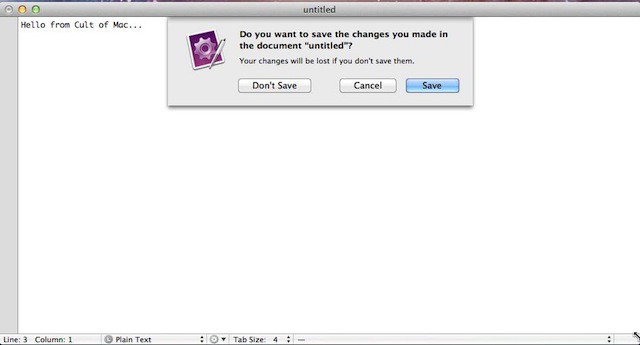
The following dialog box is an example of what pops up when you attempt to close an application after you’ve been editing a document and you haven’t saved it yet.

You can take one of the following three actions from your keyboard which this dialog box opens:
- If you want to cancel a file save dialog without saving the file that you modified then new keyboard shortcut combination is Command+Delete. It replaces Command+D used in previous generations of Mac OS X.
- If on the other hand you just want to cancel the save and remain in the application you are editing your document in you can hit ESC or Command+Period just like before since Lion hasn’t changed this.
- If you want to save your document then just hit the Enter/Return key which again isn’t something Lion has changed.
Got a tip you’d like to share? I’d like to hear about it [email protected].

David W. Martin has more than 20 years of experience in the industry as a programmer, systems and business analyst, author, and consultant. David has written for CNET’s iPhoneatlas.com, MacLife.com, CultofMac.com, BYTE.com and recently for aNewDoman.net. He comes to Cult of Mac’s website with deep knowledge and passion for the all things Apple. Follow David on Twitter @david_w_martin or see what he’s up to now at davidwmartin.com.


8 responses to “Use The New Cancel Don’t Save Keyboard Shortcut In Lion [OS X Tips]”
Sweet! I’ve been using Snow Leopard for years (just upgraded to Mavericks today) and I didn’t even know about CMD+D. Where is this even documented?