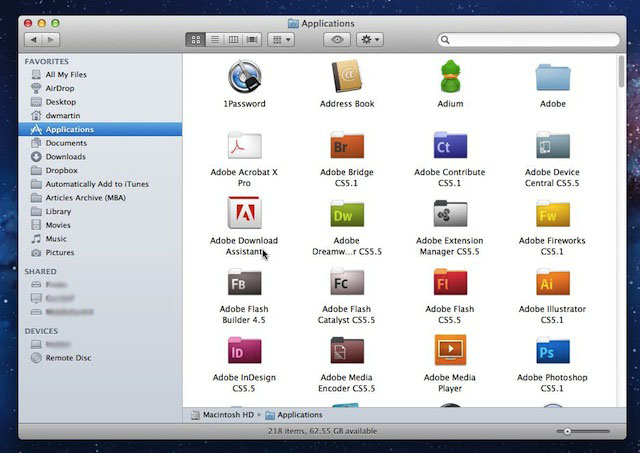

Finder has two nice features that you might want to turn on if you aren’t using them already the Finder status and path bars. Both of these give you kick access to some very useful information about your Mac.
Status Bar
The status bar displays at the bottom of Finder windows when it is on. It will show you how many items are in the window, how many you have selected if you have some selected and the amount of free space left on your disk drive.
Turn on the status bar by selecting View –> Show Status Bar from the Finder menu and afterwards the status bar is displayed in all Finder windows that you open.
Path Bar
The path bar shows your current place in your file system hierarchy. It’s a way to quickly glance down at the bottom of your Finder windows to see where you are at after drilling down through various folders.
Turn on the path bar by selecting View –> Show Path Bar from the Finder menu and afterwards the path bar is displayed in all Finder windows that you open.
Bonus Tip: You can drag files and folders to a folder in the path bar to copy or move them to that new place.

David W. Martin has more than 20 years of experience in the industry as a programmer, systems and business analyst, author, and consultant. David has written for CNET’s iPhoneatlas.com, MacLife.com, CultofMac.com, BYTE.com and recently for aNewDoman.net. He comes to Cult of Mac’s website with deep knowledge and passion for the all things Apple. Follow David on Twitter @david_w_martin or see what he’s up to now at davidwmartin.com.

