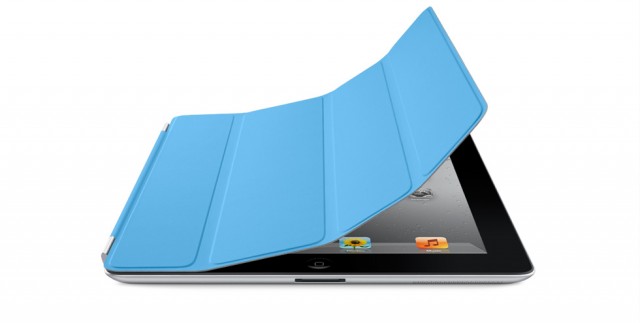
I’ve got a passcode lock on my iPad 2 so that it cannot be accessed by individuals who weren’t given permission to play with it. However, I also use an Apple Smart Cover, and thanks to a security flaw in the iPad’s iOS software, my passcode lock is now useless, because anyone can use my Smart Cover to gain entry to my iPad.
httpv://www.youtube.com/watch?v=NLgQ22naQhE
As you can see from the video above, courtesy of 9to5Mac’s Mark Gurman, you can easily gain entry to an iPad 2 with a passcode lock by using its Smart Cover. If you can’t see the video, here’s how the trick can be done:
- While on the lock screen, hold down the iPad’s power button until the “slide to power off” switch appears.
- Now close the iPad’s Smart Cover to lock the device again.
- Open the Smart Cover and hit the ‘Cancel’ button — you will now be taken to the iPad’s home screen, or the last app that was open before unlocking.
Now, you’ll be pleased to know that if your iPad opens to the home screen, then apps cannot be opened up until it’s unlocked properly using a passcode. However, the biggest issue occurs if you locked your iPad while an app such as Mail, Messages, or Contacts was open, because if it unlocks to an open app, it can be used as normal — as shown in the video.
If you’re concerned about this, there is a temporary solution: Go into the Settings app on your iPad and disable the option that allows your Smart Cover to wake your iPad from sleep. You’ll no longer be able to open/close the cover to sleep/wake the device, but no one can gain entry to the device without authorization.
Hopefully Apple will issue a fix for this in an iOS update soon. Are you concerned about this flaw?
49 responses to “The Passcode Lock On Your iPad 2 Is Useless If You Use a Smart Cover”
Ouch. I guess we’ll all be testing out iOS’ OTA updating features sooner then expected.
“easily gain entry to an iPad 2” is overstating it a bit isn’t it? More like easily gain entry to a single application but only a single application IF it was left running in the foreground when the iPad 2 was locked. I agree that this is something that needs to be fixed but it is hardly rendering your pass code lock “useless”. I would have respected your article more without the sensationalist fear mongering.
WOW! Thanks for sharing. I am sure apple will be all over that.
This also works if when the iPad is locked, you press and hold the power button to bring up the slide to power off option and then wait. After a few moments the power off screen times out and the iPad returns to the home screen bypassing the lock.
I tried this on my iPad 2, and after if broke in, I couldnt open any apps, and it re-locked itself. So even if u “break in” u can’t do anything.
You can run the Newsstand app even if it was not running beforehand, but you cannot enter the store within that app.
you can delete apps, once you’re broken in
I do not have his problem on mine. If I close my smart cover suddenly and go back I always have to enter my password!
SoRry I didn’t see the video, ignor previous comment!
Get used to the sensationist writing. CoM left the realm of respectable semi journalists a long time ago. Now they are hit whores like all the rest. And this kind of headline is classic hit whore technique
Thanks for your comment. As the article states:
“Now, you’ll be pleased to know that if your iPad opens to the home screen, then apps cannot be opened up until it’s unlocked properly using a passcode. However, the biggest issue occurs if you locked your iPad while an app such as Mail, Messages, or Contacts was open, because if it unlocks to an open app, it can be used as normal — as shown in the video.”
So you guys would say it’s not easy to gain entry? Personally, I don’t think it could be any easier. I mean, you don’t need any special hacks — you simply need a Smart Cover. How much easier could it be?
What version is of iOS were you using?
When I tried it it worked but I couldn’t use any apps
It is surely a security flaw, but it’s not as obvious as you imply.
In addition to a Smart Cover, you need to know the odd sequence of events used to gain entry. The first paragraph of the article makes it seem as though just opening the cover bypasses the passcode.
Newsstand is not an app, it is a special folder.
doesnt work on my ipad2
Wouldn’t it be as easy as flicking the switch in settings that keeps the smart cover from locking and unlocking your iPad?
You don’t need the smart cover. A simple magnet should do….
My thoughts exactly. Slow news day I guess.
While this is true there is some things worth mentioning regarding this bug. If I where to leave the iPad 2 in the home screen, you would not be able to access any apps or features until you lock it and the unlock it correctly. If I leave the iPad 2 in an app you will be able to see the app and all of the contents but if you press the home button to go to another app, it will lock the screen and you will have to enter the password. While this could potentially leave your device somewhat vulnerable, by no means you will leave it completely open to all your information.
We would say that it is not easy because it isn’t. The only way to get into an app is if the app was open when the cover was originally put into place. If you are on the home screen and try to open an app, you have to put in the passcode.
Something you yourself put in the article so you now it to be true and thus the headline is a tabloid stunt. Face it, this site has become a rag like all the rest. Stop trying to deny it and act like you are respectable writers that would never sink to such levels. Hell your precious Saint Leander is the biggest culprit and you are just as guilty as the rest. All in the name of the precious page hit.
My iPads LockedOnly at Apple, if I forgot my password to any website in the world there is a way to retrieve it BUT not with your IOS device. No your going to delete all I have purchased, plus data and expect me to spend 6 hours waiting for over 50gb of stuff to restore at a USB snails pace… Brilliant… listen I dont know why the code I use to use no longer works, I use it evry day and some genius is going to say well you forgot it but I still know my postcode so NO I did not forget it. I think this is got to be the stupidest system every devised. If your bank did this to you would walk.

