The reason the software keyboard works so well in iOS has a lot to do with Autocorrect and its pretty spot-on ability to figure out what the heck we’re typing. Most of the time, anyway, as various parody sites on the internet will attest to.
Autocorrect also learns the words you use more frequently, and adds them to a list in the background, letting you use oddly spelled terminology more easily. Sometimes, though, this functionality can backfire, as you end up adding words and phrases you really don’t want to have things autocorrect to.
Luckily, there’s an easy fix for this one.
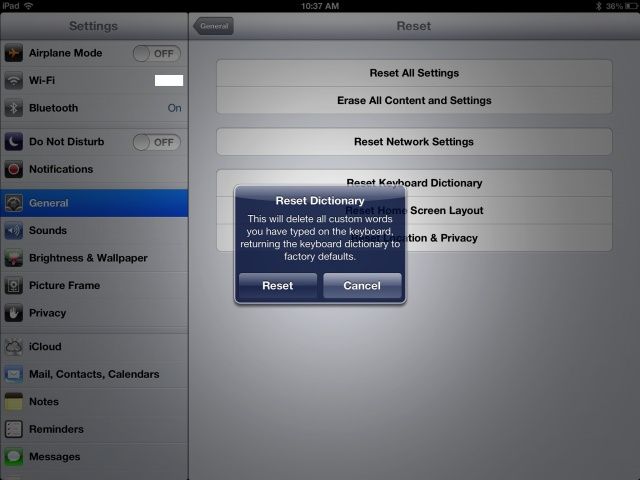
Launch the Settings app on your iOS device with a tap. Then tap on General, then scroll to the bottom of the right hand column. Tap Reset and you’ll see a host of options to reset. You can Reset All Settings, Erase All Content and Settings (yikes), Reset Network settings, Home Screen Layout, and Location & Privacy settings.
The one we want is the Reset Keyboard Dictionary. Tap that and enter your iOS passcode if you have one set. If you don’t, why don’t you? You’ll still have another chance to Cancel at this point. If you’re ready, tap Reset, and all custom words you’ve typed on the keyboard will go away, and the keyboard dictionary will be reset to the factory defaults. Hooray!
Got an iOS tip of your own? Need help troubleshooting your iPhone, iPod touch or iPad? Drop me a line or leave a comment below.

Rob LeFebvre is an Anchorage, Alaska-based writer and editor who has contributed to various tech, gaming and iOS sites, including 148Apps, Creative Screenwriting, Shelf-Awareness, VentureBeat, and Paste Magazine. Feel free to find Rob on Twitter @roblef, and send him a cookie once in a while; he’ll really appreciate it.

