There are many files that help make your system usable, but they can build up over time. System logs, for example, keep track of usage, errors, and services running on your Mac, but unless you look at these often via an app like Console, you’ll probably not need a ton of log files taking up space on your Mac, especially if you have one with a low-volume SSD.
QuickLook cache files make your Mac feel zippy when you hit the spacebar to preview files in the Finder or Open/Save dialogs. If you can stand a bit of a wait to do this, deleting these files can save you some space as well.
Put together, you might save a decent amount of space on your hard drive, so give it a shot. Here’s how.
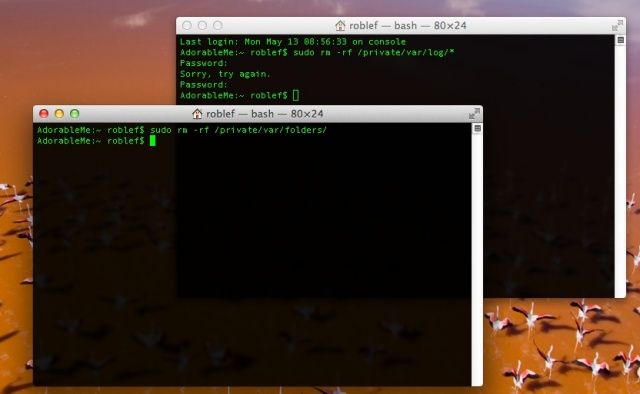
First up, launch Terminal from the Applications folder or your Dock, whichever is easier for you. Then, type or paste the following command into the resulting window:
sudo rm -rf /private/var/log/*
This should clean out the system logs up to and including when you run the command, so you might want to do this on a regular basis if you find it frees up a ton of space.
Now, close that Terminal window and open another. Type or paste the following command into Terminal:
sudo rm -rf /private/var/folders/
This will get rid of the QuickLook cache files, which will then start to accumulate again. This might be another regular task if space is at a premium on your Mac, and if the speed hit to QuickLook doesn’t bother you.
Each of the commands above will require you to enter your administrator password.
Via: OS X Daily

Rob LeFebvre is an Anchorage, Alaska-based writer and editor who has contributed to various tech, gaming and iOS sites, including 148Apps, Creative Screenwriting, Shelf-Awareness, VentureBeat, and Paste Magazine. Feel free to find Rob on Twitter @roblef, and send him a cookie once in a while; he’ll really appreciate it.


5 responses to “Save Space On Your Hard Drive – Delete System Logs And QuickLook Cache Files [OS X Tips]”
DO NOT do what is said here. I just causes problems. It broke my Safari (as mentioned below), it broke finder, it broke MySQL. I don’t want to know everything else it broke.
Onyx, Safari and Finder are screwed from this. Is there any way to undo this ?