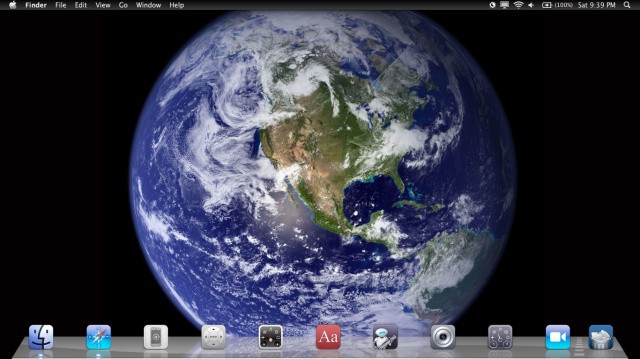
We’re taking this whole “Mac as iOS device” thing a bit far, perhaps, but it sure is fun. We found that we can make our Mac look a lot like our iPad screen with a little bit of Terminal command magic, a third party app, and some Finder tweaks. Here’s how to do just that.
First up, if you followed along with yesterday’s tip, this will look even cooler. But, even if you didn’t, you can make your dock look like the iPad dock with some spaces in between the app icons. You’ll need to launch Terminal, found in the Utilities folder, which is itself in the Applications folder. Once Terminal shows up, type or paste the following command into it:
defaults write com.apple.dock persistent-apps -array-add '{"tile-type"="spacer-tile";}'
You’ll need to do this as many times as you want spaces. For example, to create 4 spaces, hit the Up arrow on your keyboard (which recalls the last command so you don’t have to) 4 times and hit Enter 4 times.
Don’t forget to issue the killall Dock command after you’ve created as many spacers as you want, though (thanks, SamDS!).
Move the spacers around, or your app icons around, to recreate that iPad look and feel.
Next up, it’s time to change the menubar. Download a little program called Nocturne from the Google Code page to do so. Once downloaded, launch Nocturne and turn off all the checkboxes except Invert menu bar. Then click on the Switch to Day button at the top of the preference screen. Boom! You’ve got a black menu bar, just like you do on your iPad.
Source: OS X Daily

Rob LeFebvre is an Anchorage, Alaska-based writer and editor who has contributed to various tech, gaming and iOS sites, including 148Apps, Creative Screenwriting, Shelf-Awareness, VentureBeat, and Paste Magazine. Feel free to find Rob on Twitter @roblef, and send him a cookie once in a while; he’ll really appreciate it.

