Mobile menu toggle

IPad 3 Wi-Fi ‘Issues’ Tested: Worst Performance Yet, But Does It Really Matter?

By

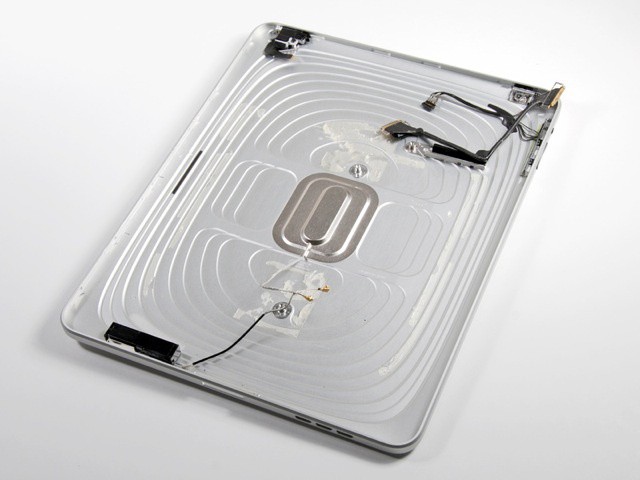
In the iPad 1, the Wi-Fi antenna hides behind the plastic Apple logo

Andy Patrizio of Tablet PC Review decided to get to the bottom of the sporadic reports of bad Wi-Fi reception in the iPad 3. Armed with the new iPad, a first-gen iPad, and a couple of iPhones (3GS and 4S), he fired up the SpeedTest app and pointed it at his Cisco WRT310N 802.11a/b/g/n router. The results? The iPad 3 came in dead last, but it’s not as bad as you might have heard.

Andy tested the down and up speeds at various distances from the router. The iPhone 4S won at pretty much every distance, and the new iPad’s performance dropped off the fastest as the distances grew. At 30 feet from the access point, and through three thin walls, the iPhone 4S managed 5.16Mb down, the iPad 1 came in at 1.67Mb and the iPad 3 a terrible 0.28Mb. Upload speeds were similarly placed.

Now, these tests are also affected by the internet connection to the servers used in the tests, which have nothing to do with the Wi-Fi signal strength, but the consistency in Andy’s results shows that there is indeed a pattern.

Is this a problem? I don’t think so. In my short experience of the new iPad, web browsing is way faster, not slower, than on the iPad 2. In fact, on today’s fast connections, the bottleneck is often the rendering speed of the browser and not the connection itself. In my quick and unscientific tests, I see no bigger drop off on my iPad 3 than on the first-gen version. Putting them side-by-side in my living room (the furthest spot from the Time Capsule router), there’s nothing in it.

Both load Google instantly, and both take similar times to load more clunky sites, with the new iPad sometimes quicker and sometimes slower than the old iPad.

And in a related (and equally unscientific test), I find the new iPad keeps its 3G signal for in places my iPad 2 would drop to EDGE or even (the horror) GPRS.

So, is Wi-Fi drop-off worse in the new iPad than in older ones? Probably. Does it make a difference in real life? Not really. And what’s causing it? My guess is that the giant battery is getting in the way somehow.

  • Subscribe to the Newsletter

    Our daily roundup of Apple news, reviews and how-tos. Plus the best Apple tweets, fun polls and inspiring Steve Jobs bons mots. Our readers say: "Love what you do" -- Christi Cardenas. "Absolutely love the content!" -- Harshita Arora. "Genuinely one of the highlights of my inbox" -- Lee Barnett.

7 responses to “IPad 3 Wi-Fi ‘Issues’ Tested: Worst Performance Yet, But Does It Really Matter?”

  1. Fabrice Faury says:

    I found that setting your wifi router to a low channel (1-4) gives best results. YMMV

  2. Mads Teland says:

    I can say I don’t have Wifi issues on my iPad Wifi + 4G 64GB :)

  3. Aybara says:

    This tester must have a bad internet connection to get those speeds.

    I can run a speed test on my new iPad, iPhone 4S, and laptop where my WAP is at one end of my house and I am at the other, with at LEAST three interior walls in between. I get 24Mbps down and 4.5Mbps up on my phone, my iPad, and my wireless laptop.

  4. Bob Forsberg says:

    Wifi strength on my new iPad exceeds that of my MacMini through 3 walls 80′ away. Netflix and Skype are also solid.

  5. poppa1138 says:

    not had a problem yet with the new iPad and wifi,I did have a problem with my Macbook a couple of years ago,everything connected to my wireless router except the Macbook which was hit and miss connecting,in the end I replaced my router and all has been ok,

  6. Steven Borjski says:

    My iPad is perfect now! But before, I had problems with the wifi, I researched about how I can fix it. I tried many tips, and anything worked for my iPad, I found some one particular, it’s about cases that <a href=”http://www.pongresearch.com/new-ipad.html”>fix iPad wifi isuues</a> made by Pong Research, I was skeptical, because the problem is inside iPad (could be software o hardware) However, I bought a case (because they are nice and have 5 positions) That’s how I fix my wifi signal, now my iPad works perfect.

  7. KevinSRT says:

    I remember having this issue, it was really annoying being forced to use the new iPad, only in the same room as my wifi router due to the poor range.
    After looking for a solution to this issue for quite a lot of time, I was just about to give up.
    At the end, I found a couple of reviews of <a href=”http://www.pongresearch.com”>Pong Research</a> ‘s cases, that convinced me into giving it a try. This special case, is built with an antennae in between layers of the back cover, which redirects and boosts the power of the signals and increases the range of the wifi antennae on the iPad. After getting one, I couldn’t be happier with my new toy!

Leave a Reply

