Mobile menu toggle

iOS 5: The Software Steve Jobs Always Thought You Deserved [Review]

By

iOS-5-features

iMessage

Wireless carriers, fear. Your days of milking practically infinite texting profit from iPhone users may not be at an end, but it has been severely curtailed with iMessage.

iMessage is not a stand alone app. Instead, Apple converged iMessages and SMS Texts into one app called “Messages.” This is great because instead of having to switch between different apps, and worrying about how to get all your contacts synced up for both of them, it’s all taken care of on the back-end. If your friend has an iPhone or iPad, they get an iMessage, which is free to send and receive. If they are on a – gah – Android device or other phone, SMS messages are sent as normal.
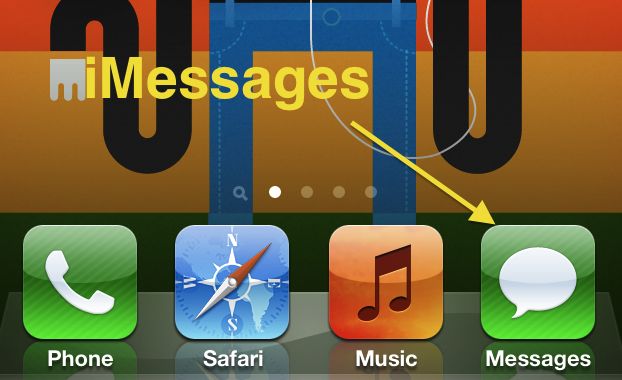
What’s great about Messages is that you don’t have to know your friends Apple ID or tell your iPhone to send them an iMessage instead of an SMS. Your iOS 5 iPhone automatically checks to see if the phone number you’re sending to is an iPhone running iOS 5 and if the recipient is running iOS 5 it will send them an iMessage rather than an SMS Text. It’s incredibly simple and will probably save a lot of people some money on texting fees.
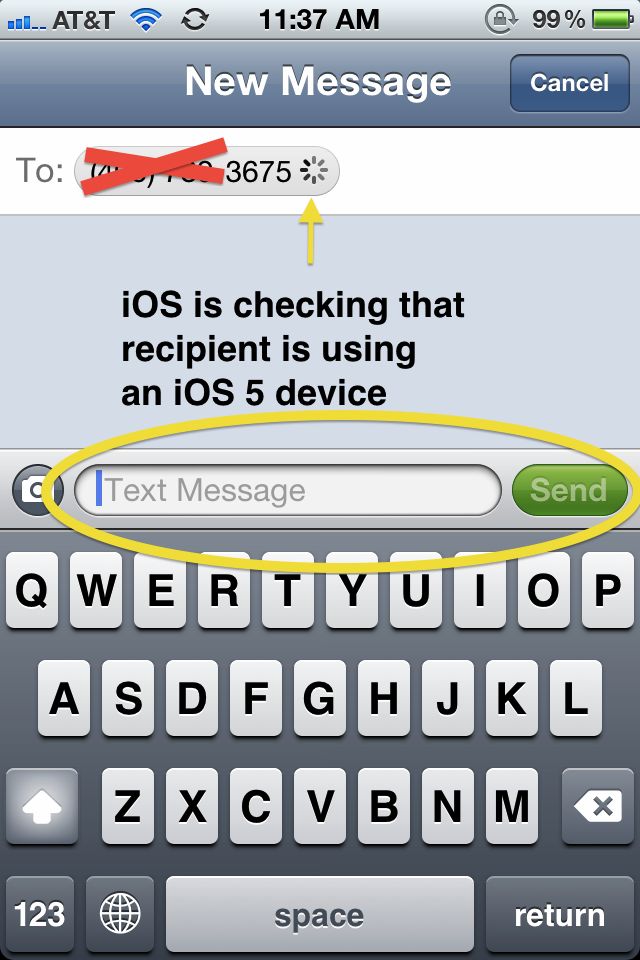
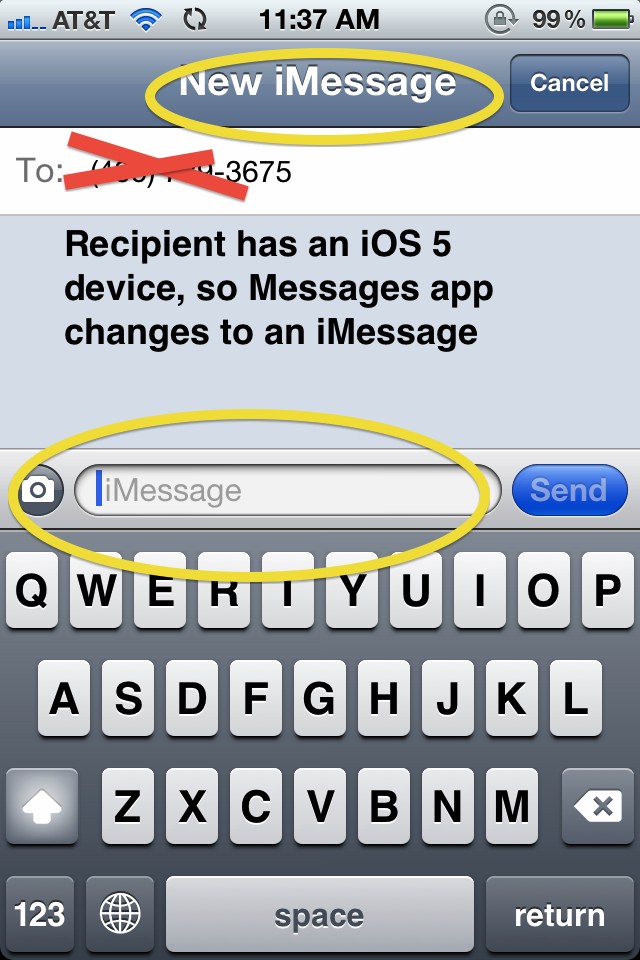
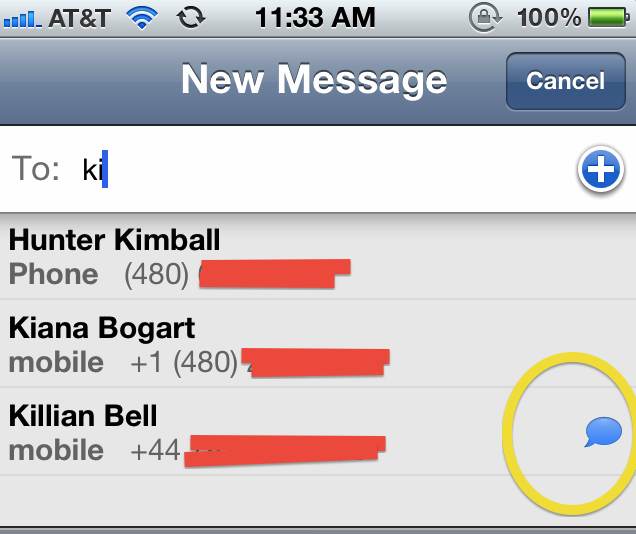
Once it’s been determined that a contact has iOS 5, your Address Book is update and a small blue chat bubble will appear next to the contact’s name in the future, indicating that they can receive iMessages.
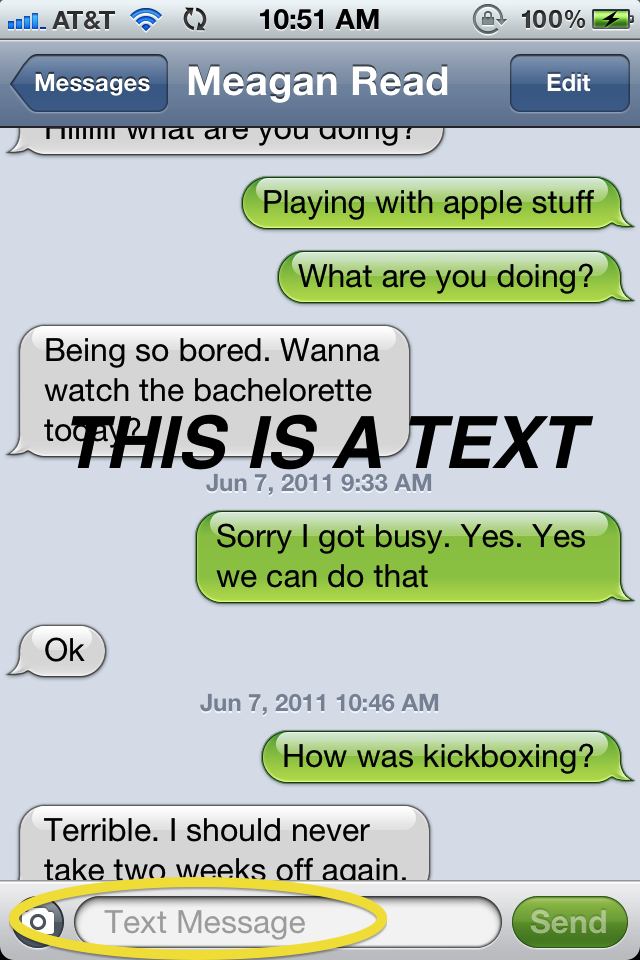
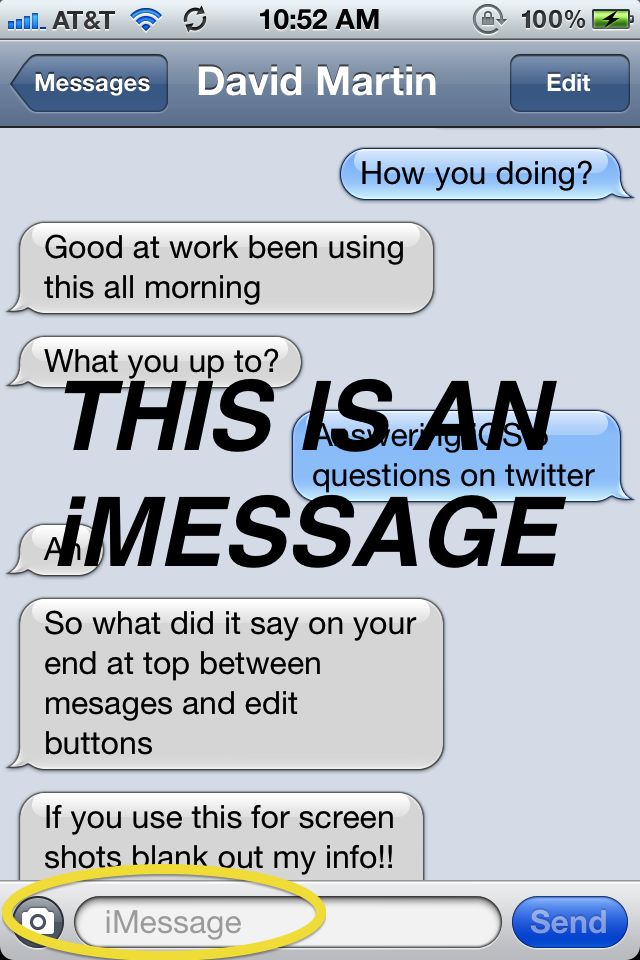
If you’re still not sure whether you’re sending an iMessage to SMS Text, Apple has revamped the texting screen by adding a little bit more color. SMS message conversations are green while iMessage conversations are blue. Here is a screenshots of me sending a text to my girlfriend (who for some reason is still rocking a Palm Pre) and another screen sending a text to CoM Writer, Killian Bell who is using an iPhone 4 with iOS 5. Notice that the “Send” button on the SMS and the iMessage are different colors, as well as the outgoing chat bubble.
A few other odds and ends: Many people look to iMessages as a way to end their Texting Plans, but how can you keep from sending SMS messages on accident? Easy. iOS 5 allows users to turn off SMS messaging completely so that iMessages are the only protocol that can be sent. The reverse is also true in that you can turn off iMessage as well so that you’re only doing SMS.

Another question has been, “well what if I have an iPod Touch and no iPhone?” Users with an iPod Touch can send/receive iMessages by using their Apple ID. You even have the option of changing your “Caller ID” from your phone number to your email address.

Overall, iMessages are great. Being able to see when a message has been delivered and whether it’s been read or not really enhance the communication experience. The best part is that you don’t have to even think about them because if Apple is doing all of the work completely behind the scenes so that you won’t even notice. Using iMessages on multiple devices with the new support of iCloud ensures that you’ll never miss a beat when you’re working on both your iPad and iPhone.

iMessage isn’t going to allow you to kill your texting plan, but it will allow you to drop to a lower tier, especially if you have a lot of iPhone toting friends. It’s one of the best additions from a user’s perspective to iOS 5, although carriers are going to hate it. But iMessage is also very likely to be Apple’s secret weapon going forward in the smartphone wars: with Blackberry Messenger, RIM proved that a free messaging platform locks customers into a platform and makes it far more unlikely for them to switch to a different smartphone maker in the future. iMessage takes that idea and runs with it. It’s the one killer feature that’s likely to lock you in to iOS for good once you use it.

Notification Center & Widgets

A revamp to the whole iOS notifications system was undoubtedly one of the most demanded features in iOS 5, and its introduction makes using the iOS operating system a much richer experience. Notifications under iOS 4 were basic, intrusive, and on the whole just unhelpful: an annoying little bubble that conveyed little and interrupted everything. Now that’s all changed.
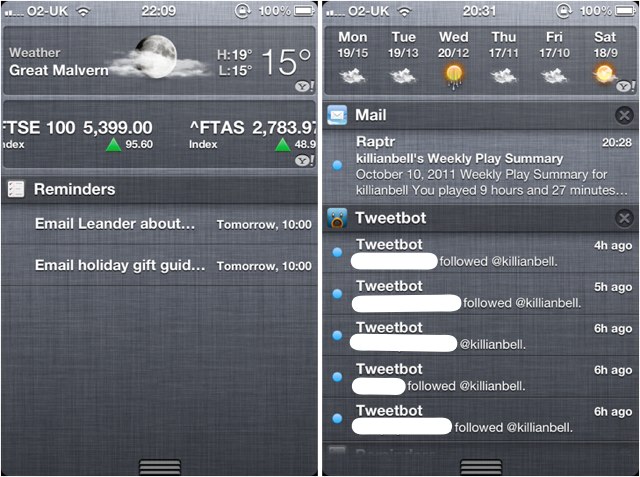
A look at iOS 5's Notification Center under heavy load.

With the introduction of Notification Center, you can customize the way in which you receive notifications on your device for each app individually. For example, you can have new SMS messages, which you want to reply to quickly, alert you with a traditional iOS popup; whereas for less important notifications, such as friend requests from Game Center, you can have a subtle banner appear at the top of the screen that won’t at all intrude what you’re doing. Alternatively, you can choose to have no notification at all.

Notification Center also introduces a pull-down tray that becomes home to all the notifications you receive. As opposed to just vanishing as they did under iOS 4, notifications that you cannot see to immediately are sent to the Notification Center, and you can action them whenever you choose to — from one convenient location.
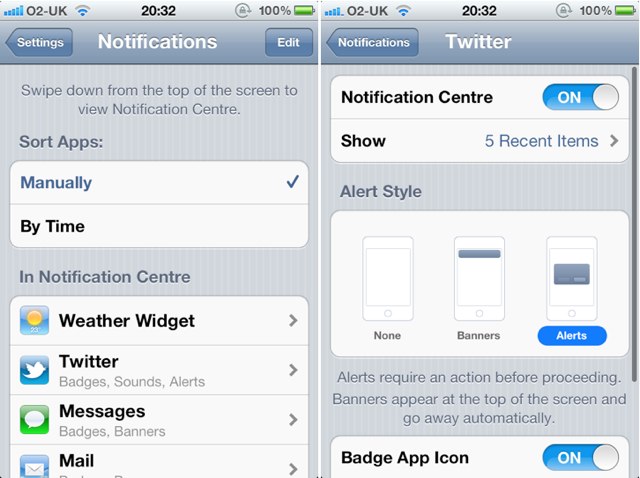
Notification Center's Settings Preferences

The Notification Center is also home to the Stocks and Weather Widgets. Widgets are another introduction to iOS 5, and they allow you to view live data without actually opening an app. With the two that Apple currently provides, you can check out the weather in your area and minor your stocks at a glance.

Notification Center nonintrusively alerts the user

Widgets are a fantastic introduction to iOS, but at the moment, there’s just not enough of them. If Apple allows third-party developers to create their own Widgets for apps we use each and every day, the feature could be a whole lot better. As it is, though, Notification Center is such an improvement on the way iOS alerts have worked in the past, it feels like iOS didn’t even have an alert feature before.

Newsstand
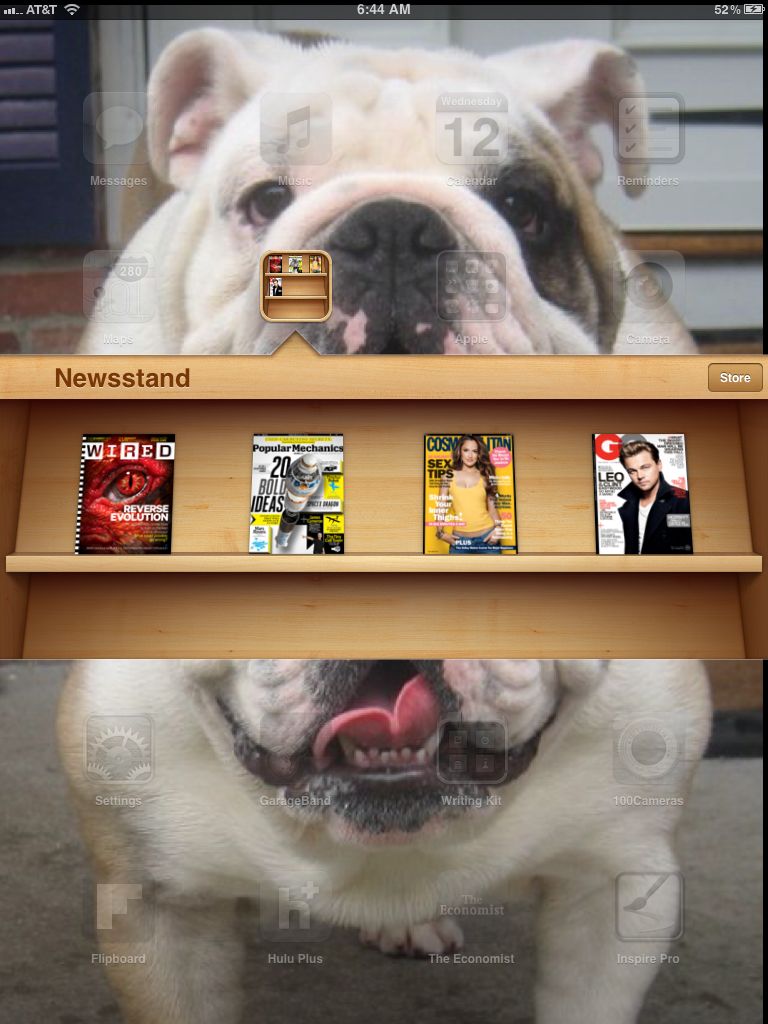
Newsstand isn't much more than a smart folder for your magazines.

Newsstand has been heralded as a major new feature of iOS 5, and perhaps the savior of dying print media, so when you finally load it up, it’s surprising to see that past all the hyperbole, Newsstand is really just a smart folder that updates the apps inside.

With Newsstand, Apple didn’t try to reinvent the wheel of iOS publishing. Apple knows that the time of setting standards for magazines and newspapers to follow is past: there are a lot of traditional publications out there, each with their own custom apps. All Newsstand really does is try to corral these apps into their own folder.

A magazine in Newsstand is still just an app, but by being in the Newsstand folder, it gains certain unique powers: it can update its app icon (with the latest cover) and download its latest issue automatically in the background once a day. A link to the App Store’s section for Newsstand compatible apps completes the feature set. And that’s it.

Really, that’s all it needs to be: for what it is, Newsstand works just fine, although we seriously doubt it’s going to make people any more or less likely to subscribe to an iOS magazine app. We’d like to see more of this smart folder functionality in future versions of iOS, frankly: the idea that grouping apps in special folders to grant them unique privileges has a lot of promise, especially if those apps can update themselves.

Reminders

Some of us rely on our iOS devices to remind us of our to-do list each day, and without it, we just wouldn’t be able to function properly. I was excited, then, when Apple announced the new Reminders app for iOS 5, which boasts an awesome location-aware feature that will automatically initiate tasks when you reach a certain destination. For example, you can have the app remind you to buy gas when you leave the office, or to feed your cat when you arrive home.
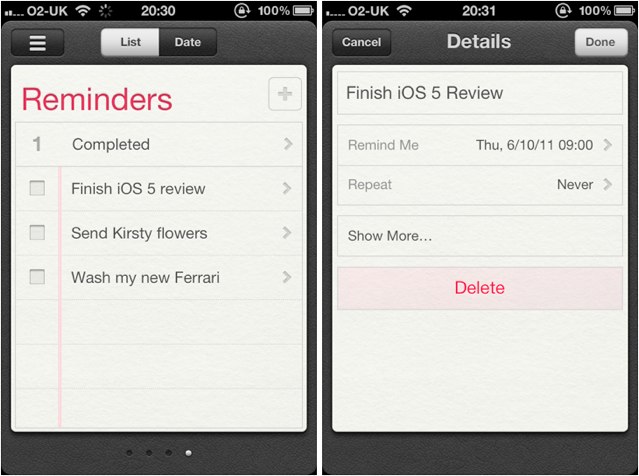
Reminders is a great way to GTD on your iPhone.

Like the majority of Apple’s apps, Reminders is easy to use and easy to understand. Entering new tasks couldn’t be more simple, and you have the option to input a date and time for your reminder, you can repeat tasks, specify their priority, and add notes.

Your tasks can also be broken down into as many separate lists as you like, meaning you can enjoy dedicated lists for personal and professional use, that allow you to separate your to-do list at work from your to-do list at home. If you’d like to view all of your tasks together, you can simply choose to have them sorted by date, which displays all of your tasks for the day, from all of your lists.
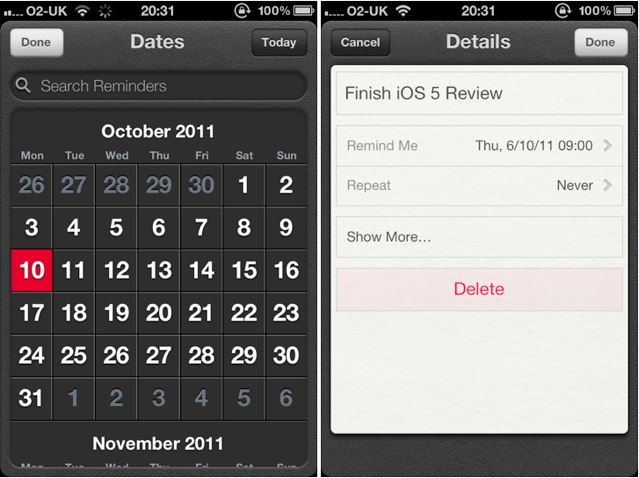
In some ways, Reminders functions a lot like Calendar, but for to-dos.

You’ll notice that the app doesn’t have as many options as some third-party reminders apps, but for managing a basic to-do list and keeping on top of your tasks, Reminders should provide you with plenty of options.

One of the best things about the Reminders app is that it syncs across all of your devices. When you enter and amend tasks and to-dos, they automatically sync to your other iOS devices via iCloud, and even to iCal on your Mac, and Outlook on your PC.

The majority of iOS users will find that Reminders offers enough features to help they stay organized, and because it’s so easy to setup and manage, it’ll become one of the most popular features of iOS. For those who need more, however, such as project management and assigning tasks, Reminders won’t completely meet your needs.

Finally, it’s worth noting that the best functionality of Reminders — the ability to set reminders that trigger when you reach or leave a certain location — doesn’t work on anything but an iPhone. That’s frustrating. Apple clearly chose to limit Reminders location features to devices in which they could count on there being GPS functionality, but you’d think Apple could easily enable this feature for 3G iPad owners.

Twitter Integration

It might seem a trifle, but Twitter integration under iOS 5 has been implemented perfectly.It has been done in such a way that if you use the service, it’s there just when you need it: when you snap a photo, when you watch a video on YouTube, while you’re browsing the web, and while you’re using the built-in Maps app. However, it’s subtle enough that if you’re not an avid tweeter, it won’t get in your way. It’s not in your face all the time begging to share your entire life with your followers, and it’s easy to avoid.
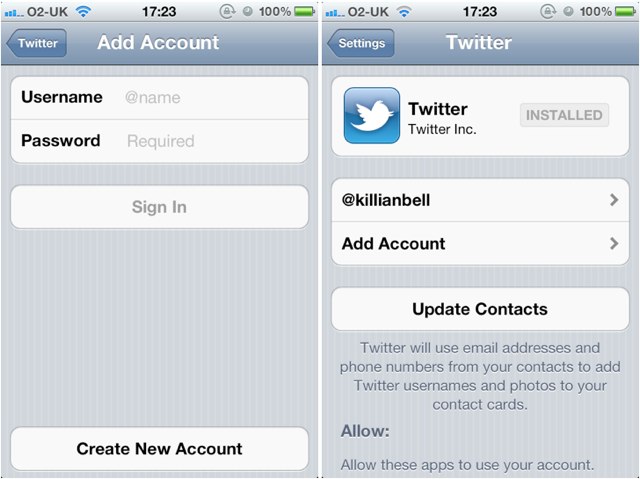
Setting up iOS 5's Twitter integration.

Don’t expect Twitter integration to replace your favorite Twitter client either. There’s only so much it will do, and for most things, you’ll still need a dedicated app. What Twitter integration does do is it makes sharing content with your friends on Twitter from an iOS device easier than ever before.

You can upload a photo directly from your Camera Roll and it’s as easy as sending an image via email or MMS. You can even add text to accompany the image, and include your location. It’s just as effortless to tweet web pages from Safari, videos from YouTube, and maps from the Maps app. And don’t think you have to enter your username and password every time you want to send something; simply sign into Twitter once via your device’s Settings app and it will save your information so that you can tweet until your heart’s content.
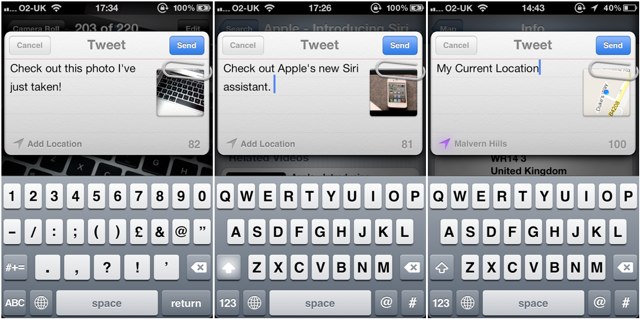
Tweeting photos or links to your followers is just a tap away in iOS 5.

Twitter integration also works seamlessly with your Contacts app — allowing you to apply your friends’ usernames and profile pictures to their contact information. You no longer have to persuade your friends to have their picture taken just so that you can add it to their contact info — Twitter just syncs them for you. It’s easy and it’s fast. Once you have synced your contacts with Twitter, you can tweet friends and access their profile directly from the Contacts app.
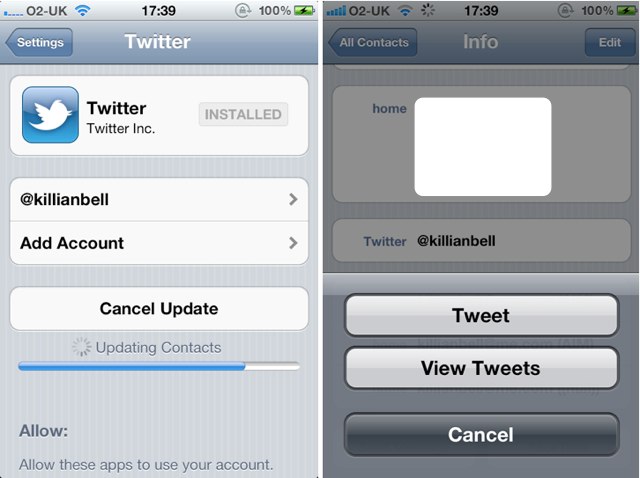
Twitter integration under iOS 5 is terrific. However, it’s not completely perfect just yet. I’d like to see a little more from this feature that will allow me to view my Twitter feed without loading up an app. For example, a Widget in the Notification Center that displays the most recent tweets — similar to those for Stocks and Weather — would make Twitter integration completely faultless.

Next Page: iCloud, Wi-Fi Sync

  • Subscribe to the Newsletter

    Our daily roundup of Apple news, reviews and how-tos. Plus the best Apple tweets, fun polls and inspiring Steve Jobs bons mots. Our readers say: "Love what you do" -- Christi Cardenas. "Absolutely love the content!" -- Harshita Arora. "Genuinely one of the highlights of my inbox" -- Lee Barnett.

130 responses to “iOS 5: The Software Steve Jobs Always Thought You Deserved [Review]”

  1. Cstephens7861 says:

    Wasn’t Steve at WWDC?

  2. bplano says:

    I have only one complaint, and that was using the word “vista” in the conclusion… even if you weren’t directly referring to Windows Vista XD

  3. brownlee says:

    Ha. Damn, you’re right. I totally forgot. Updated!

  4. gregbraddock says:

    the umbilical cord has most certainly been cut! haven’t hooked my phone up via usb since updating to the GM. iCloud backups for the iPhone are automatic (which i didn’t even realize) and iTunes syncing is wireless and runs in the background, not rendering your device useless for 5 minutes. 

  5. Remy Manuel says:

    Doesn’t Reminders only work on an iPhone because of the location aspect of it? If I want to be reminded to feed the cat when I get home and put it in via my iPhone it will sync with all other iDevices right? Most of them are probably already at home….

    They could of course have build in the option to limit the location function to the machine you are using at that moment. So iPad 3G users could use it on their iPads when they desired… But apparently Apple chose to limit it to iPhones (which are carried around more often).

  6. brownlee says:

    Our point is really just that there’s no reason not to allow iPad 3G users to use Reminders. I carry my iPad everywhere with me, just like my phone.

  7. MacHead34 says:

    But what time will iOS5 be released?! Yes, I understand that most of you have it already, which I  don’t know how. How much time will it take to download and upload onto my iPhone or iPad.

  8. MattHanterlar9765 says:

    people all over the world make $87 an hour online and their check is more than $6000 month after month just working on the computer for few houres, more home workers needed immediately,This system is so simple that anyone with a computer can make money FAST, Read about it and follow the steps to get started here, http://gzg.in/9583

  9. TonnyHartley876465 says:

    people all over the world make $87 an hour online and their check is more than $6000 month after month just working on the computer for few houres, more home workers needed immediately,This system is so simple that anyone with a computer can make money FAST, Read about it and follow the steps to get started here, http://gzg.in/9583

  10. God says:

    itunes match – what about songs ripped in 320kbps are they replaced by the 256kbps aac version?

  11. Andrew Griffin says:

    Didn’t unified inbox come in iOS 4? Is that a mistake, or have they changed something?

  12. dan says:

    I’m thinking 10:00 a.m. pacific they’ll start rolling it out. I’m on the east coast, so about 40 min from now. plug in your device, and hit “check for updates”. The servers are going to get slammed, so you may have to check a few times before itunes finally says that there is an update available. As for how long it will actually take to download, install etc. It all depends on the size of ios 5, your connection etc.

  13. dwplay11 says:

    iTunes match question:
    My brother started his own account when the iPod first came out. He downloaded a lot of songs. I wanted my own account soon after and began downloading songs of my own in my own account. We now share accounts. Is this going to effect iTunes match? If so, how?

  14. Andy Cohen says:

    In the cloud, yes. Though you can avoid the downgrade by syncing the old fashioned way even if just for those songs in particular. It’s not free either, by default the cloud will only hold the music you purchased through iTunes, the rest of your library will cost you $25 per year in “cloud rent” It’s not a perfect service by far. But remember that it’s only the first iteration and apple is always improving their services. For some users, this will be a welcomed convenience, the rest can ignore it.

  15. Andy Cohen says:

    I think that’s probably a good guess. And yes, the servers are already being slammed, about every other “check for updates” gets a “cannot connect to server” response on my MBP. I can already tell, I’m getting nothing accomplished today!

  16. Andy Cohen says:

    The people who appear to already have it, are part of the developer program and have been toying with betas, they too are waiting to download the official release, like everyone else

  17. joewaylo says:

    I’m not too fond about the iTunes Match.
    For one: If you live in a shotty 3G area, you’re not gonna be able to receive music.
    Two: You’re talking about redownloading several gigabytes of music songs when you’re ready to listen to it again?

    If by chance you were in a Wi-Fi HotSpot or at your house with Wi-Fi, this would work fine. But you’re talking about 90% of iPhone and iPad 3G users who are probably not ever home unless they work-at-home.

    On top of that, some work places don’t even have a 3G signal. Secured facilities have no 3G access either.

  18. kelly_albertine says:

    APPLE TV UPDATE IS LIVE !

  19. GDal says:

    Time to get ready for iOS 5! OSX 10.7.2 is available!!!! Downloading, of course!

  20. Cortney Taylor says:

    iOS 5 update just went live. Sweet!

  21. Photography Training says:

    Its out now. Downloading ion for iPad :-)

  22. Freeh2o says:

    ios5 is avaiabel for dl

  23. GDal says:

    SWEET! iOS5!!!!

  24. Andy Cohen says:

    If all the songs are on one computer and indexed by iTunes than the $25 subscription should index the songs not purchased by your account as your non-iTunes purchases and Mach them in the cloud anyway. If you only use the free version however, apple will only store the purchases for each account in their respective iCloud storage spaces. This will not effect the library on your computer or what you have stored on your devices. It’s simply a convinience, providing portability and remote access, it’s main purpose in my opinion for most users will be the automatic syncing of new music purchases to all devices

  25. Andy Cohen says:

    iOS 5 now available in iTunes!!!!

  26. dan says:

    I’m so stoked I’m home, today! I had my ipad plugged in, at about 12:55. So, once 1:00 pm rolled around, I hit “check for updates”, after 3 or 4 tries it finally acknowledged that an update was available.I have two dl’s going right now for mine and my gf’s ipads. Yeah, I think it’s fair to say the only thing I’ll be doing today is messing with iOS 5! Plus, it’s raining outside;)

  27. Frank Lowney says:

    I think that it’s a step in the right direction.  What’s missing, of course, is all the stuff that I have and want to intelligently sync among devices that didn’t increase Apple revenues.  The iTunes Match concept won’t work at that scale — there’s just too much stuff.  

    So what’s the missing piece?  I think that I need an interim cloud — something between iCloud and my various devices.  Something I own. Something upon which is stored all of the free podcasts I’ve downloaded, all of the AppleScript and Automator workflows I’ve developed, all of the eBooks I’ve created and all of the preferences I’ve set for hundreds of apps, desktop and otherwise.  

  28. Frank Lowney says:

    I think that it’s a step in the right direction.  What’s missing, of course, is all the stuff that I have and want to intelligently sync among devices that didn’t increase Apple revenues.  The iTunes Match concept won’t work at that scale — there’s just too much stuff.  

    So what’s the missing piece?  I think that I need an interim cloud — something between iCloud and my various devices.  Something I own. Something upon which is stored all of the free podcasts I’ve downloaded, all of the AppleScript and Automator workflows I’ve developed, all of the eBooks I’ve created and all of the preferences I’ve set for hundreds of apps, desktop and otherwise.  

  29. AndrewMclave says:

    not everyone has wi fi so untill syncing is doable via 3G for those of us who need this option, ios5 is far from post pc. In fact, this option may appease the impovrished wireless carriers somewhat and allow them to feel less hard done by, the poor guys! (not) 

  30. Chris says:

    hm…how about sending iMessages when I’m offline? like when I have once sent an iMessage to an iOS 5 user, so my Phone indentifies him and marks him blue, but I am offline..does it send an SMS instead? I hope they didn’t forget the people who don’t have data flatrates/no 3g reception

  31. S. Mulji says:

    You mean like an iServer? I agree with you completely.  MS has a great solution with Windows Home Server.  If Apple brought out a solution similar to that, that would be a great solution.

  32. Srf490 says:

    very good review, lots of detail

  33. Soho22 says:

    Yeah I can’t wait to sync 64GB over 3G.

  34. Soho22 says:

    I like how half of the additions are either missing from iPad or are only half there. No lock screen widgets, no camera button in lockscreen, no siri even though it can handle it, bah

  35. cricket477 says:

    My ipad doesnt even backup it just comes up with an error how do i fix this

  36. JoeSchmo says:

    “It just works”….yeah right…error 3200…Apple, join the ranks of other tech firms who can’t match the hype with reality.

  37. Gregory says:

    I thought so too, at least on the iPhone since I use it all the time.  Maybe this was not available on iPad?

  38. Lee Hankins says:

    My iPhone’s screen changed to the Apple Logo with the standard loading icon and now iTunes is stuck on ‘Verifying iPhone Restore with Apple’.  Do I have a brick”” :s

  39. AuthorOfThings says:

    I thought that it was streamed to his home.

  40. bbneo says:

    My last reason for booting into Windows is gone.  

  41. A. Gorilla says:

    I read somewhere, either here or on 9to5mac, that when you purchased or updated apps in the App Store in iOS 5 it would stay in the App Store rather than ‘minimising’ the store and returning to the home screen (a totally pointless exercise in my opinion). The purpose of the new feature is so multiple apps and updates can be purchased quickly.

    Has anyone else heard of this functionality? It certainly isn’t working on my iPhone 4 (with iOS 5, after many errors and restore cycles…)

  42. shy says:

    A friend of mine once told me that his Mac got better with age: either the OS got smaller/more efficient, or new functionality would come along and refresh the user experience. Now I know what he was talking about :)

    Excited by all the changes, though I’ll give iTunes Match give a miss for now. 

    Great article. In Google’s defence, I have been using their ActiveSync on an iPhone for years, for mail, contact and calendars, and it has been a seamless user experience.

  43. Chaz Waterman says:

    Easily the best and most comprehensive review I’ve seen short of Tim’s own presentation. Well done, and thank you! My update took forever, and reading this helped pass the time and get me more excited!

  44. Dave Perkins says:

    I would have preferred to see newsstand as an app instead of a “smart folder”.  I have a “media” folder with all my media apps in it, including the iBookstore.  I would love to put newsstand in there too, but I can’t.  It just begs the question….when will Apple allow us to officially hide apps?

  45. Es Loon says:

    My ‘Send As SMS’ was OFF, yet I could still receive my own text message (yes it was green in colour and it said text). Bullshit!!

  46. Yuri Kofman says:

    Excellent!

  47. Andrew Griffin says:

    Nope, it’s in the current (or just not current) iOS 4 build, too.

  48. bernhardush says:

    I was typing a comment here to ask why iPhone must be connected to a power source in order to sync over Wi-Fi. It seems like an unnecessary, annoying limitation (after all, syncing is not an overly power intensive operation, is it?).

    Well, while I was composing the question, I answered it myself. It must be to prevent iPhone’s battery from dying while syncing. I guess that an abrupt disruption of the syncing process is something you don’t want to happen.

    Sure, it is possible that the Wi-Fi goes down while syncing or that the USB cable is plugged out, but I guess that in such cases iPhone does some sort of recovery so that nothing bad happens. Now, if iPhone dies during syncing due to the battery, that would be a different thing.

    Hopefully Apple will soon be able to safely enable true wireless syncing in one of the next versions of iOS.

  49. Fitz says:

    Reminders app sucks.  It doesn’t give you your reminder/alarm until you turn the screen on…at least for me.  What’s the use in that?

  50. Fitz says:

    siri isn’t a part of iOS5.  it’s only for the iPhone 4s

  51. Rob Madrid says:

    Love the split keyboard, hunt and peck is a pain, my fingers are too big, usually I go to my PC. BTW I consider SJ greatest achievement to be getting users like me to seriously consider switching to Mac when I upgrade to a new PC next year. It wasn’t till I bought two iPad 2nd gen the switch over was utterly painless, this vs months to get vista working right

  52. Rob Madrid says:

    Love the split keyboard, hunt and peck is a pain, my fingers are too big, usually I go to my PC. BTW I consider SJ greatest achievement to be getting users like me to seriously consider switching to Mac when I upgrade to a new PC next year. It wasn’t till I bought two iPad 2nd gen the switch over was utterly painless, this vs months to get vista working right

  53. michaelra says:

    This can’t be true? I haven’t had a chance to play with the Reminder but there’s no point in a reminder if you have to turn the screen on first

  54. Fr says:

    Article is wrong. Hitting Sync Now will sync, plugged in or not. Syncing is automatic when plugged-in though. Provided your Mac/PC is running!

  55. Friso says:

    Uhm, the unified Inbox was a feature of iOS 4. This and other mistakes make me wonder… Was the OS actually reviewed hands-on?

  56. Jossef says:

    I have had iOS5 since last night. I don’t think I understand the Notifiction Center. The only way I see to use it is to get to your home screen and pull it down. Why do I need to do that? If I am on my home screen I can already see that I have mail or a message or a missed call!! It says that we can see the notifications in our lock screen. I have that turned on and still there are no notifications on the lock screen.

  57. Friso says:

    You can pull it down on any screen. Also, notifications on your lock screen only appear when you received them while phone was locked, like missed calls, messages etc. Once you unlock, they’ll move into the pull-down sheet.

  58. Pdrman says:

    The music app needs to change back to the ios4 ipod.  I can’t say enough negatives about the new music app.  I’m shocked that such a lousy app made it to production.  Hopefully they give an option for user interface in an update, and hopefully very quickly!

  59. Rogueangt says:

    Apple forces you to add your device as if it was a new device (there is no way around this. I ran into the same problem with both my iPhone and iPad). If you install iOS 5 you WILL HAVE TO RECONFIGURE YOUR WHOLE DEVICE AND KISS ALL YOUR PREVIOUSLY INSTALLED APPS GOODBYE. AS AN ADDED KICK IN THE NUTS YOU WON’T GET SIRI UNLESS YOU JAILBREAK YOUR PHONE/IPAD) Apple really took a Microsoft approach and screwed everyone with this update…

  60. Rogueagnt says:

    BEWARE!!!! iOS 5 will require you to register your device as a new device and wipe out everything to had on your iPhone/iPad!!!!

  61. Drsjatu says:

    I am greatly disappointed that I cannot color code events in one calendar. Does anyone know of a calendar application that can do this. No I don’t want to use separate calendars to do this.

    I would also like to wirelessly sync my information to my PC . Ideas?

    SEK

  62. Reinette says:

    Not true. Part of updating to iOS 5 is first backing up your current iPhone state, and then during the install/upgrade all of the previous settings and apps are restored.

  63. Reinette says:

    Cozy. Via http://www.cozi.com, also in the app store. It is an app that allows you to assign different people different colors, and you can have personalized calendars, lists, everything. You can also email/ text yourself reminders as well.

  64. Snow Angel22 says:

    It actually first used to be a stand alone app, that is until about 3 months ago when Apple removed it from the app store so they could incorporate it into the new iPhone. It was also free, and rather funny. It didn’t always understand what I said, but it had a good sense of humour.

  65. Reinette says:

    Syncing is doable over 3G in this iOS. It just takes a bit of looking.

  66. Keating Fee says:

    not the case, idiot. in upgrading you first backup, once the upgrade is complete, all the info is reloaded onto ios5 device. Idiot. Don’t scare people with your own ignorance

  67. Uniquified says:

    Kudos on the Jam/Style Council/Weller music screenshot!

  68. Disasterarea says:

    iphone 4, turn on airplane mode, turn it off again, no carrier…. ever.
    Apple forgot ot was a PHONE.

Leave a Reply

