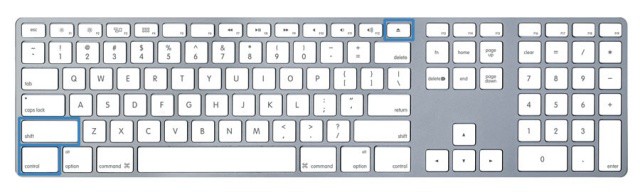
Just think of all that time you spend managing your monitor. There are Energy Saver preferences, Screen Savers, and the like to keep your energy usage lower and less costly. Today’s tip is the most easy and least time consuming way to do so that we’ve seen.
Take a look at your keyboard. If you have one of the more recent Apple-brand wired keyboards, it looks a lot like the one above. It will still work, though, if you have another type, including the Apple wireless keyboard.
To reduce your monitor’s brightness to zero, simply press the keys Shift-Control-Eject. Your monitor’s brightness will drop to zero, looking like you just turned off your MAc. You didn’t, though, as everything is running under there just fine. You’re not putting the Mac to sleep, or even sleeping the monitor. Just, you know, making it zero bright, if that’s even a term.
Let us know what you think of this simple tip in the comments below.
[Source: Everyday Mac Support]
Got an OS X tip? Need help troubleshooting OS X? Drop me a line or leave a comment below.

Rob LeFebvre is an Anchorage, Alaska-based writer and editor who has contributed to various tech, gaming and iOS sites, including 148Apps, Creative Screenwriting, Shelf-Awareness, VentureBeat, and Paste Magazine. Feel free to find Rob on Twitter @roblef, and send him a cookie once in a while; he’ll really appreciate it.


10 responses to “Drop Monitor Brightness To Zero, Reduce Energy Costs [OS X Tips]”
This is bogus.
Every single discussion about dimming an imac monitor ends in either ctr+shift+eject, hot corners or energy saving preferences (all variations on the same action).
THE PROBLEM is that any use or combination of the functions above (at least for me!) results in a NETWORK ACTIVITY DROP! Yes, I have tried every combination of the settings in the energy saving preferences. Yes! I have even tried running the Caffeine app. To no avail, the network activity monitor shows activity drops as soon as the monitor goes black.
The main reason, I assume, people want to leave a computer on, but kill the monitor completely, is to DOWNLOAD OVERNIGHT (or various other less common uses).
So lets cut to the chase – why the #$@# is there no way to simply reduce brightness to 0%? I’m looking at you, Apple. And in liue of apple giving a @#$#, is there such thing as a developer that has a) realized the actual problem here, and b) solved it be creating an app or script that ACTUALLY, SIMPLY reduces the backlight to zero.