

Here is a great tip that will let you convert any text that you can drag select into a spoken track delivered right into iTunes. You can then sync that track and take it with you on the go. Listen to what you might have been reading later or share it with friends and family.
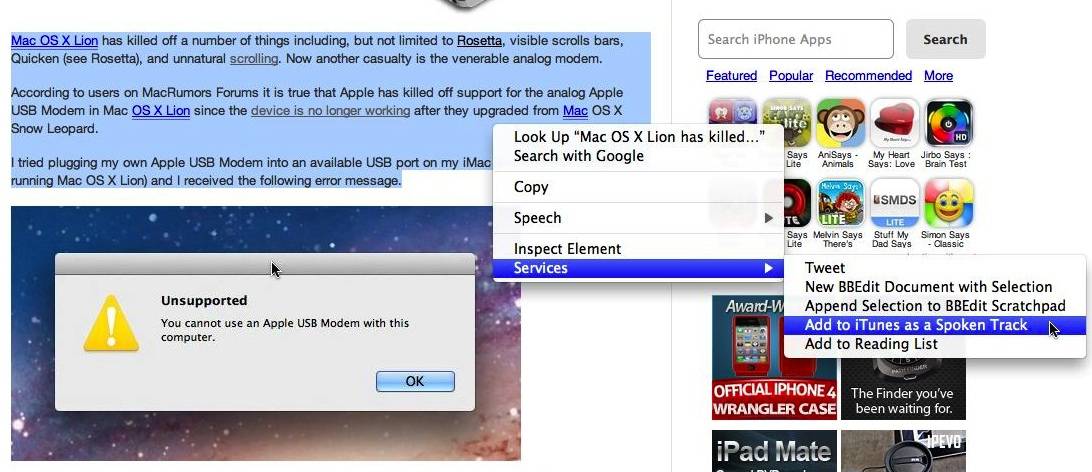
Here is one example of how you can use this feature. I opened up my post Mac OS X Lion Says Good-Bye To Analog Communications [Modems] and I highlighted the first three paragraphs. I then right clicked the selected text, selected services, and finally I selected Add to iTunes as a Spoken Track.
Mac OS X Lion asked me a few questions about the text I was converting to a spoken track via this pop-up dialog box:
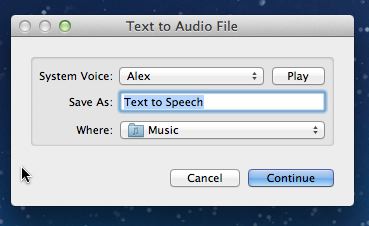
You can select the Mac OS X System Voice you want to use, press Play to hear how the voice you selected sounds, give the spoken track a name, and tell your Mac where to create the audio file. Pressing Continue sends the track to iTunes.
Got a tip you’d like to share? I’d like to hear about it [email protected].

David W. Martin has more than 20 years of experience in the industry as a programmer, systems and business analyst, author, and consultant. David has written for CNET’s iPhoneatlas.com, MacLife.com, CultofMac.com, BYTE.com and recently for aNewDoman.net. He comes to Cult of Mac’s website with deep knowledge and passion for the all things Apple. Follow David on Twitter @david_w_martin or see what he’s up to now at davidwmartin.com.

