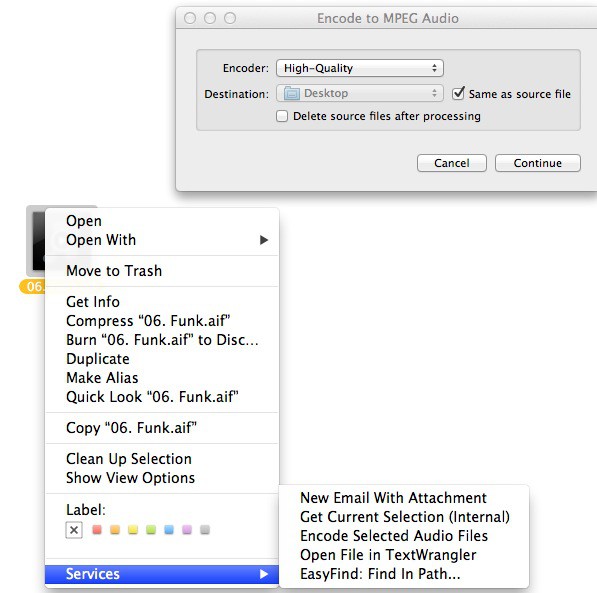
Audiophiles love their audio files. Many Mac users swear by the AIFF format (Audio Interchange File Format), which was jointly developed by Apple and Electronic Arts back in the late 80s, according to Wikipedia. This uncompressed audio format sounds great, but the resulting file sizes are huge. To change it to a smaller format like MP4 used to require a trip into an audio editing program like GarageBand, Audacity, or even iTunes. For those among us who want an even simpler way, here’s today’s tip.
These tools are built right in to OS X Lion, and should be enabled by default. To convert a large AIFF file, simple right click on it in the Finder, and choose Encode Selected Audio File from the resulting Services contextual menu. For the screenshot above, I exported a Funk song from GarageBand as an .aif file, and then clicked on it in the Finder. I chose iTunes Plus from the encoding dialog (the other choices are Apple Lossless, High-Quality, or Spoken Podcast) to get a higher quality M4A file. The iTunes Plus option gave me a nice 256K M4A file. There’s also an option to delete the source file after encoding, a nice option if you’re truly wanting to switch file formats rather than create a second file for posting somewhere.
My AIFF file was 16.6 Mb, while the M4A file ended up being 3.1 Mb. Not a huge deal in these days of ubiquitous and inexpensive hard drive space, but a huge space saving, nonetheless. A giant file, say of an entire symphony or concert, would really make sense to store at the lower file size, if the compression was good enough for your ears. And, let’s face it, most of us listen to music on less-than-ideal speakers and systems. Great to encode a copy to put on a MacBook Air, for example.
Obviously, the encoding of larger files will take longer, and the speed of encoding is also dependent on your Mac’s CPU and RAM. The file I encoded went lickety split on my Macbook Air.
[Source: OS X Daily]
Got a tip of your own? Need help with a troublesome Mac OS X issue? Leave us a comment below!

Rob LeFebvre is an Anchorage, Alaska-based writer and editor who has contributed to various tech, gaming and iOS sites, including 148Apps, Creative Screenwriting, Shelf-Awareness, VentureBeat, and Paste Magazine. Feel free to find Rob on Twitter @roblef, and send him a cookie once in a while; he’ll really appreciate it.

