
Mobile menu toggle

Check Out These 10 Cool Things That Have Been Added In iOS 5 Beta 2 [Feature]

By

overview_hero

MobileMe Mail Archiving, Better Gmail Support
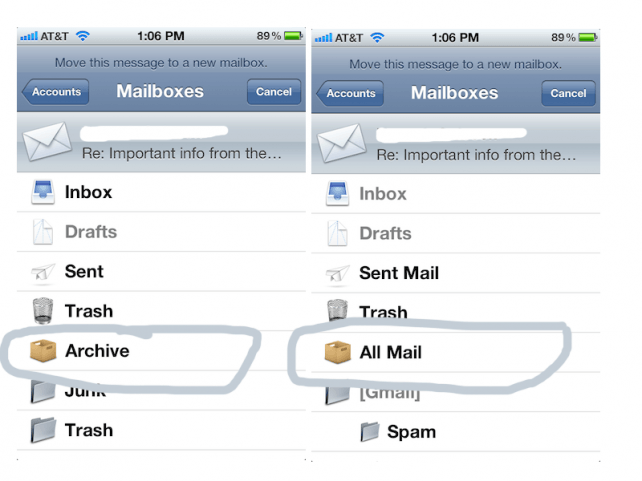
MobileMe and Gmail customers can now directly archive emails from the Mail.app. [via App Advice]

Native Mobile Safari Momentum Scrolling

Now web pages and apps using a simple CSS3 element will gain native momentum scrolling. [via Johan Brook]

Real-Time App Syncing Progress
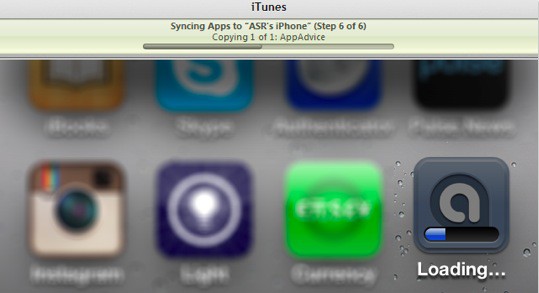
This is a small one, but as part of the iOS 5 tweaks that allow you to use your iDevice during iTunes Syncing, you can now view apps being installed in real-time while they are being synced to your device through iTunes, similarly to if you had downloaded the app to your device directly. [via App Advice]

International Assistance

If you’ve got an American iPhone and have roamed with it overseas, it’ll automatically make your dialed contact numbers internationally friendly by appending a +1 before each domestic number. It’s possible that Apple will leverage the iPhone’s GPS abilities to do this for other countries as well.

iCloud Icon Has Been Changed
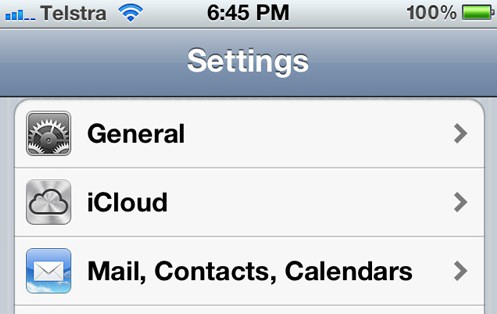
In Beta 1 it was purple. Now it’s the brushed steel we’ve seen in all the official documentation. In addition, iCloud is now the default choice for setting up a new email account, with MobileMe pushed all the way to the bottom.

Anything else you think should be highlighted here? Let us know in the comments.

  • Subscribe to the Newsletter

    Our daily roundup of Apple news, reviews and how-tos. Plus the best Apple tweets, fun polls and inspiring Steve Jobs bons mots. Our readers say: "Love what you do" -- Christi Cardenas. "Absolutely love the content!" -- Harshita Arora. "Genuinely one of the highlights of my inbox" -- Lee Barnett.

38 responses to “Check Out These 10 Cool Things That Have Been Added In iOS 5 Beta 2 [Feature]”

  1. appledrunk says:

    The WiFi syncing is pretty slick! Anyone interested in having their UDID activated to use iOS 5 check http://appledrunk.com

  2. Chris Brunner says:

    Does anyone else find it a little “odd” that iMessage is not compatible across the two beta versions? I hope that this gets addressed, as I’m sure it will, before release day. Who knows how long the 3GS will be supported for future updates? Many of my friends, family, and co-workers have a 3GS and I know would not be pleased if this were to happen to them… (especially my wife)

    -Chris
    http://friendsofmac.net

  3. Tom McGrath says:

    How is the iMessage glitch cool? But otherwise, thanks for the round-up.

  4. Luke Lucas says:

    are y’all sure about that opening animation thing? i’m not seeing anything but the static logo (and yes, i updated to beta v.2 last night).

  5. Alejandro Iglesias says:

    the boot up animation is not working on my iPhone4, it seems that only work in ipads?

  6. Kevin Olson says:

    Everything seems way smoother than beta 2, I will wifi syncing did not require being plugged in, it kind of defeats the purpose.

  7. Wayne_Luke says:

    In beta software? No.

    If the compatibility changes after it ships to the consumer without good reason, then yes.

  8. Brandon Hite says:

    Doesn’t require plugging it in. Can manually initialize it under Settings.

  9. Kevin Olson says:

    I follow you, was just thinking it would be could if the first time you connected to your home wifi, plugged in or not, it would sync automatically.

  10. James Groom says:

    I have both iOS 5 Beta 2 and iTunes Beta 2 installed where is my WiFi Sync in windows Apple!!!

  11. Brody White says:

    I am pretty sure that the new boot animation only happens the first time you boot after the restore…and that was present in beta 1….and i am pretty sure that real time app syncing was in beta 1 as well

  12. Gary M says:

    who said it was cool?  and a features not working between two beta version of an OS, that’s not a big deal, it’s beta and there’s a reason for incremental updates to a beta release, it makes the earlier version obsolete so it’s a non issue…  people won’t be running different versions of iOS 5 when it’s released.

  13. Connor O'Neill says:

    The title says “10 cool things” therefore implying that it is cool. It’s rather boring, but nevertheless understandable.

  14. theotherphil says:

    Not only that, if your phone is setup for wifi sync and you press sync from within itunes…it syncs immediately. No need to be plugged into power.

  15. Kevin Olson says:

    I see your point but you are missing mine, I don’t want to push a button, plug in or other tasks. I would like to come home set my phone down and pick it up the next day and have it be ready.  There may not be physical wires in all cases but I am still tied to performing a function that could be completely automatic.

  16. esapata says:

    Insert snide Mac>PC comment.

  17. Josh the Happy says:

     if you want a FREE $15 ITUNES GIFT CARD follow these directions:
    1) install the shopkick app from the app store.
    2) after clicking “let’s do it” (haha) click cancel at the top left of your screen.
    3) go to the “me tab at the bottom left of your ipod/iphone.
    4) click the ” got a promo code? box and on the next screen type in mink8492
       this works on all ipods/iphones jailbroken or not.

  18. Mystakill says:

    I’d just like the ability to install apps without getting tossed out of the App Store app.  Background downloading & installation of apps should have been added when “multitasking” was added to iOS.

    FWIW, this is also a pet peeve of mine for PSN downloads as well.  Xbox Live has had background download & install for years.  Why does everyone else insist on either throwing you out of their storefront (Apple), or manually installating apps (PSN)?

  19. Zeteboy says:

    No such app as shopkick.

Leave a Reply

