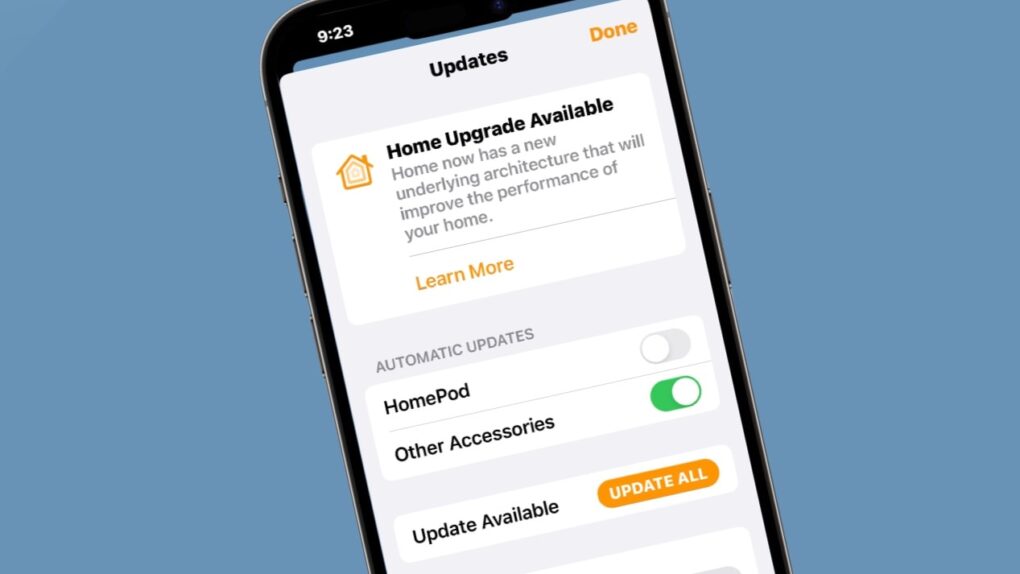
Update: Today, February 10, is the deadline to update the Apple Home app to avoid hassles. Read on for more information about what to do and why.
After previous warnings, Apple issued a final email this week to customers using its Home app: Upgrade to the latest architecture by February 10 or risk losing control of your smart home devices. Well, that doesn’t sound good.
Apple warns users to update Home app: What’s changing and why
The company reminded users that support for the previous version of Apple Home will end on that date. Users who fail to upgrade may experience significant disruptions. That could include problems with accessories and automations, or a complete loss of access to their smart home setup through the app, according to an Apple support document.
Improving on the original HomeKit platform from 2014, Apple introduced a redesigned Home architecture in 2022. The company described it as “more reliable and efficient” than its predecessor. Apple has now made the transition mandatory, ending support for the older system after more than two years of coexistence.
What will change
The newer version promises improved performance for smart home accessories and enables several features unavailable on the legacy system. These include robot vacuum cleaner support, guest access functionality, and Activity History tracking within the Home app.
Users who remain on the older version will also miss out on important security fixes and performance improvements going forward.
Who it affects
The warning applies to anyone using Apple’s Home app to manage Home-enabled devices, including HomePods, smart lights, Apple TV boxes, locks, thermostats and other compatible accessories.
With millions of users relying on the Home app for daily routines, the cutoff could cause widespread disruption for households that haven’t yet upgraded.
How to upgrade your Apple Home app before the deadline
According to Apple’s support documentation, the upgrade process is straightforward:
- Users should open the Home app on their iPhone, iPad or Mac.
- Tap or click the three dots in the upper-right corner and navigate to Home Settings.
- Select Software Update and tap Update Now.
All homes owned by a user get the update simultaneously during this process.
If you see the message “This home and all accessories are up to date,” you should do nothing. You’re already running the current version.
Critical requirements to know
Before upgrading the Home app, Apple advises users to ensure all their devices meet the minimum system requirements. The new Home architecture requires iOS 16.2, iPadOS 16.2, macOS 13.1, tvOS 16.2 and watchOS 9.2 or later.
Apple recommends updating all devices before upgrading the Home app to avoid compatibility problems and ensure uninterrupted access to your smart home ecosystem.
Any iPhone, iPad, Mac, Apple TV, or Apple Watch running older software will lose access to the updated home until upgraded. Additionally, a home hub — either an Apple TV or HomePod — is required to share control of a home and receive notifications. Notably, iPads are no longer supported as home hubs on the latest version of Apple Home.
We published this post on February 5, 2026, and republished it with an update on February 10, 2026.

David Snow, an expert on Apple hardware and software, writes on a variety of technological and cultural topics for Cult of Mac. They include Apple news, technology buying guides, and features about computer setups and Apple TV shows and movies.
With 30 years of experience covering technology and other subjects, he has written and edited for numerous print and online publications, including CMP Media, TechTV.com, CNET, Wired News, Red Herring magazine, Law.com, The National Law Journal and Law Technology News magazine. Among other roles, he served as executive editor of the Law.com network of websites and editorial director, technology, for ALM Media.
Snow graduated with a B.A. from Syracuse University with majors in magazine journalism and psychology. While there, he worked as a reporter for The Daily Orange newspaper and associate editor of Equal Time magazine.
Founder of the blog At the Waterline, he can be reached on X (formerly Twitter) via @atthewaterline and on Mastodon via @dsnow.


3 responses to “Why your Apple smart home might quit February 10 — and how to stop it [Updated]”
I always keep my apps and OSs up to date. Following Steps 1& 2 above, going into the Home app on my iPhone and then into Home Settings, I see neither “Select Software Update” nor “This home and all accessories are up to date” and I followed your steps exactly. I don’t see anything close to that. Instead I just see the regular settings for our home, but nothing about a version of anything.
I’ll try my iPad next, but for the iPhone, I’ve got nada.
Dana, Apple first launched this home architecture in 2022. If you keep all your devices updated, you probably made the change over three years ago. I know I did, and my Home app looks like what you describe.
It would be nice if the Home apps included a note that the home architecture is up to date.
-Ed
I just checked out my iPad, and it’s the same thing: The ONLY reference to software on the whole page is this sentence which is shown underneath the “People” area:
People invited to your home will need to be on the latest software to accept invitations.
That’s it. There is nothing else about versions, updating, or anything else. It’s not a difficult screen, but I looked it up, down, left & right – nothing there.
Hopefully I’m in good shape *because* I don’t see anything.