For those of us that have something to hide, you’ll be happy to know that in iOS 5 Safari offers a private internet browsing mode. Once it is toggled on it prevents Safari from compiling a history of your browser activity.
By default private internet browsing is turned off, but you can quickly turn it on and leave it on from within the Settings app. Here are the steps:
Launch the Settings app.
Tap on Safari.
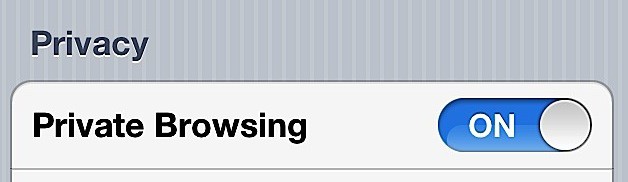
Toggle Private Browsing On by tapping the switch associated with it.
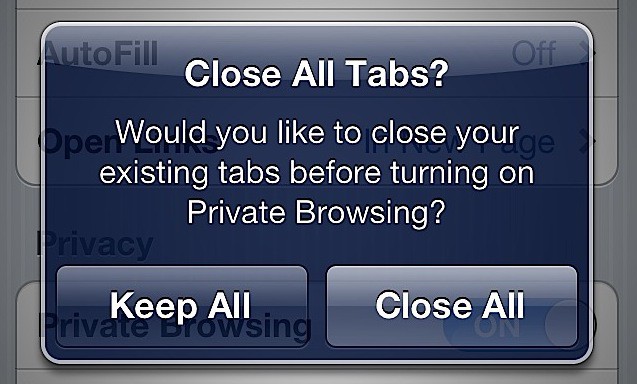
You maybe prompted to select whether or not you want to keep or close all currently opened tabs in Safari. Just select the option that is best for you.
Once you complete these steps Safari is in private internet browsing mode, more commonly known as ‘Porn Mode! ‘ All your internet surfing secrets are now between you, Safari and the sites you visit.
David W. Martin has more than 20 years of experience in the industry as a programmer, systems and business analyst, author, and consultant. David has written for CNET’s iPhoneatlas.com, MacLife.com, CultofMac.com, BYTE.com and recently for aNewDoman.net. He comes to Cult of Mac’s website with deep knowledge and passion for the all things Apple. Follow David on Twitter @david_w_martin or see what he’s up to now at davidwmartin.com.

Subscribe to the Newsletter
Our daily roundup of Apple news, reviews and how-tos. Plus the best Apple tweets, fun polls and inspiring Steve Jobs bons mots. Our readers say: "Love what you do" -- Christi Cardenas. "Absolutely love the content!" -- Harshita Arora. "Genuinely one of the highlights of my inbox" -- Lee Barnett.
Please edit your post to let novice know that when in “porn mode” your history is NOT saved! That way there will be no surprises if they need to find a previously visited site.
I turned this feature right away. It does nothing. I closed the browser and opened it again, check my history, and it was all there. Double checked the option, its in.
Just another bug in ios 5.
Other bugs I have seen… 1) random apps crash 2) weather app doesn’t do anything 3) sometimes keyboard come up missing the alpha/numerical keys, but the other keys like the “done” button and return and “123” shift button, etc, are still there 4) browsing in safari gets bugged. Unable to zoom in and out. Will zoom in and gets stuck, will not pinch zoom or tap zoom. Restarting the app doesn’t work. Hard booting phone does temp fix it. 5) sometimes swiping screen doesn’t move view in some apps like map, weather, safari, etc where moving the screen around allows you to view more
13 responses to “Activate Private Internet Browsing For Safari In iOS 5 [iOS Tips]”
Finally!
Safari changes color to black instead off the usual grey, which looks cool as well :)
The cursor on the image is the same exact size as the real one, I thought it was mine and went a little crazy when I couldn’t move my mouse :)
Please edit your post to let novice know that when in “porn mode” your history is NOT saved!
That way there will be no surprises if they need to find a previously visited site.
-mr. Bravo
a real private browsing setting would be to block your IP settings so that they don’t know who you are.
I turned this feature right away. It does nothing. I closed the browser and opened it again, check my history, and it was all there. Double checked the option, its in.
Just another bug in ios 5.
Other bugs I have seen…
1) random apps crash
2) weather app doesn’t do anything
3) sometimes keyboard come up missing the alpha/numerical keys, but the other keys like the “done” button and return and “123” shift button, etc, are still there
4) browsing in safari gets bugged. Unable to zoom in and out. Will zoom in and gets stuck, will not pinch zoom or tap zoom. Restarting the app doesn’t work. Hard booting phone does temp fix it.
5) sometimes swiping screen doesn’t move view in some apps like map, weather, safari, etc where moving the screen around allows you to view more