
I love the idea of being able to answer a phone call on my Mac, or even on my iPad. The convergence of this communication technology seems like it has great potential.
In reality, though, I end up getting three rings for every call, each slightly time-shifted from the rest, as I sit in my office/living room with my iPhone, iPad and Mac. You’d think that such an intelligent system would know that I had all three devices in one room, and only ring through to one specified device. Until Apple figures that out, maybe in an iOS update or OS X 10.11, there’s only one thing you can do: Disable the heck out of it.
Here’s how.
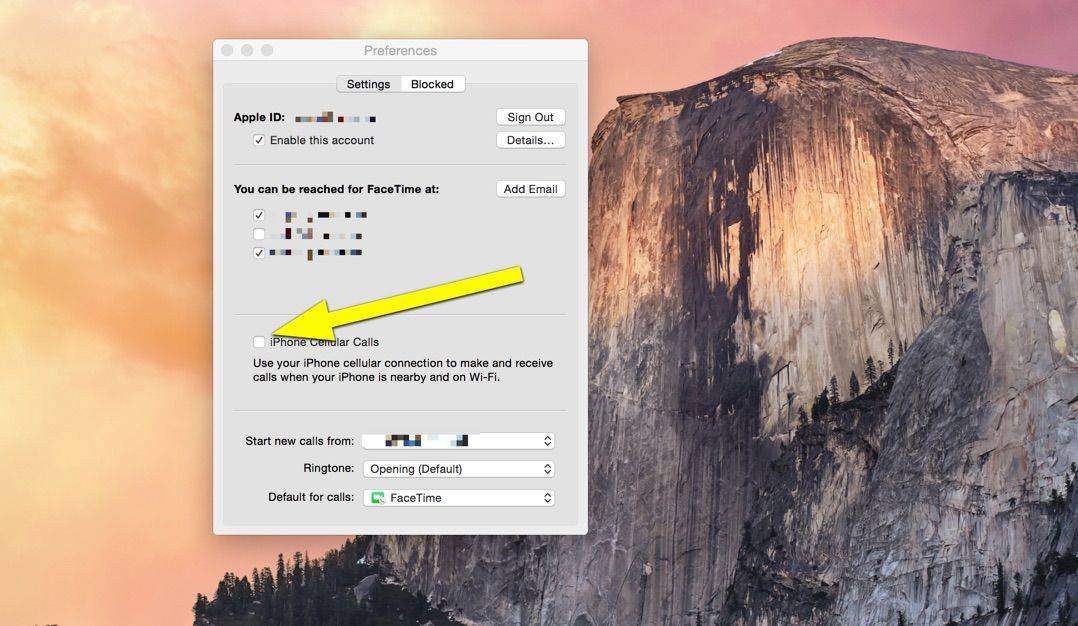
Let’s take care of your Mac first. Launch FaceTime from the Applications folder, or your Dock if you’ve got the icon there. Now, hit Command-Comma or go to the FaceTime menu and choose Preferences. Once there, uncheck the iPhone Cellular Calls checkbox. Quit FaceTime and do a little joy dance because now you’ll stop hearing that annoying default ringtone on your Mac for no good reason. If my iPhone is nearby and on Wi-Fi, like Apple says it needs to be to make this feature work, why not just pick up my iPhone to answer the call?
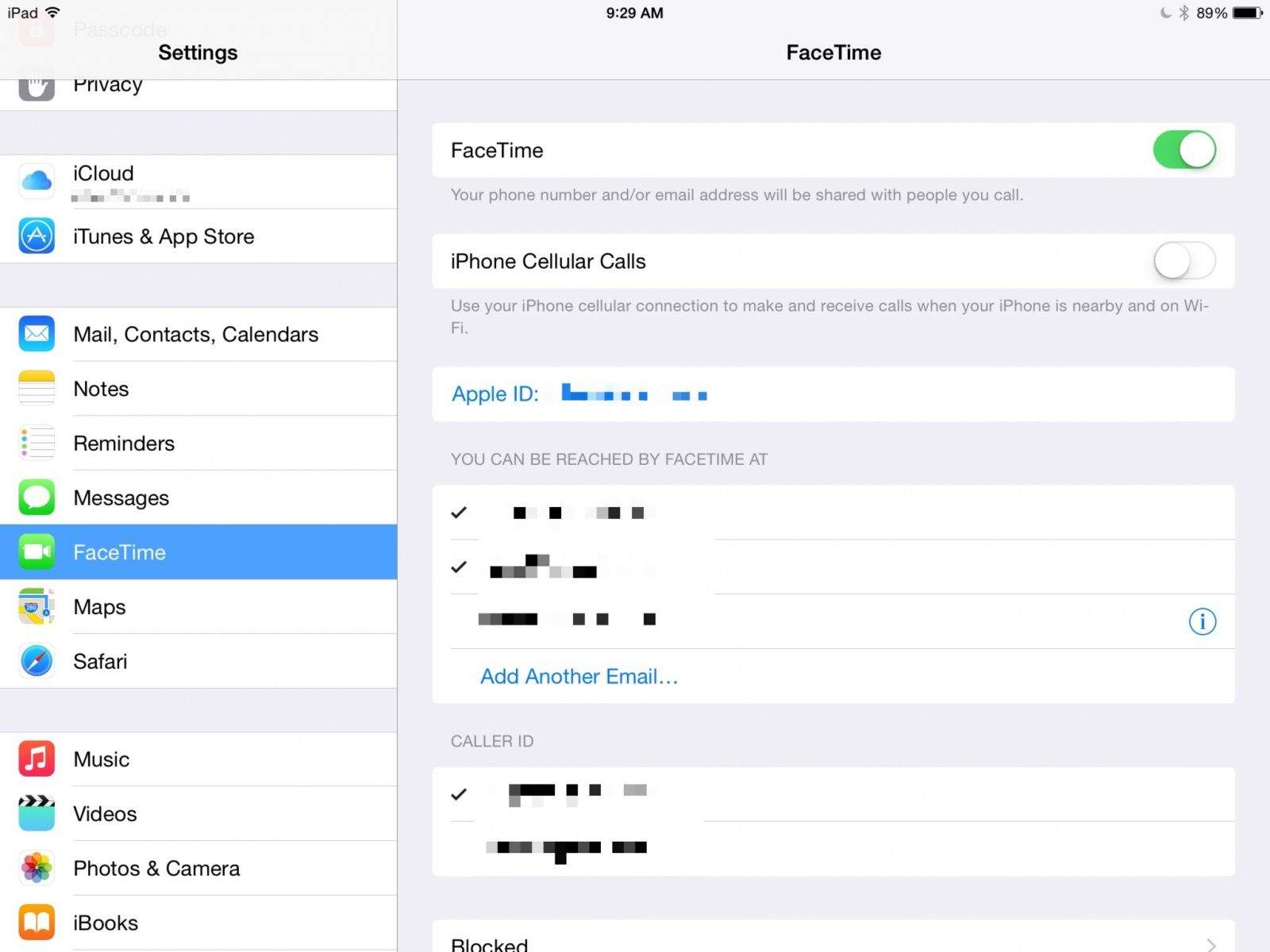
On your iPad, tap into your Settings app, then navigate to the FaceTime preference pane. Once there, tap the iPhone Cellular Calls to Off. From now on, you won’t be bothered with calls coming through to your iPad when you really just want to play Vainglory.
There’s a similar setting on your iPhone, but I’m not sure why you’d even need it. If you want to turn that off, just follow the steps for the iPad above and you’ll be all set.
Via: Apple Discussions

Rob LeFebvre is an Anchorage, Alaska-based writer and editor who has contributed to various tech, gaming and iOS sites, including 148Apps, Creative Screenwriting, Shelf-Awareness, VentureBeat, and Paste Magazine. Feel free to find Rob on Twitter @roblef, and send him a cookie once in a while; he’ll really appreciate it.


14 responses to “How to keep those annoying phone calls off your iPad or Mac”
This is great info. I actually use my Mac at the office to make/answer calls but do not want this for my iPad. PS: did you know that when you make calls, you can just use the keyboard to enter keypad information? “Press 1 for …”
And how would Apple know whether those devices are in the same room? You might find it annoying but many of us don’t. I’m sure if they did, you’d be the one to complain about some privacy issue or some such….
I find it extremely annoying.
It would be possible to use Bluetooth–that’s how Airdrop works.
Dear Santa Cook, can we please have different settings for “notification” and “answering” a phone call ? I’d really need the feature to get notification while working on Mac, but I still prefer to pick up my phone rather than talk to monitor.
This is great. It could be inconvenient when my cousins are messing around on my iPad. And potentially embarrassing if they picked it up and started talking.
My mac ringing simultaneously was getting super annoying, thanks for saving the day!
This feature has been a huge benefit to me at home. I love grabbing my iPad and catching a call, rather than running like a madman through the house to grab my phone.
“There’s a similar setting on your iPhone, but I’m not sure why you’d even need it”
This setting actually disables calls from going off on your other devices, so instead of turning off the feature on 2 or more other devices, you can just turn this off on your main iPhone and disable the feature on those other devices altogether. I think this is a simpler approach if you really just want your iphone to be the one ringing.
One major use of this feature for me is when I’m in a location where cellular signal is not very good. I put my phone near where there’s signal (i.e. near a window in my house) and just use my ipad to receive a call.
It can also be useful when I’m on my laptop in the office, listening to music on my earphones, and a call comes in. I won’t need to turn off the music and just answer the call there.
It can be annoying at times, but then again it’s a good feature when you’ve found a good use for it.
Location awareness or a schedule would be good enhancements. Perhaps optimizing to stop the ringing on the corresponding unanswered devices a second or two more quickly. Remember it is a new feature and real world usage feedback will help Apple improve.
People tell me my audio sucks when I respond from my Mac. Also, it’s very annoying how the esc key hangs up the call, I press it for irrelevant reasons while FaceTime’s ringing and I miss my calls.
I also get complaints about the audio quality with cellular calls from my Mac. Way worse problems than with a Bluetooth headset, which is strange because this goes through WiFi.
Maybe they didn’t QoS it properly in the operating system.
Any way to just disable the ringtone on Mac without turning off cellular calls entirely? I don’t mind the visual notification, just the multiple rings on all my devices.