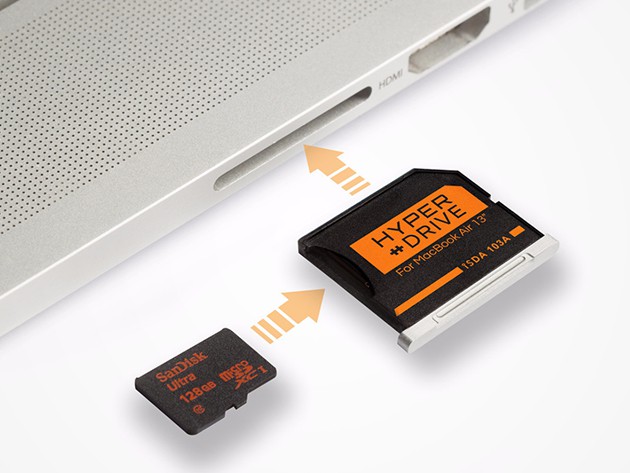
Having a backup drive is key to anyone with a laptop, but lugging around an extra hard drive can take the convenience out of portable computing. Plugging into the computer adds steps to the process of getting started with work, but one Macbook slot in particular — the SD card port — can be used to immediately expand its storage by 512 gigs. The way to do it is with a HyperDrive MacBook Storage Expander, and you can get one right now for $19.95.
HyperDrive expands the memory of any computer with MicroSD, MicroSDHC, or MicroSDXC slots, without any size or weight to your laptop bag. The plug-and-play drive inconspicuously hitches a ride while adding 128 gigs of storage for anything you want to hang on to — documents, movies, music, photos, even Time Machine backups. It’s designed specifically to match the sleek lines of a Macbook, and it’s fast too, supporting Class 10/UHS-I/U1/U3 transfers of up to 95MB/s.
Expand your Macbook’s capacity without adding to its weight or thinning your wallet, the HyperDrive MacBook Storage Expander is just $19.95 at Cult of Mac Deals.

Cult of Mac Deals are brought to you by StackSocial, an e-commerce platform offering flash sales on digital tools, web apps and tech gear. StackSocial breathes, sleeps and would probably eat Mac apps if it were at all possible. Follow StackSocial on Twitter @stacksocial.


5 responses to “How to expand your Macbook storage without taking up any extra space [Deals]”
IT DOES NOT WORK….Bought one 6 months ago, plugged in an sd card and it’s not recognized….tried several different cards and even bought one specifically for this purpose. STILL WONT READ. DO NOT WASTE YOUR MONEY.
It works on mine. What model of MBP are you using? Have you considered that maybe your SD port is dirty or damaged?
That a MBPr 13″
I have had several MBPs over the years and one of them had a flaky SD card reader which I should have had replaced under warranty and didn’t. It was never the cards, it was the actual port. I tried cleaning it but something is wrong with it.
Try cleaning as Eisenhorn suggested. Good luck, Keith.
And BTW, does this adapter work on MBP RETINA 13″?
I’ve used this in my older 2009 MBP 13″ as well as my 2014 MBP 13″… worked like a charm in both!
Sold out.