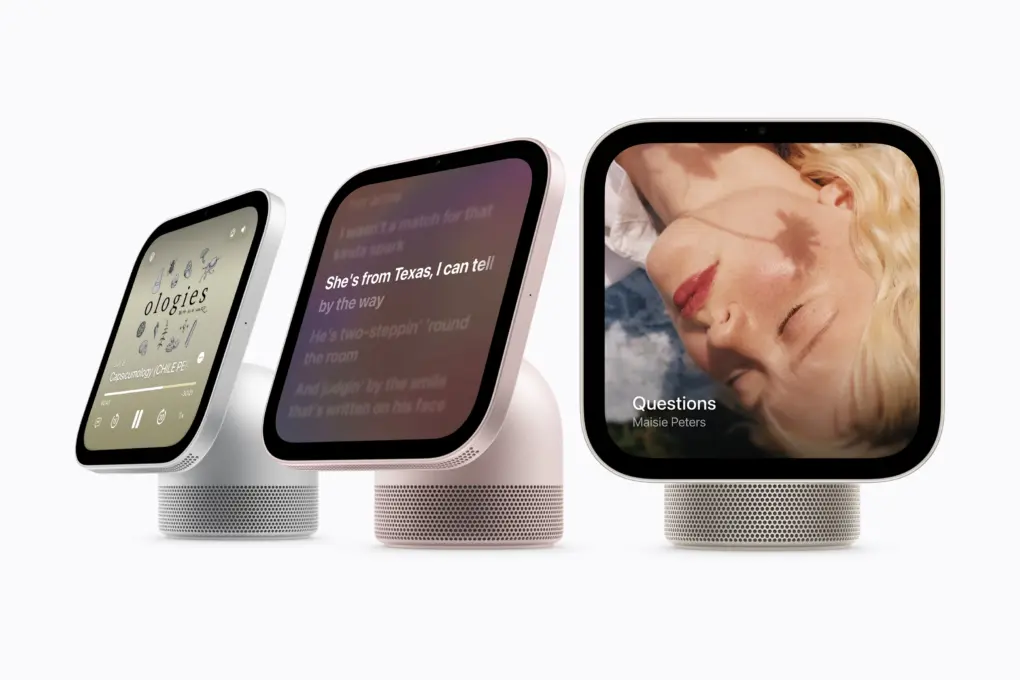
Apple is making a big push in the smart home segment with HomeView. The smart home hub, introduced Tuesday, brings Siri AI, smart home controls and FaceTime to a dedicated display for your home.
But there’s more to HomeView than its headline features. From differences between the two models to extra installation costs and requirements for personal Siri requests, these are the things you should know before ordering one.
Apple HomeView: What to know before ordering
The long-delayed HomeView serves as the centerpiece of Apple’s smart home remodel. It can recognize different household members, show live security camera feeds, and double as a digital photo frame. It works with the new devices in the Apple Home Collection, which sprang from partnerships with LG Electronics and Schneider Electric, as well as other smart home products.
And, at a surprisingly affordable $299, the HomeView could become a useful addition to a kitchen counter or hallway.
Table of contents: What to know before ordering Apple HomeView
- Two models, with different speaker systems
- The wall mount costs extra
- Siri AI capabilities depend on the paired iPhone
- It can recognize up to six people
- View nine camera feeds at once
- HomeView works with your existing smart home accessories
- HomeView doubles as a multiroom speaker
1. Two models, with different speaker systems
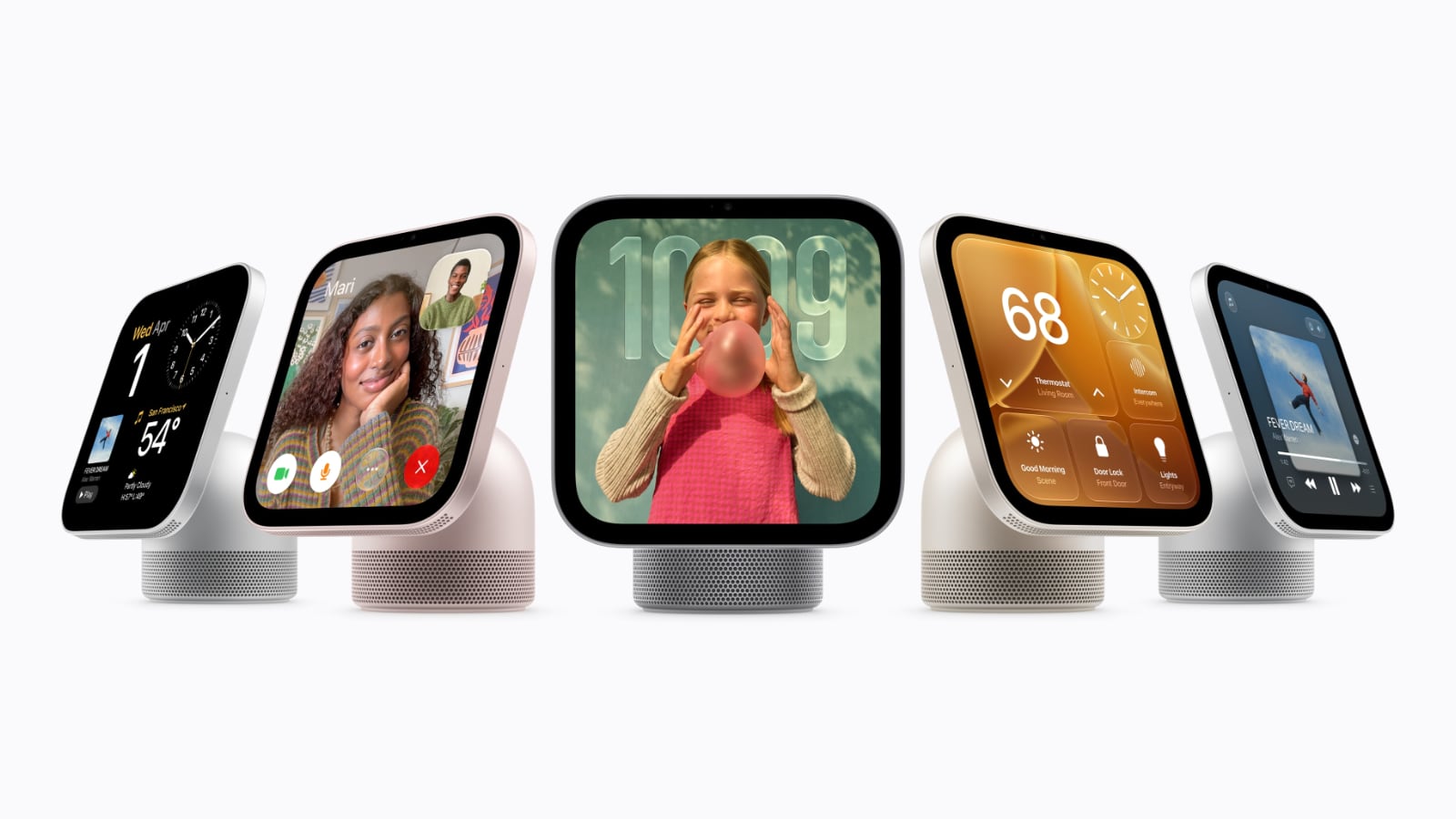
Photo: Apple
While the name may not suggest it, Apple offers the HomeView in two models: a tabletop version and a wall-mounted variant. Both sport a 7-inch-square Liquid Retina display and cost the same: $299. However, their designs and speaker systems differ.
The tabletop model features a domed aluminum speaker base connected to the display by an adjustable stainless steel hinge. It comes in silver, starlight, rose pink and space gray. Each model even comes with a color-matched cable.
The wall-mounted version skips the speaker base and comes only in silver and space gray. Its speaker setup is also more limited, with two drivers and computational audio tuned for wall placement. There is no woofer or passive radiator, so it will not sound as full as the tabletop version.
Both models pack the same display. The panel can hit a peak brightness of 500 nits and go as low as 0.3 nits. Plus, the screen can automatically adjust the information displayed based on the user’s distance. If you are far away, it shows simpler information, while the information density increases as you step closer.
2. The wall mount costs extra
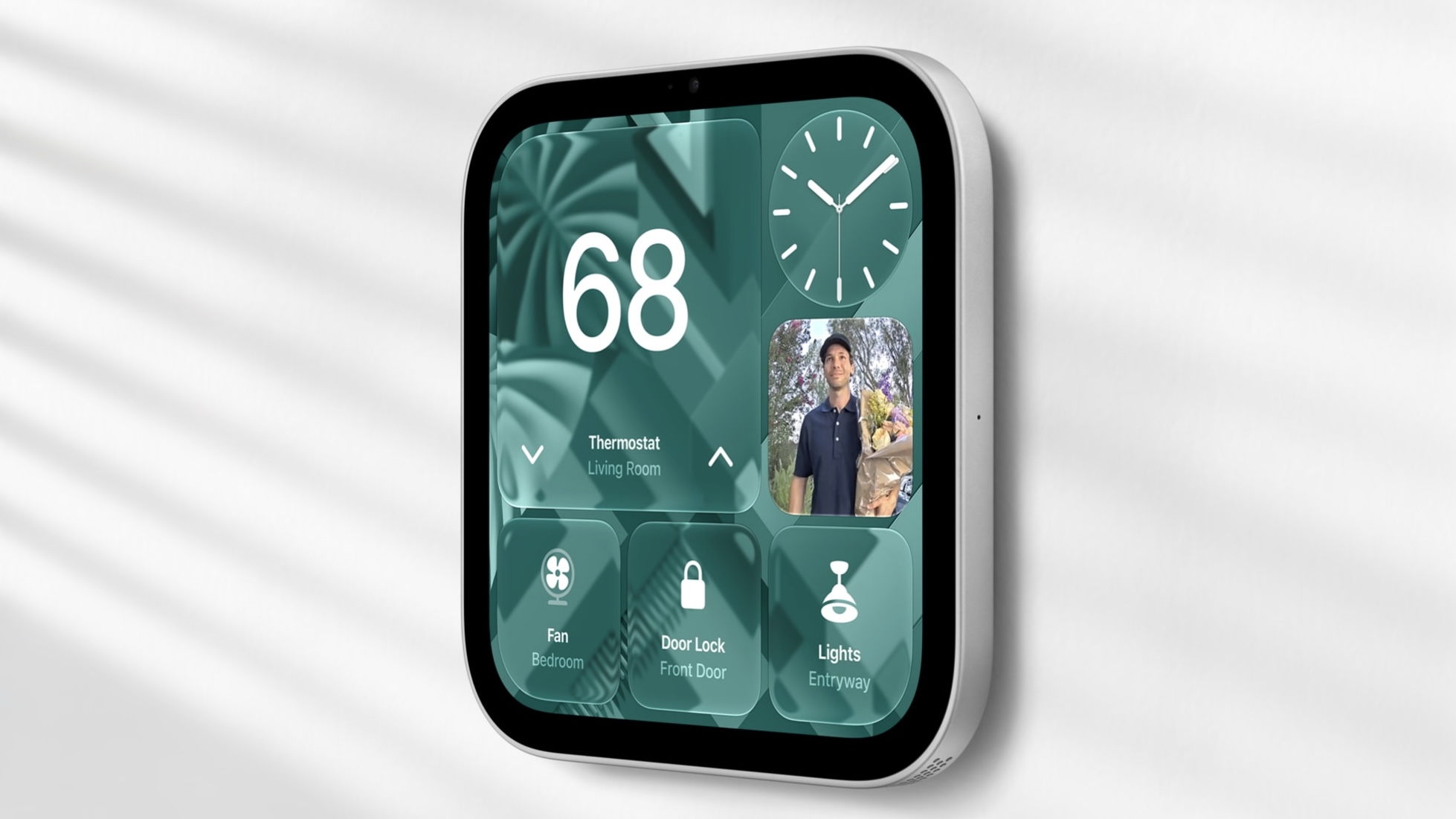
Photo: Apple
Despite its name, you must purchase the wall mount separately for the wall-mounted HomeView. That pushes its installation cost above the tabletop model’s $299 starting price.
Schneider Home offers a USB-C wall connector starting at $59.95 and an AC-wired mount starting at $79.95. Depending on the option, you can install it yourself or arrange for professional installation.
Apple says it will sell a Power over Ethernet (PoE) mount in early 2027 for $129.95.
3. Siri AI capabilities depend on the paired iPhone
HomeView runs on Apple’s A18 chip and comes with Siri AI integration. Even if your iPhone or iPad does not support Apple Intelligence, you can still ask HomeView general questions, have follow-up conversations, and discover music through Siri.
The smart display even has some useful tools for the kitchen. When you find a recipe in Safari, you can tap the Start Cooking option to turn it into a streamlined set of instructions. After that, you can control the timers hands-free and get help tracking ingredients while you cook.

Photo: Apple
Multiple timers will appear in Live Activities, so you can keep an eye on different dishes at once while using another app on the display.
Personal requests on the HomeView require a paired Apple Intelligence-enabled iPhone or iPad with Siri AI turned on. That means you cannot use Siri to find an invite in your calendar or pull up that conversation with your friend in the Messages app without a compatible device.
Like with Siri AI and Apple Intelligence on the iPhone or Mac, Apple will apply daily usage limits to certain AI features on HomeView. This won’t be an issue for simpler Siri requests, but if you or your family start using HomeView for complex queries or tasks, you may eventually hit that daily usage limit.
4. HomeView can recognize up to six people
Apple built the HomeView as a home hub for the whole family. The device can recognize up to six people in your household by their faces. For each person, it can switch to their customized home screen, apps and widgets. But the device will not automatically unlock your personal information after recognizing your face.
It will show such information only when your paired iPhone or iPad is also on the same Wi-Fi network and recently unlocked.
Apple also notes that it uses the Secure Exclaves on the A18 chip to protect and compartmentalize camera and microphone data. This ensures that the personal content of every individual stays separate.
Guests can still use HomeView without seeing your personal information. Apple says unrecognized users can control smart home accessories, check the weather, and even set timers or play music.
5. View nine camera feeds at once
The HomeView can act as a central dashboard for your security cameras. The Home Camera Face can display up to nine live camera feeds simultaneously, so you can check all the security cameras around your house at once.
With compatible cameras and a supported iCloud+ subscription, the device can also recognize people, familiar faces, pets, packages and vehicles. Plus, it can notify your household when someone arrives at the front door with a package.
With an Apple Intelligence-compatible iPhone or iPad, you also get access to video summaries and natural-language search for HomeKit Secure Video recordings. This should enable you to understand what happened in a video clip without watching it.
6. HomeView works with your existing smart home accessories
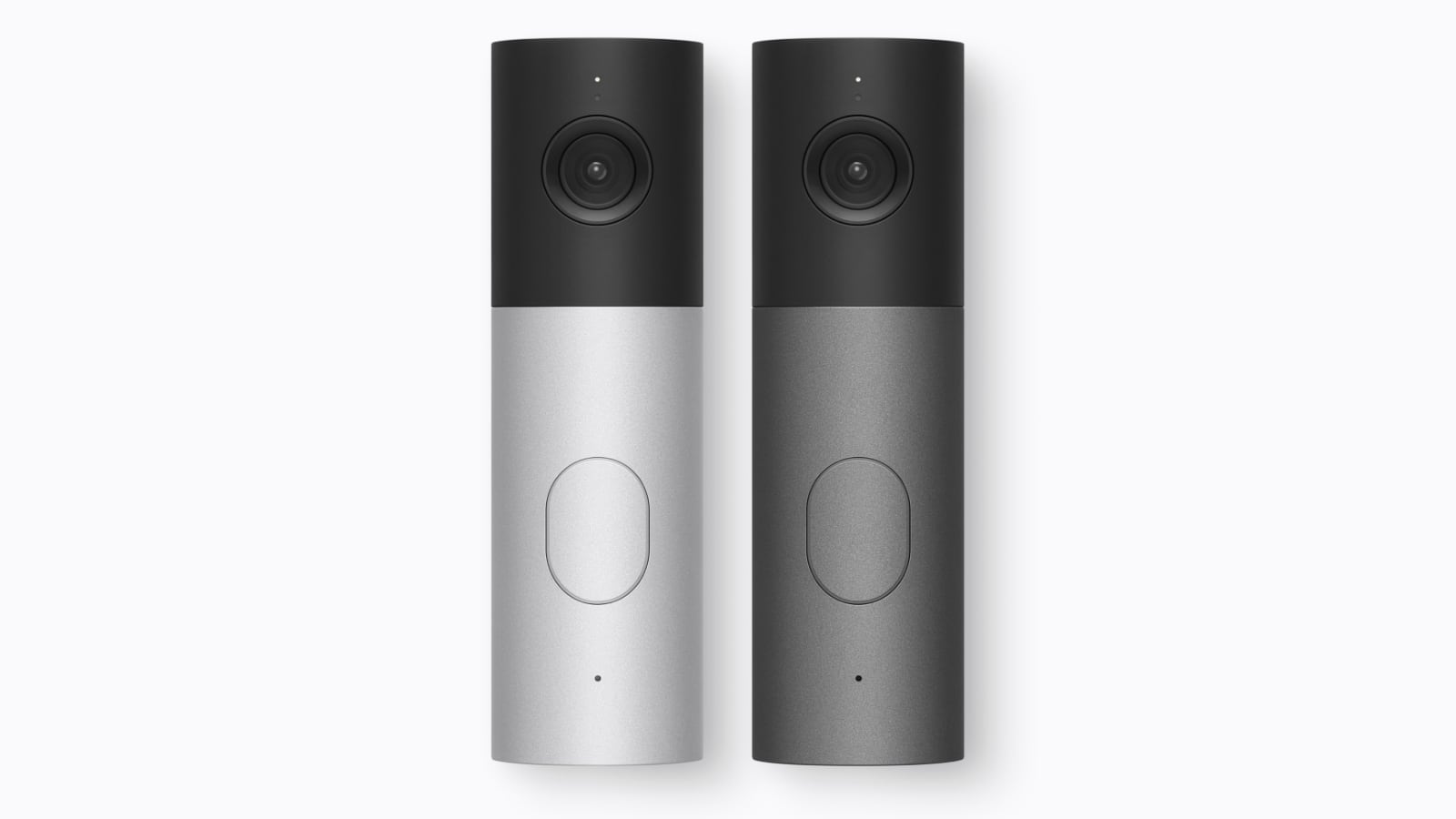
Photo: Apple
Alongside HomeView, Apple unveiled Apple Home Collection on Tuesday. Cupertino worked with LG Electronics and Schneider Electric on the second-party lineup of smart home cameras, thermostats and a smart door lock.
However, you don’t need to buy those particular accessories to use HomeView. The hub also works with existing devices that work with Apple’s HomeKit or the cross-platform Matter smart home protocol. That means you can adjust the lights, change the temperature, lock doors and close blinds without replacing your current accessories. All these accessories will also appear in the HomeView’s Home Modular face for quick access.
If you plan to buy Apple’s smart home products, they won’t arrive alongside the display. The Apple Home Collection starts rolling out in December, with select products launching in early 2027.
7. HomeView doubles as a digital photo frame and multiroom speaker
When you’re not actively using the HomeView, you can set it to act as a photo frame. It can pull pictures from your library or shared album. Plus, you can create a shared album where friends and family members can add pictures, and the smart home display will automatically cycle through them.
There is a dedicated Photo face, which adds a portrait-style depth effect to ensure the subject looks sharp. If you prefer something different, you can choose animated Snoopy scenes that respond to the time of day, weather and sporting events.
HomeView also works with other HomeView units, HomePods (including the new HomePod mini 2, also launched Tuedsay) and compatible AirPlay speakers for multiroom audio. So, you can play the same playlist on the HomeView in your kitchen and a HomePod in your living room, and the music will continue as you move between them.
HomeView pricing and availability
Both HomeView models cost $299 in the United States, with preorders now open and in-store availability beginning November 13. Apple is not launching the HomeView in the European Union because Siri AI remains unavailable there on iOS.

Rajesh has been writing about consumer technology for over a decade, with a strong focus on iPhones, Macs and Apple’s ecosystem. He enjoys digging into Apple software updates, hardware changes, and discovering new Mac apps that make work faster and more enjoyable.
You can reach out to him at mail[at]rajeshpandey.me.

